


A reliable home network shouldn’t require a second mortgage. The routers below cover everything from compact studio apartments to busy four-bedroom households, and each one was chosen for genuine everyday usefulness rather than raw spec-sheet flexing. Whether your priority is streaming, gaming, video calls, or just keeping a few smart bulbs online, there’s an option here that won’t punish your wallet.
How The Shortlist Stacks Up

NETGEAR WiFi 6 Router R6700AX (AX1800)
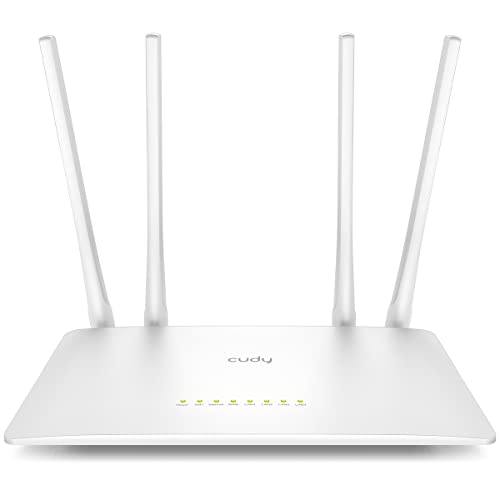
Cudy AC1200 Dual-Band Wi-Fi Router (WR1200)

D-Link Wireless AC1200 Dual-Band Gigabit Router (DIR-850L)
DBIT N300 2.4GHz WiFi Router (T1 Pro)

U-SPEED AX1500 WiFi 6 Dual-Band Router
DBIT AC1200 WiFi Router 4-Port Gigabit (T18-21K)

D-Link DIR-615/RE Wireless N Router (Refurbished)

On Networks N150 WiFi Router (N150R)

Tongyu ZETTABEAM AX3000 WiFi 6 Router
Why These Options Stand Out
The Nighthawk R6700AX is the kind of router you set up once and forget about, which is exactly what most households want from a networking upgrade. It uses WiFi 6 (the newest mainstream wireless standard, designed to handle many devices at once without slowdown) and reaches up to 1.8 Gbps combined across its two bands, so a 4K stream in the living room and a Zoom call in the home office can run at the same time without obvious contention. Coverage stretches to roughly 1,500 square feet, which suits apartments and modest single-family homes comfortably.
You can connect up to 20 devices simultaneously, making it a sensible step up from older routers that buckle under a household full of phones, laptops, smart speakers, and game consoles. The R6700AX also pairs with NETGEAR’s setup help, so first-time installers can usually get online in a few minutes.
Key Advantages
- WiFi 6 support handles modern devices more efficiently than older Wireless AC hardware
- Dual-band radios (one band for range, one for speed) keep fast traffic on the 5 GHz lane
- Generous 20-device capacity covers most family households
- 1,500 sq. ft. coverage means fewer dead zones in open layouts
- Brand-name firmware and app support make troubleshooting less painful
Things To Consider
- No multi-gig (2.5 Gb) WAN port, so very fast fiber plans over 1 Gbps won’t fully max out
- Larger antenna footprint than a basic bar router, so you may need shelf space
Feature Snapshot
Who Will Love This
Families and remote workers in small to mid-size homes who want a set-and-forget WiFi 6 upgrade without paying flagship prices.
Where Another Pick Suits Better
The Tongyu ZETTABEAM AX3000 makes more sense if your plan exceeds 1 Gbps or you want stronger throughput for serious online gaming.
The WR1200 leans into wired connectivity more than most budget routers. With five Fast Ethernet ports (one WAN, four LAN, all running at 100 Mbps), it lets you hardwire a desktop PC, a smart TV, a game console, and a streaming box straight into the router without buying a separate switch. For a home office where video calls drop over WiFi, that wired reliability often matters more than peak wireless speed.
Wireless performance is solid for the price. The 5 GHz band delivers 867 Mbps (theoretical, your real-world throughput will be lower), well-matched to HD streaming and casual gaming, while the 2.4 GHz band handles email, web browsing, and smart-home gear at 300 Mbps. A built-in VPN client (a feature that lets the router connect to a virtual private network) is a thoughtful extra for anyone who works remotely and wants a baseline layer of privacy without configuring each device.
The Case For It
- Five Fast Ethernet ports reduce the need for an extra switch
- VPN client support is uncommon at this price tier
- Dual-band setup separates traffic by priority
- Compact housing fits on most desks or shelves
Worth Noting
- 100 Mbps Ethernet caps wired speed below most modern broadband plans
- WiFi 5 standard, not WiFi 6, so future devices won’t get the newest efficiency benefits
Right Fit For
Remote workers and small offices that need stable wired connections for desktops and conferencing hardware without overspending.
Look Elsewhere When
The DBIT AC1200 (T18-21K) is the better call if your wired devices need true Gigabit Ethernet (1,000 Mbps per port) for fast file transfers or 4K media servers.
The DIR-850L earned a loyal following when it launched, and it remains a sensible choice for shoppers who want app-based control without paying for a current-generation model. It uses Wireless AC1200 (the WiFi 5 standard, providing 300 Mbps on 2.4 GHz plus 867 Mbps on 5 GHz), which is enough for HD streaming across a couple of TVs and a handful of phones. The cloud app is the highlight: you can check who’s online, set a guest network, or push firmware updates from your phone while you’re away from home.
Gigabit Ethernet ports on the back keep wired gear future-ready, and backwards compatibility with older 802.11a/g/n devices means you won’t have to replace working hardware to keep it online. For a small home or apartment on a sub-gigabit plan, it covers the essentials with minimal fuss.
Points In Its Favor
- App-based remote management is unusually polished for a budget router
- Gigabit WAN and LAN ports handle most home internet plans
- Dual-band radios reduce congestion between devices
- Compatible with older WiFi standards, so legacy gear still works
Trade Offs
- WiFi 5 performance lags behind newer WiFi 6 options on this list
- Cloud features depend on D-Link’s ongoing server support
Key Product Details
Best Suited To
Households on modest internet plans who want reliable app-managed networking without the cost of a WiFi 6 model.
Skip It When
The NETGEAR R6700AX is a smarter buy if you want WiFi 6 efficiency and broader device support for a similar outlay.
The T1 Pro is purpose-built for a job most routers ignore: keeping a fleet of smart-home and security devices online without drama. It runs a single 2.4 GHz band (the longer-range, lower-speed frequency that most IoT gear depends on) at 300 Mbps, which is more than enough for security cameras, smart plugs, sensors, and voice assistants. A WISP repeater mode (a setting that lets the router wirelessly pick up an existing WiFi signal and rebroadcast it) lets it double as a range extender if your main router can’t reach the garage or back office.
Security-minded shoppers get WPA2 encryption (a standard protocol that scrambles your wireless traffic so nearby snoops can’t read it), WPS quick pairing for compatible cameras, and a guest network option to keep visitor devices off your main IoT segment. The trade-off is plain: this is not a streaming or gaming router. For its target role, though, it does the job at a notably low cost.
Real-World Strengths
- 2.4 GHz focus is ideal for IoT and security cameras
- WISP mode extends coverage in tricky layouts
- Guest network keeps visitor devices segmented
- WPA2 and WPS support covers basic security needs
Some Limits To Know
- Single-band, no 5 GHz for fast streaming or gaming
- 300 Mbps ceiling feels tight for homes with many simultaneous users
Made For
Shoppers running a network of security cameras, smart bulbs, and IoT devices who don’t need high-speed wireless for laptops and TVs.
A Better Fit Elsewhere
The U-SPEED AX1500 handles both IoT and streaming far better if you want one router doing two jobs in a mid-size home.
The U-SPEED AX1500 is one of the more accessible entry points into WiFi 6, the latest mainstream wireless standard. It pairs 300 Mbps on 2.4 GHz with 1,201 Mbps on 5 GHz for a combined ceiling of 1.5 Gbps, which is plenty for 4K streaming, video calls, and a console or two. OFDMA (a WiFi 6 feature that lets the router talk to several devices in a single transmission window) and MU-MIMO (Multi-User, Multiple Input, Multiple Output, a method of serving multiple devices at the same time rather than one after the other) keep latency low when several family members are online at once.
Four 5 dBi antennas (the higher the dBi number, the more focused and farther the signal reaches in a given direction) help push signal through walls and across longer single-floor layouts. For a household that’s been limping along with a router-ISP rental combo, this is a clean, future-leaning upgrade without the premium price tag of flagship WiFi 6 models.
What Makes Sense
- WiFi 6 efficiency at a budget-friendly cost
- OFDMA and MU-MIMO handle multi-device households gracefully
- Four high-gain antennas improve coverage in larger layouts
- Dual-band keeps slow IoT traffic away from streaming lanes
Honest Caveats
- Brand recognition is lower than NETGEAR or D-Link, so firmware support is less predictable
- Gigabit WAN caps wired throughput below 2.5 Gb plans
At A Glance
Who Should Grab It
First-time WiFi 6 shoppers in apartments or small homes who want modern efficiency without a flagship bill.
Reach For A Different Pick When
The Tongyu ZETTABEAM AX3000 makes more sense if your household has heavy multi-user gaming or 4K streaming demands.
The T18-21K is the Cudy WR1200’s brawnier cousin, trading Fast Ethernet (100 Mbps per port) for full Gigabit (1,000 Mbps per port) across all four LAN ports. That single change reshapes who the router suits: households with a 1 Gbps fiber plan, a NAS (Network Attached Storage, a personal file server that lives on your home network), or 4K streaming boxes finally get the wired speed they’re paying for. MU-MIMO support keeps the wireless side responsive even when the wired ports are busy.
EasyMesh compatibility (a standard that lets routers from different brands cooperate to spread a single WiFi network across a home) is a nice bonus for larger layouts, letting you add a compatible extender later without replacing the main router. Four 5 dBi antennas push wireless coverage into rooms the Cudy might struggle to reach. The 5 GHz band tops out at 867 Mbps, so the wireless ceiling sits below WiFi 6 alternatives, but for mixed wired and wireless homes on a budget, the balance here is genuinely useful.
What Works In Its Favor
- True Gigabit Ethernet on every LAN port
- EasyMesh support allows future expansion
- MU-MIMO keeps multi-device wireless smooth
- Bridge and repeater modes add deployment flexibility
Points To Keep In Mind
- WiFi 5 speeds cap wireless below newer WiFi 6 rivals
- Four LAN ports may run short for fully wired media rooms
Right Fit For
Mixed-use households that want Gigabit wired performance for PCs and TVs while keeping respectable wireless for phones and tablets.
Swap It Out When
The NETGEAR R6700AX is a stronger all-WiFi 6 pick if your devices are mostly wireless and you don’t need Gigabit LAN.
The DIR-615 is a holdover from the Wireless N era, and that’s precisely the point. For someone who only needs email, web browsing, and the occasional SD video stream in a small apartment, the 300 Mbps Wireless N radio is genuinely enough. The refurbished tag means you’re getting D-Link hardware at a steep discount, with the understanding that longevity is a smaller bet than on a new unit.
Setup is straightforward through any browser, and the device’s footprint is small enough to tuck behind a monitor. You won’t get dual-band traffic separation, so interference from neighbors’ networks can slow things down in dense apartment buildings, but as a primary connection for one or two users, it does the job quietly.
Advantages To Know
- Rock-bottom cost, even lower as refurbished
- Wireless N 300 handles basic browsing and email
- Small footprint fits on crowded desks
Room For Improvement
- Single-band 2.4 GHz only, so 5 GHz devices can’t reach top speeds
- Refurbished status means warranty coverage is limited
- Throughput struggles in dense apartment buildings with neighbor interference
Best Suited To
Light internet users, a second home, or a workshop space where the router just needs to keep a laptop online without strain.
Skip It When
The On Networks N150R offers similar simplicity in a new unit if you’d rather avoid refurbished hardware, or jump up to the U-SPEED AX1500 for WiFi 6 on a tight budget.
The N150R is the smallest, most stripped-down router in this roundup, and that’s its appeal. Dorm rooms, studio apartments, and guest spaces don’t need blazing speed, just reliable WiFi for a phone, a laptop, and maybe a smart speaker. N150 means 150 Mbps on a single 2.4 GHz band, which is enough for video calls, music streaming, and scrolling.
Setup happens entirely in a browser, with no installation disc required, so it works on any modern computer. WPS pairing (WiFi Protected Setup, a one-button method for connecting devices without typing a password) lets you connect phones and printers without digging through menus. For someone leaving for college or furnishing a small guest space, the simplicity and low cost outweigh the modest specs.
The Helpful Details
- Browser-based setup avoids clunky install software
- WPS pairing simplifies connecting phones and printers
- Compact body disappears on shelves and desks
Less-Strong Areas
- 150 Mbps ceiling can’t keep up with modern broadband plans
- Single-band only, so no fast 5 GHz option for newer laptops
Perfect Match For
Students, renters in small units, or anyone outfitting a guest space where full-speed wireless is overkill.
Consider Something Else When
The DBIT N300 (T1 Pro) is a logical step up if you need more bandwidth for security cameras or a small smart-home setup.
The ZETTABEAM AX3000 is the throughput champion of this list, pairing 2,402 Mbps on 5 GHz with 574 Mbps on 2.4 GHz. For a busy household with multiple gamers, 4K streamers, and a pile of connected devices, that headroom keeps everyone happy at once. The four built-in antennas use PA (Power Amplifier) and LNA (Low Noise Amplifier) circuitry to strengthen outgoing signal and clean up incoming signal, which helps the signal punch through walls and reach distant rooms more reliably.
Built-in VPN support (both client and server modes) is a rare bonus at this price tier, useful for remote workers who need a baseline of privacy on every device. EasyMesh compatibility allows future expansion if your home layout outgrows a single router. The honest trade-off is brand familiarity: Tongyu is less established than NETGEAR or D-Link, so long-term firmware cadence is something to monitor after purchase.
Features That Help
- AX3000 throughput handles simultaneous 4K streams and gaming
- PA and LNA signal amplification extend useful range
- VPN client and server modes for remote-work privacy
- EasyMesh-ready for whole-home expansion
Factors To Consider
- Newer brand with a shorter public track record than legacy names
- Larger footprint than budget compact routers
Quick Facts
Built With In Mind
Active households with multiple gamers, streamers, and remote workers who want flagship-tier throughput at a budget price.
Where A Sibling Pick Shines
The NETGEAR R6700AX is the safer long-term bet if you prefer a more established brand for firmware and support consistency.
How To Choose The Right Low Cost Router
Match The Standard To Your Devices
WiFi 6 (802.11ax) is the current mainstream standard, and it’s worth the small premium if most of your gear was bought in the last two or three years. Older WiFi 5 (802.11ac) routers still cover browsing and HD streaming, but they handle simultaneous device traffic less gracefully. For light use in a small space, Wireless N remains a workable fallback, especially when budget matters more than speed.
Count Real Devices, Not Just Phones
Smart speakers, security cameras, smart bulbs, and game consoles all count toward the device ceiling. A household that feels like ten devices often has twenty. Pick a router that supports more concurrent connections than you think you need, and lean toward MU-MIMO and OFDMA support when the price is close. Those features prevent lag when several devices request bandwidth at the same instant.
Weigh Wired And Wireless Together
Fast Ethernet caps wired speed at 100 Mbps, while Gigabit Ethernet supports up to 1,000 Mbps. If your internet plan exceeds 100 Mbps or you run a NAS, a media server, or a wired gaming PC, the wired port speed matters as much as the wireless rating. The DBIT T18-21K is a strong example of a budget router that handles both lanes competently.
Check Coverage Against Your Layout
Square footage is a starting point, not the whole story. Walls, floors, and interference from neighbors all reduce effective range. For multi-story homes or dense apartments, routers with high-gain antennas or EasyMesh support give you a path to extend coverage later without replacing the main unit.
Key Considerations Across These Picks
Pitfalls Shoppers Hit
A common mistake is buying based on the headline speed number alone. A router rated 1.8 Gbps won’t deliver that to any single device, since that figure is the combined throughput across both bands. Another trap is ignoring the WAN port, the jack where the internet cable from your modem plugs in. A router with only 100 Mbps WAN can’t pass through a 500 Mbps internet plan, no matter how fast the WiFi is. Finally, many shoppers forget that router placement matters as much as specs: tucking a router in a closet or behind a TV cuts coverage dramatically.
Where The Extra Money Goes
Stepping up to a pricier tier usually buys three things: WiFi 6 efficiency, better multi-device handling, and a stronger processor that keeps the router responsive under load. You also tend to get longer firmware support windows from major brands. For a single user in a small apartment, none of that matters much, and a basic router will serve you fine. For a family juggling remote work, school, and streaming, those upgrades pay back quickly in fewer buffering moments and simpler troubleshooting.




