


Dead zones in the back bedroom, dropped Zoom calls when someone starts streaming, smart-home gear that refuses to stay online: these are the daily frustrations that push households past a basic router. A tri-band mesh system spreads traffic across three dedicated wireless bands (a low-frequency 2.4 GHz for range, a 5 GHz for speed, and either a second 5 GHz or the newer 6 GHz for the cleanest, fastest lanes), so the back of the house and the home office finally get equal treatment. The nine systems below span budget-friendly 3-packs, WiFi 6E options built around the uncluttered 6 GHz band, and full WiFi 7 setups with the latest performance features.
How The Shortlist Stacks Up

NETGEAR Orbi 770 Series WiFi 7 Mesh System 3-Pack

TP-Link Deco XE70 Pro Tri-Band WiFi 6E Mesh System 3-Pack

NETGEAR Orbi 370 WiFi 7 Mesh System 3-Pack

NETGEAR Orbi Tri-Band WiFi 6 Mesh System RBK752P 2-Pack

TP-Link Deco 7 Pro BE14000 Wi-Fi 7 Mesh 3-Pack

Cudy AX3000 Wi-Fi 6 Mesh System M3000 3-Pack

TP-Link Deco XE75 Pro AXE5400 Tri-Band WiFi 6E 3-Pack (Renewed)
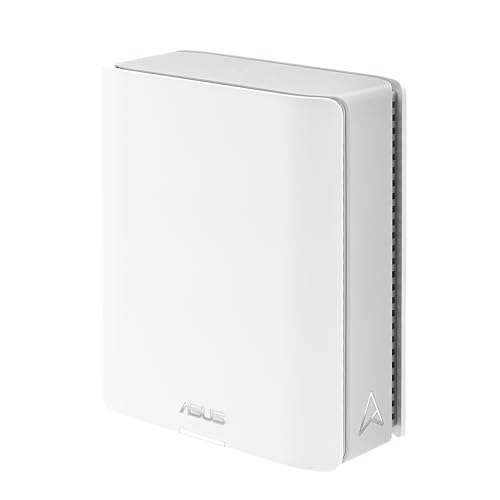
ASUS ZenWiFi BT6 WiFi 7 Tri-Band Mesh 1-Pack

TP-Link Deco W7200 Tri-Band WiFi 6 Mesh 2-Pack
Taking A Closer Look At The Options
The Orbi 770 Series is the most ambitious mesh kit in NETGEAR’s current lineup, and it shows in the numbers: a router plus two satellites rated for roughly 8,200 square feet of coverage and up to 100 connected devices. Tri-band WiFi 7 (the newest wireless standard, offering wider channels, lower latency, and the ability to use multiple bands at once) gives the system a dedicated 6 GHz backhaul, which is the private wireless link the satellites use to talk back to the main router. That dedicated lane is the difference between a mesh that hums along and one that crawls once the household is busy.
For a four-bedroom house with a home office, a couple of gaming consoles, and a stack of smart-home gadgets, this is the kit that finally stops requiring resets. Setup runs through the Orbi app, and the units look clean enough to leave out on a shelf rather than hiding behind a TV stand.
The Case For It
- Tri-band WiFi 7 with a dedicated 6 GHz backhaul keeps satellite links uncluttered
- Up to 8,200 sq ft of coverage comfortably handles most suburban homes
- Rated for around 100 simultaneous devices without noticeable slowdowns
- Orbi app walks through setup in roughly 10 minutes for most users
- Multi-gig wired ports future-proof the system for faster fiber tiers
Things To Consider
- Three towers take up real shelf space and want a power outlet nearby
- You will want a WiFi 7 client device to feel the full speed benefit
Key Specs
Who It Suits Best
Large households with a long house footprint, lots of connected gear, and at least one newer laptop or phone that supports WiFi 7.
Consider Something Else When
Smaller spaces where the NETGEAR Orbi 370 WiFi 7 Mesh System 3-Pack delivers the same core experience without stretching coverage past what a 1,500 sq ft apartment actually needs.
WiFi 6E is the version of WiFi 6 that opens up the 6 GHz band, and the Deco XE70 Pro is one of the more approachable ways to bring that home. Rated coverage lands at about 7,200 square feet across three units, with support for up to 200 devices. Unlike many mesh kits, the XE70 Pro includes a 2.5G WAN/LAN port on each node, which is a real win for households with multi-gig fiber that the Orbi 770 in slot one cannot match at the wired level.
In a real two-story home, the dedicated 6 GHz band gives compatible laptops and phones a quiet lane for video calls while the rest of the household streams and games on the older bands.
Points In Its Favor
- Tri-band design with the uncluttered 6 GHz band for newer clients
- 2.5G WAN/LAN ports per node suit multi-gig fiber connections
- Rated for up to 200 devices, generous for busy smart homes
- Setup and management through the Deco app stays simple
Worth Noting
- WiFi 6E tops out below the throughput of full WiFi 7 kits like the Orbi 770 in slot one
- The 6 GHz band is short-range, so satellites may need to sit closer together than expected in larger homes
Made For
Households with a multi-gig fiber plan and a mix of newer WiFi 6E laptops, phones, and tablets that can take advantage of the 6 GHz band.
Reach For A Different Pick When
You want the absolute newest standard and a dedicated 6 GHz backhaul, in which case the NETGEAR Orbi 770 Series WiFi 7 Mesh System 3-Pack is a smarter long-term play.
The Orbi 370 is the friendlier entry point into NETGEAR’s WiFi 7 lineup. It trims back on the 770’s flagship specs but keeps the same modern standard, with up to 6,000 square feet of coverage across three units and room for roughly 70 devices. NETGEAR’s enhanced dual-band backhaul (the wireless connection the satellites use to reach the router) is the key compromise: the 370 uses a smart combination of bands rather than a fully dedicated 6 GHz link like the 770.
For a household that wants WiFi 7 headroom without paying for the biggest kit, this lands as a practical everyday choice. Orbi app setup and the included Armor security trial round out the package.
Real-World Strengths
- WiFi 7 at a more approachable cost than the flagship Orbi 770
- Up to 6,000 sq ft suits most three-bedroom homes
- Orbi app setup gets most households online in well under 15 minutes
- Works with any internet provider, no need to swap modems
Honest Caveats
- Dual-band backhaul means the 770 in slot one is the better pick for very busy households
- Armor security trial expires and converts to a subscription if not cancelled
Right Fit For
Families stepping into WiFi 7 for the first time, in homes that sit between 2,000 and 4,000 square feet.
Look Elsewhere When
Your home stretches past 6,000 square feet or has thick interior walls, in which case the NETGEAR Orbi 770 Series WiFi 7 Mesh System 3-Pack is the better long-term match.
The RBK752P is a familiar workhorse in NETGEAR’s line: one router and one satellite covering up to 5,000 square feet and roughly 75 devices on tri-band WiFi 6. The dedicated backhaul band is the headline feature, keeping satellite traffic separate from your phones and laptops. Compared with the WiFi 7 systems above, this is last-generation silicon, but it is fast enough for gigabit internet in most homes.
For a townhouse or mid-size single-family home, the 2-pack format is the more practical pick. You do not need to deploy a third unit in spaces where two reach every room.
A Favorable Mix
- Dedicated wireless backhaul keeps the satellite link from competing with your devices
- 5,000 sq ft is plenty for most apartments and mid-size homes
- Tri-band WiFi 6 handles busy households without breaking a sweat
Trade Offs
- WiFi 6 cannot match the throughput ceiling of the Orbi 770 or 370 in slots one and three
- Two units leave less placement flexibility than a 3-pack in trickier floor plans
Quick Facts
Best Suited To
Mid-size homes with one obvious dead zone, where a 2-pack with a dedicated backhaul solves the problem without overspending on extra satellites.
A Better Fit Elsewhere
You need WiFi 7 or a third satellite, in which case the NETGEAR Orbi 770 Series WiFi 7 Mesh System 3-Pack is the more futureproof option.
The Deco 7 Pro BE14000 is TP-Link’s flagship tri-band WiFi 7 mesh, designed for households that push a lot of data. The headline spec is support for internet plans up to 10 Gbps, paired with 8 spatial streams (independent data paths between router and client) spread across 6 GHz, 5 GHz, and 2.4 GHz. For 4K and 8K streaming households, AR/VR rigs, and large file transfers, this is the mesh that does not flinch.
Compared with the Orbi 770 in slot one, the Deco 7 Pro trades some placement flexibility for raw throughput. It is the right call for power users who already own WiFi 7 clients.
Notable Gains
- Top-tier tri-band WiFi 7 throughput for heavy multi-device use
- 10 Gbps internet support futureproofs multi-gig fiber
- 8 simultaneous streams keep many devices running at once
- Deco app setup is widely considered one of the friendliest in the category
Points To Keep In Mind
- You need WiFi 7 client hardware to feel the speed difference versus a 6E kit like the Deco XE70 Pro in slot two
- Power users will want to confirm the wired port layout before committing
Feature Snapshot
Who Should Grab It
Content creators, competitive gamers, and households that already have multi-gig fiber and WiFi 7 laptops or phones ready to use it.
Skip It When
Your home sits under 3,000 square feet, in which case the ASUS ZenWiFi BT6 WiFi 7 Mesh 1-Pack in slot eight delivers WiFi 7 without overbuilding coverage.
The Cudy M3000 is the most approachable mesh on this list, aimed at renters, apartments, and anyone tired of paying flagship prices for basic whole-home coverage. The 3-pack covers around 2,900 square feet with dual-band WiFi 6, supports 160 MHz channels for faster 5 GHz speeds, and includes a 2.5G WAN port for multi-gig plans. The built-in VPN client (a feature that lets the router route traffic through a secure encrypted tunnel) is a rare bonus at this tier.
Compared with the Orbi kits above, you give up tri-band hardware and brand-name polish, but for a small space this is genuinely all the router most people need.
A Few Strong Suits
- Among the most affordable tri-unit mesh kits in this roundup
- 2.5G WAN port ready for current and future fiber tiers
- Built-in VPN support is uncommon at this level
- Handles well over 100 connected clients in typical use
Less Ideal Details
- Dual-band only, so no dedicated backhaul like the Orbi kits
- Coverage tops out around 2,900 sq ft, so larger homes will need to add nodes
At A Glance
Perfect Match For
Renters and apartment dwellers who want mesh coverage and a 2.5G WAN port without paying for whole-house overkill.
Not Your Match When
You need tri-band hardware with a dedicated backhaul, in which case the TP-Link Deco W7200 Tri-Band WiFi 6 Mesh 2-Pack in slot nine is the natural step up.
The Deco XE75 Pro in renewed condition is the value play for shoppers who want WiFi 6E without paying retail. Coverage lands at about 7,200 square feet across the 3-pack, with a 2.5G WAN/LAN port per node. The AI-driven mesh learns your network environment over time, prioritizing the path each device takes through the system. For most households, you would never guess these are not factory-fresh units.
The honest read: renewed electronics come with a shorter return window and cosmetic wear, so the savings trade for a little less cushion if something goes wrong.
The Good Stuff
- Tri-band WiFi 6E with the clean 6 GHz lane for newer clients
- 2.5G WAN/LAN ports match multi-gig internet plans
- AI-driven mesh adapts as you add devices or rearrange furniture
- Renewed pricing brings 6E closer to standard WiFi 6 territory
Some Limits To Know
- Renewed units may show light cosmetic wear from prior use
- WiFi 6E throughput ceiling is below what the Deco 7 Pro BE14000 in slot five delivers
Whose Shelf It Belongs On
Cost-aware upgraders moving from a WiFi 5 router to WiFi 6E without paying full retail for the privilege.
Swap It Out When
You want factory-fresh hardware and the longest possible support runway, in which case the TP-Link Deco XE70 Pro Tri-Band WiFi 6E Mesh System 3-Pack in slot two is the obvious alternative.
The ZenWiFi BT6 is the smallest commitment on this list: a single tri-band WiFi 7 node rated for about 3,000 square feet, with two WAN ports and ASUS’s AiMesh extendability if you decide to add more nodes later. MLO (Multi-Link Operation, a WiFi 7 feature that lets a device use multiple bands at once for higher throughput and lower latency) and 4K-QAM modulation (a denser data-packing technique that boosts per-symbol speed on WiFi 7) put it firmly in the modern camp.
For an apartment, a small home office, or a single-floor condo, one well-placed unit often beats a 3-pack that is wired to the same room. It is also the easiest way to dip a toe into WiFi 7 without committing to a full-house deployment.
Where It Delivers
- Tri-band WiFi 7 with MLO and 4K-QAM support in a single node
- Two WAN ports offer redundancy or link aggregation (combining two wired connections for higher throughput) for power users
- AiMesh lets you expand with compatible ASUS routers later
- ASUSWRT interface gives advanced users deep tuning options
Possible Compromises
- Single unit means a single point of placement, so signal falls off in distant rooms
- Advanced features sit behind a denser interface than TP-Link’s Deco app
Built With In Mind
Apartment dwellers and small-office owners who want the newest WiFi 7 standard with room to expand later.
Where Another Pick Suits Better
Your home is multi-story, in which case the NETGEAR Orbi 370 WiFi 7 Mesh System 3-Pack in slot three covers more ground with less placement hassle.
The Deco W7200 is a practical two-unit mesh for households that need tri-band hardware without the cost or footprint of a 3-pack. The two nodes cover up to 5,500 square feet and use AI-driven mesh to learn your environment, routing devices to the cleanest path. Tri-band WiFi 6 gives you a dedicated backhaul so the satellite link does not crowd your phones and laptops.
It lands as a thoughtful middle ground: more capable than the budget Cudy M3000 in slot six, more compact than the Orbi 770 in slot one. For a 2,000 to 3,500 square foot home, the 2-pack is often the right shape.
A Strong Showing
- Tri-band WiFi 6 with a dedicated wireless backhaul between nodes
- 5,500 sq ft of coverage from just two units
- AI-driven mesh adapts as devices move around the home
- Deco app keeps setup and management approachable
Where It Is Less Suited
- Two nodes give you less placement flexibility than a 3-pack in tricky layouts
- WiFi 6 throughput ceiling sits below the Orbi 370 in slot three
Core Details
Who Will Love This
Mid-size family homes that want tri-band performance and clean setup without the cost of a flagship 3-pack.
Where A Sibling Pick Shines
You want the newest WiFi 7 standard and a bigger 3-pack footprint, in which case the TP-Link Deco 7 Pro BE14000 Wi-Fi 7 Mesh 3-Pack in slot five is the more future-ready alternative.
What To Weigh Before Choosing Your Mesh
Picking the right mesh tri-band system starts with your floor plan, not the spec sheet. Measure the square footage you actually need to cover, then add roughly 20% as a buffer for thick walls, multi-story layouts, and signal loss through masonry. A 3,000 square foot ranch is a very different problem from a 3,000 square foot three-story home with plaster walls.
Device count matters just as much. Modern households routinely run 30 to 50 connected devices, from laptops and TVs to smart bulbs and doorbells. Tri-band systems handle that load better than dual-band kits because one radio is dedicated to backhaul traffic between nodes, leaving two clean radios for your gear. WiFi 6E adds a 6 GHz lane, and WiFi 7 layers in MLO for devices that can use multiple bands at once, but you only feel those benefits if your phones, laptops, and consoles support the newer standard.
Finally, think about your internet plan. A 300 Mbps cable connection does not need a 10 Gbps router, and overpaying for flagship WiFi 7 leaves speed on the table that your modem cannot deliver. Match the mesh to the plan you have today, with one generation of headroom for tomorrow.
Key Considerations Across These Picks
Wrong Turns To Avoid
The most common mistake is buying more coverage than the home actually needs. A 3-pack rated for 8,000 square feet in a 1,200 square foot apartment creates overlapping signals that confuse roaming devices, which is the feature that hands off your phone from one node to another as you walk around. Match the kit to the space.
Another trap is ignoring wired backhaul. Most mesh kits can use an Ethernet cable between nodes for the backhaul link, which always outperforms a wireless one. Households with Ethernet run through the walls should plan node placement around those jacks first, then fall back to wireless placement if needed.
Where The Extra Money Goes
Stepping up to a premium mesh buys three concrete things: a dedicated 6 GHz backhaul on WiFi 6E and WiFi 7 systems, multi-gig wired ports for 2.5 Gbps and 10 Gbps internet plans, and stronger processing for managing dozens of devices without slowdowns. For households with gigabit or faster service, those upgrades are real and visible. For a 300 Mbps plan in a small apartment, the difference mostly lives in the spec sheet.
Frequently Asked Questions
Do I need tri-band or will dual-band work?
Dual-band mesh handles light use in small homes just fine, but tri-band earns its keep the moment a household adds gaming consoles, 4K streaming, and video calls. The extra radio gives backhaul traffic its own lane.
Is WiFi 7 worth it over WiFi 6E?
WiFi 7 adds Multi-Link Operation and 4K-QAM, both of which matter most to power users with newer devices and multi-gig internet. For most households on a 1 Gbps plan, WiFi 6E is still plenty.
How many nodes do I need for a two-story home?
Two well-placed nodes often cover a two-story home up to about 3,500 square feet. Larger layouts, basements, or homes with thick interior walls usually need a third satellite.
Can I mix mesh kits from different brands?
Generally no. Mesh kits use proprietary protocols for node-to-node communication, so mixing brands usually forces every unit into a basic compatibility mode that loses the benefits of tri-band backhaul.
Where should I place mesh nodes?
Roughly central, elevated, and away from large metal objects or microwaves. Stacking all three units in a media cabinet defeats the purpose of a mesh.
The Takeaway
Tri-band mesh routers solve the same stubborn problem from different angles. Match the kit to the size of your home, the speed of your internet plan, and the number of devices you actually run, and you will stop noticing your WiFi. That quiet reliability is the whole point.




