


Choosing a 6e router gets easier once you match the hardware to your home, not the box copy. Some setups need a simple single-router unit for a smaller apartment, while others need mesh coverage for dead zones, busy device counts, or a harder working gaming corner. You also want to weigh ports, band layout, and how much setup help you’ll want on day one. The right pick should feel steady, not fussy.
The Shortlist At A Glance

NETGEAR WiFi 6 Router R6700AX

TP-Link Deco XE75 AXE5400 Tri-Band Mesh System

Linksys Velop Pro 6E Mesh System MX6200
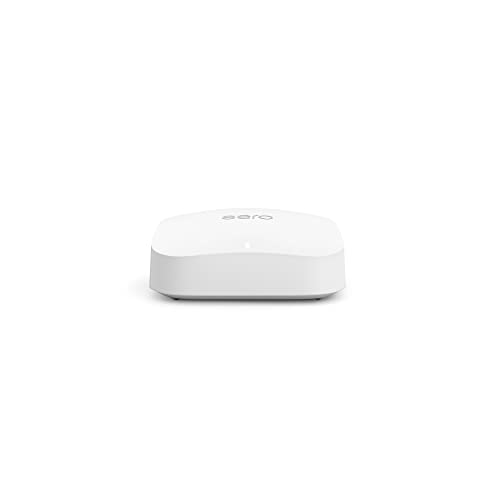
Amazon eero Pro 6E Mesh Router

MSI Radix AXE6600 Gaming Router

GL.iNet Flint 3e GL-BE6500 Router

TP-Link Deco AXE5300 3-Pack Mesh System

TP-Link Roam 7 BE3600 Travel Router

TP-Link Deco XE70 Pro AXE4900 Mesh Router
More Details On Our Top Picks
The R6700AX feels aimed at the home that wants a cleaner connection without moving up to a full mesh setup. Four-stream design means it can handle multiple data lanes at once, and the dual-band layout keeps setup straightforward for everyday streaming, homework, and video calls.
That simpler approach is also the trade-off, since a single router works best in a compact footprint rather than a sprawling house. For apartments, starter homes, and daily household use, this NETGEAR model keeps the focus on steady coverage instead of extra complexity.
What We Like
- AX1800 class wireless speed suits normal household traffic without feeling overbuilt.
- Covers up to 1,500 sq. ft., which can be enough for a small home or apartment.
- The 20-device rating fits a modest mix of phones, laptops, and streaming gear.
- Dual-band operation keeps the setup less fussy than a tri-band mesh system.
Points To Note
- Single-router coverage makes more sense for a compact layout than for thick walls or long hallways.
- Households with many hard-working smart devices may want more headroom from a mesh system.
Core Details
Who It Suits Best
You’ll get the most from this router in a smaller home, apartment, or townhouse where one central unit can cover the main rooms.
Where A Sibling Pick Shines
TP-Link Deco XE75 suits you better once your floor plan stretches beyond a single-router footprint and you want mesh nodes handling the load.
The XE75 is built for homes where one router starts feeling stretched thin, especially across more than one floor. Tri-band networking adds a third radio band, and that extra lane helps mesh traffic stay organized as phones, TVs, and work laptops pile on.
Compared with the NETGEAR pick, this one leans much harder into whole-home reach and smoother room-to-room handoff. The honest read is that it makes more sense for households that want fewer dead spots than for someone who just needs a tidy single box near the modem.
Highlights
- Coverage up to 2,900 sq. ft. suits a larger apartment or a typical house layout.
- Mesh design replaces a separate router and extender setup, which keeps the network simpler.
- AI-driven mesh can help the system adapt to changing device loads.
- The 6 GHz band gives compatible devices a cleaner lane for traffic.
- One-pack format is useful for a smaller starter mesh or as the first node in a larger plan.
Small Caveats
- Mesh only pays off fully once placement is sensible, so node location still matters.
- A single-pack system may not fill a very spread-out home on its own.
Feature Snapshot
Made For
This suits you best in a medium to large home where coverage gaps matter more than having a single router beside the modem.
Another Choice May Suit
NETGEAR R6700AX is the cleaner fit for a smaller living space that does not need the added overhead of mesh nodes.
Linksys pushes this one toward busier homes, especially where many devices are online at once. The 5.4 Gbps class speed and tri-band layout give the Velop Pro room to handle a lot of simultaneous traffic without feeling like a stripped-down basic option.
Compared with the TP-Link XE75, it leans a bit more into device capacity and full-home scale rather than a simpler starter mesh shape. You may find it especially useful in a house where streaming, gaming, and work calls happen at the same time.
Reasons To Buy
- Coverage up to 3,000 sq. ft. suits larger floor plans.
- The 200-plus device claim fits a crowded connected home.
- AXE5400 speed gives a strong ceiling for mixed household traffic.
- Tri-band operation helps spread demand more cleanly than a dual-band unit.
Areas To Watch
- A large mesh system can feel like more than you need in a small apartment.
- Placement still matters, so the nodes need room to breathe.
Technical Sheet
Best Suited To
This belongs on the shortlist for large households that keep many devices online and want mesh coverage to feel invisible in daily use.
Skip It When
TP-Link Deco XE75 makes more sense for a more modest home where broad coverage matters, but the device load stays lighter.
The eero Pro 6E keeps the setup story tidy, which is a real plus in a home where you want the network to fade into the background. Its support for internet plans up to 2.5 Gbps and coverage up to 2,000 sq. ft. puts it in that comfortable middle ground between compact and ambitious.
Compared with the Linksys system, this one feels more restrained and less about packing every possible capability into the spec sheet. For a household that wants a neat mesh layout with room for a solid mix of devices, that restraint can be the appeal.
Bright Spots
- Mesh coverage up to 2,000 sq. ft. fits many townhomes and mid-size houses.
- Support for plans up to 2.5 Gbps gives you room for faster service tiers.
- The 100-plus device capacity helps in homes where lots of gear stays online.
- A single-node mesh format can be easier to place than a larger bundle.
Room For Improvement
- A one-pack mesh setup may need expansion in a more spread-out home.
- Like any mesh unit, placement near the center of the home usually helps.
Feature Rundown
Who Will Love This
This is a good fit for households that want a calmer mesh setup and do not need the biggest coverage figure in the group.
Look Elsewhere When
TP-Link Deco XE75 suits you better once you need more reach from the start, while the NETGEAR R6700AX works better for a smaller footprint.
The MSI Radix is the most gaming-forward shape in this group, and that starts with the 1.8 GHz quad-core processor. AI QoS, which stands for quality of service, helps prioritize traffic, so game sessions and voice chat can be treated differently from background downloads.
RGB lighting makes it look more deliberate on a desk or shelf, though not everyone wants that visual attention. Compared with the eero and TP-Link mesh options, this one is less about whole-home sprawl and more about squeezing smooth performance from a central router.
Upsides
- AI QoS is a practical plus for game-heavy homes.
- The quad-core processor gives the router more processing headroom.
- MU-MIMO, or multi-user multiple-input multiple-output, helps handle several devices at once.
- 8-stream wireless design supports a busier, more layered network.
Ongoing Considerations
- RGB styling may feel busy in a minimalist room.
- A gaming router makes the most sense when your setup stays near the main unit.
- Mesh systems still make more sense for far-flung rooms.
Quick Facts
Who Should Grab It
This suits you best for a gaming room, media corner, or desk setup where performance tuning matters more than full-home mesh reach.
Reach For A Different Pick When
Linksys Velop Pro 6E is the better fit for large households that need mesh coverage rather than a performance-first single router.
GL.iNet’s Flint 3e is the most forward-looking router in the set, mainly because it brings Wi-Fi 7, MLO, and 4K-QAM into one box. MLO means multi-link operation, which lets supported devices use more than one band path at the same time, and that can matter for streaming, gaming, or video calls in a busy home.
The built-in VPN angle gives it a more technical personality than the easier mesh systems above it. You may find it best suited to a home office or a tech-savvy household that wants to stay ahead of the curve without turning the network into a science project.
Best Bits
- Wi-Fi 7 support gives you a newer wireless platform.
- BE6500 up to 6.5 Gbps sets a strong speed ceiling.
- MLO can help supported devices use the connection more efficiently.
- 4K-QAM, a higher-density modulation format, can improve data packing for compatible gear.
- VPN support adds flexibility for privacy-minded home setups.
Softer Spots
- The extra networking features make this a more hands-on choice.
- Wi-Fi 7 benefits depend on the devices you already own.
- A simple household may not use all of the advanced tools.
Spec Overview
The Right Fit
You’ll like this most if you keep up with newer hardware and want router features that go beyond the usual home setup.
A Better Fit Elsewhere
TP-Link Deco XE75 is easier to live with for households that want a calmer mesh layout and less feature depth.
This 3-pack is the sort of setup that makes sense when you want coverage spread across a larger home without piecing together a router and separate extender. Because it’s a mesh kit, the handoff between points should feel more natural than the old patchwork approach many homes end up with.
Compared with the single-node eero and NETGEAR options, you’re getting a more distributed layout right away. The renewed label can make it appealing for practical shoppers who want a broader mesh footprint without paying for extra new hardware that sits unused.
Strong Points
- Three nodes give you a built-in whole-home layout.
- Tri-band design helps separate traffic as devices stack up.
- The Wi-Fi 6E platform adds the 6 GHz band for supported gear.
- Better fit for multi-room coverage than a lone router.
Worth Noting
- A mesh kit takes a little more planning for node placement.
- Renewed condition may appeal less to someone who wants only brand-new hardware.
- A 3-pack can be more than a small apartment needs.
Details At A Glance
Whose Shelf It Belongs On
This belongs in a home that needs mesh coverage across several rooms and wants the network to feel more evenly spread out.
Swap It Out When
NETGEAR R6700AX is the simpler fit for a smaller home, while Linksys Velop Pro 6E suits a more device-heavy household.
Roaming between hotels, cruises, and RV stops changes the rules, and this little router is built around that reality. Its portable shape, 2.5G port, USB 3.0 support, and multi-mode setup make it easier to create your own connection point instead of depending on a shared network that may not behave well.
Compared with the home-first mesh routers above, this one is less about whole-house coverage and more about keeping your own network handy on the road. The lack of 6 GHz may matter to some tech-focused users, but travel use is usually about control and convenience first.
Highlights
- Portable format suits bags, carry-ons, and temporary setups.
- OpenVPN and WireGuard support give you flexible tunneling choices.
- Public Wi-Fi sharing modes fit hotel, cruise, RV, and plane use cases.
- USB 3.0 and a 2.5G port add useful connection flexibility.
Things To Consider
- Travel routers solve a different problem than home mesh systems.
- No 6 GHz band means it is not aimed at the same lane as the 6E mesh units.
- Setup takes a little more thought than simply plugging in a standard router.
Feature Card
Built With In Mind
This is a smart fit for frequent travelers who want to keep a personal network ready in hotel rooms, RVs, or other temporary stops.
Where A Sibling Pick Shines
TP-Link Deco XE75 is a better call for a house or apartment where you need broad, stationary mesh coverage instead of portability.
The XE70 Pro sits in a very usable middle lane, which is often where a lot of households land. You get tri-band 6E mesh coverage, a 2.5 Gbps WAN or LAN port, and two 1 Gbps LAN ports, so it has enough wired flexibility for a main desk, console, or streaming box without becoming overcomplicated.
Compared with the XE75, it puts a bit more emphasis on physical ports while keeping the same broad mesh mindset. For mixed-device homes that still care about wired connections, that balance can feel like the sensible move rather than the flashiest one.
Positives
- Up to 2,900 sq. ft. of coverage suits many family homes.
- Support for up to 200 devices helps a busy network stay organized.
- The 2.5 Gbps port is handy for a fast wired backbone.
- Two extra gigabit LAN ports make it easier to plug in fixed devices.
Minor Gripes
- Mesh placement still matters more than most people expect.
- A single-pack system may not stretch to the largest layouts on its own.
- More ports help, but they also make cable management a little more involved.
Core Details
Right Fit
This is a strong match for you if you want mesh coverage plus a few useful wired ports without pushing into a more technical setup.
Where Shoppers Go Wrong
TP-Link Deco AXE5300 3-Pack suits larger homes that need more nodes right away, while the NETGEAR R6700AX is the cleaner choice for a smaller space.
How To Choose The Right 6e Routers
Coverage Should Match The Floor Plan
Coverage numbers matter, but they matter most in the context of walls, floors, and where you place the hardware. A compact router like the NETGEAR R6700AX makes sense in a smaller apartment or townhouse, while mesh kits such as the TP-Link Deco XE75 and Linksys Velop Pro 6E fit broader spaces better.
For a long hallway or a house with an upstairs office, a single-box router often leaves weak spots at the edges. Mesh systems spread the signal more evenly, though that also means you need room for node placement and a little patience while you arrange them.
Band Count Changes How Traffic Feels
Dual-band routers are simpler and often easier to live with, which is why the NETGEAR unit feels so approachable. Tri-band models add another lane for traffic, and that extra separation helps in homes where streaming, gaming, and work calls happen at once.
6E models also open the 6 GHz band for supported devices, and that can reduce crowding on older bands. The trade-off is straightforward, because you only benefit from that band with compatible hardware, so older devices will not suddenly gain a new trick.
Ports, Device Load, And Placement Matter
Wired ports still matter in a wireless-first house. The TP-Link Deco XE70 Pro is useful because it includes a 2.5 Gbps port plus two gigabit LAN ports, which helps for a desktop, game console, or media box that stays in one place.
Device count matters too, especially in homes where phones, tablets, cameras, and TVs stay connected all day. A router that looks generous on paper can still feel cramped in real use, so your rough device total and room layout deserve as much attention as the speed class.
Things Worth Knowing First
Hidden Buying Traps
Common mistakes start with overbuying coverage for a small space or underbuying it for a large one. Another trap is focusing only on headline speed and ignoring band count, which matters just as much once several devices are online.
Placement gets overlooked too. A mesh system can feel underwhelming when the nodes sit in poor spots, and a travel router loses its point entirely if your trip never calls for a separate network.
The Upgrade Payoff
Higher-tier models cost more because they usually add stronger chipsets, more bands, better mesh coordination, or extra wired ports. GL.iNet’s Flint 3e and the Linksys Velop Pro 6E both show that pattern, since each one leans into a different kind of advanced use.
The upgrade makes sense when you have dense traffic, more demanding rooms, or a need for newer wireless features like Wi-Fi 7. For a smaller household with routine streaming and browsing, a simpler model can still be the smarter spend.
Frequently Asked Questions
What does 6E actually add?
6E adds the 6 GHz band, which can reduce congestion for compatible devices. It helps most in busy homes where several devices compete for airtime.
Do you need mesh for a small home?
Not always. A single router like the NETGEAR R6700AX can be enough in a compact space with a central modem location.
Is Wi-Fi 7 worth it now?
It makes sense for you if your home already has newer hardware or you want room to grow. GL.iNet Flint 3e and TP-Link Roam 7 bring that newer standard into different use cases.
Why do some routers have so many LAN ports?
Extra LAN ports help you wire in devices that stay put, like consoles, desktops, or media hubs. That can make the wireless side less crowded.
What should you prioritize first?
Start with coverage and layout, then match speed class and bands to your device load. That order keeps you from overpaying for features your home will not use much.
Final Thoughts
Your best match depends on how your home lives day to day. A smaller space does well with the NETGEAR R6700AX, while larger or busier homes benefit from the TP-Link Deco XE75, Linksys Velop Pro 6E, or TP-Link Deco XE70 Pro. The eero Pro 6E, MSI Radix, GL.iNet Flint 3e, TP-Link Deco AXE5300 3-Pack, and TP-Link Roam 7 each solve a more specific problem, which is exactly why this category rewards a careful read of the specs. Choose the setup that fits your rooms first, and the rest tends to fall into place.




