


Home internet gear can feel simple until your stream stutters during a family movie night or your work call drops at the worst moment. These six cable modem and router choices cover different kinds of households, from apartment setups that want a smaller footprint to larger homes that need steadier wireless reach. You’ll also see where a modem-router combo makes life easier and where a separate modem plus your own router gives you more room to grow.
The Shortlist At A Glance
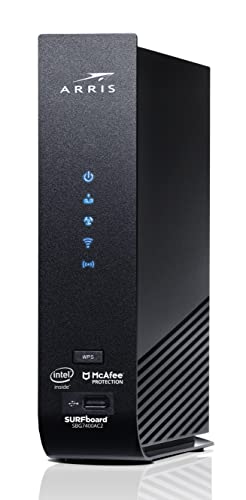
ARRIS Surfboard SBG7400AC2-RB AC2350 Modem-Router Combo

NETGEAR Nighthawk CAX80 WiFi 6 Modem-Router

NETGEAR Nighthawk CM3000 DOCSIS 3.1 Modem

Arris G18 DOCSIS 3.1 WiFi 6 Combo
ARRIS Surfboard G20 DOCSIS 3.1 AX3000

Motorola B12 Advanced Compact Cable Modem
More Details On Our Top Picks
The SBG7400AC2-RB fits the household that wants one box doing two jobs, with four 1 Gbps Ethernet ports for wired gear and AC2350 Wi-Fi for the rest. Refurbished status matters here, because you get the combo format without paying for extra hardware, though the trade-off is a more modest DOCSIS 3.0 platform than the newer models below.
For everyday streaming, schoolwork, and light gaming, that balance still makes sense. Busy homes with a simple cable plan benefit most, while power users on faster service tiers will probably want a newer DOCSIS 3.1 option such as the ARRIS G18 or NETGEAR CM3000.
Strong Points
- Combo design trims cable clutter and keeps setup straightforward.
- Four gigabit ports help desktops, consoles, and TVs stay wired.
- AC2350 wireless can cover routine home use without much fuss.
- Refurbished format can make the feature set easier to justify for basic service tiers.
Points To Note
- DOCSIS 3.0 sits behind the newer DOCSIS 3.1 picks in this list.
- Refurbished units can vary in cosmetics, so a close look at the listing details helps.
Feature Snapshot
Who It Suits Best
Apartment dwellers and smaller homes with basic cable internet will get the most from this compact combo.
A Better Fit Elsewhere
NETGEAR Nighthawk CAX80 suits faster plans and heavier wireless traffic better, especially in homes where several people stream at once.
The CAX80 leans into speed headroom, with DOCSIS 3.1 on the cable side and WiFi 6 on the wireless side. That matters in a home where several people are streaming, gaming, or working at once, because the router half has more breathing room than the older combo above.
You also get broad cable provider compatibility, though the listing clearly rules out Verizon, AT&T, CenturyLink, DSL services, DirecTV, DISH, and bundled voice plans. For cable households chasing larger plans, this feels like a serious step up, while lighter-use homes may not need this much hardware.
Highlights
- DOCSIS 3.1 gives you a newer cable platform than the SBG7400AC2-RB.
- AX6000 WiFi 6 is built for dense wireless traffic.
- Fits major cable providers, which keeps compatibility straightforward for many homes.
- Strong choice for larger service tiers and busy households.
Worth Noting
- It does not work with DSL or non-cable providers.
- The size and capability are overkill for small apartments on modest plans.
- Renewed gear can be a smart value play, though cosmetic variation is part of the trade.
Details At A Glance
Who Will Love This
Larger households with cable service and a long list of connected devices will appreciate the breathing room here.
Where A Sibling Pick Shines
ARRIS Surfboard G20 fits better for homes that want a newer combo with a slightly simpler setup and less emphasis on extreme wireless capacity.
This one is for you if the modem half matters more than the router half, because the CM3000 is built as a standalone cable modem rather than a combo unit. The mid/high-split design is geared toward today’s faster cable setups, and that gives you a cleaner upgrade path when you already own a router you like.
In a house with a strong mesh system or a preferred gaming router, that separation can be the smart move. The trade-off is obvious, though, since you still need a separate router and the setup has one extra box to place.
Upsides
- Standalone design lets you pair the modem with your own router.
- DOCSIS 3.1 suits newer cable infrastructure better than older cable hardware.
- Mid/high-split support points toward faster service environments.
- 2.5 Gbps class positioning gives more room for higher-speed wired gear.
Small Caveats
- You’ll need to supply your own router, which adds cost and setup time.
- The separation means more desk or shelf space than a combo unit.
- Service compatibility still matters, so checking plan details first is worth doing.
Core Details
Best Suited To
Home network tinkerers and advanced cable subscribers will get the most out of this modem-first approach.
Look Elsewhere When
NETGEAR Nighthawk CAX80 fits better for households that want modem and router in one enclosure.
The G18 sits in a comfortable middle ground, especially compared with the older ARRIS combo at the top of the list. You get DOCSIS 3.1 and WiFi 6 in one unit, which makes it a practical choice for homes that want modern hardware without moving into the larger CAX80 class.
ARRIS also leans on a long history in home networking, and that can matter to anyone who wants a familiar brand name for daily internet use. The honest read is that AX1800 is a more measured wireless class than the G20’s AX3000, so it suits solid everyday service better than dense device loads.
What We Like
- DOCSIS 3.1 gives you a current cable modem platform.
- WiFi 6 helps modern phones, laptops, and TVs connect more smoothly.
- Combo design cuts down on separate boxes and extra cabling.
- Works with major cable providers such as Xfinity, Spectrum, and Cox.
Areas To Watch
- AX1800 is fine for many homes, though heavier traffic may ask for more.
- A combo unit gives you less freedom than a modem like the CM3000.
Feature Rundown
Who Should Grab It
Families that want a current combo without stepping into a bulky high-capacity setup will appreciate this fit.
Another Choice May Suit
ARRIS Surfboard G20 is the stronger match for homes that want more wireless headroom and a higher AX class.
The G20 steps up from the G18 with AX3000 wireless, which gives it more breathing room for homes full of phones, tablets, and smart TVs. That stronger wireless class makes sense in shared spaces where internet use doesn’t happen one device at a time.
For households that want a single box and a little extra margin above the basics, this feels well judged. You still need to remember that combo units are less flexible than the CM3000 modem-only route, but for most families the simplicity is the point.
Reasons To Buy
- AX3000 wireless provides more headroom than the G18’s AX1800.
- DOCSIS 3.1 keeps the cable side current.
- All-in-one design makes desk or shelf placement simpler.
- Good match for homes with multiple streamers and work devices.
Softer Spots
- Combo layout leaves less room for router upgrades later.
- The stronger wireless class still has to share space inside one enclosure.
Spec Overview
Who It Suits Best
Shared homes with several active devices and a preference for one tidy network box will feel right at home here.
Reach For A Different Pick When
NETGEAR Nighthawk CM3000 fits better for you if you already own a strong router and want the modem to stay out of the way.
The B12 is the neatest route here for anyone who already has a router they like and only wants the modem side handled cleanly. Its compact shape matters in media cabinets, desk nooks, or apartment shelves where larger combo units can feel bulky.
Because it pairs with your own WiFi router, it gives you more freedom than the combo picks above, though that also means one more device to manage. For homes that like a modular network setup, that trade-off often makes sense.
Best Bits
- Compact body is easier to tuck into tight spaces.
- Works with a separate WiFi router, which preserves upgrade flexibility.
- DOCSIS 3.1 keeps it aligned with modern cable service.
- 2.5 Gbps port gives wired gear a stronger connection point.
Trade Offs
- You still need to own or choose a router.
- Small size means less all-in-one simplicity than the combo models.
- Provider compatibility still depends on your cable service and plan.
Technical Sheet
Who It Suits Best
Space-conscious homes and anyone planning to use a separate router will get the cleanest fit from this modem.
Swap It Out When
ARRIS Surfboard SBG7400AC2-RB fits better for you if you want modem and router combined in one unit from the start.
How To Choose The Right Cable Modem And Routers
Match the modem standard to your plan
DOCSIS 3.0 still works for lighter cable service, but DOCSIS 3.1 is the safer long-term choice for faster plans and more demanding homes. That difference matters because the modem is the gatekeeper between your service tier and your home network, and a mismatch can leave speed sitting on the table. In a house with work laptops, gaming consoles, and several streaming boxes, the newer standard usually makes more sense.
Decide whether combo convenience or modular flexibility fits you
A modem-router combo, such as the ARRIS G18 or G20, keeps setup simple and trims clutter. A standalone modem like the NETGEAR CM3000 or Motorola B12 gives you more freedom to choose the router you want, which helps after a router upgrade or when mesh coverage becomes important. The trade-off is straightforward, one box is easier, two boxes are easier to fine-tune.
Pay attention to wireless class and wired ports
WiFi 6 matters because it handles busy homes more gracefully than older wireless generations, especially when several devices stay active at the same time. AX1800 is fine for lighter traffic, while AX3000, AX6000, or AC2350 offer more room depending on the item. Wired ports matter too, since a console, desktop, or streaming box often behaves better on Ethernet than on a crowded wireless band.
Check compatibility before you settle on a pick
Major cable providers often appear on these listings, but compatibility still needs a quick check against your exact service. That’s especially true with the NETGEAR CAX80, which excludes DSL and several non-cable services, and it also matters for refurbished gear where condition can vary. A careful match here saves setup headaches later.
A Quick Reality Check
Common Shopping Slip Ups
Many people focus on router speed and ignore the cable side, which is where DOCSIS compatibility really matters. Another common miss is buying a combo when a separate modem would fit better with an existing mesh system. A short compatibility check and a quick look at the number of wired ports usually prevents both mistakes.
Where The Extra Money Goes
Higher-tier models pay for newer modem standards, stronger wireless classes, and more headroom for multiple devices. You also tend to get better fit for faster service plans, which matters in homes where streaming, gaming, and remote work happen at the same time. The upgrade is worth it when your current setup feels crowded, not just because the spec sheet looks taller.
Frequently Asked Questions
What is the main difference between a cable modem and a router?
A modem connects your home to the cable service, while a router spreads that connection across your devices. Combo units do both jobs in one box.
Is DOCSIS 3.1 worth it for a normal home?
DOCSIS 3.1 is the better match for many newer cable plans and busier households. For lighter service, DOCSIS 3.0 can still be enough.
Should you choose a combo or separate units?
A combo keeps setup simpler and reduces clutter. Separate units give you more freedom to upgrade the router later.
Do all cable internet services work with these picks?
No, compatibility depends on the provider and plan. The listing details matter, especially for non-cable or bundled voice services.
Why does a 2.5 Gbps port matter?
That port gives fast wired devices more room to move data than a standard gigabit port. It helps most in homes with newer networking gear.
Closing Thoughts
The right cable modem and router setup depends less on hype and more on how your home actually uses the network. A compact modem like the Motorola B12 fits a clean, modular setup, while the ARRIS G20 or NETGEAR CAX80 makes more sense when you want an all-in-one unit with more wireless headroom. For most homes, the best choice is the one that matches your cable plan, your room layout, and how many devices stay online at once. Pick the path that keeps your network calm, and the rest gets easier.




