


Choosing a Dsl Modem Router gets easier once you match the hardware to your line type, home size, and how many devices stay online at once. The right pick can smooth out video calls, keep streaming steady, and cut down on the usual setup frustration. These eight choices cover older ADSL lines, bonded CenturyLink service, cable internet, and mesh or standalone router setups, so you can narrow things down without sorting through a wall of jargon.
The Shortlist At A Glance

ZyXEL C3000Z Modem CenturyLink
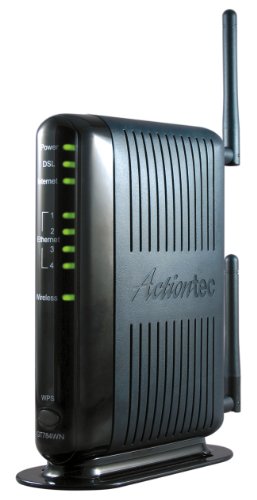
Actiontec 300 Mbps Wireless-N ADSL Modem Router GT784WN

NETGEAR Orbi 770 Series Tri-Band WiFi 7 Mesh System RBE772
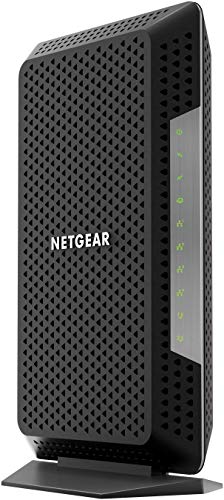
NETGEAR Nighthawk 32 x 8 DOCSIS 3.1 Voice Cable Modem Black

Netgear Nighthawk C7800 Cable Modem WiFi Router Combo

NETGEAR Nighthawk 5-Stream AX5 WiFi 6 Router RAX43

C4000BG CenturyLink Bonded Line Wi Fi DSL Router

Tp-Link TD-W9950 300Mbps Wireless N VDSL/ADSL Modem Router
More Details On Our Top Picks
The C3000Z makes sense for CenturyLink homes that want a single box instead of separate modem and router gear. Compared with the mesh-heavy Orbi ahead in this list, it keeps the setup more traditional and easier to fit beside a desk or cabinet.
You may find it a calmer choice for everyday browsing, streaming, and family devices than a high-output mesh system. The trade-off is simple, it stays tied to a specific provider setup, so it suits a narrower slice of households.
Reasons To Buy
- Combines modem and router duties in one unit, which cuts clutter around the wiring spot.
- Fits CenturyLink service without making you piece together separate hardware.
- Works well for households that want a straightforward path from box to connection.
- Uses a compact all-in-one layout, so it sits neatly in small utility areas.
Small Caveats
- Its value drops fast outside the intended CenturyLink setup.
- All-in-one hardware can be less flexible later if you want to upgrade only one part.
Feature Card
Who It Suits Best
You get the most from this pick in a CenturyLink home that wants simple hardware and low fuss.
Swap It Out When
Actiontec GT784WN is a better match for a broader ADSL setup, especially in homes that need a less provider-specific route.
This Actiontec combo is built for homes that still run on ADSL, the older broadband line that reaches many service areas. Unlike the ZyXEL C3000Z, it is aimed at a wider set of major DSL providers, though it stays off cable and fiber service types.
The built-in firewall, parental controls, and pre-set service detection make it friendly for a first-time setup in a spare room or apartment. The honest read is that 300 Mbps Wireless-N is dated by newer WiFi standards, but that can still be enough for light household use.
Highlights
- Three functions in one box, modem, four-port switch, and WiFi router.
- Auto-detection of service settings reduces the usual setup guesswork.
- Wireless security options and a built-in firewall add useful control.
- Four Ethernet ports help wired gear stay connected without extra hardware.
- Works with many ADSL services, which broadens the fit beyond a single provider.
Points To Note
- It does not fit VDSL or cable systems, so service matching matters.
- Wireless-N trails newer WiFi standards in speed and headroom.
- The design feels more utility-focused than modern, which may matter on a visible shelf.
Core Details
Made For
You fit this best when you want a straightforward ADSL all-in-one for modest internet use and a few wired devices.
A Better Fit Elsewhere
Tp-Link TD-W9950 suits you better when you want a similar DSL path with a fresh-looking option and VDSL support in the same category.
This Orbi setup is less about a single room and more about pushing signal through a whole house with the router and satellite working together. Compared with the DSL-focused picks, it sits in a different lane entirely, and that matters because it suits larger homes with many active devices rather than a narrow provider match.
You get the kind of headroom that makes sense for busy households, especially where streaming, gaming, and smart devices all stay active at once. The trade-off is that mesh systems take more space and cost more to justify, so you only want this scale when your home layout actually asks for it.
What We Like
- Tri-band mesh design spreads traffic across more wireless lanes.
- Coverage claims point toward larger homes with hard-to-fill corners.
- Supports many devices, which fits crowded family networks.
- 2.5 Gig internet port gives the hardware more modern backhaul room.
- Security features and around-the-clock support add peace of mind for setup-heavy homes.
Areas To Watch
- Mesh hardware asks for more space and planning than a plain modem-router combo.
- It is broader than a DSL-specific fix, so it only belongs in the right internet setup.
- Some households will never use the full scale, which makes the extra reach harder to justify.
Spec Overview
Who Will Love This
You suit this best when your home has multiple floors, thick walls, or a long layout that eats wireless signal for breakfast.
Where A Sibling Pick Shines
NETGEAR Nighthawk C7800 fits better for cable subscribers who want one hardware piece instead of a mesh pair.
This Nighthawk model belongs with cable homes that want voice support alongside modern cable modem hardware. Compared with the mesh Orbi, it keeps the setup simpler and more focused, which can be exactly what you want in a media room or small office.
Because it is renewed, the appeal leans toward getting a capable cable modem without stepping into a brand-new premium tier. You should be comfortable with a refurbished route, though, since renewed gear can feel a little less straightforward for some shoppers.
Best Bits
- DOCSIS 3.1 support gives the modem modern cable compatibility.
- 32 x 8 channel layout points to strong cable handling capacity.
- Voice support matters for homes that still rely on phone service through the modem.
- Black housing keeps the look simple and easy to tuck near other AV gear.
Softer Spots
- Renewed condition can matter to shoppers who prefer brand-new hardware.
- It is a cable modem, not a DSL unit, so the fit is provider-specific.
- Voice features only help households that actually use that service path.
Details At A Glance
Right Fit For
You fit this best when your internet plan rides over cable and you also need voice support in the same box.
Look Elsewhere When
Actiontec GT784WN is the simpler call for DSL-only homes that do not need cable modem hardware at all.
The C7800 is the familiar all-in-one shape many cable households want, because it removes the need to match a separate modem and router. Compared with the renewed Nighthawk above, this one leans harder into the modem-router combo idea, which helps when you want fewer boxes to manage.
Its AC3200 class and DOCSIS 3.1 support make sense for busy homes with multiple streamers and game consoles. The catch is that it only belongs on cable service, so it is a poor fit for DSL homes no matter how solid the hardware looks.
What We Like
- All-in-one cable modem and WiFi router simplifies the shelf and the setup.
- DOCSIS 3.1 keeps it aligned with modern cable network expectations.
- AC3200 wireless class suits homes with many connected devices.
- Works with several major cable providers, which widens practical use.
- Fewer separate components mean fewer cords and fewer points of confusion.
Minor Gripes
- It is not a DSL solution, so service matching still comes first.
- The combo design can be less flexible than buying separate hardware later.
- Renewed status may not suit everyone’s comfort level.
Feature Rundown
The Right Fit
You fit this best when you want a single cable box for a busy household and do not want separate modem and router pieces.
Skip It When
CenturyLink C4000BG is the better path for a DSL home that needs bonded line support instead of cable hardware.
The RAX43 belongs to households that need more breathing room from a router than older wireless gear tends to provide. Compared with the C7800 combo, it drops the modem function and focuses on WiFi 6 performance, which can be smarter for homes that already have a separate modem.
Its 5-stream design and AX4200 class point to a stronger fit for many devices, especially in a 2,000 square foot home or a busy apartment with lots of streaming. The honest trade-off is that it is only the router half of the internet chain, so it belongs next to the right modem rather than replacing one.
Positives
- WiFi 6 support gives you a newer wireless baseline.
- 5-stream design helps spread traffic in busier homes.
- AX4200 class suggests stronger bandwidth headroom for multiple devices.
- 2,000 square foot coverage target suits medium homes well.
Room For Improvement
- It is not a modem, so your internet service still needs separate front-end hardware.
- Renewed status can matter to anyone who prefers untouched packaging and parts.
- Coverage depends heavily on walls, floor plan, and device placement.
Key Specs
Built With In Mind
You fit this best when your modem already works and your main pain point is weak WiFi in a medium-size home.
Another Choice May Suit
NETGEAR Orbi 770 Series makes more sense for larger homes that need mesh coverage across several rooms or floors.
The C4000BG is aimed squarely at CenturyLink homes that need bonded line support, so it makes more sense for a service-matched setup than a generic router search. Compared with the older ZyXEL C3000Z, it talks more directly to higher-speed DSL use, and that distinction matters in homes that are trying to squeeze more out of a landline connection.
Its one-home WiFi name and support for ADSL or VDSL profiles up to 17a point to a cleaner whole-house setup. You may find it especially useful in a home office or family space where a single network name keeps device switching simple.
Bright Spots
- Bonded line support suits eligible CenturyLink connections.
- Up to 3 Gbps class speed points to more headroom for busy home traffic.
- One WiFi name across the home keeps connections simpler for phones and laptops.
- 160 MHz channel support helps compatible devices move more data at once.
- Works across ADSL and VDSL profiles up to 17a, which broadens the DSL fit.
Worth Noting
- Bonded line support only matters on the right CenturyLink service.
- Higher WiFi speed claims only pay off with compatible devices nearby enough to benefit.
Core Details
The Right Fit
You fit this best when your CenturyLink line supports bonded service and you want one WiFi name across the house.
Where Shoppers Go Wrong
Actiontec GT784WN makes more sense for a simpler ADSL setup that does not call for bonded line support or the newer feature set.
The TD-W9950 gives you a straightforward DSL path with both VDSL and ADSL support in one box. Compared with the Actiontec GT784WN, it stretches into VDSL territory, which makes it the more flexible fit for households whose service has moved beyond older ADSL.
Its 300 Mbps Wireless N class keeps expectations grounded, and that can be fine for everyday browsing, streaming, and homework devices. The trade-off is simple, it is not the kind of router that exists to impress a spec sheet, just to keep a basic home connection moving without drama.
Strong Points
- Combines modem and router roles, which saves desk space and cabling.
- VDSL and ADSL support widen the service fit.
- 300 Mbps wireless class works for modest everyday network loads.
- Good fit for smaller homes that do not need a big wireless footprint.
Areas To Watch
- Wireless N is older gear, so newer WiFi expectations may outgrow it.
- The product is built for simpler homes, not crowded device-heavy households.
- Line compatibility still matters, so service type needs a quick check before you settle on it.
Technical Sheet
Who Should Grab It
You fit this best when you want a low-fuss DSL combo for a modest home and do not need premium wireless extras.
Reach For A Different Pick When
NETGEAR Nighthawk RAX43 is the smarter move for homes that already have a modem and want a stronger WiFi-only upgrade.
How To Choose The Right Dsl Modem Routers
Match The Line Before The Features
DSL hardware starts with service compatibility, not WiFi speed. ADSL, VDSL, and bonded line support are different lanes, and the wrong one turns a promising box into shelf decoration.
CenturyLink households usually need a closer look at provider support than cable users do. That is why the ZyXEL C3000Z and C4000BG sit in different spots, even though both belong to the same broad category.
Decide Whether You Need One Box Or Two
Combo units save space and reduce cable clutter, which helps in apartments, small offices, and shared rooms. Separate modem and router gear gives you more room to upgrade later, especially when you care more about WiFi performance than line termination.
The Actiontec GT784WN and Tp-Link TD-W9950 suit the one-box crowd. The NETGEAR Nighthawk RAX43 makes more sense when your modem already does its job and your real problem is weak wireless coverage.
Look Past Speed Names And Read The Living Space
Big speed labels matter less than wall layout, floor count, and how many devices stay active in the same hour. A 300 Mbps Wireless N unit can still feel fine in a modest household, while a tri-band mesh system earns its keep in a larger home with stubborn dead zones.
The Orbi 770 Series is built for that bigger, busier picture, while the Nighthawk C7800 and C4000BG lean toward households that want fewer moving parts. The honest read is that the best fit often comes from room count, not the biggest number on the page.
Think About Maintenance And Daily Use
Modem-router combos are usually easier to live with because there is less to dust, label, and replace. Renewed gear can be a sensible route, but it suits you best when you are comfortable with pre-owned condition and the usual wear-and-tear questions that come with it.
Voice support, extra Ethernet ports, and a single WiFi name all matter in real homes because they shape how smoothly phones, laptops, and streaming boxes stay connected. Small details like that often matter more than flashy marketing language.
Things Worth Knowing First
Common Shopping Slip Ups
One common misstep is treating DSL and cable hardware as interchangeable. Another is buying a router with strong wireless branding but no modem support, which leaves you missing the actual internet connection piece.
Service matching comes first, then household size, then extras like voice support or mesh coverage. That order saves you from ending up with a box that sounds impressive but never fits your line.
Where The Extra Money Goes
Higher-tier models usually pay for newer wireless standards, stronger channel handling, wider coverage, and more flexible service support. Mesh kits and advanced cable hardware also cost more because they solve bigger homes or busier networks, not because they look shinier.
The upgrade matters most in homes with several streamers, gaming systems, or long floor plans. A simpler home with one or two active devices often gets more value from a basic combo unit than from a heavier-duty setup.
Frequently Asked Questions
What Makes A DSL Modem Router Different From A Plain Router?
A DSL modem router includes the modem function that connects to the phone line service. A plain router only shares an internet connection that already exists.
Can You Use A Cable Modem Router For DSL?
No, cable and DSL use different connection types, so the hardware is not interchangeable. You need a unit built for your service line.
Is Wireless N Still Enough For A Small Home?
Yes, it can still work for modest browsing, streaming, and schoolwork in a smaller space. Newer wireless standards help more when many devices stay online at once.
Do Mesh Systems Replace DSL Modem Routers?
Mesh systems improve coverage, but they do not replace a DSL modem unless the hardware also includes modem functions. They suit homes that already have the right front-end connection.
Should You Choose A Combo Unit Or Separate Hardware?
Combo units are easier to manage and usually take up less room. Separate hardware gives you more upgrade flexibility later.
Final Thoughts
The right Dsl Modem Router comes down to service match, room layout, and how much simplicity you want in daily use. For a CenturyLink line, the ZyXEL and C4000BG make strong sense, while the Actiontec and Tp-Link models cover more basic DSL needs. Cable homes belong with the Nighthawk options, and larger multi-room spaces lean toward the Orbi mesh system. Pick the one that matches your actual connection first, then let the extras do their quiet work.




