


Your home network is under more pressure than ever: remote work, smart cameras, kids’ tablets, and a growing list of devices that all need clean bandwidth and a hardened edge. A dedicated firewall router sits between your modem and everything else, filtering traffic before trouble reaches your laptops. The five options below cover very different needs, from plug-and-play security to full multi-WAN business setups, so you can match the hardware to how you actually live and work online.
The Essentials At A Glance

TP-Link ER7206 Multi-WAN Gigabit VPN Router
Firewalla Purple SE Cyber Security Firewall

TP-Link Archer BE600 Tri-Band WiFi 7 Router

Cudy R700 Multi-WAN OpenWRT Router
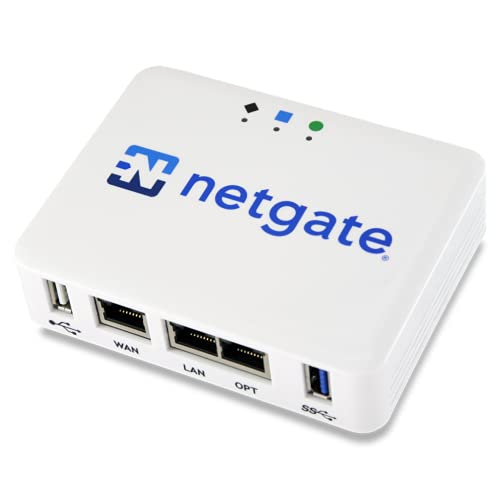
Netgate 1100 pfSense+ Security Gateway
The Picks, Examined More Closely
The ER7206 is built like a rack-ready workhorse rather than a consumer gadget, and that shows the moment you look at its port layout. You get an SFP WAN slot alongside standard gigabit WAN and LAN jacks, which means fiber handoffs are handled without extra converters.
In a small office running VoIP, cloud backups, and guest Wi-Fi at once, the ability to spread load across multiple internet lines is what keeps Monday morning productive. Unlike the app-first Firewalla later in this list, this one leans on TP-Link’s Omada platform for centralized management, which suits admins who like dashboards over phone apps.
Everyday Advantages
- Up to four WAN connections let you combine ISPs and reroute traffic automatically when one line fails, keeping a storefront or remote office online.
- A five-port flexible layout, including one SFP fiber slot, saves you from buying separate media converters.
- Support for roughly 150,000 associated devices and up to 700 active clients means dense offices won’t choke the routing table.
- Omada SDN integration gives you one pane of glass for switches and access points from the same ecosystem.
- Built-in VPN handling covers secure remote access without adding another box to the shelf.
Points To Note
- This is a wired-only unit, so plan on separate access points for Wi-Fi coverage.
- Owners commonly report the web interface takes some study time; budget an evening for initial setup.
Feature Rundown
Who It Suits Best
IT-minded owners of small businesses or shared workspaces who want carrier-grade redundancy on a wired backbone.
Where Another Pick Suits Better
Home users who mostly want simple app-based parental controls will find the Firewalla Purple SE far less demanding to run day to day.
Where the TP-Link ER7206 speaks fluent network-admin, the Purple SE speaks fluent parent. Its companion app surfaces every device on your network, flags suspicious activity, and lets you pause a teenager’s gaming session from the couch. There’s no recurring subscription attached to the core features, which matters when similar services charge monthly.
You can run it as your primary router or bridge it behind an existing one in Simple Mode, though compatibility with some stock ISP routers is limited, so check the maker’s guide first. One honest constraint: intrusion-prevention throughput is capped around 500 Mbps, which is plenty for most homes but worth knowing before you buy gigabit service expecting full-speed inspection.
Features That Help
- Malware and hacking protection runs continuously across every connected device, including ones that can’t run their own security software.
- Smart parental controls handle screen-time rules, content filtering, and per-device pauses from one interface.
- Built-in ad blocking trims clutter on phones and browsers without browser extensions.
- Dual role as VPN server and client lets you reach home securely or route household traffic through a provider.
- No monthly fee keeps the long-term cost of ownership predictable.
Worth Bearing In Mind
- IPS performance tops out near 500 Mbps, so very fast plans may not see full inspected throughput.
- Simple Mode bridging isn’t universal; verify your current router against the published compatibility list before ordering.
Right Fit For
Households with kids, mixed smart-home gear, and no interest in learning command-line networking.
A Better Fit Elsewhere
Tinkerers who want open-source flexibility and VLAN segmentation will get more mileage from the Cudy R700 covered next.
Not everyone shopping this category wants a box that only does security. The Archer BE600 is a WiFi 7 router first, bringing tri-band radios, seven streams, and features like Multi-Link Operation (which lets a device talk on two bands simultaneously) and 320 MHz channel widths to a modern living room.
For households stacked with a PS5 Pro, a WiFi 7 laptop, and 8K streaming ambitions, the difference shows up as lower latency during evening congestion rather than raw headline numbers. Compared with the wired-only ER7206 earlier, this pick trades multi-WAN redundancy for cutting-edge wireless, so think about which bottleneck actually hurts you.
Bright Spots
- Tri-band BE9700-class speeds keep 4K and 8K streams smooth even with many devices competing.
- WiFi 7 technologies such as MLO, Multi-RU, and 4K-QAM reduce lag for compatible phones, consoles, and laptops.
- Wide 320 MHz channels give supported WiFi 7 clients noticeably more headroom than WiFi 6 gear.
- Seven-stream design spreads capacity across crowded apartments and media-heavy homes.
Things To Consider
- Older devices can’t use the newest features, so gains depend partly on your hardware refresh cycle.
- As a general-purpose router, it lacks the dedicated firewall depth of purpose-built gateways like the Netgate below.
Quick Facts
Who Will Love This
Gamers, streamers, and early adopters who already own WiFi 7-capable devices and want wireless performance above all else.
Swap It Out When
Anyone whose priority is multi-line failover for a business should step back to the TP-Link ER7206 instead.
The R700 is the tinkerer’s entry ticket. OpenWRT support, meaning a community-maintained open operating system for routers, unlocks VLAN segmentation, custom QoS policies, granular firewall rules, and thousands of community packages that stock firmware never ships. Five gigabit Ethernet ports round out a spec sheet aimed squarely at people who enjoy configuring things.
Multi-WAN is the other headline: you can attach up to five internet sources, and the router balances load across them while failing over instantly when one drops. That makes it a quiet favorite for home labs and remote offices where connectivity loss equals lost work. Against the pricier Netgate 1100, you trade polished vendor software for freedom, and honestly, that trade suits a certain kind of owner perfectly.
Benefits That Matter
- Five-ISP support with automatic failover keeps a business or lab online through single-provider outages.
- Load balancing spreads traffic across lines so no connection idles while another saturates.
- Full OpenWRT compatibility opens VLANs, custom QoS, and community packages for professional-grade control.
- Advanced firewall rule creation lets you shape traffic exactly the way your setup demands.
Small Caveats
- OpenWRT assumes comfort with manual configuration; expect a steeper learning curve than app-based rivals.
- Community firmware updates depend on the OpenWRT project’s release cadence, not the manufacturer alone.
- No built-in Wi-Fi radio is listed, so wireless coverage requires separate access points.
The Right Fit
Hands-on users running home labs, self-hosted services, or small remote sites who want maximum configurability per dollar.
Reach For A Different Pick When
Shoppers who prefer guided apps and out-of-the-box security will be happier with the Firewalla Purple SE’s phone-first experience.
pfSense is arguably the most respected name in open-source firewalling, and the 1100 is Netgate’s compact appliance pre-loaded with the pfSense+ software so you’re configuring within minutes of unboxing. Nothing else here combines mature firewall tooling, VPN termination, and official vendor backing in a footprint this small.
Software updates are included for the product’s lifetime, and Netgate’s TAC Lite technical assistance plus a year of hardware coverage come standard, which softens the usual risk of rolling your own gateway. For a home office handling client data, that combination of proven software and real support is reassuring in a way DIY builds aren’t.
What Earns Its Place
- pfSense+ arrives pre-installed, removing the fiddly installation step most DIY gateways require.
- Lifetime software updates keep security patches flowing without recurring license costs.
- Vendor TAC Lite support and a one-year hardware warranty back the purchase.
- Consolidates firewall, routing, and VPN roles into one low-power always-on device.
- Round-the-clock expert help is available for setup questions.
Potential Sticking Points
- The pfSense interface rewards patience; newcomers commonly need a few sessions before the layout clicks.
- It’s a wired gateway only, so existing Wi-Fi equipment stays in place downstream.
Key Product Details
Built With In Mind
Serious homelabbers and remote professionals who want enterprise-grade firewall software with legitimate manufacturer support behind it.
Look Elsewhere When
Budget-focused experimenters happy to self-support open firmware will find the Cudy R700 delivers similar flexibility for less.
What Matters Most Before Choosing Firewall Routers
Match The Box To Your Actual Threat Model
A family blocking ads and managing screen time needs something very different from a business surviving ISP outages. List your non-negotiables first: multi-WAN failover, VPN throughput, parental controls, or open firmware. Buying for the feature you’ll use weekly beats paying for a spec sheet you’ll never touch.
Throughput Is Where Cheap Gear Bites
Firewall inspection consumes processing power, so a device rated for high raw speeds may inspect traffic much slower. The Firewalla Purple SE’s 500 Mbps IPS ceiling illustrates the point. Size the unit against your internet plan plus headroom, not just today’s speed test result.
Wired Gateways Need An Ecosystem
Several picks here ship without Wi-Fi radios. Budget for access points, and favor ecosystems like Omada if centralized management appeals to you. Mixing brands works fine technically, but one management app saves genuine time.
Key Considerations Across These Picks
Wrong Turns To Avoid
The classic mistake is buying on peak speed ratings alone, then discovering inspection throughput lags well behind. Another trap is skipping the compatibility homework: bridged setups like the Purple SE’s Simple Mode don’t play nicely with every ISP router, so verify before checkout.
The Case For Spending Up
Higher-tier models justify cost through sustained throughput under load, vendor software updates, and human support channels. The Netgate’s lifetime pfSense+ updates exemplify this: pay once, get patched indefinitely. Heavy-use households and businesses recover that premium quickly in avoided downtime and hassle.
Frequently Asked Questions
Do I still need antivirus on my computers with a firewall router?
Yes. A firewall router filters network traffic but doesn’t scan files or stop malware you install deliberately. Layered protection remains the sensible approach.
Can a firewall router replace my ISP modem?
No, these devices connect to your modem rather than replacing it. Your modem converts the incoming signal, then the firewall router manages and protects everything downstream.
What is multi-WAN and who benefits from it?
Multi-WAN lets one router accept two or more internet connections simultaneously. Small businesses, streamers, and anyone who dreads downtime benefit most from automatic failover.
Will a firewall router slow down my internet?
Any inspection adds slight overhead, and budget models may throttle heavily encrypted or filtered traffic. Choose hardware rated comfortably above your plan speed to stay ahead of the curve.
Are open-source options like OpenWRT safe to run?
Yes, widely used projects receive frequent community security updates. The trade-off is that you handle configuration yourself rather than relying on a guided app.
Bottom Line
Your best match depends on the problem you’re solving. Businesses needing line redundancy should lean toward the TP-Link ER7206 or Cudy R700, families get the friendliest experience from the Firewalla Purple SE, gamers chasing WiFi 7 belong with the Archer BE600, and pfSense loyalists will feel at home on the Netgate 1100. Whichever direction fits, any of these five puts a proper defensive layer between your devices and the wider internet, and that upgrade pays off quietly every single day.




