Hanging a TV or mounting a shelf sounds simple until you’re staring at blank drywall wondering what’s behind it. An inexpensive stud finder takes that guesswork out, showing you where framing sits before your drill bit goes in. The five options below cover a wide range of needs, from basic edge-finding to multi-mode scanning with live wire alerts. Each one earns its spot through practical features rather than flashy marketing, so you can match the tool to the projects you actually do around the house.
The Shortlist At A Glance
PickWhy We Picked ItBest ForAction

Multi-Use Pick
PREXISO 2-in-1 Stud Finder with Laser Level
Two tools in one body
Hanging shelves and art

Feature Rich
HANMATEK 6-in-1 Stud Finder Wall Scanner
Six scanning modes built in
Renovation and rewiring work

Beginner Friendly
Zircon StudSensor A100 Stud Finder
Simple center-finding operation
First-time DIY users

Value Pick
SUNTUTUFY 5-in-1 Stud Finder Wall Scanner
Deep metal reach at low cost
Older homes with thick walls
Professional Pick
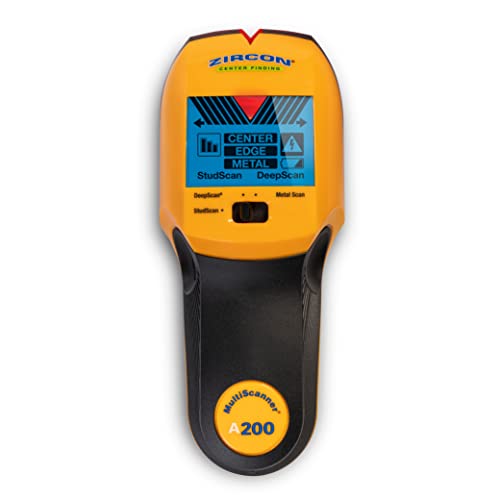
Zircon MultiScanner A200 Stud Finder
Trusted brand, fuller data
TV mounts and cabinets
What Each Pick Brings To The Table
Most budget scanners stop at detection, but this Prexiso adds a cross line laser to the same housing. That combination matters more than it sounds: you locate the stud, then project a level reference line across the wall without reaching for a second tool or a tape-and-pencil routine.
The rechargeable battery is another quiet advantage over coin-cell rivals, since weekend projects won’t stall on dead batteries. One honest caveat up front: the laser here is manual-leveling, so you’ll rely on bubble vials rather than automatic self-leveling, which takes a steadier hand.
Real-World Strengths
- ✓Detects studs and projects cross lines, cutting tool swaps during picture-hanging or shelf installs.
- ✓Rechargeable power means no hunting for replacement cells mid-project.
- ✓Bubble vials light up in laser mode, making horizontal and vertical alignment easier to verify.
- ✓Cross line laser doubles as a layout guide for multiple anchors at matching height.
Things To Consider
- •The laser needs manual leveling via the vials, so expect a short learning curve compared to self-leveling units.
- •The included adhesive strips won’t hold well on dusty, textured, or wallpapered surfaces, so plan mounting accordingly.
Built With In Mind
Renters and casual DIYers who hang décor regularly and want one pocketable device instead of two.
A Better Fit Elsewhere
Anyone needing deeper multi-material detection should look at the HANMATEK 6-in-1 Stud Finder Wall Scanner instead.
Where the Prexiso trades depth for versatility, the HANMATEK goes deep on detection itself. Six distinct modes cover wood studs in both standard and deep scans, plus copper wiring, AC lines, ferrous metals like nails, and non-ferrous metals such as copper pipe. That spread suits anyone opening up walls for renovation rather than just hanging a mirror.
The HD LCD screen pulls real weight here. Mode, depth, signal strength, battery status, and the detected center point all display at once, so you’re interpreting data instead of guessing at beeps. An audio alarm backs up the visual readout when your eyes are on the wall, not the screen.
Everyday Wins
- ✓Six modes let you distinguish a plastic pipe from a live wire before drilling, which is the whole point of scanning.
- ✓Dedicated deep scan reaches roughly 1.5 inches into thicker drywall or plaster scenarios.
- ✓The full-data LCD shows detection depth and signal strength together, reducing false positives on textured walls.
- ✓Audio alarm confirms hits hands-free while you steady the tool against the surface.
Potential Sticking Points
- •More modes mean more calibration steps per job, and owners commonly report skipping recalibration between walls leads to missed readings.
- •The feature density can feel overwhelming if you’ve never used a multi-mode scanner before.
Key Specs
| | Feature | Specification | Why It Matters |
|---|
| Scanning modes | 6 total: stud exact/deep, copper conductor, AC wire, ferrous, non-ferrous | Matches the mode to the material instead of forcing one guess |
| Stud deep mode depth | About 1.5 inches (38 mm) | Handles thicker wall assemblies common in older homes |
| Display | HD LCD with depth, strength, battery, and center point | Fewer ambiguous readings, faster confident marking |
Who Will Love This
Renovators and handy homeowners who routinely drill into unknown walls and want wire warnings before every hole.
Consider Something Else When
First-time users who want one-button simplicity will find the Zircon StudSensor A100 far less intimidating.
Zircon has been in the wall-scanning business longer than most brands in this price range, and the A100 reflects that experience. It’s an edge-finder with live wire detection, meaning it locates where wood and metal studs begin and end behind standard drywall, then flags energized electrical lines as a bonus safety net.
This is the scanner you’d hand to someone who’s never owned one. Press it flat against the wall, calibrate, slide slowly, mark the edges. Compared to the HANMATEK’s six modes, there’s almost nothing to learn, and for typical shelving or TV bracket jobs on standard drywall, that’s genuinely enough tool.
Points In Its Favor
- ✓Live wire detection warns you about energized lines hiding behind the drywall before your bit meets them.
- ✓Edge-finding logic works reliably on standard drywall for shelves, mirrors, and cabinet rails.
- ✓Zircon’s long track record means replacement parts and support are easier to come by than with no-name brands.
Honest Caveats
- •It finds stud edges rather than centers, so you’ll mark both sides and measure between them yourself.
- •Calibration before each scan is part of the routine, and skipping it is the most commonly reported cause of erratic results.
Right Fit For
First-time homeowners tackling straightforward hanging projects on standard interior drywall.
Swap It Out When
You need center-finding and direction data for heavy loads, which points straight to the Zircon MultiScanner A200 below.
The SUNTUTUFY splits the difference between the simple A100 and the mode-heavy HANMATEK, offering five functions at a wallet-friendly position. Its three-tier stud scan stands out: shallow, medium, and deep settings at roughly half an inch, one inch, and 1.5 inches respectively, letting you tune sensitivity to your actual wall thickness.
Metal detection reaches deeper still, around 60 mm, which matters in older houses where plumbing runs and conduit hide further back. Like its sibling picks, it pairs an HD LCD with audio alerts, so you get confirmation by eye or ear depending on how you’re holding it.
Why It Works Well
- ✓Three graduated stud depths prevent over-scanning thin drywall, where excessive sensitivity often triggers phantom hits.
- ✓Metal mode reaches about 60 mm, useful for locating pipes and conduit in older construction.
- ✓AC scan mode flags live wiring up to roughly 51 mm deep before drilling.
- ✓Center-and-edge reporting helps you hit the middle of a joist on the first anchor hole.
Small Caveats
- •Lesser-known brand support, so warranty questions may take longer to resolve than with Zircon.
- •Owners commonly note that textured or plaster surfaces require slower, repeated passes for clean readings.
Quick Facts
| | Feature | Specification | Why It Matters |
|---|
| Stud scan depths | 13 mm, 25 mm, and 38 mm tiers | Tune sensitivity to wall type for fewer false signals |
| Metal scan depth | About 60 mm | Finds deeper pipes and conduit in older walls |
| AC scan depth | About 51 mm | Extra warning margin around live wiring |
Whose Shelf It Belongs On
Owners of older homes who want serious detection depth without paying premium-brand money.
Reach For A Different Pick When
Brand trust tops your list, since the Zircon MultiScanner A200 carries decades of category reputation.
The A200 is the A100’s more capable sibling, built for people mounting things that absolutely cannot fall. Beyond edges, it reports the center of wood and metal studs along with their direction, which turns a 60-inch TV install from educated guessing into measured placement.
In our view, this is the pick that justifies spending slightly more within a budget roundup. Metal and live wire detection round out the picture, giving you a fuller read of the wall cavity before committing holes. The trade-off is a busier interface than the entry-level Zircon, though nothing close to the HANMATEK’s six-mode depth.
What Earns Its Place
- ✓Center, edge, and direction output lets you align heavy mounts precisely on the first attempt.
- ✓Metal detection catches nails, screws, and conduit that edge-only scanners walk right past.
- ✓Live wire sensing adds a warning layer for circuits behind finished walls.
- ✓Zircon’s established support network makes ownership headaches rarer over the tool’s life.
Trade Offs To Consider
- •More capability means a slightly steeper learning curve than the single-purpose A100.
- •Like all capacitive scanners, consistent flat contact and fresh batteries matter, and owners report weak cells cause flaky readings.
Core Details
| | Feature | Specification | Why It Matters |
|---|
| Target reporting | Center, edges, and direction of wood and metal studs | Precise placement for TVs, cabinets, and handrails |
| Material detection | Wood studs, metal, and live wires | One pass reveals the hazards and anchors alike |
Who Should Grab It
DIYers mounting televisions, cabinets, or anything load-bearing where a misplaced anchor isn’t an option.
Not Your Match When
Occasional picture hangers will be happier with the cheaper, simpler Zircon StudSensor A100.
What Matters Most Before You Buy
Match Depth To Your Walls
Detection depth is the spec that separates useful scanners from frustrating ones. Standard modern drywall sits around half an inch thick, so nearly any model here handles it. Older plaster, doubled drywall, or textured finishes demand the 1.5-inch deep modes found on the HANMATEK and SUNTUTUFY. Buying shallow for thick walls guarantees missed studs.
Decide Between Edges And Centers
Edge-finding tools like the A100 cost less but require you to mark both edges and measure the midpoint yourself. Center-finding models such as the A200 report the midpoint directly, saving time on precise installs. Heavy mounts justify the upgrade; picture frames rarely do.
Don’t Skip Live Wire Detection
A live wire alert costs little and prevents the worst drilling mistakes. Every pick here includes some form of AC detection except you’ll want to confirm mode availability before relying on it near outlets or switch boxes.
Key Considerations Across These Picks
Where Shoppers Go Wrong
The biggest mistake is trusting a single pass. Slow, overlapping sweeps with fresh batteries produce consistent results; rushed scans produce phantom studs and drilled regrets. Calibration also gets skipped constantly, yet it’s the step every manufacturer emphasizes.
What Separates Premium From Basic
Paying more buys material discrimination, telling copper pipe from a nail from a live wire. For renters hanging art, that’s overkill. For anyone renovating or mounting heavy loads, knowing exactly what’s behind the wall is worth every extra dollar.
Frequently Asked Questions
QDo cheap stud finders actually work?
Yes, within their limits. Budget models detect wood and metal studs reliably on standard drywall, though they struggle more with plaster, lath, and heavily textured surfaces than premium units do.
QHow deep can these scanners see?
Most budget options reach roughly 1.5 inches in deep mode, which covers standard drywall and much older construction. Thicker masonry or tile requires specialized equipment beyond this category.
QWhy does my stud finder keep beeping randomly?
Low batteries, skipped calibration, or moving too fast across the wall are the usual culprits. Recalibrate against a known empty wall section and slow your sweep speed.
QCan a stud finder detect live wires?
All five picks include some form of AC wire detection. Treat it as a helpful warning layer, not a substitute for checking with a proper voltage tester before cutting or drilling near electrical boxes.
QDo I need to calibrate every time?
Yes, ideally before each new wall or after changing grip position. Calibration teaches the sensor the baseline density of that specific wall section, which is why skipping it causes most false readings.
Closing Remarks
Every scanner here solves the same core problem for under what you’d spend on a nice dinner out. The right choice comes down to your walls and your projects: grab the PREXISO for its dual-tool convenience, the HANMATEK or SUNTUTUFY for depth and modes, or either Zircon for proven simplicity and support. Whichever lands in your toolbox, slow down, calibrate, and let the sensor do its quiet work before the drill starts spinning.







