Whether you’re hanging a TV, hunting down misplaced keys, or commissioning a network of security cameras, there’s a finder tool built for the job. The catch is that these categories overlap confusingly online, and shoppers often grab a wall scanner when they actually need an IP camera tester. This roundup splits the difference honestly: two stud finders for DIYers, one RF tracker for everyday life, and two professional-grade testers for anyone working with networks and surveillance gear. Each entry below explains who it serves, where it falls short, and which alternative on this list fits better.
The Main Contenders
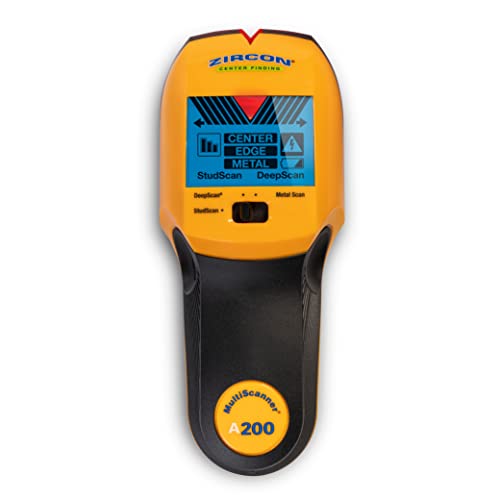
Zircon MultiScanner A200 Stud Finder

Key Finder Locator RF Wireless Remote Tracker with 4 Receivers
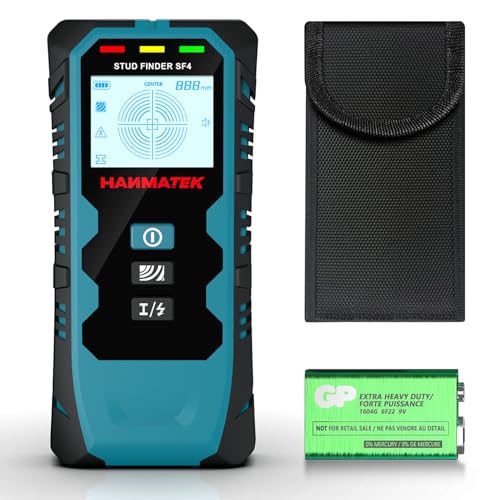
HANMATEK 5-in-1 Stud Finder Wall Scanner

NOYAFA Network Cable Tester with IP Scan
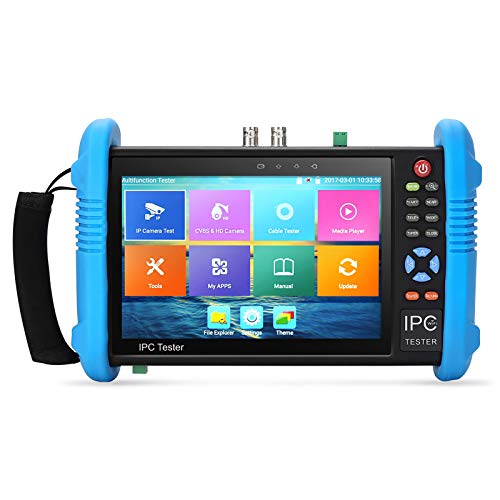
Koolertron IPC-9800 Plus IP Camera Tester
More On The Choices That Made The List
Zircon has been making wall scanners longer than most of its rivals have existed, and the A200 reflects that history. Instead of only flagging a stud’s edge like basic models do, it locates the center, edges, and direction of wood and metal framing, which is exactly what you want before driving a lag bolt into drywall.
The practical payoff shows up on mounting day. Hanging a heavy mirror or a flat-screen means hitting solid framing, not empty cavities, and a center read saves you the drill-and-repair loop. It also detects live electrical wiring, a detail that matters more than most first-timers expect.
What Works In Its Favor
- Finds the center, edges, and direction of studs, not just one edge
- Metal detection helps you avoid pipes and ductwork hidden behind plaster
- Live wire alerting reduces the chance of drilling into energized cable
- Suits TVs, shelves, cabinets, handrails, and general décor installs
Things To Consider
- Owners commonly report that thick or textured walls require a slower scan pass to get consistent readings
Who It Suits Best
A weekend DIYer mounting shelves, mirrors, or a television who wants reliable framing location without paying for pro-tier features.
Where Another Pick Shines
Anyone planning major renovation work near plumbing or AC lines should look at the HANMATEK 5-in-1 scanner instead, since its five detection modes cover pipes and wiring more broadly.
This is the simplest tool on the list, and that’s its strength. One remote talks to four receivers over radio frequency, so pressing a button makes the attached receiver beep until you track down whatever went missing. No app, no account, no charging routine to forget.
Each receiver ships with a key ring plus double-sided adhesive, so you can tag keys, remotes, glasses cases, luggage, even a pet’s collar depending on your household. In our view, that flexibility is what separates a useful tracker from a gadget that lives in a drawer after week one.
Real-World Strengths
- Four receivers let you label different items around the house at once
- RF signal works without Wi-Fi or Bluetooth pairing, so it keeps working during internet outages
- Adhesive backing expands use beyond key rings to remotes and wallets
Small Caveats
- Sound-based tracking means buried items under cushions stay quiet until uncovered, and receiver batteries will eventually need replacing
- Range depends heavily on walls and interference between floors
Made For
Busy households tired of morning searches for keys, glasses, or the TV remote, especially anyone uncomfortable with app-dependent trackers.
Swap It Out When
You need to locate items across a large property rather than inside one home, in which case none of these picks fit and a GPS-class tracker is the better category.
Where the Zircon A200 focuses on framing, the HANMATEK spreads wider. Five detection modes cover metal, wood studs, joists, pipes, live AC wire, and plaster construction, all processed through an onboard microprocessor chip. That breadth is why renovators reach for it before cutting into anything.
The backlit HD display marks both center and edge positions, and an audio alarm signals hits so you can watch the wall instead of the screen. On ladders or in dim basements, that combination genuinely speeds things up compared to edge-only scanners.
The Case For It
- Five scanning modes handle studs, joists, metal, pipes, and live wiring
- Microprocessor processing delivers faster, steadier readings than analog designs
- Backlit display stays readable in dark closets, attics, and basements
- Audio alarm lets you confirm hits by ear while your eyes stay on the work
- Works on walls, floors, and ceilings alike
Potential Sticking Points
- More modes mean more calibration steps per surface, which slows casual single-shelf jobs
- Deeply buried copper pipe can still register inconsistently on dense plaster, based on widely reported user experience
Feature Rundown
Right Fit For
Homeowners mid-renovation who need to know what’s behind every surface before sawing or drilling into it.
Reach For A Different Pick When
Your project is a simple TV bracket on standard drywall, where the lighter Zircon MultiScanner A200 gets you there with fewer mode switches.
Shifting from walls to wiring, the NOYAFA NF-8506 is a handheld diagnostic unit for people who maintain networks professionally. It bundles several tests that normally require separate tools: TDR cable-length measurement, Ping verification, POE checking, port flashing, and non-contact voltage detection.
TDR, short for time-domain reflectometry, measures how far a signal travels down a cable before reflecting back, which pinpoints breaks or shorts without pulling runs out of walls. Pair that with the IP scanning function and you can map devices on a network from the palm of your hand.
Notable Gains
- IP scanning identifies addresses on connected networks directly from the tester
- TDR length testing locates cable faults at a distance instead of guesswork
- POE test confirms power-over-Ethernet delivery before camera or access point installs
- Handles RJ45 and RJ11 terminations across CAT5 and CAT6 cabling
- Sensitivity adjustment helps isolate cables in crowded bundles
Points To Note
- The learning curve is real, since features like TDR and anti-interference toning assume some networking background
- Handheld testers see hard site use, so a protective case is worth budgeting for separately
Quick Facts
Who Will Love This
IT technicians and low-voltage installers who troubleshoot office drops and need one pocketable unit instead of a bag of adapters.
Another Choice May Suit
Camera-focused installers who also need a live video feed should step up to the Koolertron IPC-9800 Plus below, which adds a full display to similar cable diagnostics.
This is the heavyweight of the list, aimed squarely at CCTV installers. The 7-inch IPS touch screen renders live 4K video from H.265 and H.264 cameras over mainstream protocols, letting you aim, focus, and verify footage on the spot rather than walking back to a monitor repeatedly.
Beyond the display, it carries RJ45 TDR cable testing, HDMI input, built-in Wi-Fi, POE output, CVBS analog support, dual-window viewing, and an included 8GB TF card for snapshots. Compared with the NOYAFA NF-8506, you give up nothing on cable diagnostics and gain a complete visual workflow.
Useful Touches
- 1280×800 IPS touchscreen shows crisp live camera feeds at height
- H.265 and H.264 support covers modern and legacy camera fleets
- Analog CVBS testing handles older coax systems during mixed-site upgrades
- Dual-window view lets you compare two cameras simultaneously
- 8GB TF card stores captured images for client documentation
Trade Offs To Consider
- Size and weight make it overkill for occasional home users who just want a cable check
- The generic packaging and manual mean functionality discovery takes some hands-on exploration, per commonly reported owner feedback
Details At A Glance
Best Suited To
Professional CCTV technicians commissioning IP and analog camera systems who need live video verification plus cable testing in a single rugged unit.
Consider Something Else When
Your work stops at cable certification without any camera involvement, because the NOYAFA NF-8506 covers those tests in a smaller, simpler package.
Factors To Consider When Choosing Ip Finders
Match The Tool To The Target
Start with what you’re actually finding. Framing behind drywall calls for a stud scanner, lost household items call for an RF beeper, and network infrastructure demands a dedicated tester. Buying across categories wastes money, since none of these tools substitute for each other.
Detection Depth And Surface Type
Wall scanners behave differently on plaster, textured drywall, and tile. Deeper modes help on older homes with lath-and-plaster walls, but they also demand slower, more deliberate passes. Renters doing light décor work can stay basic; renovators opening walls should prioritize multi-mode units.
Display And Feedback Style
Audio alarms, backlit screens, and center-plus-edge indicators each change how fast you work. On ladders or in dim spaces, audible confirmation beats squinting at a small readout every time.
Professional Versus Occasional Use
The Koolertron and NOYAFA testers earn their cost through daily job-site use. For a one-off home project, that investment rarely pays back, and a simpler tool serves better.
Key Considerations Across These Picks
Traps First Timers Fall Into
The most common error is assuming one “finder” does everything. A stud scanner cannot locate your keys, and an RF tracker cannot find wiring. Second, first-timers often skip calibration steps on multi-mode scanners, then blame the tool for false readings. Read the mode guide before the first wall.
Where The Extra Money Goes
Higher-tier testers bundle functions that would otherwise cost several separate purchases. Live video displays, TDR fault location, and POE verification save professionals billable hours on every job. That math only works with regular use, which is why pros upgrade and homeowners shouldn’t feel pressure to.
Frequently Asked Questions
Can a stud finder detect live electrical wires?
Many modern scanners include AC wire detection alongside stud modes. Treat alerts as warnings and verify with a dedicated voltage tester before cutting.
How deep can wall scanners typically read?
Depth varies by model and wall material, with most consumer units tuned for standard half-inch drywall. Dense plaster reduces effective range noticeably.
Do RF key trackers work through walls?
Radio frequency signals generally pass through interior walls within their rated range. Concrete and multiple floors weaken the signal considerably.
Is an IP camera tester necessary for home security installs?
Casual single-camera setups rarely justify one. Installers handling multiple cameras benefit from live-view screens and integrated cable diagnostics daily.
What does TDR mean on a cable tester?
Time-domain reflectometry sends a pulse down a cable and measures reflections to locate faults. It estimates the distance to a break or short accurately.
Bottom Line
Five tools, five different problems solved. Mounting projects belong to the Zircon A200, whole-home renovations favor the HANMATEK’s five modes, and forgetful households get real value from the four-receiver RF tracker. Working technicians should weigh the NOYAFA against the Koolertron based on whether cameras are part of the job. Match the tool to the task and each of these earns its place in a toolkit.