


Hotel Wi-Fi that drops every ten minutes, a phone hotspot that drains your battery by noon, roaming charges that sting weeks later. A dedicated mobile hotspot router fixes all three, giving your laptop and tablets their own reliable connection without touching your phone. The five options below cover different needs and budgets, from prepaid-data pocket units to full travel routers with open-source firmware, so you can match the device to how you actually travel or work remotely.
The Lineup, Simplified
GlocalMe UPP 4G Mobile Hotspot with 60GB US Data

GlocalMe Numen Air 5G Mobile Hotspot, No SIM Card Required

TP-Link Roam 6 AX3000 Dual-Band Wi-Fi 6 Travel Router (TL-WR3002X)

NETGEAR Nighthawk M6 5G WiFi 6 Mobile Hotspot Router (MR6110), White
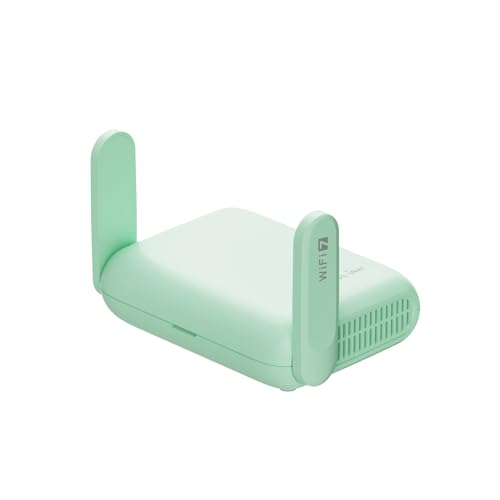
GL.iNet GL-MT3600BE Beryl 7 Dual-Band Wi-Fi 7 Travel Router
A Breakdown Of The Leading Choices
The appeal here is simplicity: data comes preloaded, so you register through the GlocalMe app, check your balance under Profile-Service Plans, and start browsing without buying a SIM card. For someone who has never owned a hotspot, that removes the most confusing step in the whole process.
In practice this suits occasional use rather than heavy daily streaming. The bundled allocation covers a few months of typical US trips plus a monthly global allowance for a year, which is plenty for email, maps, and video calls on the road.
Well-Handled Touches
- Ready to use out of the box, no SIM purchase needed before your first trip
- Monthly US data across the first three months keeps short trips covered
- A year of recurring global data means international weekends need no planning
- Optional damage protection plans cover drops, spills, and breakdowns with round-the-clock support
Small Caveats
- Once the preloaded allowance runs out, you will need to top up through the app, so budget accordingly
- 4G speeds feel dated next to the 5G units later in this list
Who Should Grab It
First-time hotspot owners who want a working connection on day one without contracts or carrier research.
Where A Sibling Pick Shines
Heavy travelers should look at the GlocalMe Numen Air instead, since its 5G radio and wider band support handle long-haul itineraries far better.
This is the step up from the UPP 4G, and the difference is felt the moment you land somewhere with 5G infrastructure. The Numen Air supports peak speeds up to 2.5Gbps, which translates into smooth video calls and fast downloads even when several devices share the link.
Coverage breadth is the real selling point. With support spanning more than 200 countries and hundreds of operator networks worldwide, you can hop between continents without swapping hardware, and the SIM-free design means no local card hunting at arrivals.
What Stands Out
- Up to 2.5Gbps peak throughput makes lag a non-issue for streaming and large transfers
- Broad international band support reduces dead zones across multi-country trips
- SIM-free operation spares you the hassle of registering local plans abroad
- Handles up to 16 connected devices, enough for a small work group sharing one unit
- Optional protection coverage includes accidental damage and 24/7 assistance
Points To Note
- Real-world speed depends heavily on local 5G rollout, so rural destinations may fall back to slower bands
- Pocket-sized radios run warm during long sessions, which owners commonly report in hot climates
Feature Snapshot
Made For
Digital nomads and frequent flyers who cross borders often and want one dependable connection everywhere.
Swap It Out When
Domestic-only users get better value from the NETGEAR Nighthawk M6, whose AT&T-certified 5G modem is tuned for stateside networks.
Unlike the GlocalMe units above, the Roam 6 does not carry its own cellular radio. Instead it takes an existing connection, hotel Ethernet, a tethered phone via USB, or public Wi-Fi, and rebroadcasts it as your own private, secure network. That distinction matters more than people expect.
Wi-Fi 6 (the current mainstream wireless standard) lets it push up to 2402Mbps on the 5GHz band and 574Mbps on 2.4GHz, comfortably ahead of what most hotel networks deliver. Anyone who has paid for a single-device hotel login knows the value of sharing one authenticated connection across a laptop, tablet, and phone.
A Favorable Mix
- Router mode accepts Ethernet or USB phone tethering, so almost any source becomes usable
- Your own encrypted network replaces sketchy open hotspots in hotels and airports
- Wi-Fi 6 efficiency keeps connections stable with several devices active
Things That May Matter
- No built-in cellular, so it always depends on another internet source being available
- Actual throughput varies with the upstream connection, distance, and interference
The Right Fit
Road warriors staying in hotels with wired Ethernet who want a private network without paying for cellular data plans.
Reach For A Different Pick When
You need standalone connectivity with no external source nearby, which is exactly where the GL.iNet Beryl 7 paired with a USB modem setup earns its keep.
The Nighthawk M6 plays in a different league than the pocket GlocalMe devices. This is a carrier-grade 5G Sub-6 hotspot with LTE Category 19 fallback, unlocked for worldwide use and certified with AT&T, and it arrives renewed, meaning inspected and restored to working order rather than brand new.
Band support is unusually deep, including FirstNet Band 14, CBRS Band 48, and LAA Band 46 alongside standard LTE and 5G frequencies. For anyone working in areas with patchy coverage, that flexibility can be the difference between a dropped call and a steady session.
Positive Points
- Deep band list, including CBRS and LAA, improves odds of a strong signal in congested zones
- Unlocked design works with compatible SIMs from carriers around the world
- AT&T certification simplifies activation for stateside subscribers
- Renewed pricing typically lands well below the new-unit cost
Honest Caveats
- You must verify regional band compatibility with your carrier before committing, since mismatched bands mean weak service
- As a renewed unit, cosmetic wear is possible and battery health may sit below factory-new levels
The Numbers That Matter
Whose Shelf It Belongs On
Remote professionals and streamers who need maximum domestic throughput and already have a 5G-compatible SIM plan.
Skip It When
Light users mostly checking email abroad are better served by the cheaper GlocalMe UPP 4G and its preloaded data.
Where the TP-Link Roam 6 keeps things simple, the Beryl 7 hands you the keys. It runs OpenWrt 21.02 firmware, an open-source operating system that unlocks deep customization, plugin installation, and advanced networking features most travel routers never touch.
The hardware backs that up with genuine headroom: dual 2.5G Ethernet ports, a USB 3.0 port, and pre-installed WireGuard and OpenVPN clients capable of pushing up to 1100Mbps through a VPN tunnel. For privacy-conscious travelers, running all traffic through an encrypted tunnel at those speeds is rare in a palm-sized box.
Notable Gains
- Wi-Fi 7 radios deliver 2882Mbps on 5GHz and 688Mbps on 2.4GHz for future-proofed performance
- Dual 2.5G ports handle high-speed wired backhaul, uncommon at this size
- 512MB storage leaves room for OpenWrt plugins and custom configurations
- Interchangeable US, UK, EU, and AU plugs ship in the box, handy for multi-region trips
- Supports up to 120 connected devices for gaming and streaming households
Worth Bearing In Mind
- The open-source interface rewards patience, and networking newcomers may find the learning curve steep
- Like the TP-Link, it needs an upstream source such as Ethernet or a tethered phone
Quick Facts
Built With In Mind
Tech-savvy travelers and home-lab hobbyists who want VPN routing, custom firmware, and granular control in a portable package.
Consider Something Else When
Simplicity matters more than control, in which case the TP-Link Roam 6 offers a friendlier setup path with solid Wi-Fi 6 speeds.
What Matters Most Before Choosing Mobile Hotspot Routers
Match The Device To Your Connection Source
The first question is deceptively basic: does the unit create its own cellular connection, or does it share someone else’s? Standalone hotspots like the GlocalMe and NETGEAR models carry internal modems and need only a data plan, while travel routers such as the TP-Link and GL.iNet require Ethernet, tethering, or an existing Wi-Fi feed. Buying the wrong type is the most common regret in this category.
Coverage And Band Support
A hotspot is only as good as the networks it can reach. Check that the device supports the bands used by carriers in your regular destinations, especially outside North America where frequency allocations vary widely. Frequent flyers benefit most from broad band lists and multi-region plug adapters.
Data Economics
Preloaded allowances suit light users, while heavy streamers should price out unlimited carrier plans against pay-as-you-go top-ups. Do the math for your actual monthly usage before committing to either model.
Device Count And Shared Use
Solo workers rarely stress a hotspot, but family trips or small teams change the picture. Units rated for 16 or more simultaneous connections, like the Numen Air and Beryl 7, hold up far better under load than budget single-purpose devices.
Key Considerations Across These Picks
Wrong Turns To Avoid
The biggest mistake is skipping the band-compatibility check. An unlocked 5G device without your carrier’s frequencies delivers disappointing speeds no matter its spec sheet. Another common slip is buying a standalone hotspot when you mostly stay in hotels with decent wired Ethernet, where a travel router costs less over time.
Why Top Tier Costs More
Premium units justify their price through faster modems, deeper band support, and higher-quality components that sustain long sessions without throttling. Paying up pays off for daily heavy use; for a handful of trips per year, a mid-range pick usually covers everything you actually do.
Frequently Asked Questions
Do I still need a SIM card with these devices?
Some do, some don’t. The GlocalMe units operate SIM-free using preloaded or app-based data, while the NETGEAR requires a compatible SIM from your chosen carrier.
Can I connect a laptop and several phones at once?
Yes, all five picks support multiple simultaneous devices. Capacity ranges from modest household loads up to 120 devices on the GL.iNet Beryl 7.
Is a travel router useful at home?
It can be, particularly for extending coverage or adding VPN routing to an existing network. The GL.iNet and TP-Link both pull double duty as compact home routers.
Will 5G hotspots work in rural areas?
Coverage depends entirely on local infrastructure. Most 5G devices fall back to 4G LTE automatically, so you stay connected, just at lower speeds.
How durable are portable hotspots for frequent travel?
Pocket-sized units tolerate normal bag transport well. Optional protection plans covering drops and spills are worth considering for gear that lives in luggage.
Closing Thoughts
The right choice comes down to how you connect. Preloaded simplicity points to the GlocalMe UPP 4G, global range to the Numen Air, hotel-room security to the TP-Link Roam 6, raw domestic speed to the Nighthawk M6, and total control to the Beryl 7. Whichever direction fits your routine, each option here solves the same core problem in its own way. Safe travels, and may your connection hold.




