


Comcast’s modem rental fee shows up every month whether you use it or not, and over a year it quietly adds up to a real chunk of change. Owning your own hardware ends that line item for good. The five options below cover two paths: all-in-one modem router combos that simplify setup, and a standalone modem that pairs with gear you already own. Each one works with Xfinity service, and several also support Cox and Spectrum if you ever move or switch providers. Match one to your plan speed and home size, activate it through your provider’s app, and you’re done paying rent on a box you could own outright.
The Main Contenders
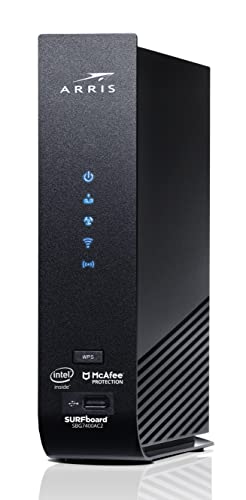
ARRIS Surfboard SBG7400AC2-RB Modem Router Combo (Renewed)

Arris (G18) Cable Modem Router Combo WiFi 6
ARRIS Surfboard G20 DOCSIS 3.1 Cable Modem & Wi-Fi 6 Router

Motorola B12 Advanced Compact Cable Modem

NETGEAR Nighthawk CAX30 Modem Router Combo (Renewed)
Taking A Closer Look At The Options
This renewed unit has been professionally inspected, cleaned, and tested before resale, which drops the entry cost well below new equivalents. The SBG7400AC2 pairs a DOCSIS 3.0 cable modem, the widely supported standard behind most current cable plans, with an AC2350 dual-band router in one chassis.
For an apartment or a modest single-story home, that combination handles streaming and everyday browsing without fuss. Four gigabit Ethernet ports give wired devices like a console or desktop a stable lane, something many slimmed-down combos skip.
Everyday Perks
- Two-in-one design means one power outlet and one activation call instead of two devices to manage.
- DOCSIS 3.0 channel bonding supports plans up to roughly 800 Mbps, plenty for 4K streaming on a few screens at once.
- Four 1 Gbps LAN ports let you hardwire latency-sensitive gear rather than gamble on wireless congestion.
- Renewed pricing shortens the payback period against monthly rental fees considerably.
Things To Consider
- DOCSIS 3.0 tops out below gigabit plans, so it can bottleneck faster Xfinity tiers.
- Cosmetic wear is common on renewed units; expect minor scuffs even though function is verified.
Key Specs
The Right Fit
Renters and first-time owners on mid-speed Xfinity plans who want the cheapest legitimate path off rental fees.
A Better Fit Elsewhere
Anyone subscribed to a gigabit plan should step up to the Arris G18, whose DOCSIS 3.1 chipset actually keeps pace with those speeds.
Where the SBG7400AC2 above plateaus at older cable tech, the G18 moves to DOCSIS 3.1, the current standard built for gig-speed plans. Pair that with AX1800-class Wi-Fi 6 radios, which pack more data into each transmission and handle crowded airwaves far better than prior generations.
In a household where several people game, stream, and join video calls simultaneously, that combination shows its worth. ARRIS equipment sits in a very large share of American homes already, so firmware maturity and provider compatibility are rarely a question mark here.
Strong Points
- DOCSIS 3.1 support future-proofs you for Xfinity’s fastest residential tiers without another hardware swap later.
- Wi-Fi 6’s OFDMA scheduling keeps phones, laptops, and smart devices from stepping on each other during peak evening hours.
- Single-unit design simplifies moves between apartments since there’s only one box to reactivate.
- Approval across Xfinity, Cox, and Spectrum gives flexibility if your address or provider changes.
Potential Sticking Points
- AX1800 throughput is solid but not lavish; very large homes may still want mesh satellites downstream.
- Combo units concentrate heat in one enclosure, so give it open shelf space rather than a closed cabinet.
Made For
Households on or near gigabit Xfinity plans who want current-generation wireless without managing separate boxes.
Swap It Out When
Multi-story homes with dead zones will get better whole-house coverage from the NETGEAR CAX30’s stronger radio profile instead.
Think of the G20 as the G18’s bigger sibling within the same SURFboard family. Both run DOCSIS 3.1 modems, but this one steps the wireless side up to AX3000, pushing noticeably more simultaneous bandwidth to connected devices.
In practice, that headroom matters most in homes where 4K streams, cloud backups, and a dozen smart gadgets share the same network. Extended protection plans covering accidental damage are available separately, which some shoppers appreciate on a device meant to run around the clock.
Useful Highlights
- AX3000-class Wi-Fi 6 delivers wider channels and higher aggregate throughput than the G18’s AX1800 radios.
- DOCSIS 3.1 modem section sustains gig-speed downloads without choking under multi-user load.
- All-in-one footprint clears clutter from media consoles and removes a second power brick from the equation.
- Optional damage coverage can offset repair costs over a long ownership window.
Honest Caveats
- You’re paying a premium over the G18 for wireless headroom that smaller apartments won’t fully use.
- Like any combo unit, upgrading one half later means replacing the whole device.
- Dust buildup on vents can throttle performance over time; a quick quarterly cleaning keeps airflow healthy.
Feature Snapshot
Who Should Grab It
Large or device-dense homes running top-tier Xfinity speed packages who want maximum ceiling from one box.
Where A Sibling Pick Shines
Smaller households on 400 to 600 Mbps plans will find the Arris G18 delivers nearly identical daily performance for less money.
This is the odd one out on purpose. Unlike the four combos here, the Motorola B12 is a modem only, descended from the well-regarded MB8611 platform. There’s no Wi-Fi inside; it pairs with whatever router you already own or plan to buy separately.
That split appeals to anyone who likes choosing their own wireless hardware, especially mesh-system owners who’d otherwise pay twice for routing they don’t need. Its compact body tucks into tight entertainment centers easily, and a 2.5 Gbps Ethernet port leaves room for multi-gig plans down the road.
Notable Gains
- DOCSIS 3.1 chipset with a 2.5 Gbps port supports the fastest residential cable plans currently sold.
- Separating modem and router lets you upgrade either half independently instead of replacing everything at once.
- Small vertical-friendly footprint suits cramped shelves and wall-mounted networking closets.
- Works with Xfinity, Cox, and Spectrum, keeping your options open across providers.
Points To Note
- No built-in Wi-Fi means budgeting for a separate router if you don’t already have one.
- Two devices mean two power adapters and slightly more cabling to tidy up.
Who Will Love This
Tech-comfortable users who already run a quality router or mesh system and just want to retire their rented modem.
Consider Something Else When
First-time setups with no existing networking gear are better served by the all-in-one ARRIS Surfboard G20, which needs nothing else plugged in.
The Nighthawk name carries weight for good reason, and this renewed CAX30 brings flagship-style hardware down to a friendlier price point. Inside sits a DOCSIS 3.1 modem alongside AX2700-rated Wi-Fi 6 radios, positioned right between the Arris G18 and G20 on raw wireless muscle.
Nighthawk units tend to run warm by design, so ventilation matters more here than with the Motorola B12. Renewed stock arrives inspected and cleaned, and the trade-off is purely cosmetic in most cases.
Real-World Strengths
- AX2700 wireless class handles 25-plus connected smart-home devices without visible slowdowns during peak hours.
- DOCSIS 3.1 modem keeps gigabit Xfinity plans running at full advertised rates.
- Renewed pricing makes flagship-tier hardware accessible to tighter budgets.
- Nighthawk app-based management simplifies guest networks and parental schedules for less technical households.
Softer Spots
- Runs warmer than most rivals, so avoid enclosing it in cabinets or stacking gear on top.
- Renewed cosmetics vary unit to unit; minor surface marks are normal.
- Firmware updates arrive on NETGEAR’s schedule rather than instantly, occasionally delaying new feature rollouts.
Quick Facts
Right Fit For
Smart-home-heavy households on gigabit Xfinity service who want proven Nighthawk performance at a reduced entry price.
Skip It When
Shoppers wanting brand-new condition with full manufacturer backing should look at the Arris G18 instead of accepting renewed trade-offs.
What Matters Most Before Choosing Modem And Routers For Comcast
Match Your Plan Speed First
Your Xfinity tier dictates the hardware floor. DOCSIS 3.0 units like the SBG7400AC2 cap out around 800 Mbps, while DOCSIS 3.1 models sustain gigabit and beyond. Buying below your plan wastes money you’re already paying the provider every month.
Combo Versus Separates
Combos save space, outlets, and setup effort, which suits renters and smaller homes. Separates like the Motorola B12 let you upgrade wireless and cable halves independently, a smarter long-term play for enthusiasts who refresh routers every few years.
Coverage Reality
A combo rated for 2,500 square feet still struggles through brick walls and multiple floors. Larger homes benefit from higher AX-class ratings or pairing a modem-only unit with a mesh system placed where people actually use devices.
Compatibility Check
Xfinity publishes a list of approved devices, and all five picks here appear on it. Confirming before purchase avoids an activation headache, especially for renewed units where return windows matter.
Key Considerations Across These Picks
Traps First Timers Fall Into
The classic error is buying a modem that outranks nothing: paying for gigabit hardware while staying on a 300 Mbps plan. The reverse hurts too, pairing a fast plan with aging DOCSIS 3.0 gear. Also check whether your ISP charges activation fees for customer-owned equipment, since policies shift.
When Paying More Pays Off
Premium models earn their cost through DOCSIS 3.1 chipsets, higher AX-class radios, and better heat management. That extra spend pays back fastest for gig-plan subscribers and large households. On slower plans in small spaces, the value tier covers daily needs without compromise.
Frequently Asked Questions
Do these work with Xfinity without calling support?
Yes, all five are on Comcast’s approved equipment list. Activation typically completes through the Xfinity app in minutes.
Is a renewed modem router risky?
Renewed units are professionally inspected and tested before resale. Function is verified, though cosmetic wear is common and worth expecting.
Can I use my own router with these?
Only the Motorola B12 is modem-only and designed for external routers. The other four integrate routing internally.
How much do I save by owning?
Rental fees commonly run $15 or more monthly depending on provider terms. Ownership usually pays for itself within the first year or two.
Will Wi-Fi 6 matter for older devices?
It does. Wi-Fi 6 networks remain backward-compatible, and older phones and laptops often see improved stability even without matching the new standard.
Closing Thoughts
Owning your Comcast-compatible hardware is one of the rare upgrades that pays you back on a schedule. Start by matching the modem standard to your plan speed, then decide whether a combo or separates fit your living situation. Renters on mid-tier plans have a clear path with the renewed SBG7400AC2, while gigabit households should lean toward the G20 or CAX30. Whichever direction fits, the monthly rental fee stops coming out of your account, and that’s the kind of quiet win worth taking.




