


Dead zones above the garage, a video call that freezes mid-sentence, a console that lags right when the match tightens up. Most of these problems trace back to one box under the TV that your internet provider handed you years ago. Swapping in your own modem router setup fixes the bottleneck, cuts the monthly rental fee out of the picture, and gives you control over coverage and speed. Below are five options worth a close look, from a straightforward router-only upgrade to a full cable combo to an extender that stretches signal into stubborn corners.
An Overview Of The Picks

NETGEAR R6700AX WiFi 6 Router (AX1800)

ARRIS G18 DOCSIS 3.1 Cable Modem Router Combo
ARRIS Surfboard G20 DOCSIS 3.1 Cable Modem & Wi-Fi 6 Router (AX3000)
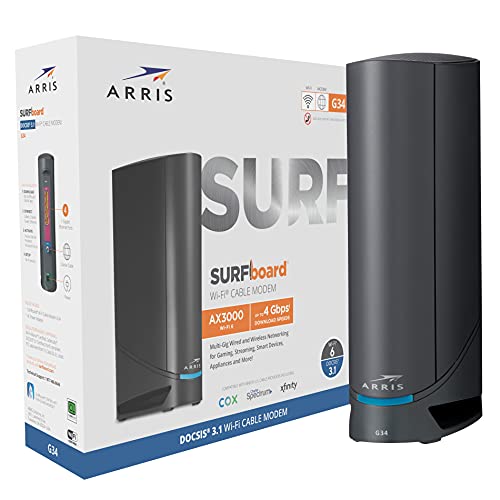
ARRIS Surfboard G34 Gigabit Modem & AX3000 Router (Renewed)

FVFV 2026 Router Amplifier Internet Extender
The Picks, Examined More Closely
This is the pick for anyone whose provider modem already does its job but whose WiFi falls apart at the far end of the house. The R6700AX pushes AX1800-class speeds, which tops out around 1.8 Gbps across both bands, and it holds a connection steady for roughly 20 devices at once.
In a typical apartment or small home, that translates to streaming in one room while someone joins a video call in another without either side stuttering. Coverage reaches about 1,500 square feet, enough for most two-bedroom layouts assuming standard construction.
The Good Stuff
- WiFi 6 (the current 802.11ax standard) handles many devices at once far better than older routers did.
- The 1,500 sq. ft. footprint suits apartments and most single-story homes comfortably.
- Support for around 20 connected gadgets covers phones, laptops, TVs, and smart home gear together.
- Dual-band operation lets you split older devices onto the 2.4 GHz band to reduce congestion.
- Optional protection plans add accidental damage coverage with round-the-clock expert help available.
Things To Consider
- It’s router-only, so you’ll still need a separate modem from your ISP, and placement near the center of the home matters for best coverage.
Key Specs
Who It Suits Best
Renters and small-household owners who want a dependable WiFi 6 upgrade without replacing their existing modem.
Where A Sibling Pick Shines
Anyone on cable internet should look instead at the ARRIS G18, which combines the modem and router into one box.
Where the NETGEAR above needs a companion modem, the G18 folds both jobs into a single chassis. It’s built on DOCSIS 3.1, the latest cable standard, which supports multi-gigabit download plans and delivers noticeably faster uploads than the older DOCSIS 3.0 hardware most rental units still use.
ARRIS hardware sits in a very large number of homes worldwide, and that track record shows in how routinely these units get activated by major US cable providers. Setup is usually a phone call to your ISP and a few minutes of waiting. For a household tired of paying a monthly equipment fee, the math tends to work out quickly.
Features That Help
- DOCSIS 3.1 support future-proofs you against faster cable tiers rolling out over the next several years.
- One device means one power brick, one fewer thing to troubleshoot, and less shelf clutter.
- Broad compatibility with major providers like Xfinity, Cox, and Spectrum simplifies activation.
Worth Noting
- Combos put the modem and router in the same spot, so you can’t position the WiFi where it works best independently.
- You’ll want to confirm your specific plan tier is supported before activating, since some providers restrict certain models.
Right Fit For
Cable subscribers who want to retire their rental gateway and run a clean, modern two-in-one setup.
Another Choice May Suit
Heavier multi-device homes will get more headroom from the ARRIS Surfboard G20, reviewed next, thanks to its stronger AX3000 radios.
The G20 takes the same DOCSIS 3.1 foundation as the G18 and pairs it with a beefier AX3000 wireless section, running WiFi 6 on every radio rather than just the headline band. In practice that means more simultaneous streams and steadier performance once the whole family logs on at 7 pm.
Think of it as the middle child done well: not the cheapest route, but the one that ages slowest. Optional damage-protection plans are available alongside it, covering drops, spills, and breakdowns after the manufacturer’s own coverage ends, with parts, labor, and shipping handled at no added cost.
The Helpful Details
- AX3000 throughput gives gaming consoles and 4K streams real breathing room during peak hours.
- WiFi 6 across all radios keeps latency low when dozens of devices compete for airtime.
- DOCSIS 3.1 modem section handles today’s gig-speed cable plans with room to spare.
- Available protection plans include 24/7 access to real technicians for setup and connectivity questions.
Small Caveats
- Combo placement limits where the strongest WiFi lands, which matters in larger or multi-story homes.
- Internal fans and vents on combo units collect dust over time, so a quick quarterly cleaning helps longevity.
- Households with mesh systems may prefer a modem-only unit to avoid double routing.
Made For
Busy households juggling remote work, streaming, and gaming on a gig-speed cable plan.
Skip It When
Tight budgets are better served by the renewed ARRIS Surfboard G34 coming up next, which offers similar AX3000-class wireless for less.
This is the G34, a gigabit DOCSIS 3.1 modem with AX3000 WiFi 6 onboard, sold as a renewed unit. Renewed products have been returned, then professionally inspected and tested to function and appear like new before resale. For networking gear, which ages slowly, that’s often a sensible way in.
The spec sheet matches what makes the G34 popular new: gigabit-class cable throughput, dual-band AX3000 wireless, and compatibility with Cox, Spectrum, Xfinity, and other major providers. Owners commonly report these units running for years without issue, though cosmetic wear varies from unit to unit.
Standout Benefits
- Gigabit DOCSIS 3.1 support handles mainstream high-speed cable plans without breaking a sweat.
- AX3000 WiFi 6 delivers strong wireless throughput for a household of streamers and gamers.
- The renewed route typically costs meaningfully less than buying the same hardware new.
Points To Note
- Cosmetic condition isn’t uniform on renewed stock, so expect minor scuffs even on fully functional units.
- Activation with some ISPs can involve extra verification steps for second-hand equipment.
Quick Facts
Whose Shelf It Belongs On
Students, first-apartment renters, and anyone setting up cable internet on a lean budget.
Reach For A Different Pick When
Shoppers who want brand-new condition and the newest silicon should step up to the ARRIS Surfboard G20 instead.
Not every home needs new core hardware. Sometimes the router is fine and the walls are the problem, and that’s the gap this FVFV extender fills. Four high-gain external antennas and a dedicated internal processor push your existing signal deeper into the house, with the maker claiming reach up to 13,389 sq. ft. under favorable conditions.
Two operating modes give it range beyond simple boosting. Repeater mode extends your current wireless network, while AP mode converts a wired connection into fresh WiFi, handy for rooms where an Ethernet drop already exists. An Ethernet port also prioritizes wired links, which gamers will appreciate for consoles.
Key Advantages
- Four external antennas improve penetration through concrete walls compared with internal-antenna designs.
- Repeater and AP modes cover both wireless extension and wired-to-wireless conversion scenarios.
- WPA/WPA2-PSK encryption keeps the extended network secured to common standards.
- An Ethernet port gives consoles and desktop PCs a stable wired option.
Trade Offs
- Extenders halve available bandwidth in repeater mode, so heavy 4K streaming through a hop may feel slower than a direct connection.
- Real-world coverage depends heavily on wall materials and router placement, so the claimed maximum rarely applies indoors.
Feature Snapshot
Who Will Love This
Homeowners with one stubborn dead zone, such as a basement office or back-bedroom nursery, who’d rather extend than replace.
Look Elsewhere When
Whole-network upgrades belong to the ARRIS G18 combo, which rebuilds both your modem and WiFi from scratch.
What Matters Most Before Choosing Modem Routers
Match The Hardware To Your Internet Type
Cable households need a DOCSIS modem, and DOCSIS 3.1 is the version worth holding out for since it supports gigabit and multi-gig plans. Fiber and DSL subscribers skip the modem conversation entirely and shop router-only units like the NETGEAR R6700AX. Confirming your provider’s compatibility list before ordering saves an annoying return trip later.
Size And Construction Beat Raw Speed Numbers
A 1,500 sq. ft. rating assumes open layouts and typical drywall. Concrete, brick, and plaster eat signal aggressively, which is why the extender category exists at all. Larger or multi-story homes often do better pairing a solid router with a dedicated extender than betting everything on one powerful box.
Count Your Devices Honestly
WiFi 6’s main trick is managing many simultaneous connections efficiently. A household with 25-plus smart bulbs, cameras, speakers, and screens benefits far more from an AX3000-class radio than a two-person apartment ever will. Buy capacity for the home you actually live in.
Factor In Ownership Costs Beyond Sticker
Combos eliminate monthly rental fees, renewed units cut upfront spend, and protection plans spread risk over time. Weigh all three against how long you expect to keep the hardware.
Key Considerations Across These Picks
Where Shoppers Go Wrong
The classic mistake is buying a router rated for a bigger home than yours while ignoring wall construction, then blaming the hardware. Another frequent slip is skipping the ISP compatibility check, which turns an easy activation into a week of phone calls. Measure your space first, verify compatibility second, and only then compare speed classes.
What Separates Premium From Basic
Higher-tier units spend their extra cost on radios, processors, and memory, which shows up as stability under load rather than a higher number on the box. The jump from AX1800 to AX3000 matters most in crowded networks. Light-use households rarely notice the difference, so pay up only when your device count demands it.
Frequently Asked Questions
Do modem routers work with any internet provider?
No, cable modems require provider approval, so check your ISP’s supported-device list first. Fiber and DSL services use entirely different connection types.
Is WiFi 6 worth upgrading to in 2026?
For households with many simultaneous devices, yes, because WiFi 6 manages congestion far better than WiFi 5. Smaller setups may see little practical difference day to day.
Can I use an extender with any router?
Most modern extenders work with any standard router regardless of brand. Performance still depends on signal strength at the extender’s location.
Does a combo unit perform worse than separate devices?
Separate gear lets you place the router optimally away from the modem’s coax entry point. Combos trade that flexibility for simplicity and lower total cost.
How long do modem routers typically last?
Well-maintained units commonly serve five or more years before standards move on. Dust buildup and heat are the main enemies, so occasional cleaning helps.
Closing Thoughts
Every home’s network problem looks a little different, and that’s why this list spans router-only, three combos, and an extender rather than five variations of one idea. Start by identifying whether your bottleneck is the modem, the WiFi, or the walls between them. From there, matching the right box to the actual problem becomes straightforward, and your evenings of frozen calls and laggy matches quietly end.




