


Renting a gateway from your cable company quietly drains your budget every single month, and the hardware they hand you rarely keeps pace with modern internet plans. Owning your own modem and router fixes both problems at once. This roundup covers five options that handle gigabit-class cable service, heavy streaming households, and the newest Wi-Fi standards without demanding a network engineering degree to set up. Whether you’re upgrading a lagging home office connection or building out whole-home coverage for a family of gamers and streamers, one of these will fit.
The Main Contenders

NETGEAR Nighthawk CAX80 WiFi 6 Modem Router (Renewed)

TP-Link Archer BE600 Tri-Band BE9700 WiFi 7 Router

NETGEAR Nighthawk CM3000 DOCSIS 3.1 Cable Modem

ARRIS SURFboard G18 Cable Modem Router Combo (AX1800)
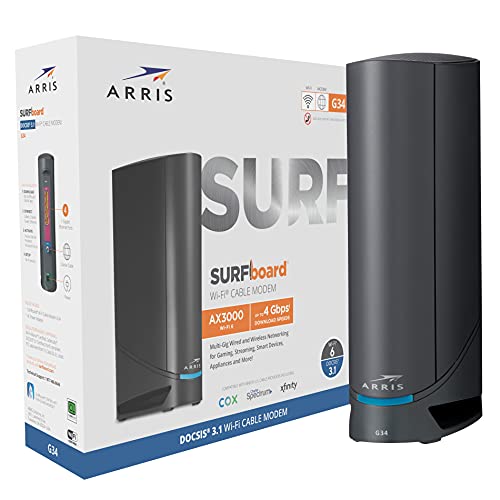
ARRIS Surfboard G34 Gigabit Cable Modem & AX3000 Router
A Deeper Look At The Lineup
This is the do-everything box in the lineup: a DOCSIS 3.1 cable modem and an AX6000 dual-band Wi-Fi 6 router sharing one chassis. For homes where the cable outlet lives in an awkward corner, collapsing two devices into one removes clutter and a tangle of cables. NETGEAR rates its reach at roughly 2,500 square feet with around 30 simultaneous connections.
The renewed status is the honest trade-off here. Units sold through refurbishment programs are inspected before resale, and this listing pairs well with an optional damage plan covering drops, spills, and breakdowns after the factory warranty ends. In our view, that safety net matters more on a pre-owned unit than on new hardware.
The Helpful Details
- DOCSIS 3.1 support means headroom for cable plans scaling toward multi-gig speeds, so you won’t outgrow it next year.
- Four gigabit LAN ports plus a 2.5G multi-gig option let you hardwire a desktop or console for latency-sensitive gaming.
- Wi-Fi 6 handles a house full of phones, laptops, and smart TVs without the congestion slowdowns older routers show.
- One device replaces two, trimming monthly rental fees and shelf space at the same time.
Things To Consider
- It’s cable-only; fiber and DSL households need a different path entirely.
- Renewed units may arrive with cosmetic wear, which owners of display-shelf gear sometimes mind more than expected.
Key Specs
Who It Suits Best
Families on major US cable providers running gigabit-plus plans who want one box doing both jobs well.
A Better Fit Elsewhere
Shoppers wanting brand-new hardware rather than refurbished should look at the ARRIS SURFboard G18 instead.
Unlike the combo units elsewhere on this list, the Archer BE600 is router-only, so it assumes you already own a modem you like. That’s exactly why it appeals to a certain crowd: anyone pairing it with a standalone unit such as the Nighthawk CM3000 below gets a two-box setup with serious ceiling. The tri-band BE9700-class radio layout splits traffic across three bands, keeping congested networks moving.
Wi-Fi 7 brings features worth naming plainly: Multi-Link Operation lets a device talk over two bands simultaneously, and wider 320 MHz channels plus 4K-QAM push throughput higher on compatible hardware like recent flagship phones and consoles. For most households still on Wi-Fi 5 or 6 devices, some of that capability sits idle until upgrades catch up.
A Few Highlights
- Tri-band architecture dedicates bandwidth so streaming boxes don’t fight video calls for airtime.
- Seven-stream BE9700-class speeds are built for smooth 4K and 8K streaming across a busy household.
- An optional protection plan adds accidental-damage coverage and round-the-clock setup help beyond the manufacturer warranty.
Worth Noting
- You’ll need a separate modem, adding a purchase step and another power adapter to manage.
- Full Wi-Fi 7 benefits require equally modern client devices; older gadgets see smaller gains.
Made For
Tech-forward homes loaded with Wi-Fi 7 laptops, current-generation consoles, and multi-gig internet service.
Reach For A Different Pick When
If simplicity wins, the NETGEAR Nighthawk CAX80 folds modem and router into a single unit for cable households.
Mid-split technology is the term to know here. Cable providers are re-engineering their networks to open more upload capacity, and only modems built for mid/high-split frequencies can tap those faster upload tiers, such as Xfinity’s 2-gigabit download plans paired with 200-megabit uploads. The CM3000 is engineered specifically for that generation of service.
Pairing it with a strong router like the Archer BE600 gives you a modular setup where either half can be upgraded independently later. That flexibility costs a little extra wiring and a second outlet, but it’s the configuration enthusiasts tend to land on. Upload-heavy users, think cloud backups, live streaming, and frequent large file transfers, gain the most from what this modem unlocks.
Useful Touches
- Mid/high-split DOCSIS 3.1 support future-proofs your connection against provider network upgrades.
- Natively handles Xfinity’s fastest 2Gbps download and 200Mbps upload tiers.
- Works with Cox and Spectrum alongside Xfinity, giving three major carriers a single hardware answer.
- Optional coverage plans add post-warranty breakdown protection and 24/7 expert assistance.
Points To Note
- No built-in Wi-Fi, so budget for a router if you’re starting from zero.
- Providers commonly require activation calls or app-based registration before the line goes live.
Quick Facts
Right Fit For
Remote workers and content creators on Xfinity’s top tiers who need symmetric-feeling upload performance.
Swap It Out When
Households wanting everything in one plug-and-play unit should consider the ARRIS SURFboard G18 combo instead.
ARRIS has been inside cable walls for decades; the company cites hardware in over 260 million homes, and that track record shows in how routinely providers accept its equipment. The G18 packages DOCSIS 3.1 modem capability with dual-band AX1800 Wi-Fi 6 in one modestly sized unit, aimed squarely at gig-speed cable plans.
Honestly read, the AX1800 radio class is the entry rung of Wi-Fi 6. In a small apartment or a condo under roughly 1,500 square feet with a handful of active devices, it holds up fine for streaming and everyday browsing. Larger homes pushing dozens of simultaneous connections will feel its limits sooner than they would with the Nighthawk CAX80’s AX6000 radios.
The Practical Payoff
- Single-device setup means one activation call and one power outlet instead of two.
- DOCSIS 3.1 support covers gigabit-class cable plans from Comcast Xfinity, Cox, and Spectrum.
- Wi-Fi 6 efficiency helps crowded networks breathe easier than older Wi-Fi 5 combos.
- The compact footprint disappears onto a shelf or behind a TV stand.
Small Caveats
- AX1800 throughput is modest for very large homes or heavy multi-user households.
- Combo designs mean a single failure takes down both your internet and your Wi-Fi.
Best Suited To
Apartment dwellers and small households on mid-tier cable plans who value simplicity over maximum spec sheets.
Where A Sibling Pick Shines
Buyers chasing top-tier multi-gig upload speeds should step up to the NETGEAR Nighthawk CM3000 modem.
The G34 is one of the most widely recommended combos in this category, and this renewed version makes the math even friendlier. You get DOCSIS 3.1 modem hardware certified for gigabit plans on Cox, Spectrum, and Xfinity, joined to a dual-band AX3000 Wi-Fi 6 router. Compared with the G18 above, the step up in wireless class is meaningful for busier networks.
Refurbished stock here comes professionally inspected to work and look like new, typically consisting of returned or traded-in units. Owners commonly report these arriving in clean condition, though checking the listing details before ordering never hurts. An optional protection plan can extend coverage past the original warranty window with parts, labor, and shipping handled at no added repair cost.
What Helps Most
- AX3000 wireless class delivers noticeably stronger throughput than the G18’s AX1800 tier.
- Gigabit DOCSIS 3.1 support matches the speed ceilings of mainstream cable plans.
- Refurbished pricing lowers the entry cost for cutting rental fees permanently.
- Broad carrier approval across Cox, Spectrum, and Xfinity simplifies switching providers later.
Potential Drawbacks
- Pre-owned condition means cosmetic wear is possible despite inspection.
- Like any combo, firmware updates depend on ARRIS release cadence rather than separate devices updating independently.
At A Glance
Who Should Grab It
Cost-conscious shoppers on gigabit cable plans who want proven hardware at a reduced entry point.
Not Your Match When
Those preferring untouched new-in-box gear will find the TP-Link Archer BE600 a cleaner starting point.
What Matters Most Before Choosing Modems And Routers
Match The Hardware To Your Internet Plan
A modem can’t exceed what your provider delivers, so check your plan’s download and upload tiers first. DOCSIS 3.1 is the current cable standard and covers every mainstream gigabit plan, while mid/high-split support unlocks newer upload tiers on select networks. Buying less than your plan wastes money every month; buying far more than your plan offers is usually unnecessary.
Combo Or Separate Devices?
Combos save space, outlets, and setup effort, which suits apartments and straightforward homes. Separate units cost more upfront but let you upgrade one side without replacing the other, and a router failure doesn’t take your internet offline entirely. Heavy users and tech enthusiasts generally prefer the split approach.
Wireless Class And Home Size
Wi-Fi 6 (the 802.11ax standard) handles dense device counts efficiently, while Wi-Fi 7 adds wider channels and multi-band links for the newest gadgets. Match the radio class to your square footage and device load: AX1800 suits small spaces, AX6000-class covers large homes, and Wi-Fi 7 pays off mainly when your clients support it.
Provider Compatibility
Always confirm your ISP approves the specific model before purchasing. Most major cable carriers publish compatibility lists online, and activation typically involves a quick call or app step once hardware arrives.
Key Considerations Across These Picks
Traps First Timers Fall Into
The classic mistake is buying hardware your provider won’t activate, so verify compatibility lists first. Another common slip is mismatching wireless class to home size, then blaming the router for dead zones a mesh system would actually solve.
What Separates Premium From Basic
Higher-tier models spend their extra cost on radio class, channel width, and processing power for many simultaneous devices. That premium earns its keep in large homes and gadget-dense households; modest apartments rarely need it.
Frequently Asked Questions
Do these work with fiber internet?
No, every cable modem listed requires coaxial cable service. Fiber households need an optical network terminal from their provider plus a standalone router.
Will a new modem really lower my bill?
Most carriers charge a recurring monthly rental fee for their gateway hardware. Owning your own equipment eliminates that line item after the initial purchase.
Is buying renewed networking gear risky?
Refurbished units are inspected and tested to function like new before resale. Pairing one with an optional protection plan adds coverage beyond the original warranty period.
Can I use the TP-Link Archer BE600 by itself?
No, it’s a router only and needs a separate modem upstream. Pairing it with the Nighthawk CM3000 forms a complete high-performance setup.
How long do modems and routers typically last?
Networking hardware commonly serves reliably for four to six years before standards move on. Upgrading sooner makes sense mainly when your internet plan outpaces your equipment.
Closing Thoughts
Every household’s right answer depends on plan speed, home size, and how much you value modularity. The Nighthawk CAX80 covers big homes in one box, the CM3000 serves upload-hungry professionals, and the G34 keeps costs down without gutting performance. Check your provider’s compatibility list, match the wireless class to your space, and you’ll stop paying rent on someone else’s hardware.




