


A loose box of mismatched hardware has derailed more weekend installations than any other single thing. You’re 30 minutes into mounting a new display, the included screws turn out to be the wrong depth, and the whole project grinds to a halt while you drive to a hardware store. The kits and mounts below tackle that exact frustration, covering everything from universal M4 through M8 assortments to model-specific replacements and full bracket systems.
An Overview Of The Picks

Universal TV Mounting Hardware Screw Kit with Box

92PCs TV Mounting Hardware Screw Kit M4 M5 M6 M8

PERLESMITH Tilting TV Wall Mount 37–85 in 132 lb

PERLESMITH Full Motion TV Wall Mount 37–82 in

PERLESMITH Full Motion TV Wall Mount 32–65 in
Lag Bolt Kit for TV Mounting M8x70mm
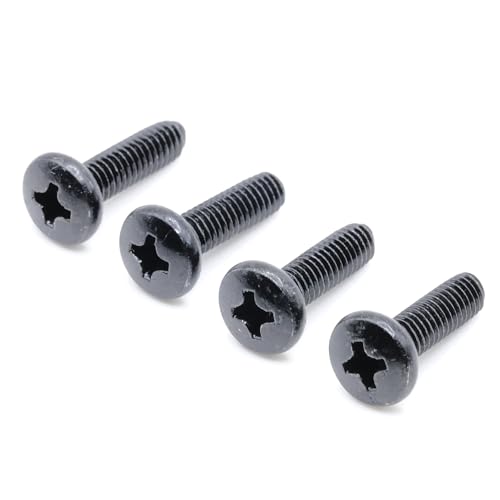
ReplacementScrews Stand Screws for Samsung UN55NU6900

ReplacementScrews Wall Mount Screws for TCL 32S331

PERLESMITH Universal TV Mounting Hardware Kit up to 80 in
Meet The Standout Selections
This kit takes the small chaos out of a TV install. Everything ships in a single divided case, so the moment you open the lid you can see what you have rather than digging through a plastic baggie. For anyone mounting a display for the first time, that visual organization alone is worth the swap from the loose hardware that ships in the box.
Each compartment is labeled by name and size, which means fewer trips between the TV and the instruction manual. The included washers and spacers sit in their own slots, so the moment a step calls for a spacer, you find it instantly instead of dumping the whole kit onto the carpet.
Positive Takeaways
- Pre-labeled compartments remove guesswork during installation
- Closed case keeps dust and moisture off the hardware between projects
- Compact storage means leftover pieces stay useful for the next mount
- Good starter assortment for households with one TV and a basic mount
Trade Offs
- Size range is more limited than the larger 92-piece kit below
- Case takes up a drawer, which may bother smaller workshops
Who It Suits Best
First-time TV owners who want one organized box that covers a single standard install without sifting through loose bags.
Look Elsewhere When
You manage several displays at once; the 92-piece kit from the same brand covers a wider size range for mixed setups.
Where the first kit is tidy, this one is exhaustive. Ninety-two pieces span the four metric thread sizes (M4, M5, M6, M8) that cover the back of virtually any flat-panel TV or monitor you’d mount today, plus the washers and spacers to match. The dividing scheme follows the same logic as the smaller box, just with more room for each category.
Anyone running a small AV setup, a classroom, or a short-term rental will appreciate the breadth. It doubles as a replacement drawer for tenants who have misplaced the original hardware, which is one of the more common weekend problems for property managers.
What Stands Out
- Four thread sizes cover most TVs and monitors in one purchase
- Acts as a long-term replacement drawer for lost hardware
- Pre-sorted layout speeds up jobs where time matters
Honest Caveats
- More pieces than a single-room install actually needs
- Storage case is bulkier than the compact kit above
Feature Snapshot
Right Fit For
Property managers, AV hobbyists, and households juggling more than one display who want one kit to rule them all.
Swap It Out When
You only need to mount a single mid-size TV once; the smaller Universal Kit at pick one keeps things tighter.
Sometimes the problem isn’t the screws, it’s the mount itself. This PERLESMITH bracket tilts to reduce glare from overhead lights and supports VESA patterns from 200×100 up to 600×400, the spacing between the four mounting holes on the back of a TV. That covers most panels from 37 to 85 inches, so the same bracket survives a living room upgrade cycle.
The 132-pound capacity leaves a real margin for heavier sets, and the tilt action helps when a TV sits above a fireplace. Where the screw kits above are about hardware, this is about the frame that holds the hardware in place.
Real-World Strengths
- Six VESA patterns in one bracket cover most modern TVs
- Tilt action reduces glare from recessed ceiling lights
- Generous weight limit adds safety margin for large panels
Worth Noting
- Not compatible with the small 100×100 VESA pattern found on some compact screens
- Fixed tilt means no side-to-side swivel for off-angle seating
Key Specs
Made For
Living room installs where the TV sits higher than eye level, like over a mantel or in a media niche.
Reach For A Different Pick When
You need to pull the TV away from the wall or swivel it between seating zones; the full-motion PERLESMITH at pick four handles that.
Full-motion mounts earn their keep in rooms where the seating rotates. A kitchen that opens to a dining nook, a studio apartment with a couch on one wall and a desk on the other, or a bedroom where the bed faces a corner; those are the cases this bracket was built for. It extends, swivels, and tilts, so the same panel reaches multiple viewing angles.
Compatibility matches the tilt model above, supporting VESA patterns from 200×100 to 600×400 and TVs from 37 to 82 inches at 132 pounds. Where the lag bolt kit later in the list addresses only the stud-side fasteners, this bracket comes with the wall anchors and lag screws you need for a standard 16-inch stud spacing. If your studs sit wider apart, the brand lists an alternative model designed for 18- and 24-inch spacing.
Reasons It Performs
- Articulating arm reaches corners and open-plan rooms
- Same wide VESA support as the tilting sibling above
- Hardware included for standard 16-inch stud installation
Points To Keep In Mind
- Heavier mechanism means a sturdier wall section is essential
- Profile when retracted sits further from the wall than a fixed mount
Best Suited To
Open living spaces, corner installations, and anywhere the same screen serves two seating zones at different times of day.
A Better Fit Elsewhere
Bedrooms and small offices with a single fixed viewing angle; the compact full-motion PERLESMITH at pick five covers those screens more efficiently.
The smaller sibling to the full-motion bracket above trades some size range for a tighter footprint. VESA coverage runs from 75×75 up to 400×400, which lines up with most bedroom and office screens from 32 to 65 inches. The 99-pound rating is plenty for the panels in that range, even with a soundbar bolted to the bottom.
Mounting flexibility matches the larger model, with anchors and lag screws included for wood stud, concrete, or brick. If you have ever tried to install a TV on a brick fireplace surround and ended up at the hardware store for the right anchors, you will appreciate that coverage.
Where It Delivers
- Lower VESA minimum opens up smaller monitors and older TVs
- Anchors included for masonry, not just wood studs
- Lighter mechanism feels less overbuilt for small rooms
A Few Limitations
- 99-pound capacity rules out the largest 75-inch-plus panels
- Arm reach is shorter than the bigger full-motion model
Quick Facts
Who Should Grab It
Apartment dwellers and home office setups running a 32 to 55-inch panel where flexibility matters more than maximum reach.
Consider Something Else When
You plan to mount a 70-plus-inch flagship screen; the larger PERLESMITH full-motion at pick four is rated for that size class.
Most bracket kits include lag bolts, but the included ones are often the weakest link. This standalone set ships M8x70mm steel lag bolts with matching washers, heavy-duty wall anchors, a small bubble level, and an Allen key, all in a single case. For anyone whose included hardware has stripped, corroded, or simply gone missing, it is a clean replacement.
The bubble level alone is worth noting. Most TV installs start by holding a bracket against the wall and eyeballing level, which is fine until it isn’t. A pocket-sized level in the same box means one less tool to track down mid-project.
Practical Pluses
- Steel construction resists stripping during high-torque installs
- Includes a bubble level and Allen key for a single-trip install
- Storage case keeps fasteners protected between uses
Less Ideal Details
- M8 size is specific; check your bracket’s bolt spec before ordering
- Not a complete assortment like the M4-M8 kit at pick two
Feature Card
Perfect Match For
Homeowners whose original mount hardware has failed, rusted, or been lost during a move.
Where Another Pick Suits Better
First-time installers who don’t yet know which bolt size they need; the universal PERLESMITH kit at pick nine covers all four common sizes.
Universal kits are great until a model needs an exact thread pattern. This four-screw set targets the Samsung UN55NU6900, with self-tapping tri-lobe threads, a screw profile with three curved lobes that bites cleanly into metal without a pilot hole. The set is small but specific, which is exactly the point.
The most common scenario is a stand that came loose during a move or a child-related incident. Rather than chasing the right part through a parts catalog, this kit delivers the four fasteners that fit the factory stand without modification.
Everyday Wins
- Tri-lobe threads seat cleanly in factory-threaded holes
- Black finish matches original Samsung hardware
- Compact order replaces one specific lost piece, nothing more
Worth Bearing In Mind
- Compatible only with the Samsung UN55NU6900, not a universal set
- Verify the model number on the back of your TV before ordering
Whose Shelf It Belongs On
Samsung UN55NU6900 owners who need a four-pack of stand screws without sorting through universal kits.
Not Your Match When
You own a different Samsung model or a non-Samsung TV; the universal PERLESMITH kit at pick nine handles cross-brand replacements better.
Like the Samsung set above, this kit targets a single TCL model, in this case the 32S331. The package adds split lock washers, those small serrated washers that bite into the bolt head to prevent loosening from vibration, plus extra-large flat washers for a wider load spread across the back of the panel.
It is the kind of kit that only matters to a narrow group, but to that group it matters a lot. Owners who lost a wall-mount screw mid-install, or who stripped an original during a previous attempt, get a direct replacement without buying a full assortment.
What It Does Well
- Lock washers prevent back-out from normal wall vibration
- Extra-large flat washers reduce stress on the back panel
- Direct-fit replacement avoids guesswork on thread pitch
Points To Note
- Model-specific, so it does not help with other TCL sizes
- Confirm the listed length works for your bracket depth before purchase
Best Suited To
TCL 32S331 owners who need a fast, exact replacement for a lost or damaged wall-mount screw.
Skip It When
You are not sure which TCL model you have; the universal kits earlier in the list are safer general-purpose picks.
PERLESMITH’s take on the universal kit covers M4 through M8 screws plus the washers and spacers needed to mount TVs up to 80 inches. The label system inside the package is the real upgrade, with each fastener clearly marked by size so the right piece is obvious at a glance. It reads as a kit designed for people who do this often.
Brand coverage is broad: LG, Sharp, Panasonic, Toshiba, Vizio, TCL, Sanyo, Insignia, Hitachi, Polaroid, RCA, JVC, Apex, Daewoo, Pioneer, and others. For a household that has rotated through a few different TVs over the years, that breadth removes the small frustration of mismatched replacements.
Well-Handled Touches
- Strip-resistant screws hold up across multiple install cycles
- Brand list covers legacy and current panels
- Internal labeling speeds up the actual install moment
Room For Improvement
- Spread is similar to the 92-piece kit above, so the choice comes down to brand and label preference
- Storing four full thread sizes plus washers takes drawer space
Essential Details
Built With In Mind
Multi-TV households, AV hobbyists, and anyone replacing hardware on different panels over a long stretch.
Where A Sibling Pick Shines
You need lag bolts specifically for a heavy stud mount; the M8x70mm Lag Bolt Kit at pick six is a more targeted fit.
Matching The Right Hardware To Your Wall And TV
The first number to confirm is the VESA pattern on the back of your panel, which is the distance in millimeters between the four mounting holes. Measure horizontally and vertically and write both numbers down before browsing mounts. A 200×200 panel needs a different bracket than a 400×400, and only some mounts cover both.
Next, confirm the wall material. Wood studs at standard 16-inch spacing accept lag bolts directly, while concrete or brick needs sleeve anchors or wedge anchors rated for the wall type. Mounts that ship with all three anchor styles, like the PERLESMITH compact full-motion, save a parts run when you don’t know what’s behind the drywall.
Weight capacity is a third check that gets overlooked. The rule of thumb is to add a 20% margin above the TV’s listed weight, so a 60-pound panel belongs on a bracket rated for 75 pounds or more. The PERLESMITH tilter at pick three and the full-motion siblings all clear that bar with room to spare for most panels in their listed size range.
Finally, decide between fixed, tilting, and full-motion based on seating. Fixed brackets sit closest to the wall and look cleanest; tilting models cut glare from above; full-motion arms pull the TV out and swivel for kitchens and corner mounts. The mount you choose drives the screw length you need, since the bracket sandwiches the TV’s back panel between itself and the fastener head.
Key Considerations Across These Picks
Wrong Turns To Avoid
Skipping the model check is the most common miss. Universal kits cover most TVs, but specific models like the Samsung UN55NU6900 or TCL 32S331 use unique thread pitches that a generic M6 may not seat into cleanly. The model-specific ReplacementScrews picks at seven and eight exist for that exact reason. Verify your TV’s model number on the back label before committing to a kit.
The other trap is assuming the included hardware is enough. Most mounts ship with lag bolts rated for wood studs only, and the included quantity is exactly enough for one install. Lose one bolt, hit a metal stud, or mount on concrete, and the included hardware is suddenly insufficient. The Lag Bolt Kit at pick six addresses this by giving you heavy-duty replacements plus anchors and a level in one box.
Where The Extra Money Goes
Higher-tier options in this list tend to spend their cost on tolerance and finish. The PERLESMITH full-motion brackets, for example, use heavier-gauge steel arms and tighter pivot tolerances, which translates to less sag over years of swiveling. Premium picks also tend to include masonry anchors and a level in the box, while budget mounts leave those as separate purchases. For a single install in a standard interior wall, the cost difference is small relative to the time saved. For a recurring need across multiple rooms, the upgrade pays off in fewer stripped screws and straighter final results.
Frequently Asked Questions
What screw size do most TVs use?
Most flat-panel TVs use M4, M5, M6, or M8 screws, with the right size determined by the VESA pattern and the back-panel recess depth. Universal kits like the PERLESMITH option at pick nine include all four sizes.
Do universal TV screw kits really fit every brand?
They cover the major thread sizes used by LG, Samsung, Sony, TCL, Vizio, and most other consumer brands. A small number of budget or older models use less common threads, which is where model-specific kits like the Samsung set at pick seven become useful.
How do I know which VESA pattern my TV has?
Measure the horizontal and vertical distance between the four mounting holes on the back of the panel in millimeters. Common patterns are 200×200, 400×400, and 600×400, and most mount listings name the range they support.
Can I mount a TV on drywall without studs?
Standard drywall alone cannot hold a TV’s weight. Use a mount rated for the TV’s size with anchors that distribute load across the wall, or install a plywood backer between studs to spread the force.
How often should TV mounting screws be replaced?
Screws generally last the life of the install unless they strip, corrode, or loosen. Many owners keep a universal kit on hand specifically so a lost or damaged piece can be replaced without a hardware store run.




