


Picking up a soldering iron for the first time feels oddly intimidating, because the tool looks simple, yet the wrong choice can leave you with cold joints, melted tips, or a workspace that never feels safe. The nine options below cover the most common beginner paths: corded starter kits with everything in the bag, full stations for tighter work, and cordless pens for quick fixes around the house. Each one handles a different kind of project, so the goal here is matching the iron to the kind of soldering you actually plan to do.
A Fast Comparison Of The Options

M12 REDLINK Soldering Iron Kit

Bakon Cordless Precision Soldering Iron Kit

Plusivo 60W LED Digital Soldering Iron Kit
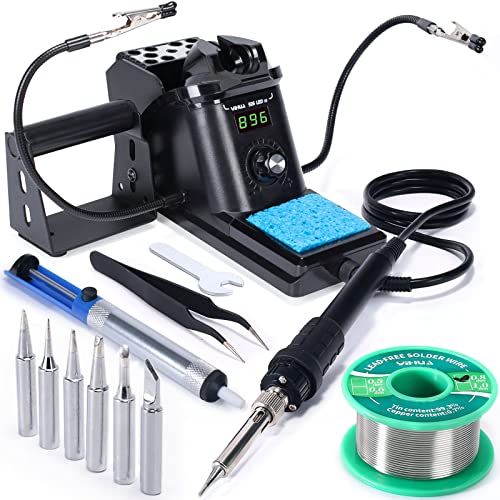
YIHUA 926 III 60W Soldering Station Kit

Cordless Soldering Iron for Dewalt 20V Max

FNIRSI HS-03 2600mAh Cordless Soldering Iron
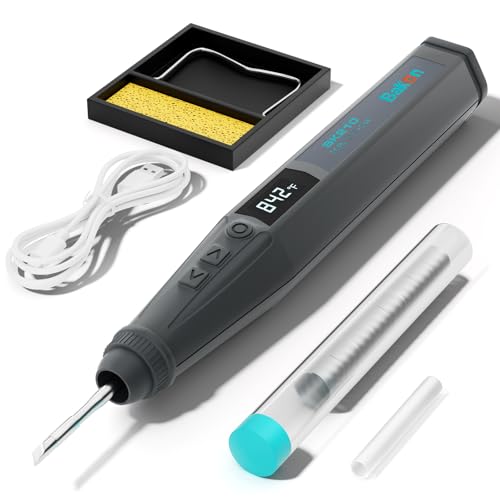
BAKON BK210 Cordless Soldering Iron

BAKON BK210 Cordless Soldering Iron Kit

Zylany USB-C Rechargeable Soldering Pen (Black)
What Each Pick Brings To The Table
The M12 REDLINK Soldering Iron Kit sits in a curious spot for beginners: it borrows the same battery platform that many DIYers already own, so the entry cost drops sharply for anyone with M12 tools in the garage. Unlike the wall-plug kits like the Plusivo reviewed later, this one travels with you, which matters when fixing a car wiring harness in the driveway or a guitar output jack away from a workbench.
The 3-stop pivoting head solves a real beginner problem, which is getting the tip into tight spots like guitar control cavities, RC car battery leads, or appliance control boards. Combined with a built-in LED work light, you keep visibility on small joints without juggling a separate flashlight.
Useful Strengths
- Pivoting head reaches awkward joints in guitar cavities, RC cars, and small appliances
- LED light on the tool itself keeps the work area visible without a separate lamp
- REDLINK heat indicator removes guesswork about when the tip is ready or cool enough to store
- Shares batteries with the rest of the M12 tool ecosystem, which lowers long-term cost
Things To Consider
- Battery and charger are sold separately if you do not already own M12 tools
- Tip ecosystem and replacement parts tend to be pricier than generic third-party options
Who It Suits Best
Existing M12 tool owners who want a quick-heat, grab-and-go iron for mobile repairs and small hobby jobs.
Where Another Pick Suits Better
The Plusivo 60W LED Digital Soldering Iron Kit fits newcomers without any existing battery platform, since it ships with every accessory in one bag.
The Bakon Cordless Precision Soldering Iron Kit leans into flexibility, and that is the trait beginners value most when their projects scatter between the kitchen counter, the car, and the workbench. You can run it cordless from the built-in 1100mAh battery or plug in a USB-C cable when the job runs longer, which sidesteps the all-too-common panic of a dying iron mid-repair.
The 7-second heat-up is a real quality-of-life gain for anyone testing their first through-hole joint on a hobby board. Where the M12 REDLINK trades cordless freedom for a heavier platform, this pen stays slim and pen-like, so it feels closer to holding a thick marker than a power tool.
A Few Strong Suits
- Dual power supply keeps the pen working when the battery runs low on longer sessions
- Slim pen form factor helps with fine PCB work and small wire tinning
- 7-second heat-up shortens the trial-and-error loop beginners experience
- USB-C charging works from laptops, power banks, and car adapters
Worth Noting
- Cordless output caps around 10W, so it is best matched to lighter joints rather than thick ground wires
- Tip selection is more limited than full station kits like the YIHUA 926 III
Made For
Beginners tackling small electronics and field repairs who value portability over bench-station precision.
Consider Something Else When
Reach for the FNIRSI HS-03 if you need longer cordless runtime, since its 2600mAh battery roughly doubles the on-the-go working window.
The Plusivo 60W LED Digital Soldering Iron Kit is the closest thing on this list to a “buy one thing and start soldering” experience. The 21-piece set bundles a stand, solder wire, desoldering pump, and five replaceable tips, all stored in a carry bag that keeps the bench tidy. That matters for beginners, who often stall on a project because they are missing one small accessory.
The digital temperature display on the pen takes the guesswork out of heat settings, which is the most common beginner failure mode, namely burning a pad or getting a cold joint. Compared to the Bakon cordless pen, this one stays plugged in, so runtime is unlimited and the iron stays lighter in the hand.
Positive Points
- Five replaceable tips cover a wide range of beginner projects, from through-hole to small SMD work
- Carry bag keeps every piece accounted for, which is helpful for shared spaces and small apartments
- LED display lets you set temperatures accurately without trial and error
- Desoldering pump included, so first mistakes are easy to correct
Trade Offs
- Stays tethered to a wall outlet, so it is less convenient for jobsite or field repairs
- Stand and accessories are functional but not heavy-duty, so rough handling can shorten their life
Best Suited To
First-time hobbyists and students who want a complete starter kit ready to open and use the same day.
Not Your Match When
The YIHUA 926 III Soldering Station Kit is a better pick once you settle into longer bench sessions and want steadier temperature control.
The YIHUA 926 III is the only true bench station on this list, and that brings genuine advantages for beginners who plan to spend real time soldering rather than dabble. The station housing holds the iron between uses, regulates heat through a closed-loop system (the station adjusts power to keep the tip at your chosen temperature), and lifts the working temperature into a range that handles heavier joints like thicker gauge wire and larger connectors.
It also ships with helping hands, six extra tips, lead-free solder, and a desoldering pump. That bundle turns a single purchase into a real workshop, which is why it works for hobbyists stepping beyond their first repair.
The Value In It
- Closed-loop temperature control keeps the tip stable, which reduces cold joints on longer jobs
- Wide temperature range covers both delicate electronics and sturdier wiring
- Helping hands free both of your hands for steadier, more accurate joints
- Six extra tips give you room to experiment without buying replacements right away
Points To Note
- Station footprint takes up more desk space than a standalone pen like the BAKON BK210
- Auto-sleep and calibration features need a quick read of the manual to use well
Right Fit For
Hobbyists who plan a permanent workbench and want station-grade temperature stability from their first setup.
Look Elsewhere When
The Plusivo 60W LED Digital Soldering Iron Kit fits a smaller budget and a tighter space without giving up the carry-bag convenience.
The QSDXNYDC Cordless Soldering Iron Station is built around a specific scenario: you already own Dewalt 20V Max batteries, and you want a soldering tool that drops onto the same charger. It runs on DCB203, DCB204, DCB205, and DCB206 packs, which is a quietly huge deal for anyone who keeps a stack of batteries charged for weekend projects.
The 8-second heat-up to roughly 350°C puts it close to the BAKON BK210 on speed, but the higher 60W ceiling gives it a noticeable edge on heavier joints. Unlike the M12 REDLINK Kit, this one leans on a USB and Type-C interface for its standby functions, so it feels more like a power-tool accessory than a dedicated soldering pen.
What Earns Its Place
- Compatible with the most common Dewalt 20V Max packs, which keeps charging simple
- 8-second heat-up is fast enough for spontaneous repair jobs around the house
- 60W ceiling handles thicker wire and small appliance terminals better than slim pens
Honest Caveats
- Battery and charger are not included, so first-time Dewalt users face an extra purchase
- Brand compatibility locks the iron into one ecosystem, which is limiting for anyone switching tools later
Who Should Grab It
Existing Dewalt 20V Max owners who want a soldering iron that fits into the same battery and charger workflow.
A Better Fit Elsewhere
The FNIRSI HS-03 is the more universal cordless pick, since it charges over USB-C and does not tie you to a specific battery platform.
The FNIRSI HS-03 answers a question that the smaller Bakon pen leaves open: how long can you actually solder on a single charge? The 2600mAh battery roughly doubles the runtime of the smaller 1100mAh Bakon kit, and the dual power setup means you can keep working through a Type-C cable when the battery finally runs dry.
For beginners who want one tool that handles a full afternoon of hobby builds, this strikes a useful middle ground. The 60W peak and steady temperature recovery give it a closer feel to a bench station than to a typical USB pen.
Useful Highlights
- Larger battery supports longer sessions without forcing a recharge break
- Dual power mode keeps the iron running when the battery eventually drains
- USB-C input is widely compatible with power banks and laptop ports
- Compact form factor still works for tight PCB and small wire jobs
Small Caveats
- Heavier than slimmer pens like the Zylany USB-C Rechargeable Soldering Pen, which can fatigue smaller hands over long sessions
- Tip selection skews toward precision work, so very heavy joints still favor a full station
Whose Shelf It Belongs On
Hobbyists and field technicians who need a longer-running cordless iron without committing to a battery platform.
Reach For A Different Pick When
The YIHUA 926 III Soldering Station Kit is a stronger match for stationary bench projects where runtime is not a concern.
The BAKON BK210 in slate grey is the cleaner, simpler version of the brand’s cordless pen, and that is its real appeal for first-time users. You get a 3200mAh battery, a Type-C charging port, an LCD screen for live temperature, and an auto-sleep timer that protects the tip when you forget to power down.
Where the full BK210 Kit reviewed next adds more accessories, this stripped-back version suits anyone who already owns a basic set of tips and just wants a refined, pen-shaped tool for small jobs around the apartment. For a beginner, the slate grey finish is a small but pleasant detail that makes the tool feel less like a toy.
What Pays Off
- Large 3200mAh battery supports a full evening of small repair jobs
- LCD temperature readout removes the guesswork from low and high heat settings
- Auto-sleep timer extends tip life and reduces the risk of accidental burns
- USB-C charging works from any modern phone charger or laptop
Points To Keep In Mind
- Shipped as the iron only, so beginners still need to source tips and accessories separately
- Pen form factor limits how heavy a joint you can realistically tackle
Perfect Match For
Beginners who already own basic soldering accessories and want a clean, rechargeable pen for small household fixes.
Swap It Out When
The Plusivo 60W LED Digital Soldering Iron Kit is a better starting point if you do not yet own any accessories at all.
The BAKON BK210 Kit version builds on the same pen hardware with the extras beginners usually need to buy anyway: a C210 quick-change tip, an LED display, a child lock, and an auto-hibernation mode. The 8-second heat-up to working temperature keeps you moving on small projects, and the 356 to 842°F range covers both delicate electronics and jewelry work.
Compared to the bare BK210 iron, this kit pulls together a more complete out-of-box experience. The child lock is a quietly important detail for shared homes with curious kids, and it adds a small layer of safety that the corded kits cannot match.
Real-World Strengths
- Child lock adds safety in shared spaces and family workbenches
- C210 tip system is widely supported, so replacements are easy to find
- Auto-hibernation protects the tip and conserves battery during pauses
- Wide temperature window handles both circuit board and small jewelry projects
Potential Drawbacks
- More features mean a slightly steeper learning curve on the first day of use
- Tip size and battery life favor lighter projects over long, heavy joints
Who Will Love This
Family households and shared workspaces that want a safer, feature-complete cordless kit right out of the box.
Where A Sibling Pick Shines
The bare BAKON BK210 is the simpler pick for users who already own tips and accessories and want to skip the extras.
The Zylany USB-C Rechargeable Soldering Pen rounds out the list as the most deliberately light-duty option, and that is a real strength rather than a limitation. The 8 to 15W output range targets PCB pads, fine wires, and small electronics, where too much heat can lift a trace or damage a component in seconds. Three included tips give you a usable spread without forcing extra purchases.
Charging-while-use is a useful feature for longer sessions, since you can keep a power bank clipped to the pen instead of stopping to recharge. For beginners who only need an iron for hobby kits, guitar wiring, or small appliance repairs, this stays in scope and avoids the overpowered traps that burn delicate parts.
Everyday Wins
- Lower wattage protects delicate PCB pads and small components from heat damage
- Three tips cover most common light-duty soldering jobs out of the box
- Charging-while-use extends runtime for occasional longer sessions
- Stable temperature control keeps joints consistent during careful work
Where It May Fall Short
- Not suited for heavy joints like motor terminals, thick gauge wire, or large copper pads
- 1600mAh battery is smaller than the 3200mAh BK210, so cordless sessions are shorter
Built With In Mind
Beginners focused on light electronics, hobby kits, and small repair jobs where precision matters more than raw power.
Skip It When
The YIHUA 926 III is a stronger pick once you start working on heavier wiring or want a permanent bench station.
How To Choose The Right Soldering Iron For Your First Projects
Wattage And Heat-Up Speed
Wattage tells you how much thermal headroom (extra heat reserve that prevents the tip from cooling when it touches a joint) the iron has, not the maximum temperature. A 60W iron can usually reach and hold soldering temperature faster than a 15W pen, which matters when the joint is large or the work is continuous. For beginners, anything in the 40 to 60W range handles most small electronics comfortably.
Corded Station Versus Cordless Pen
Corded stations like the YIHUA 926 III deliver steady temperature and unlimited runtime, which suits longer bench sessions. Cordless pens like the BAKON BK210 and FNIRSI HS-03 trade some thermal mass for the freedom to solder anywhere, which suits quick fixes and small hobby kits. Match the format to the project, since neither is universally better.
Tip Selection And Accessories
A starter iron with multiple tip shapes (conical, chisel, knife) lets you learn different joint styles without buying extras. The Plusivo kit and YIHUA 926 III Kit both ship with multiple tips, which removes the early shopping trip that often stalls beginners.
Temperature Control And Readout
A digital display takes the guesswork out of choosing heat, which lowers the chance of burning pads. Closed-loop stations adjust power to keep the tip at your chosen temperature, which is a real upgrade for steady work.
Key Things To Watch Across These Picks
Common Shopping Slip Ups
Many beginners buy the cheapest pen and discover too late that it cannot recover heat when touching a larger joint, leading to frustration and damaged components. Others grab a heavy-duty station without realizing they have no space or accessories to support it. Match the iron to the project, not the perceived prestige of the tool.
What The Higher Tier Buys
Spending up usually buys better temperature stability, faster heat recovery, and a wider range of compatible tips. A bench station like the YIHUA 926 III pays off once projects run longer than a few minutes, while a feature-rich cordless kit like the BAKON BK210 Kit pays off for shared or family workspaces. For quick household fixes, the light-duty Zylany pen is plenty.
Frequently Asked Questions
What wattage should a beginner soldering iron have?
A wattage range of 40 to 60W is a safe starting point for most small electronics, wire tinning, and hobby kits. Very low-wattage pens struggle to maintain temperature on anything but the tiniest joints.
Is a soldering station better than a soldering pen for beginners?
A station offers steadier temperature and longer runtime, but a cordless pen is more convenient for small, scattered jobs. Beginners who plan to solder regularly benefit from a station, while casual users do fine with a quality pen.
Do cordless soldering irons run out of battery quickly?
Battery life depends on the capacity and the heat setting, but most modern cordless pens last between 30 minutes and an hour per charge. Models with larger batteries, like the FNIRSI HS-03, stretch that further.
What safety gear do beginners need for soldering?
Good ventilation, safety glasses, and a stable stand are the core safety items. Beginners should also work on a fire-safe surface and keep the tip away from flammable materials.
How often should a beginner replace the soldering tip?
Tip life depends on use and care, but tinning the tip (coating it with a thin layer of solder after each session) and cleaning it regularly extends its life. Replace the tip when the plating wears through or the tip no longer holds solder evenly.




