


Picking up a soldering iron for the first time feels equal parts exciting and intimidating. The bench fills with unfamiliar gear, temperatures climb into the hundreds, and a wrong tip choice can turn a tidy joint into a cold mess. A purpose-built beginner station smooths that learning curve with safer temperature control, included accessories, and forgiving heat delivery that matches what new hands actually do at the workbench. Whether you’re fixing a worn charging cable, modding a keyboard, or just curious about electronics, the right starter rig makes the difference between frustration and a clean, shiny first joint.
A Snapshot Of The Selections

Hakko FX888DX Digital Soldering Station (Blue/Yellow)
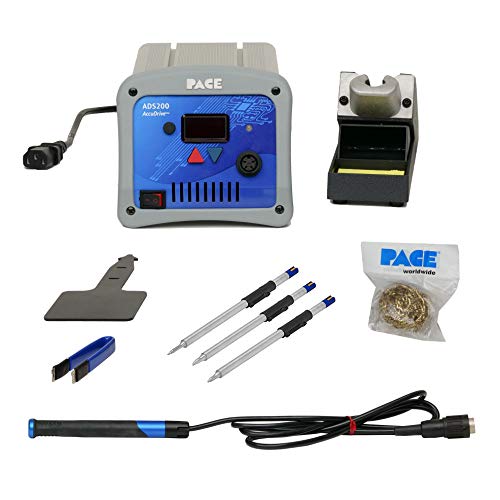
PACE ADS200 Professional Soldering Station 120VAC

SainSmart Magnetic Helping Hands Soldering Station
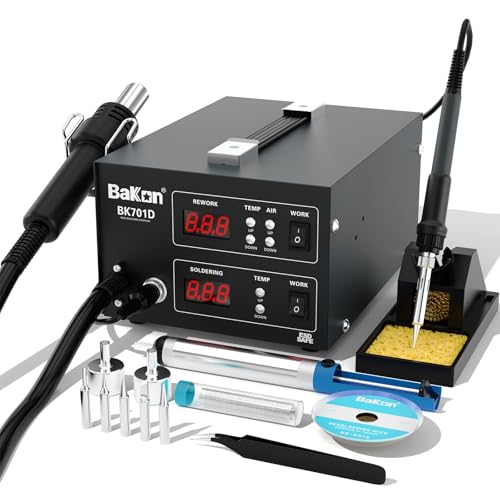
BAKON BK701D 700W 2-In-1 Hot Air Soldering Station

BAKON 852D+ Heat Gun And Soldering Iron 2-In-1 Kit
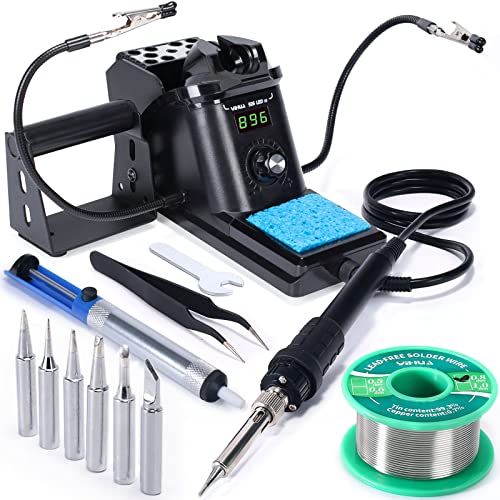
YIHUA 926 III 60W Digital Soldering Iron Station Kit
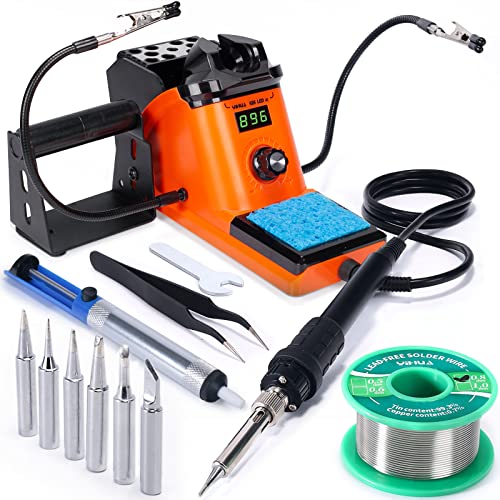
YIHUA 926 III 60W LED Soldering Iron Station Kit

YIHUA 926 III Soldering Iron Station Kit 12-IN-1

BAKON BK602S 2-In-1 Soldering And Hot Air Station
Inside Each Recommended Option
The Hakko FX888DX sits at the top of the beginner pile for one reason: it stays out of your way. Its rotary encoder dial sets temperature in single-degree increments, the digital readout stays visible even in a shaded corner of the bench, and the ceramic heater (the metal-oxide element that converts electricity into tip heat) brings the iron to working temperature faster than most entry units. ESD-safe circuitry means static from a doormat-thick carpet won’t fry a microcontroller, and the included tip family covers the through-hole joints most beginners tackle first.
For a first real station, the FX888DX feels less like a stepping stone and more like a tool you keep for years. The included iron stand is small enough to crowd a corner shelf, the sponge tray pops out for cleaning, and replacement tips remain widely available. Compared with the YIHUA 926 III kits, you trade bundled accessories for stronger daily build quality.
Everyday Wins
- Rotary encoder dials let you set and lock temperature without scrolling through menus.
- Ceramic heater recovers heat quickly, so dragging across a populated board doesn’t drop the tip temperature mid-joint.
- ESD-safe design protects sensitive components during longer hobby projects.
- Wide tip compatibility means you can swap to a fine conical or a wider chisel as your skills grow.
- Solid metal housing stands up to years of bench use.
Things To Consider
- The base station ships with one tip, so a starter tip set is a useful add-on purchase.
- Owners commonly note the included iron cord is a bit stiff until it breaks in.
Key Specs
Best Suited To
First-time builders who plan to keep soldering past the first weekend and want a station that grows with their skills.
Skip It When
The YIHUA 926 III 60W Digital Soldering Iron Station Kit makes more sense if bundled accessories matter more than long-term build quality on day one.
The PACE ADS200 is the kind of station that makes you rethink what a beginner should buy. Its AccuDrive system senses the thermal load on the tip in real time and pushes extra wattage exactly when a heavy joint demands it, all without the user touching a setting. The included three-tip bundle covers most through-hole and surface-mount tasks a newcomer might attempt, and the 120VAC operation matches standard North American outlets without a converter.
For someone starting out, the ADS200 is generous overkill, though you may find the headroom welcome as projects grow heavier. Compare it to the Hakko FX888DX above, and the difference shows up in how each station handles a thick ground-plane joint: the PACE simply keeps the temperature where you set it.
Reasons It Performs
- AccuDrive load-sensing control recovers heat in milliseconds, keeping the tip steady during heavy joints.
- High-power output handles thick ground planes and multi-layer boards without a tip change.
- Includes three professional tips out of the box, so you skip a separate tip purchase.
- No calibration routine required for the iron itself, which lowers the learning curve.
Worth Noting
- The price tier sits well above typical starter stations, so the value argument only works for committed hobbyists.
- The station ships without a helping-hands rig, so you may want a separate board holder for fine work.
- Owners commonly mention the learning curve on the menu-driven interface is steeper than a simple dial.
Feature Snapshot
Who Should Grab It
Hobbyists stepping up from a basic plug-in iron who want professional thermal control without learning a calibration routine.
Look Elsewhere When
The BAKON BK701D 2-In-1 Hot Air Soldering Station fits better when the projects lean toward phone and laptop rework rather than fine electronics.
The SainSmart Helping Hands isn’t a soldering iron at all, and that’s the point. It solves the single biggest beginner headache: holding tiny components still while the iron comes down. The 11.1 by 7.1 inch steel base gives you room to spread out, four magnetic gooseneck arms (flexible metal tubes that hold position where you bend them) snap wherever you place them, and four PCB pillars grip the board itself. A 5X LED magnifying lamp sits over the work, cutting eyestrain on a dim bench.
For fine-pitch SMD work, this rig does more than any temperature upgrade can. Pair it with a YIHUA 926 III or the Hakko FX888DX, and you have a workstation that holds a board like a third hand. Most newcomers find the magnetic feet come and go easily, which makes repositioning painless during a long session.
Practical Pluses
- Large steel base accommodates full-size hobby boards with room for tools on the side.
- Magnetic gooseneck arms reposition anywhere on the base without clamps or screws.
- Built-in 5X LED magnifier makes small joints readable without leaning in.
- Four PCB pillars lock a board in place for two-handed soldering.
Trade Offs
- This is a holding fixture only, so a separate soldering iron is required.
- Owners commonly report the LED lamp runs warm during extended sessions, though it stays bright.
- Gooseneck arms hold position best when loaded lightly, so very heavy cables may droop.
Whose Shelf It Belongs On
Beginners tackling small SMD components, USB-C repair, or any project where shaky hands are the bottleneck.
Reach For A Different Pick When
The BAKON 852D+ Heat Gun And Soldering Iron 2-In-1 Kit suits you better when you want the holding rig and the soldering tool in one box.
The BAKON BK701D packs two tools into one chassis: a soldering iron for through-hole work and a hot air gun (a pencil-shaped nozzle that blows focused heated air) for removing and reflowing surface-mount components. That dual setup opens up a wider set of beginner projects, especially phone charging port swaps and laptop keyboard repairs, where hot air is the gentlest way to lift a part without ripping pads off the board.
The 700W total rating means you won’t be waiting forever for either tool to come up to temperature, and the ESD-safe design protects the kind of chips you’ll be working near. Compared with the YIHUA 926 III kits, you trade a polished beginner-friendly interface for a rougher but more versatile two-tool setup.
Advantages To Know
- Independent iron and hot air channels let you run one tool without powering the other.
- 700W combined output supports both fine SMD reflow and heavier through-hole joints.
- ESD-safe circuitry keeps static-sensitive components protected during rework.
- Single chassis saves bench space over owning two separate stations.
Honest Caveats
- The hot air gun takes practice to control without drifting a nearby small component.
- Owners commonly note the included nozzle set is functional but limited, so extra nozzles are a likely add-on.
The Right Fit
Beginners who want to attempt phone and laptop board repair alongside standard soldering projects.
A Better Fit Elsewhere
The BAKON BK602S 2-In-1 Soldering And Hot Air Station is a smarter pick when bench space is tight and a smaller footprint matters more than raw wattage.
The BAKON 852D+ takes the dual-tool concept and wraps it in a beginner-ready accessory bundle. Inside the box, you get a roll of lead-free solder, five certified tips, two hot air nozzles, ESD-safe tweezers, a desoldering pump, a brass cleaner, a sponge, and a soldering iron stand. The LED digital display shows the current temperature for both tools, and the knob-based adjustment keeps the interface simple to learn.
For someone opening a soldering kit for the first time, the 852D+ removes the “what else do I need” scramble. The included tips cover most common beginner joints, and the desoldering pump is the kind of tool you appreciate the first time you bridge two pads and need to wick the excess away.
Useful Strengths
- Comprehensive accessory bundle covers most beginner needs in a single purchase.
- Knob-based temperature control is easier to learn than menu-driven interfaces.
- LED digital display provides clear temperature feedback during use.
- Independent hot air and iron control lets you focus on one task at a time.
Points To Note
- The iron stand runs small for the included cable, so cable management needs attention.
- Owners commonly report the included lead-free solder has a higher learning curve than leaded wire for absolute first-timers.
Who Will Love This
First-time SMD rework hobbyists who want the entire starter bundle shipped in one box.
Swap It Out When
The YIHUA 926 III 60W LED Soldering Iron Station Kit is a better match when the focus stays on through-hole work and the hot air tool isn’t needed yet.
The YIHUA 926 III is the kit that introduced a generation of hobbyists to a real soldering station. Its 60W ceramic heater reaches working temperature in a couple of minutes, the PID temperature control (a feedback loop that adjusts heater power to hold the set temperature) keeps the iron steady through a long joint, and the included accessories cover the immediate “what do I need” list. You get two helping hands, six extra tips, lead-free solder, a desoldering pump, and stainless tweezers.
For a tight budget, the 926 III delivers the kind of completeness that other kits leave to add-on purchases. The temperature range hits the sweet spot for both small electronics and heavier wire work, and the °C/°F conversion lets you follow tutorials written in either unit. Compared with the YIHUA 926 III LED variant, the difference is mostly the screen style.
What Pays Off
- 60W output with PID stabilization keeps the tip temperature consistent during long joints.
- Wide temperature range handles both fine electronics and heavier wire work.
- Bundled helping hands, tips, and solder remove several separate purchases.
- Auto sleep mode (a power-saving state that cools the iron when idle) extends tip life between sessions.
Points To Keep In Mind
- The plastic housing is lighter than the metal-cased stations, so it shifts on a smooth bench.
- Calibration support is helpful but requires a separate temperature reference tool, depending on your accuracy needs.
- Owners commonly report the included sponge tray is small, so a larger cleaning sponge is a useful upgrade.
Spec Overview
Made For
First-time DIY builders who want a single affordable box that covers the basics without compromise on temperature control.
Not Your Match When
The BAKON 852D+ Heat Gun And Soldering Iron 2-In-1 Kit fits better when surface-mount rework is on the project list.
The YIHUA 926 III LED variant swaps the standard digital readout for a larger LED display, and for some beginners, that’s the difference between squinting at small numbers and reading the temperature at a glance. The core station matches the standard 926 III: 60W ceramic heater, PID temperature control, six extra tips, lead-free solder, a desoldering pump, two helping hands, and stainless tweezers.
For a new solderer learning what a proper working temperature looks like, a clearer display removes one source of confusion. The °C/°F conversion works the same way as the standard model, so following temperature guides from either side of the Atlantic stays straightforward.
Notable Upsides
- Larger LED display improves temperature readability from a normal sitting position.
- Full accessory bundle covers beginner needs without separate add-ons.
- PID stabilization prevents the temperature sag that ruins slow joints.
- Auto sleep function helps protect the tip when you walk away mid-task.
Some Limits To Know
- The plastic housing is lighter than metal-cased stations, so the unit can slide on a slick surface.
- Owners commonly note the included helping hands have a soft grip, so heavier boards may need extra clamping.
Perfect Match For
Visual learners and first-time builders who want clearer temperature feedback during the learning phase.
Consider Something Else When
The YIHUA 926 III Soldering Iron Station Kit 12-IN-1 fits better when integrated helping hands matter more than display size.
The 12-IN-1 version of the YIHUA 926 III leans into the “all-in-one” angle by integrating the helping hands directly into the base station. The 60W ESD-safe iron still uses PID temperature control, the dispenser for solder wire keeps one hand free, and the heat-resistant holder parks the iron safely between joints. A 12-piece accessory set covers the basics for entry-level work, with six soldering tips and a desoldering pump in the box.
For a hobbyist who already knows what soldering is but wants a tidier bench, the integrated helping hands free up a chunk of desk space that a separate rig would normally claim. The compact footprint also makes it a friendly choice for an apartment desk or a shared maker space.
Everyday Perks
- Integrated helping hands remove the need for a separate holding rig.
- 60W PID-controlled iron keeps the tip temperature steady through long joints.
- Built-in solder wire dispenser keeps one hand free during work.
- Heat-resistant iron holder adds a layer of safety between joints.
A Few Limitations
- The integrated helping hands have a smaller reach than the standalone SainSmart rig.
- Owners commonly note the integrated design makes it harder to swap in a third-party holding fixture later.
Right Fit For
Garage workbench tinkerers who want a tidy, all-in-one station without a sprawling accessory pile.
Another Choice May Suit
The SainSmart Magnetic Helping Hands Soldering Station makes more sense when maximum holding flexibility matters more than a single compact base.
The BAKON BK602S is the smallest dual-channel station in the roundup, and that small footprint is the whole selling point. The chassis combines a soldering iron channel and a hot air rework channel into a single compact body, and the dual-switch design lets you run one tool at a time or both together. The PID temperature control loops keep both outputs stable, the auto sleep function cools the iron when idle, and the °C/°F toggle removes a small unit-conversion headache.
For a beginner in a small apartment or a shared maker space, the BK602S delivers the same two-tool workflow as the larger BAKON BK701D without eating the entire desk. The trade-off shows up in maximum power, where the BK602S is gentler on heavy joints, but for typical through-hole and SMD work, the thermal headroom is plenty.
What Earns Its Place
- Compact chassis fits a small desk or shared workbench.
- Independent iron and hot air controls with dual switches for safer solo use.
- PID temperature control keeps both tools at their set temperatures.
- Auto sleep extends tip life and saves energy between sessions.
Some Soft Spots
- Lower maximum output than the larger BAKON BK701D, so very heavy joints take longer to reflow.
- Owners commonly report the hot air nozzle set is basic, so extra nozzles are a likely add-on.
- The smaller chassis means the tip-cleaning sponge sits closer to the controls, so cleanup takes a little more care.
At A Glance
Built With In Mind
Apartment and dorm hobbyists who want hot air rework capability without a station that takes over the desk.
Where Another Pick Suits Better
The BAKON BK701D 2-In-1 Hot Air Soldering Station is the smarter call when maximum wattage and heavy board rework are the priority.
What To Weigh Before Picking A Beginner Soldering Station
A few core attributes separate a kit that teaches good habits from one that teaches bad ones. The first is temperature stability, often called PID control, which keeps the tip from sagging when a joint pulls heat away. Stations without it can leave a beginner wondering why a “hot enough” iron still produces cold joints. The second is tip compatibility, since a station that ships with only one conical tip forces a separate purchase as soon as drag soldering or larger pads enter the picture. The third is safety, especially ESD-safe circuitry for anyone working on boards with microcontrollers.
Wattage matters more than beginners expect. A 60W iron handles most through-hole and SMD work comfortably, while a 40W iron slows down once you hit a ground plane. For projects that lean toward phone and laptop repair, dual hot air and iron stations (like the BAKON BK701D or BK602S) save the cost of a second tool, but they add a learning curve to airflow control. The YIHUA 926 III kits remain a sensible default for absolute first-timers, while the Hakko FX888DX rewards anyone who plans to solder for years. Owning a station is mostly about matching the tool to the work, not buying the biggest number on the box.
Wattage And Power Delivery
Wattage alone tells you how fast the iron heats up, not how well it holds temperature. A 60W station with a quality ceramic heater and PID feedback handles heavier joints more confidently than a higher-wattage station with a sluggish recovery curve. Beginners working on small electronics usually find 60W is the sweet spot.
Tip Family And Replacement Cost
The station you buy is only as flexible as its tip ecosystem. Models with a wide third-party tip catalog (Hakko FX-888DX, PACE ADS200) let you grow into micro-soldering and drag work without buying a new station. Closed-ecosystem stations can be fine, but factor tip prices into the long-term cost.
Safety And Static Protection
ESD-safe circuitry matters the moment you work near chips, sensors, or any board with a microcontroller. Stations that lack it can still work for cable and connector projects, but electronics repair demands the protection. Auto sleep is a related safety and lifespan feature, cooling the iron when you walk away mid-task.
Bundled Accessories Versus Add-Ons
Kits like the BAKON 852D+ and the YIHUA 926 III series ship with tips, solder, and helping hands in one box, which removes the scramble of buying a dozen small items separately. Standalone stations like the Hakko FX888DX ship lean, so plan on a starter tip set and an iron stand if the included one is too small for your bench.
Things Worth Knowing Before You Buy
Common Shopping Slip Ups
The most common beginner mistake is buying a plug-in pencil iron instead of a real station. Plug-in irons often lack temperature control, ESD protection, and a proper stand, which trains bad habits from day one. A second slip is ignoring tip ecosystem: a station with one included conical tip quickly feels limiting once you attempt wider pads or fine SMD work. A third is overlooking ventilation, since even lead-free solder produces fumes that benefit from a small fan or fume extractor. None of these are deal-breakers, but they shape the early experience.
Where The Extra Money Goes
Stepping up from a starter kit to a station like the Hakko FX888DX or the PACE ADS200 buys three concrete things: faster heat recovery, tighter temperature accuracy, and a longer-lasting build. A ceramic heater with strong recovery keeps the tip temperature stable during heavy joints, so solder flows cleanly instead of dragging. Tighter temperature accuracy means your settings match the dial, which matters for lead-free work that runs hot. A sturdier chassis and replaceable cords save money over the years. For a casual hobbyist, the upgrade is optional. For anyone planning regular projects, the upgrade pays for itself in time and tip life.
Frequently Asked Questions
What temperature should a beginner set a soldering station to?
For most lead-free work on small electronics, 700°F to 750°F is a reasonable starting point. Leaded solder runs cooler, around 600°F to 650°F. The right number depends on the joint size, the tip shape, and whether the board has a heavy ground plane, so plan to adjust by 25°F at a time until the solder flows smoothly.
Is a hot air rework station necessary for beginners?
Not for a first project. Hot air rework is most useful for removing and reflowing surface-mount components like phone charging ports and small ICs. Beginners focused on through-hole work, cable repair, or basic kits can hold off until a specific project demands it.
What accessories are most useful for a beginner soldering station?
A starter tip set (chisel, conical, and a small SMD tip), a brass tip cleaner, a desoldering pump, lead-free solder wire, and a pair of helping hands cover the most common needs. A small fume extractor is worth adding for any extended session.
How long does a soldering tip last with normal beginner use?
A quality tip can last months to years with proper care: tin the tip before parking the iron, wipe it on a brass cleaner between joints, and avoid sanding or filing the plating. Heavy daily use shortens the lifespan, but the typical hobbyist can expect a year or more from a single tip.
Can one soldering station handle both small electronics and heavier wire work?
A 60W station with PID control handles both, though heavier wire and large connectors benefit from a wider tip and the upper end of the temperature range. For frequent heavy work, a higher-wattage station like the PACE ADS200 keeps the tip temperature stable through larger joints.




