


Running a small business in 2026 means juggling cloud apps, remote staff, point-of-sale terminals, and a steady stream of devices that didn’t exist five years ago. A consumer-grade router from the local electronics aisle struggles the moment more than a handful of users start pushing traffic through it. The picks below are purpose-built for small-office workloads, with the kind of port density, VPN support, and threat filtering that holds up once your team grows past the kitchen table.
The Main Contenders

Ubiquiti EdgeRouter 4

TP-Link ER7206 Multi-WAN VPN Router
Firewalla Purple SE Cyber Security Firewall

Cudy R700 Gigabit Multi-WAN Router
Omada ER707-M2 Multi-Gigabit VPN Router
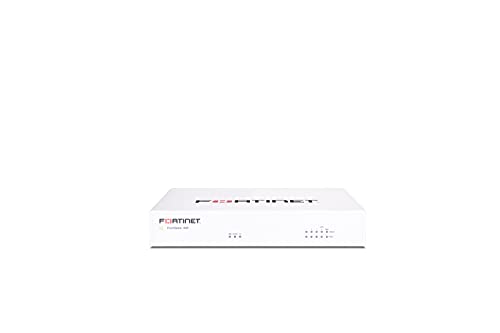
FortiGate-40F Firewall Appliance (FG-40F)

ASUS ExpertWiFi EBG15 Wired VPN Router

Omada ER8411 Enterprise 10G VPN Router

SonicWall TZ270W Wireless Gen7 Firewall
Meet The Standout Selections
The EdgeRouter 4 has been a quiet workhorse in small-network closets for years, and it remains a compelling pick when raw routing muscle matters more than glossy apps. Under the hood it pairs a quad-core MIPS processor with hardware acceleration for offloaded encryption, so VPN tunnels and ACL filtering don’t choke your throughput the way they do on consumer hardware. For a small office running a handful of VLANs, site-to-site links, and QoS rules, that headroom tends to matter more than the missing touchscreen.
Setup is via the EdgeOS web interface or CLI, which is a fair trade for the price. Owners comfortable with command-line tweaking tend to extract the most value; those looking for a phone app experience will be happier elsewhere in this list.
A Favorable Mix
- Multi-gig routing with hardware-accelerated encryption for smooth VPN performance.
- Fanless metal chassis runs cool and silent inside a small wiring closet.
- EdgeOS exposes deep routing, firewall, and policy controls without license fees.
- SFP port lets you bridge straight to a fiber handoff without extra media converters.
Things To Consider
- No integrated wireless, so you’ll need a separate access point for office Wi-Fi.
- No subscription or app dashboard; expect a learning curve on EdgeOS.
- Limited official support channels compared to TP-Link’s or Fortinet’s commercial offerings.
Who It Suits Best
Technically inclined small business owners running wired networks who want carrier-class routing without ongoing license costs.
Skip It When
You want integrated Wi-Fi and app-based management; the ASUS ExpertWiFi EBG15 is a more accessible fit for non-technical shop owners.
Where the EdgeRouter 4 leans on raw silicon, the ER7206 leans on flexibility. The standout feature is a port layout that includes a Gigabit SFP WAN, a dedicated Gigabit WAN, two switchable WAN/LAN ports, and a final Gigabit LAN, giving you up to four simultaneous ISP links on one box. For a small business that can’t afford a single point of failure, that redundancy at this price tier is rare.
It also slots into TP-Link’s Omada SDN ecosystem, so you can manage it alongside Omada switches and access points from a single controller. Compared with the standalone EdgeRouter experience, that centralized control is a genuine quality-of-life upgrade for offices without a dedicated IT person.
Points In Its Favor
- Up to four WAN ports for automatic failover and load balancing across ISPs.
- Omada SDN integration centralizes router, switch, and AP management.
- Supports IPSec, PPTP, and L2TP VPN tunnels for remote staff connections.
- Handles a substantial client count for the price tier.
Worth Noting
- Omada controller software takes time to learn for first-time users.
- Gigabit-only ports; no 2.5G or 10G uplink for multi-gig fiber builds.
- Advanced threat filtering depends on the Omada subscription tier.
Feature Snapshot
Made For
Growing small offices that want redundant ISP links and centralized management without stepping up to enterprise pricing.
Where Another Pick Suits Better
You need 10G uplinks or larger session capacity; the Omada ER8411 is a more future-proof fit for traffic-heavy SMBs.
The Firewalla Purple SE approaches firewall protection from a very different angle than the TP-Link and Ubiquiti options above. There is no web-based CLI to wrestle with, and there are no recurring license fees. Instead, everything lives inside a phone app where you tap to enable intrusion prevention, ad blocking, VPN server hosting, and parental controls. For a solopreneur or a five-person office, that approach dramatically lowers the barrier to meaningful network security.
Deployment is flexible: it can act as your primary router or sit in bridge mode behind an existing gateway. The trade-off is throughput, since the Purple SE caps its intrusion prevention at around 500 Mbps. Most small offices will never approach that ceiling, but gigabit-plus fiber subscribers should look up the list.
A Strong Showing
- App-driven setup removes the need for command-line or web-based configuration.
- No monthly subscription required for core firewall, VPN, and ad-blocking features.
- Continuous behavior-based threat detection flags unusual device activity.
- Compact purple chassis fits unobtrusively on a desk or shelf.
Trade Offs
- IPS throughput caps around 500 Mbps, limiting future-proofing on multi-gig links.
- Simple Mode compatibility varies with your existing router brand.
- Power users may outgrow the app’s simplified rule engine.
Feature Snapshot
Right Fit For
Non-technical small business owners who want serious firewall protection without learning CLI configuration or paying monthly fees.
Not Your Match When
You need multi-gig throughput or VLAN-heavy enterprise segmentation; the Omada ER707-M2 handles those requirements more comfortably.
The Cudy R700 sits in an interesting middle ground. It ships with Cudy’s own firmware for newcomers, but it’s also designed to run full OpenWRT, the open-source router operating system that gives you granular control over VLANs, firewall rules, and quality-of-service policies. For a small IT consultancy or a home-lab enthusiast, that dual personality is genuinely useful.
It also provides five Gigabit Ethernet ports with multi-WAN failover and load balancing. If one ISP goes down, traffic reroutes automatically. Compare that to the EdgeRouter 4, which keeps a similar management depth but lacks the same multi-WAN breadth in this price range.
Benefits That Matter
- Full OpenWRT support unlocks VLAN segmentation and custom firewall rules.
- Up to five WAN connections for ISP redundancy and bandwidth aggregation.
- Automatic failover keeps traffic moving when an upstream link drops.
- Community OpenWRT packages extend functionality beyond stock firmware.
Points To Keep In Mind
- OpenWRT configuration requires networking knowledge beyond casual users.
- No built-in wireless, so an access point is still required.
- Cudy’s own firmware is more limited than its OpenWRT counterpart.
Feature Snapshot
Best Suited To
IT hobbyists and small technical teams who want OpenWRT flexibility without paying enterprise prices.
A Better Fit Elsewhere
You prefer a managed app experience with vendor support; the Firewalla Purple SE is friendlier to non-technical owners.

The ER707-M2 is the natural step up from the ER7206 covered earlier. Where the ER7206 maxes out at gigabit, this model introduces a 2.5G WAN port alongside a 2.5G WAN/LAN port, a Gigabit SFP WAN/LAN port, and four additional Gigabit WAN/LAN ports. As more ISPs deliver multi-gig residential and small-business service, that 2.5G headroom keeps your router from becoming the bottleneck.
A USB 2.0 port supports LTE dongle backup, so you can add a cellular failover path on top of the wired links. The catch is that you’ll want to run the Omada controller software to get the most out of it; standalone mode works, but management gets clunky fast.
Key Advantages
- 2.5G WAN and LAN ports ready for multi-gig fiber or cable tiers.
- LTE dongle support via USB provides cellular failover when wired links drop.
- High concurrent session capacity for busier office environments.
- Omada SDN integration mirrors the ER7206’s centralized management.
Honest Caveats
- LTE backup requires a separate dongle and data plan, adding ownership cost.
- Realized throughput depends on running Omada’s hardware or software controller.
- Advanced features assume familiarity with VLANs and policy routing.
Feature Snapshot
Whose Shelf It Belongs On
Small offices that already use or plan to deploy Omada gear and want 2.5G headroom for current or future multi-gig internet.
Swap It Out When
You need 10G uplinks for a high-traffic backbone; the Omada ER8411 covers that scale with more session capacity to spare.
Fortinet’s FortiGate line is what you’ll find protecting branch offices of large enterprises, and the 40F is the smallest entry point. The hardware itself is a compact, fanless desktop unit with five Gigabit Ethernet RJ45 ports, one dedicated WAN and four internal. That fanless design means it runs silent, which matters when it lives on a desk or in a small shared office.
The honest read is that without a FortiGuard subscription, the 40F functions more like a capable stateful firewall than a full UTM. Many small businesses buy the appliance and add the subscription later as their security needs grow. That modular path keeps the upfront cost approachable while preserving the upgrade runway.
Notable Upsides
- Compact, fanless chassis fits in noise-sensitive office environments.
- Five Gigabit RJ45 ports cover a typical small-office topology.
- Optional FortiGuard subscription adds IPS, antivirus, and web filtering.
- FortiOS supports deep policy controls familiar to enterprise admins.
Softer Spots
- Appliance-only purchase lacks the threat intelligence subscription.
- FortiOS interface has a steeper learning curve than app-driven rivals.
- Total cost climbs quickly once a FortiGuard bundle is added.
Perfect Match For
Small businesses with compliance pressure or IT staff who want an enterprise-grade firewall foundation with a clear upgrade path.
Reach For A Different Pick When
You want built-in Wi-Fi for a clinic or retail counter; the SonicWall TZ270W combines firewalling with wireless in one box.
ASUS leans into the small-business market with the ExpertWiFi line, and the EBG15 is the wired entry point. What sets it apart from the routers earlier in this list is the combination of a Layer 7 firewall, IPS intrusion prevention, and a mobile app for day-to-day management. Shop owners who don’t want to touch a CLI get a clean interface without sacrificing meaningful security features.
Up to three WAN Ethernet ports plus a USB WAN for cellular modems give you flexible uplink choices. As the office grows, the EBG15 also plays nicely with ASUS ExpertWiFi switches and access points, so coverage can scale without replacing the core.
Notable Gains
- Layer 7 firewall inspects traffic by application, not just port.
- IPS intrusion prevention catches common attack signatures out of the box.
- Mobile app provides remote management without a dedicated controller.
- Up to three Ethernet WAN ports plus USB WAN for cellular backup.
Less Ideal Details
- No built-in Wi-Fi, so a separate ASUS access point is required for wireless coverage.
- Layer 7 inspection adds modest latency compared to simpler stateful firewalls.
- App is convenient but offers less depth than full web-UI configuration.
Who Should Grab It
Shop owners and small-office managers who want app-driven security management without hiring a network engineer.
Another Choice May Suit
You want integrated wireless in the same appliance; the SonicWall TZ270W combines firewall and Wi-Fi for a similar audience.
The ER8411 is what you reach for when small business traffic has outgrown gigabit entirely. It pairs a 10G SFP+ WAN/LAN port with a second 10G SFP+ WAN port, a Gigabit SFP WAN/LAN port, and eight Gigabit RJ45 WAN/LAN ports. That gives you up to ten WAN ports in aggregate, plenty for offices running redundant fiber lines plus a cellular fallback.
Two USB 3.0 ports (one of which supports LTE backup) round out the connectivity, and the session capacity climbs into the millions. For an SMB that runs VoIP, video conferencing, and cloud apps across dozens of seats, the headroom shows up the moment multiple people are online at once.
Where It Excels
- 10G SFP+ ports provide genuine multi-gig uplink capacity for modern fiber.
- Massive concurrent session count for offices with heavy simultaneous traffic.
- Up to ten aggregated WAN ports for sophisticated failover topologies.
- USB 3.0 with LTE backup adds cellular redundancy to wired links.
Factors To Consider
- Higher price tier; overkill for offices under ten seats on gigabit links.
- Realized benefits require a 10G-capable modem, switch, and cabling plant.
- Omada ecosystem expectation again; standalone management is functional but limited.
Feature Snapshot
Built With In Mind
Larger small businesses, busy branch offices, and SMBs already running 10G fiber that need headroom to spare.
Look Elsewhere When
Your office tops out at gigabit; the Omada ER707-M2 covers the multi-gig transition at a friendlier price point.
The TZ270W closes the list by combining a wired firewall, deep threat inspection, and integrated wireless radios in a single compact box. SonicWall built the TZ series for small offices and branch locations, and the Gen7 platform adds sandboxing, intrusion prevention, and anti-malware scanning across one appliance. For a dental office, retail counter, or small clinic, that consolidation is genuinely useful.
The 2 Gbps firewall speed figure refers to basic stateful inspection; with full threat protection enabled, throughput drops considerably. That tradeoff is standard across the category, but worth noting before you match it against a multi-gig fiber link.
The Case For It
- Integrated wireless radios remove the need for a separate access point.
- Capture ATP sandboxing helps block zero-day and ransomware payloads.
- Cloud management simplifies oversight across multiple small sites.
- Compact form factor suits reception desks and small back offices.
Potential Compromises
- Full threat-protection throughput is lower than raw firewall throughput.
- Advanced features require an active SonicWall service subscription.
- Wireless radios are 802.11ac Wave 2 rather than the newer Wi-Fi 6 standard.
Who Will Love This
Small clinics, retail counters, and professional offices that want firewall and Wi-Fi in a single managed appliance.
Consider Something Else When
You need higher threat-inspection throughput or modern Wi-Fi 6 coverage; the FortiGate-40F plus a Wi-Fi 6 access point is a more scalable pairing.
What To Weigh Before Buying Firewall Routers for Small Business
Port Count and Multi-WAN Capability
Count the devices that will sit behind the router, then add the ISP links you want online simultaneously. Single-WAN routers work for the smallest offices, but any business that depends on uptime should consider multi-WAN failover, which the ER7206, ER707-M2, and ER8411 all support at varying port counts.
Threat Inspection and Subscription Costs
Many firewalls offer basic stateful filtering for free, then charge a subscription for intrusion prevention, antivirus, and sandboxing. The Firewalla Purple SE bucks that trend with no required fees, while Fortinet and SonicWall lean on annual subscriptions for the deeper feature set. Budget for ongoing costs, not just the hardware price.
Throughput With Features Enabled
Manufacturers quote firewall speeds measured with minimal inspection enabled. Once intrusion prevention and antivirus scanning activate, real-world throughput typically drops significantly. The SonicWall TZ270W and FortiGate-40F in particular need careful sizing if your link is multi-gig.
Management Style and Existing Ecosystem
CLI-driven routers like the EdgeRouter 4 reward technical users, while app-managed options like the Firewalla Purple SE and ASUS EBG15 suit shops without dedicated IT. If you already run Omada switches, sticking with an Omada router simplifies centralized management.
Key Considerations Across These Picks
Where Shoppers Go Wrong
A common mistake is sizing the firewall to current device count rather than projected growth. Adding five new staff next year, a VoIP system, and a cloud backup link can quickly outgrow an entry-level router. Another trap is buying on raw firewall speed alone and ignoring how much throughput survives once threat inspection is enabled, which is the more realistic day-to-day figure.
What The Higher Tier Buys
Stepping up to the Omada ER8411 or FortiGate 40F buys genuine headroom in concurrent sessions, port density, and inspection throughput. For a five-person office, that headroom is wasted; for a thirty-person office running cloud apps and VoIP, it is the difference between a network that hums and one that buckles at lunch hour. Paying up makes sense when session count, multi-gig links, or compliance requirements enter the picture.
Frequently Asked Questions
What is a firewall router for small business?
A firewall router combines internet routing with built-in security features like stateful packet inspection, VPN support, and intrusion prevention, all in one device. It replaces a consumer router while adding protections suited to office traffic and remote workers.
Do small businesses need a dedicated firewall?
Any business handling customer data, processing payments, or supporting remote staff benefits from a dedicated firewall. Consumer routers lack the inspection depth, VPN capacity, and session handling required for these workloads.
How many WAN ports do I need?
Single-WAN suits offices with one ISP and low uptime requirements. Dual-WAN or more is worth it whenever downtime means lost sales, missed calls, or stalled operations, and the router supports automatic failover between links.
Are subscription-based firewalls worth it?
Subscription tiers on Fortinet and SonicWall add intrusion prevention, antivirus, and sandboxing that the appliance alone does not provide. For compliance-driven or customer-data-heavy businesses, those subscriptions are typically worth the ongoing cost.
Can I use a firewall router without IT staff?
Yes. App-managed options like the Firewalla Purple SE and ASUS ExpertWiFi EBG15 are designed for non-technical owners. Larger enterprise appliances from Fortinet and SonicWall generally benefit from at least part-time IT support.
Closing Remarks
The right firewall router depends less on spec sheets and more on the shape of your business today and where it’s headed next. Solo shops get plenty from the Firewalla or ER7206, while growing offices with multi-gig links and dozens of users will appreciate the ER8411 or TZ270W. Match the device to your traffic, your team, and your appetite for ongoing management, and the rest tends to fall into place.




