


6 Best Cable Modem And Router Comboes for 2026: Practical Picks for Faster Home Networks
Trying to replace a separate modem and router setup can save desk space, reduce cable clutter, and make troubleshooting simpler. The trick is matching the combo to your provider, your speed tier, and the size of your home. These six picks cover cable households ranging from modest apartments to busier homes with several screens going at once.
The Shortlist At A Glance

NETGEAR Nighthawk CAX80 Built-in WiFi 6 Router

ARRIS G34-RB Cable Modem Router Combo AX3000

ARRIS Surfboard G54 DOCSIS 3.1 Wi-Fi 7 Router

Arris G18 Cable Modem Router Combo AX1800
ARRIS Surfboard G20 DOCSIS 3.1 Wi-Fi 6 Router AX3000
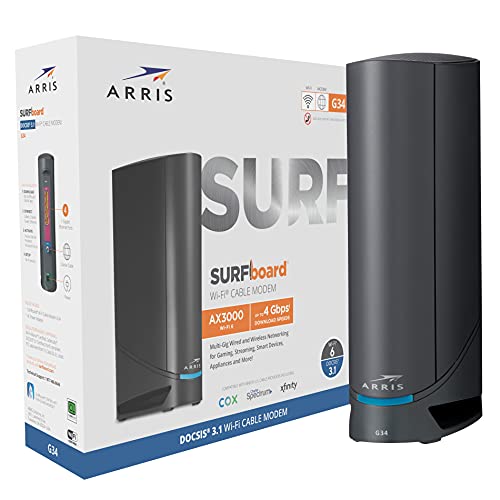
ARRIS Surfboard G34 DOCSIS 3.1 Gigabit Wi-Fi 6 Router
More Details On Our Top Picks
The CAX80 makes sense for a home that already lives on a fast cable tier and needs a single box to handle the load. It supports major cable providers, but it does not fit Verizon, AT&T, DSL, or bundled voice service setups, so the match starts with your provider list.
Its DOCSIS 3.1 cable side and WiFi 6 wireless side point to a higher-capacity setup, which is where this model separates itself from the more modest ARRIS G34-RB and G18. That extra headroom matters most in larger homes, especially with multiple streams, game downloads, and work devices active at once.
Strong Points
- DOCSIS 3.1 gives you a modern cable foundation for higher service tiers.
- WiFi 6 helps spread traffic across phones, laptops, and streaming gear more cleanly.
- Support for plans up to 6Gbps gives ambitious cable setups room to grow.
- The renewed listing can make a premium-class feature set easier to justify.
Things To Consider
- Compatibility stays cable-specific, so the provider check matters before anything else.
- The larger feature set may be more than you need for a small apartment.
- Renewed gear usually rewards careful placement and a tidy setup routine.
Feature Rundown
Who It Suits Best
Tech-comfortable cable households with demanding internet habits will get the most from this setup.
Where A Sibling Pick Shines
ARRIS Surfboard G34 DOCSIS 3.1 Gigabit Wi-Fi 6 Router suits a more ordinary home setup that does not need the CAX80’s larger speed ceiling.
The G34-RB sits in a very useful middle lane, with DOCSIS 3.1 on the modem side and AX3000 WiFi 6 on the wireless side. For a family that streams, scrolls, and works from home without needing a giant speed cushion, that balance often feels more sensible than chasing the biggest number.
Compared with the NETGEAR CAX80, this ARRIS model feels easier to justify for ordinary cable plans, while the G18 offers a simpler, more restrained route for homes that do not need as much wireless capacity. The renewed angle also makes the package feel more practical for a shopper who cares about value but still wants modern networking.
What We Like
- WiFi 6 with AX3000 gives you a healthy step up from basic router hardware.
- DOCSIS 3.1 keeps the cable side aligned with current service expectations.
- The renewed listing may suit a household trying to stretch the budget without going too bare-bones.
- It fits common cable providers, which takes some of the guesswork out of setup.
Room For Improvement
- It is not the right match for non-cable services.
- AX3000 is capable, though heavier homes may still want the higher ceiling of the CAX80.
- Renewed networking gear usually benefits from a quick inspection of cabling and placement after unboxing.
Core Details
Who Will Love This
Cable households that want a sensible middle-ground combo without moving into premium territory will feel at home here.
Another Choice May Suit
ARRIS Surfboard G54 DOCSIS 3.1 Multi-Gig Modem & Wi-Fi 7 Router suits power users who are ready to pay for more wireless headroom.
The G54 is the boldest option in this group, and the Wi-Fi 7 label tells you where its focus sits. Wi-Fi 7 is the newest wireless class here, so it tends to appeal to households that want more future room than the WiFi 6 models provide, especially around heavy streaming and multiple newer devices.
That extra ambition is a clear step beyond the G34-RB, G20, and G18, which makes the G54 the pick for a more demanding network rather than a casual replacement. The trade-off is simple: you are paying for headroom, and that only makes sense when your home actually pushes a lot of traffic.
Highlights
- Wi-Fi 7 gives this model the most forward-leaning wireless spec in the lineup.
- DOCSIS 3.1 keeps the modem side current for cable service.
- BE18000 points to a high-capacity wireless design.
- It suits homes with newer phones, laptops, and streaming gear that can make use of stronger network headroom.
- The all-in-one format keeps the setup cleaner than separate boxes.
Honest Caveats
- The feature level can be overkill for smaller homes with modest internet habits.
- Newer wireless tech makes more sense when your devices are also fairly current.
- You may want to keep the layout tidy, since a premium combo deserves a sensible placement spot.
Spec Overview
Built With In Mind
Households with several active users, newer devices, and a desire for longer-term network headroom are the best fit here.
Skip It When
ARRIS G34-RB Cable Modem Router Combo AX3000 makes more sense for a simpler setup that does not need Wi-Fi 7.
The G18 keeps things straightforward, which is a good thing for many homes. It pairs DOCSIS 3.1 with dual-band WiFi 6 and AX1800, so you get current cable tech without moving into the more aggressive capacity of the G34-RB or G54.
That makes it a sensible fit for everyday streaming, browsing, and work calls, especially in a home where the network does not need to do everything at once. The claim about wide use across many homes also fits the profile here, though the real win is the uncomplicated shape of the package.
Bright Spots
- DOCSIS 3.1 gives the modem side a modern cable baseline.
- Dual-band WiFi 6 helps split traffic between the common 2.4 GHz and 5 GHz lanes.
- AX1800 is a comfortable match for routine streaming and browsing.
- Its simpler profile can be easier to live with in smaller homes or apartments.
Small Caveats
- AX1800 sits below the stronger wireless classes in this roundup.
- It makes less sense for very heavy network use than the CAX80 or G54.
- Like every cable combo here, provider matching deserves a quick double-check before setup.
Details At A Glance
The Right Fit
Apartment dwellers and smaller households that want a clean, practical cable combo will appreciate this one.
Where A Sibling Pick Shines
ARRIS Surfboard G20 DOCSIS 3.1 Wi-Fi 6 Router AX3000 gives you a little more wireless breathing room for busier homes.
The G20 sits in a comfortable middle ground, using DOCSIS 3.1 on the cable side and WiFi 6 with AX3000 on the wireless side. That combo gives you enough muscle for common household habits without pushing into the more aggressive positioning of the G54 or the CAX80.
For busy kitchens, homework corners, and living rooms where several devices stay active, that balance can feel just right. The trade-off is that it still stays in the standard WiFi 6 lane, so homes chasing the newest wireless standard may look higher up the list.
Upsides
- AX3000 gives you a healthy wireless step up for a typical family home.
- DOCSIS 3.1 keeps the cable connection on a current standard.
- It suits mixed use, including streaming, browsing, and regular video calls.
- The all-in-one format helps reduce clutter around your modem shelf or desk.
Areas To Watch
- It does not move into Wi-Fi 7 territory.
- Heavier homes may still prefer the headroom of the CAX80 or G54.
- Renewed or preowned networking gear usually benefits from a careful setup and cable check.
Feature Card
Best Suited To
Families who want a dependable all-purpose cable combo without jumping to premium hardware should look here first.
A Better Fit Elsewhere
ARRIS Surfboard G54 DOCSIS 3.1 Multi-Gig Modem & Wi-Fi 7 Router suits households that want a stronger ceiling for newer devices.
The G34 keeps the same general shape as the G34-RB, but the renewed route gives it a different kind of appeal for cost-conscious shoppers. You still get DOCSIS 3.1 and AX3000 WiFi 6, so the backbone is familiar, practical, and easy to place in a normal cable household.
That makes it a strong fit for someone who wants a capable combo without jumping to the larger-feeling CAX80 or the more futuristic G54. The honest read is that it suits a lot of ordinary homes very well, especially where the internet load is steady rather than extreme.
Best Bits
- DOCSIS 3.1 keeps the modem side current for cable service.
- AX3000 WiFi 6 brings a capable everyday wireless profile.
- The renewed format can make the hardware feel easier to budget around.
- It works with several major cable providers, which helps narrow the setup path.
Points To Note
- Renewed networking gear can benefit from a quick visual check and tidy placement.
- It remains a WiFi 6 model, so it does not aim at the newest wireless class.
- The speed ceiling is more modest than the higher-tier options in this roundup.
Technical Sheet
Whose Shelf It Belongs On
Homeowners and apartment dwellers who want a capable renewed cable combo with sensible wireless headroom will like this one.
Look Elsewhere When
NETGEAR Nighthawk CAX80 Built-in WiFi 6 Router fits the shopper who needs a much higher ceiling for a very demanding connection.
How To Choose The Right Cable Modem And Router Comboes
Start With Your Cable Provider
Compatibility matters more than the spec sheet drama. A combo can look impressive, but it still needs to match your cable provider, and some households also need to avoid models that do not work with voice bundles.
That is why the provider list comes first, before WiFi class or speed ceiling. The CAX80 and the ARRIS models above all lean toward common cable services, while each one still has its own limits.
Match The Combo To Your Speed Tier
Speed support should sit close to your actual plan, not miles beyond it. A home on a moderate tier usually does well with AX1800 or AX3000 hardware, while a faster plan or a busier household can justify DOCSIS 3.1 with a larger wireless ceiling.
The point is not chasing the biggest number. It is making sure the modem side and router side do not become the bottleneck that slows down a plan you already pay for.
Think About House Size And Device Count
Small apartments rarely need the same network muscle as a multi-story home with several people online at once. Dual-band WiFi 6 can be enough for routine streaming and calls, but bigger homes tend to benefit from higher-capacity wireless bands and stronger placement flexibility.
The G18 and G20 fit everyday homes well, while the CAX80 and G54 make more sense once your network starts carrying heavier traffic across more rooms.
Renewed Versus New Hardware
Renewed combos can make sense when you want stronger features without going straight to the priciest tier. The trade-off is simple, you may want to be more careful about condition, cabling, and initial setup than you would be with a fresh out-of-box unit.
That is usually a fair exchange for many cable households. It just helps to keep expectations grounded and choose the model that matches both your plan and your comfort level with setup.
What To Weigh Before You Choose
Traps First Timers Fall Into
Plenty of people focus on WiFi speed and forget provider support. That mistake leads to returns, long setup headaches, or a combo that simply does not fit the service line in the wall.
Another common miss is overspending on capacity the home will never use. A balanced AX3000 or AX1800 unit often feels more sensible than a premium model in a smaller place.
The Upgrade Payoff
Higher-tier comboes usually cost more because of newer wireless standards, higher capacity radios, and stronger cable-side headroom. More advanced units also tend to suit larger homes better, especially where several devices stay active all day.
That extra spend only pays off when your network habits are actually demanding. For lighter use, a midrange model can leave you with a cleaner setup and less regret.
Frequently Asked Questions
Do you need DOCSIS 3.1 for a cable combo?
DOCSIS 3.1 is the more current cable standard in this roundup, so it pairs well with modern service tiers. For most homes, that makes it the safer long-term choice.
Is WiFi 6 enough for a busy household?
Yes, WiFi 6 handles a lot of normal household traffic well, including streaming and video calls. A very busy home with newer devices may still look at Wi-Fi 7.
Are renewed comboes worth considering?
They can be, especially when you want more capability without moving to the highest tier. The trade-off is a little more attention to condition and setup.
What matters more, modem speed or router speed?
Both matter, because the modem connects you to the provider and the router spreads that connection through the home. A strong router cannot fully make up for a weak modem tier, and the reverse is true too.
Can one combo work for every internet service?
No, cable comboes are built around cable internet service. DSL, fiber, and bundled voice setups need a different match.
Final Verdict
You get the best results here by matching the combo to the home, not by chasing the biggest spec on the page. The NETGEAR CAX80 suits heavy cable use, the ARRIS G34-RB and G20 sit in the useful middle, and the G54 is the boldest step forward. Smaller homes can stay with the G18, while the renewed G34 gives you a smart value angle. Pick the one that fits your provider, your space, and how many screens stay active at once.




