


Swapping a separate modem and router for one combined unit can trim cable clutter and make setup feel less fussy. That matters in a home with streaming TVs, work laptops, game consoles, and phones all reaching for bandwidth at once. The picks below focus on cable modem router combos that fit common cable plans, with a mix of DOCSIS 3.0 and DOCSIS 3.1 options for different speed needs and budgets.
Quick Look At The Shortlist
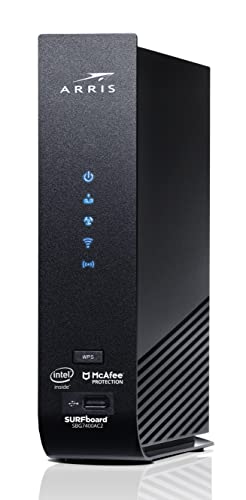
ARRIS Surfboard SBG7400AC2-RB DOCSIS 3.0 Cable Modem and AC2350 Wi-Fi Router

NETGEAR Nighthawk Cable Modem with Built-in WiFi 6 Router (CAX80)

NETGEAR Nighthawk DOCSIS 3.1 Mid/high-Split Cable Modem (CM3000)

Arris (G18) Cable Modem Router Combo Fast DOCSIS 3.1 WiFi 6 (AX1800)
ARRIS Surfboard G20 DOCSIS 3.1 Cable Modem and Wi-Fi 6 Router AX3000

NETGEAR Nighthawk Modem Router Combo (CAX30) DOCSIS 3.1 WiFi 6 Router AX2700

Arris (G36-RB) Cable Modem Router Combo Fast DOCSIS 3.1 WiFi 6 (AX3000)

Motorola MG7550 Modem Wi-Fi Router Combo with Power Boost AC1900
More Details On Our Top Picks
For a home that still runs on a solid DOCSIS 3.0 cable plan, this ARRIS combo keeps things simple. Four Gigabit Ethernet ports matter more than they sound, because a desktop, game console, TV box, and mesh node can all plug in without a switch.
The AC2350 Wi-Fi rating points to a fairly capable dual-band wireless setup, and that helps in apartments or smaller houses where you want one box to cover a lot of daily traffic. The trade-off is age, since newer DOCSIS 3.1 picks later in this list are the better long-term match for faster service tiers.
Strong Points
- Four wired ports make desk and entertainment setups easier.
- AC2350 wireless suits everyday streaming and browsing.
- ARRIS has a long-running reputation in cable hardware, which matters when you want a familiar setup path.
- Renewed status can appeal to budget-minded households that still want a full combo unit.
Things To Consider
- DOCSIS 3.0 is the older standard, so it fits modest plans better than the faster tiers above.
- The refurbished route can mean a little more attention to condition and return handling.
- Users with many Wi-Fi 6 devices will probably prefer a newer unit from this list.
Feature Snapshot
Who It Suits Best
You fit this model well if you want a familiar cable combo for a modest-speed household with several wired devices.
Where A Sibling Pick Shines
NETGEAR Nighthawk DOCSIS 3.1 Mid/high-Split Cable Modem (CM3000) makes more sense for you if your cable plan sits in a faster tier and you want more room to grow.
Plans that push hard on download speed call for a stronger front end, and this Nighthawk leans that way with DOCSIS 3.1 plus WiFi 6. WiFi 6, the newer wireless standard with better efficiency for busy homes, matters most when phones, laptops, and streaming boxes are all active at once.
Its cable-plan ceiling reaches much higher than the older DOCSIS 3.0 entry from ARRIS, so this fits households that expect more from the internet line itself, not just the router side. The honest read is that it’s a better fit for a fast, modern home than for a simple one-room apartment.
Highlights
- DOCSIS 3.1 gives you a current cable modem standard.
- WiFi 6 helps the network handle more active devices with less congestion.
- High plan support makes it a stronger match for faster service tiers.
- Nighthawk hardware usually attracts homes that want a polished, performance-first setup.
Worth Noting
- It only fits cable providers, so DSL and bundled voice setups are out.
- The speed ceiling is wasted on slower internet plans.
- Renewed status means the condition path matters more than with a brand-new unit.
Technical Sheet
Who Will Love This
You fit this pick best if your home runs a fast cable plan and you care about strong wireless capacity as much as modem speed.
Skip It When
ARRIS Surfboard SBG7400AC2-RB makes more sense for a smaller setup that values extra Ethernet ports and doesn’t need this much headroom.
This CM3000 is the one that makes sense when your cable plan is already moving into a faster lane and you want a modem built for that reality. Mid/high-split support refers to network layouts that can raise upstream capacity, so it matters most for households that send as much as they receive.
Compared with the full combo units above, this is more about modem strength than all-in-one convenience. That makes it a smart choice for someone using a separate router already, or planning to pair it with a stronger wireless system later.
Bright Spots
- Mid/high-split support lines up with newer cable network upgrades.
- DOCSIS 3.1 gives you the modem standard expected for faster plans.
- Its 2.5Gbps plan support makes it fit more ambitious home internet setups.
- Separate modem-first design gives you more freedom on the router side.
Points To Note
- You still need a separate router for Wi-Fi coverage.
- It makes less sense for slower plans that never use the extra capacity.
- The higher-end network focus can feel like overkill for a compact household.
Core Details
Built With In Mind
You suit this modem best if your internet plan is already fast and you want room for future cable network changes.
Look Elsewhere When
NETGEAR Nighthawk Cable Modem with Built-in WiFi 6 Router (CAX80) fits better for you if you want the router side built into the same unit.
The G18 sits in a comfortable middle zone, with DOCSIS 3.1 on the modem side and WiFi 6 on the wireless side. ARRIS also points to broad usage across millions of homes, which makes this feel like a plainspoken option for people who want a familiar layout without chasing the flashiest spec sheet.
AX1800 is a wireless rating that suggests a more modest ceiling than the AX3000 and AX6000 entries below, so this one suits steady everyday use more than heavier network loads. In a busy house, that trade-off is usually fine as long as you’re not trying to cover a large space with wall-to-wall speed.
What We Like
- DOCSIS 3.1 keeps it aligned with modern cable service.
- WiFi 6 helps it stay practical for daily device traffic.
- The combo format saves you from matching a separate modem and router.
- Broad ISP compatibility makes setup feel less narrow.
Small Caveats
- AX1800 is more modest than the faster wireless classes in this list.
- Large homes may still want extra Wi-Fi coverage from a mesh system.
- It is better suited to steady use than to very heavy multi-user loads.
Feature Card
The Right Fit
You fit this combo well if you want a straightforward all-in-one unit for normal streaming, browsing, and home office use.
A Better Fit Elsewhere
ARRIS Surfboard G20 makes more sense for you if you want more wireless headroom and are willing to step up to AX3000.
The G20 pushes further than the G18 with AX3000 wireless, and that extra room matters in homes where several devices stay active at once. AX3000 indicates a stronger wireless class than AX1800, so you get a better fit for households that juggle streaming, gaming, and work traffic through the same box.
That said, a stronger spec sheet only pays off when your internet plan and home layout can use it. In a smaller apartment, this can feel like more hardware than you need, but in a busy house it has a sensible amount of headroom.
Reasons To Buy
- DOCSIS 3.1 keeps the modem side current.
- WiFi 6 AX3000 gives you more wireless capacity than the AX1800 pick above.
- The combo setup reduces clutter and simplifies placement.
- It suits homes where several people connect at the same time.
Room For Improvement
- Its stronger wireless class may be more than a small place needs.
- The extra capability only helps when your service and home layout can use it.
- Large homes may still want a mesh system for full coverage.
Details At A Glance
Perfect Match For
You suit this model best if your home has several active devices and you want a little extra wireless breathing room.
Reach For A Different Pick When
NETGEAR Nighthawk Cable Modem with Built-in WiFi 6 Router (CAX80) is the better fit for you if you want a more performance-forward NETGEAR combo.
AX2700 sits between the more modest AX1800 and the stronger AX3000 class, and that middle ground is exactly why this combo makes sense for many homes. For a household that wants modern WiFi 6 without stepping all the way to the most aggressive tier, it lands in a very practical spot.
Like the G20, it uses DOCSIS 3.1, so the modem side is current enough for newer cable service plans. The trade-off is plain enough, since the wireless spec is not as roomy as the higher-end Nighthawk CAX80 above.
Upsides
- DOCSIS 3.1 keeps it aligned with current cable service.
- WiFi 6 brings a more modern wireless baseline.
- AX2700 offers a nice middle ground for mixed-use homes.
- The combo format keeps the setup compact and tidy.
Softer Spots
- It gives up some wireless headroom versus AX3000 and AX6000 picks.
- Renewed status can make condition checks more important.
- Homes with heavy device loads may still want more capacity.
Quick Facts
Whose Shelf It Belongs On
You fit this combo best if you want a sensible midrange setup that feels current without moving into the most demanding class.
Swap It Out When
ARRIS Surfboard G20 is the better fit for you if you want a little more wireless headroom and a stronger overall feature set.
This renewed G36-RB gives you a DOCSIS 3.1 and WiFi 6 combo at an approachable angle, which is useful when you want modern networking without paying for the newest model every time. The AX3000 wireless class places it above the G18 and alongside the G20, so it has enough breathing room for busy daily use.
One thing worth considering is the renewed path itself, since that makes condition and handling more relevant than they are on a sealed new unit. Still, for households that want a current-feeling combo and can live with the refurb route, it has a sensible profile.
Best Bits
- DOCSIS 3.1 keeps it current on the modem side.
- WiFi 6 AX3000 gives it strong everyday wireless capacity.
- The combo design keeps cables and shelves cleaner.
- Renewed pricing path can make the spec mix easier to reach.
Minor Gripes
- Renewed units can take a little more checking on arrival and setup.
- AX3000 is strong, but not the highest class in this list.
- Households with very large floor plans may still need extra coverage gear.
Core Details
Who Should Grab It
You fit this pick well if you want a current combo unit with strong everyday capacity and are comfortable with the renewed route.
Where A Sibling Pick Shines
ARRIS Surfboard G20 is the cleaner fit for you if you want the same brand family but a newer, more feature-rich take.
The MG7550 leans on the older DOCSIS 3.0 standard, so it fits the kind of cable plan where simplicity matters more than chasing the newest spec sheet. AC1900 Wi-Fi keeps it in a familiar middle zone, which is fine for a smaller home or a setup that doesn’t need the extra room of WiFi 6.
Compared with the newer ARRIS and NETGEAR units above, it asks for less from your internet plan and gives less back in future headroom. That can actually be a fair trade for basic streaming, schoolwork, and everyday browsing, especially when you want a straightforward replacement.
Positives
- DOCSIS 3.0 keeps the setup simple for older cable plans.
- AC1900 Wi-Fi covers normal home use without much fuss.
- Power Boost branding suggests a signal-minded design for ordinary rooms.
- It can feel easier to match with modest networking needs.
Areas To Watch
- It trails the DOCSIS 3.1 models in long-term headroom.
- WiFi 6 alternatives above offer more room for crowded device lists.
- It makes the most sense for basic plans, not ambitious upgrades.
Spec Overview
Made For
You fit this model best if you want a familiar cable combo for everyday use and your internet plan stays on the modest side.
Another Choice May Suit
ARRIS Surfboard SBG7400AC2-RB is the stronger fit for you if you want extra Ethernet ports and a somewhat more capable wireless profile.
How To Choose The Right Cable Modems With Router
Start With Your Cable Plan
Your internet tier should drive the choice before anything else. DOCSIS 3.0 suits older, lighter plans, while DOCSIS 3.1 gives you more room for modern cable service and faster speed tiers.
That difference matters in real life, because an overbuilt combo rarely helps a small apartment on a modest plan. A household on a faster plan, though, can feel boxed in by an older modem long before the Wi-Fi side becomes the problem.
Match Wi-Fi Class To Household Traffic
WiFi 6, also called 802.11ax, is the newer wireless standard in this list, and it handles crowded homes more gracefully than older AC-only gear. AX1800, AX2700, AX3000, and AX6000 are shorthand for wireless class, not a promise of real-world speed on every device.
In practical terms, higher wireless classes help when several phones, laptops, TVs, and consoles are active together. Smaller homes often do fine with a midrange class, while busy homes with multiple heavy users benefit from the extra headroom.
Count The Wired Ports And The Coverage Plan
Four Gigabit Ethernet ports can matter as much as wireless strength, especially around desks, game consoles, and streaming boxes. A combo with fewer ports may still work well, but you could end up adding a switch, which means another device and another cable run.
Coverage deserves a sober look too. A single combo box is tidy, yet larger floor plans or thick walls often call for mesh nodes or an access point, and that’s where a modem-router combo becomes part of a broader setup rather than the whole story.
A Quick Reality Check Before You Decide
Where Shoppers Go Wrong
Provider fit is the first place trouble shows up. Cable modem router combos only work with cable internet, so DSL and bundled voice services need a different route.
The second slip-up is overbuying for a plan that never reaches the hardware’s ceiling. A fast AX6000 combo can be overkill for a simple one-bedroom setup, while an older DOCSIS 3.0 unit can feel cramped in a house with a higher-tier plan.
What The Higher Tier Buys
Higher-tier models usually cost more because they bundle newer modem standards, stronger wireless radios, and more capable chipsets in the same enclosure. That extra engineering shows up in better support for busy homes, faster cable tiers, and more graceful handling of many connected devices.
The upgrade pays off most when your plan is already fast, your household has several active users, or you want to keep the same unit for a longer stretch before the network grows around it. For a lighter use case, the added capability can be nice but not necessary.
Frequently Asked Questions
Do Cable Modems With Router Work With Every Internet Provider?
No, these units are for cable internet service, not DSL or most bundled voice setups. You still need to match the model to the provider list and service type.
Is WiFi 6 Worth It For A Small Home?
WiFi 6 helps most when several devices connect at the same time. In a very small home with light use, an older Wi-Fi class can still be enough.
Should You Choose DOCSIS 3.0 Or DOCSIS 3.1?
DOCSIS 3.1 is the better long-term choice for newer and faster cable plans. DOCSIS 3.0 can still make sense for older, lower-speed service.
Do Combo Units Need Much Setup Space?
They usually need less space than two separate boxes, which helps on a shelf or desk. Ventilation still matters, so don’t tuck them tightly into a closed cabinet.
Are Renewed Units A Reasonable Choice?
They can be, especially when you want a stronger spec mix without stepping up to a new premium model. Condition handling matters more, so the listing details deserve a close look.
Final Thoughts
You get the best results from a cable modem router combo when the hardware matches your plan, your floor space, and the number of devices that stay online at the same time. The ARRIS and NETGEAR picks above cover very different needs, from simple DOCSIS 3.0 setups to faster DOCSIS 3.1 homes with WiFi 6. For a balanced purchase, start with your cable tier first, then choose the wireless class that fits your daily routine. That order keeps the whole setup feeling calm instead of crowded.




