


Choosing a combined router and modem can save you from stacking two boxes, two power cords, and two sets of settings. That matters in a busy home, a small apartment, or a setup where you just want the internet to behave without a long installation routine. The right combo also depends on your cable provider, your home size, and how many devices fight for bandwidth at once. You’ll see a mix of renewed cable gateway units and standalone routers here, because different homes need different kinds of network control.
The Shortlist At A Glance

NETGEAR Nighthawk CAX30-100NAR


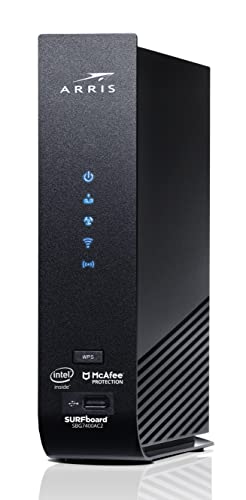
ARRIS Surfboard SBG7400AC2-RB

NETGEAR Nighthawk CAX80

NETGEAR Nighthawk C7000

GL.iNet Flint 3e BE6500

More Details On Our Top Picks
The CAX30-100NAR sits in a useful middle ground for cable homes that want a single box instead of a separate modem and router. Its WiFi 6 platform and DOCSIS 3.1 support give it a current-generation feel, while the renewed listing keeps it aimed at practical setups rather than flashy extras. For daily streaming, work calls, and a handful of devices, that balance is the point.
Compared with the older DOCSIS 3.0 options later in this list, this model makes more sense for homes that expect a longer service runway. The trade-off is straightforward, renewed gear can be a smart value move, but you still want to be comfortable with that format and with matching the unit to your cable provider. Nothing fancy here, just a sensible network hub for normal households.
What We Like
- WiFi 6 brings a more current wireless standard to the home network.
- DOCSIS 3.1 suits cable plans that need newer modem-side support.
- One combined unit means less cable clutter around the shelf or desk.
- Good fit for households that stream, work, and game at the same time.
Points To Note
- Renewed hardware asks you to be comfortable with pre-owned condition.
- Provider compatibility still needs a careful check before setup day.
Feature Rundown
Who It Suits Best
Busy cable households that want a current combo unit without chasing the most extreme feature set will get the most out of this one.
Where A Sibling Pick Shines
NETGEAR Nighthawk C7000 suits you better for a simpler DOCSIS 3.0 setup, especially where older service tiers still make sense.
The SBG8300-RB pushes a little harder on router performance than the first pick, especially with AC2350 WiFi and four OFDM channels. OFDM means Orthogonal Frequency Division Multiplexing, a cable-tech approach that helps the modem side organize traffic more efficiently. For households that keep several screens active at once, that extra headroom can feel helpful.
You’ll notice the same cable-provider mindset as the NETGEAR CAX30, but this Arris unit leans into speed class and connection density rather than a more compact feature story. The honest read is that it suits cable homes that want a stronger all-in-one box for busier evenings, though renewed condition still deserves a steady eye. It’s the kind of unit that makes sense when the network has to carry its share of the load.
Bright Spots
- DOCSIS 3.1 keeps it aligned with newer cable service tiers.
- AC2350 WiFi gives it a stronger wireless profile than older AC1900 picks.
- Four OFDM channels help the modem side handle traffic more efficiently.
- All-in-one design works well in homes that want fewer devices on the shelf.
Softer Spots
- Renewed hardware means condition can vary more than a brand-new unit.
- Setup still depends on your provider allowing the model on its network.
Core Details
Who Will Love This
Cable households with several active users and a preference for a more muscular combo box will be most comfortable here.
Another Choice May Suit
NETGEAR Nighthawk CAX30-100NAR fits better for anyone who wants a newer WiFi 6-based path with a slightly cleaner upgrade story.
This one changes the conversation, because it’s a router only, not a modem-router combo. That makes it useful for anyone whose modem is already handled elsewhere, or for homes that want to keep the gateway hardware separate from the WiFi layer. With AX1800 speed, dual-band operation, and coverage listed up to 1,500 square feet, it’s built for a modest home footprint.
Compared with the combined units above, the R6700AX is easier to think of as a wireless upgrade path rather than a full internet gateway. The included expert help can be reassuring during setup, although the router-only format means it won’t replace your modem by itself. That split matters most for apartment setups, starter homes, and anyone who wants fewer moving parts.
Positives
- Router-only design keeps the setup focused on WiFi coverage.
- AX1800 is a sensible fit for everyday home internet use.
- Coverage up to 1,500 square feet suits smaller houses and apartments.
- Support for up to 20 devices helps in device-heavy homes.
Areas To Watch
- You still need a separate modem, so it does not cover every setup by itself.
- The coverage figure suits moderate spaces more than larger multi-floor homes.
Details At A Glance
Built With In Mind
Apartment dwellers, starter-home setups, and anyone replacing only the WiFi side of an existing network will get the clearest value from this router.
Skip It When
ARRIS G34-RB is the more direct fit for someone who needs modem and router functions together for a cable connection.
The SBG7400AC2-RB leans into older DOCSIS 3.0 territory, which makes it a different kind of cable combo than the newer WiFi 6 and DOCSIS 3.1 units above. That older standard can still be useful in homes with service plans that do not call for the latest modem platform. Four 1 Gbps ports also make it friendlier for wired gear around a desk, console, or media cabinet.
Because it’s refurbished, the value proposition depends partly on how comfortable you are with that format. The practical upside is clear enough, especially for homes with a few wired devices that benefit from direct connections, but you give up the newer feature set found in the CAX30 or CAX80. It’s a grounded pick for straightforward cable use, not a bragging-rights machine.
Best Bits
- Four wired Ethernet ports suit desks, game consoles, and media devices.
- AC2350 Wi-Fi gives it a stronger wireless profile than basic DOCSIS 3.0 combos.
- Works with several major cable providers, which helps simplify matching.
- The combo format reduces the amount of separate gear you need to manage.
Small Caveats
- DOCSIS 3.0 is older than the newer 3.1 class used by later picks.
- Refurbished condition can mean you should check cosmetic wear carefully on arrival.
Feature Snapshot
Whose Shelf It Belongs On
Homes that still run a practical DOCSIS 3.0 cable plan and want multiple wired connections will feel at home with this combo.
Reach For A Different Pick When
NETGEAR Nighthawk CAX30-100NAR makes more sense for a home that wants WiFi 6 and DOCSIS 3.1 in one newer package.
The CAX80 is the biggest step-up style choice in this list, aimed at cable homes that need more network headroom than the lower-tier combos. It’s built for major cable providers and for plans up to 6Gbps, which puts it in a different bracket from the more modest picks above. That makes it a fit for households with many devices, heavy streaming, and a lot of simultaneous traffic.
There’s an important catch, though, it does not work with Verizon, AT&T, CenturyLink, DSL services, satellite bundles, or bundled voice service. That kind of compatibility line is exactly why this model deserves careful checking before you bring it home. For the right cable setup, it offers serious breathing room, almost like giving the network a wider hallway.
Reasons To Buy
- DOCSIS 3.1 keeps it aligned with current cable modem expectations.
- AX6000 WiFi 6 speed class gives it a very roomy wireless profile.
- Support for cable plans up to 6Gbps suits demanding home networks.
- Good match for large households with many active devices.
Honest Caveats
- Provider compatibility is narrower than some simpler combo units.
- It does not fit non-cable services or bundled voice arrangements.
Key Specs
Perfect Match For
Large cable households with many devices and a plan that can make use of extra modem and router headroom will get the most out of this unit.
Look Elsewhere When
ARRIS G34-RB is the easier fit for a more straightforward DOCSIS 3.1 cable setup without the same compatibility fine print.
The C7000 is the familiar middle-of-the-road cable combo, and that’s exactly why it belongs here. Its AC1900 WiFi and DOCSIS 3.0 support are older than the WiFi 6, DOCSIS 3.1 models ahead of it, but many normal homes still find that mix perfectly serviceable. For standard streaming, general browsing, and a couple of wired gadgets, it stays easy to understand.
The attraction is simplicity, not headline-grabbing speed. You also get the convenience of a combined unit, which matters in homes where the networking shelf already feels crowded. The trade-off is that it lacks the newer standards found in the CAX30 or G34-RB, so it suits a more conventional cable plan better than a cutting-edge one.
Highlights
- AC1900 keeps the wireless side respectable for everyday use.
- 24×8 channel layout gives it a familiar cable-network profile.
- Combo design keeps modem and router duties in one enclosure.
- A straightforward fit for homes that want less setup complexity.
Room For Improvement
- DOCSIS 3.0 is older than the newer cable standards above.
- Not the strongest match for homes chasing higher-capacity service tiers.
At A Glance
Best Suited To
Households that want a plain, dependable combo for routine internet use will find the C7000 easy to live with.
Swap It Out When
NETGEAR Nighthawk CAX30-100NAR is the better call for anyone who wants WiFi 6 and DOCSIS 3.1 in one newer unit.
The Flint 3e stands apart because it’s a Wi-Fi 7 router, not a combined modem-router unit. That makes it a better fit for homes that already have a modem and want more wireless speed, more modern multi-device handling, and VPN support in one router. MLO, or Multi-Link Operation, and 4K-QAM are the kind of Wi-Fi 7 features that matter most when your network stays busy with gaming, streaming, and video calls.
Compared with the router-only NETGEAR R6700AX, this GL.iNet pick is the more ambitious option for users who want a newer wireless standard. The catch is obvious, it does not replace a cable modem, so it belongs in a different kind of setup. For power users and tech-forward homes, that split can be a strength rather than a limitation.
Plus Points
- Wi-Fi 7 support gives you a very current wireless platform.
- BE6500 class points to high throughput potential.
- MLO can help newer devices use the connection more efficiently.
- VPN support adds flexibility for privacy-conscious home networking.
- Good fit for gaming, streaming, and video calls happening together.
Trade Offs
- Router-only design means you still need a separate modem.
- The feature set can be more than casual users need.
Technical Sheet
Who Should Grab It
Tech-savvy homes with a separate modem and a need for stronger wireless performance will get the clearest payoff here.
Not Your Match When
ARRIS G34-RB is the easier choice for someone who wants the modem and router combined in one cable-ready box.
The G34-RB is a clean fit for cable homes that want DOCSIS 3.1 and WiFi 6 without wandering into the more aggressive price-and-performance tier of the CAX80. Its AX3000 class is a useful step up from more modest router combos, and the one-box layout keeps installation straightforward. That balance makes sense for families and roommates who just want dependable network hardware with fewer moving parts.
Against the older ARRIS Surfboard SBG7400AC2-RB, this model brings a newer wireless and modem base, which is the real reason to consider it. It still needs the usual provider match check, so the convenience comes from getting the right combo for your plan rather than from any magic shortcut. In plain terms, it’s a sensible cable gateway for everyday use.
What We Like
- DOCSIS 3.1 gives it a modern cable modem base.
- WiFi 6 AX3000 is a comfortable fit for busy home traffic.
- Combined design cuts down on separate boxes and wiring.
- Good middle-ground choice for households that want current standards without going extreme.
Minor Gripes
- Compatibility still depends on your cable provider list.
- It is not the most advanced option in this roundup.
Feature Card
The Right Fit
Households on cable service that want a current, easy-to-grasp combo unit will find the G34-RB a comfortable match.
Where A Sibling Pick Shines
NETGEAR Nighthawk CAX80 suits you better for a larger cable setup that needs more speed ceiling and broader network headroom.
How To Choose The Right Combined Router And Modems
Start With Your Service Type
Cable compatibility comes first because a combo unit only helps when it matches the line coming into your home. DOCSIS 3.1 is the newer cable modem standard in this roundup, while DOCSIS 3.0 still works for many plans that don’t need the latest platform. Match the unit to your provider before you think about speed tiers or extra ports.
That also explains why the list separates true combined units from router-only models like the NETGEAR R6700AX and GL.iNet Flint 3e BE6500. Those work well in homes where a modem already exists, but they do not replace the cable gateway part. The cleanest setup starts with the service you already pay for.
Match Speed To Real Household Use
Speed labels such as AX3000, AX6000, or BE6500 describe the class of the wireless hardware, not a promise of real-world throughput. For a small apartment or a single working adult, AX1800 or AC1900 may feel entirely reasonable. Larger homes with lots of phones, TVs, and game consoles benefit more from the higher tiers.
The trade-off shows up in cost and in complexity. Higher-capacity models usually bring stronger radios, newer standards, or more flexible handling of multiple devices, but many homes won’t use every bit of that headroom. Paying more makes sense when your network gets crowded every evening.
Look At Ports, Placement, And Aging
Wired ports matter more than many shoppers expect, especially for consoles, desktop PCs, and media gear. Four Ethernet ports, like the ARRIS Surfboard SBG7400AC2-RB, can save you from adding another switch later. A single combined box also keeps the network shelf tidier, which matters in tight rooms.
Renewed hardware can be a sensible route, but it asks for more patience with condition and return handling. Newer standards also tend to age more gracefully, since modem support and WiFi features stay useful longer. For most homes, the best choice is the one that fits the next few years, not just the next weekend.
A Quick Reality Check
Mistakes Worth Dodging
One common slip is buying a combo unit without checking provider approval, then finding out setup stalls on day one. Another is choosing a modem-router for speed alone and ignoring the number of wired ports, the home layout, or the need for a separate modem in router-only models. A neat spec sheet can still be the wrong fit for your wall jack.
Also watch the gap between a current standard and an older one. DOCSIS 3.0 still has a place, but homes with newer cable plans usually do better with DOCSIS 3.1. The point is fit, not chasing the biggest label on the box.
The Upgrade Payoff
Money tends to go into newer modem standards, stronger WiFi radios, wider device support, and better traffic handling. That matters most in homes where streaming, downloads, and calls happen at the same time. The upgrade is less about bragging rights and more about fewer slowdowns during busy hours.
For smaller homes, the extra spend may not change day-to-day life much. For larger households, though, the jump from an older AC1900 combo to a WiFi 6 or Wi-Fi 7 option can feel well chosen. Think of it as buying breathing room, not just raw speed.
Frequently Asked Questions
Do Combined Router And Modems Work With Every Internet Provider?
No, compatibility depends on the service type and the provider’s approved equipment list. Cable households need a model built for cable service, while DSL, fiber, and bundled voice setups often need something different.
Is DOCSIS 3.1 Worth It For A Home Network?
DOCSIS 3.1 is the better long-term fit for most cable plans in this roundup. It gives you a more current modem base than DOCSIS 3.0, which matters more as plans and device counts grow.
What’s The Main Benefit Of A Combo Unit?
You get fewer separate boxes, fewer cables, and one place to manage your network. That often makes setup and shelf space easier to live with.
Should You Choose WiFi 6 Or Wi-Fi 7?
WiFi 6 is the sensible sweet spot for many homes and already covers a wide range of everyday use. Wi-Fi 7 makes more sense for newer, busier, or more performance-focused networks.
Are Renewed Units A Sensible Choice?
They can be, especially when you want a known model at a more practical entry point. You just want to be comfortable with pre-owned condition and check the return terms carefully.
Closing Thoughts
You have a clear path now: match the modem standard to your service, match the wireless class to your home size, and only pay for extras that you’ll actually use. The newest gear is useful, but the smartest choice is still the one that fits your provider, your rooms, and your daily habits. For many homes, that means a current DOCSIS 3.1 combo; for others, a simpler router-only upgrade or an older cable unit still makes sense. Pick the setup that keeps your network quiet in the background, which is usually the nicest thing a home connection can do.




