


Getting into engraving usually starts the same way: a gift idea, a side project, then a rabbit hole of specs you didn’t know existed. The right first machine makes that climb painless instead of frustrating. This roundup covers five options spanning budget diode lasers, a CNC router, and one compact dual-laser marker, plus a leveling tool that earns its spot in any maker’s setup. Each entry breaks down what it does well, where it falls short, and who should actually spend their money on it.
A Side-By-Side Look

Twotrees TTS-55 Pro Laser Engraver 5500mW

Alloyman 4× 360° Self Leveling Laser Level with Tripod

FoxAlien Masuter Pro 3-Axis CNC Router Machine
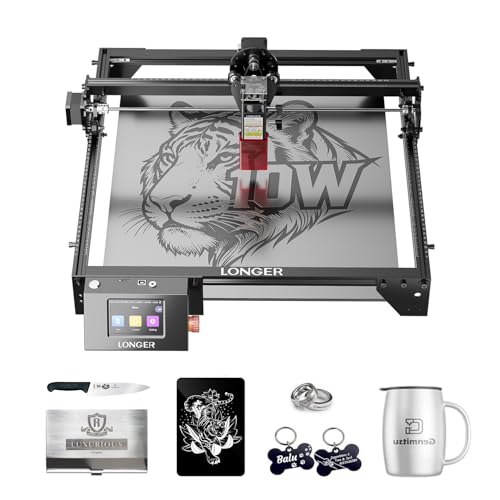
Longer RAY5 Laser Engraver Cutter 15.75″×15.76″

xTool F1 2-in-1 Dual Laser Engraver
Inside Each Recommended Option
Most people dipping a toe into engraving don’t want to sink serious money before knowing whether the hobby sticks. That’s exactly the gap this Twotrees fills. Its aluminum-and-plastic frame keeps weight and cost down while still holding the laser head steady enough for clean lines on wood, leather, and coated metals.
The Pro refresh adds an air-assist nozzle mount, which matters more than it sounds. Air assist blows a stream of air at the cut point, clearing smoke so edges come out darker and crisper rather than scorched.
What Earns Its Place
- Gentle entry price leaves room in your budget for material scraps to practice on
- Aluminum frame sections resist flex better than all-plastic rivals at this tier
- Built-in air-assist nozzle support means cleaner cuts without aftermarket add-ons
- Red laser shield helps you preview placement safely before committing to a burn
Things To Consider
- A 5.5W output handles engraving well but will feel slow on thick hardwoods; owners commonly report needing multiple passes
- Plastic joints in the frame benefit from occasional re-tightening as vibration works them loose over months of use
Key Specs
Who Should Grab It
Hobbyists making their first engraved coasters, keychains, and signs who want capable hardware without a steep commitment.
Where A Sibling Pick Shines
Anyone planning to sell thicker wood or acrylic pieces should step up to the Longer RAY5, whose dual-beam design cuts far deeper.
No engraving bench is complete until something on it is actually level, and this Alloyman covers that job across an entire room. Instead of a single beam, it projects sixteen green lines in four full 360-degree planes, wrapping walls, floors, and ceilings simultaneously. Tile setters and cabinet installers rely on this kind of coverage because it removes the constant repositioning a single-line unit demands.
Self-leveling means the unit finds plumb on its own once you set it down, and the included tripod gets the lines to working height right away. Green beams also read noticeably brighter than red ones under shop lighting, which you’ll appreciate mid-project.
What Pays Off
- Four 360° planes let you align shelving, tile, and fixtures in one setup session
- Tripod included, so there’s no hunting for a compatible stand on day one
- Green lines stay visible in brighter rooms where red lasers wash out
Small Caveats
- The battery needs firm seating to keep the unit stable; a loose cell causes intermittent shutdowns some owners report
- Manual mode silences the leveling alarm, which is handy indoors but easy to forget you’ve enabled
The Right Fit
DIY renovators and workshop owners who hang, mount, or tile often and want one tool handling every alignment task.
Swap It Out When
Pure engraving hobbyists with no renovation plans will get more value from the Twotrees TTS-55 Pro instead.
Laser engravers burn surfaces; a CNC router like this FoxAlien physically carves them. Where the Twotrees TTS-55 Pro marks a board, the Masuter Pro mills grooves, pockets, and relief designs into wood, acrylic, MDF, and nylon. For sign makers and model builders, that difference is the whole point.
The all-metal structure paired with a linear-rail Z-axis keeps the cutting bit from wandering, which is what separates usable detail work from wobbly frustration. A dust-resistant controller box with an accessible emergency stop rounds out a design clearly aimed at people learning in a garage or spare room.
A Few Strong Suits
- All-aluminum framework delivers the rigidity needed for repeatable, precise passes
- Linear rail on the Z-axis improves depth consistency across long jobs
- Handles a wide material range, from soft nylon to denser hardwood stock
- Emergency stop within reach adds confidence during your early learning runs
Points To Note
- CNC carving produces chips and dust, so plan for cleanup and eye protection in shared spaces
- The learning curve around feeds, speeds, and bit selection is steeper than point-and-burn lasers
Core Details
Made For
Hands-on hobbyists ready to graduate from surface engraving to true 3D carving in wood and plastics.
Another Choice May Suit
Shoppers who want results in an afternoon rather than a learning project will find the plug-and-play Longer RAY5 friendlier.
This is the machine for anyone whose hobby is quietly becoming a business. The RAY5 pairs dual-beam technology with a generous 400 x 400mm bed, which translates to roughly sixteen inches of working space in both directions. In practical terms, that’s room for a full serving tray or several keychains batched in one run.
Power is the headline. Dual beams combine to slice through boards up to about 0.8 inches thick and acrylic sheets around 1.2 inches, depths the single-diode Twotrees simply can’t reach in a reasonable number of passes. Top engraving speeds reach 24,000 mm/min, so production batches move along quickly.
Standout Benefits
- Dual-beam output cuts thick wood and acrylic in single sessions, not marathon multi-pass jobs
- 400 x 400mm area fits larger finished pieces and efficient batch layouts
- Fast maximum speed shortens turnaround when fulfilling custom orders
- Depth capacity opens door signs, furniture accents, and thicker craft stock
Where It May Fall Short
- Higher output demands stricter ventilation and fire awareness than entry diodes; a fume extraction plan isn’t optional
- The larger footprint needs dedicated bench or floor space, a real constraint in apartments
Whose Shelf It Belongs On
Sellers and serious makers producing thick-material products regularly who’ve outgrown starter-class power.
Not Your Match When
Desk-bound crafters marking jewelry and tags will find the portable xTool F1 a far better spatial fit.
Metals are the wall most beginner lasers hit, since standard diodes struggle to mark bare steel or brass. The xTool F1 sidesteps that by carrying two sources in one small body: a 10,000mW diode for wood, leather, and similar organics, plus a 2W infrared laser built specifically for metal marking. One machine, both material worlds.
Speed is the other story here. At up to 4000 mm/s, vector graphics on metal business cards or pet tags finish in seconds, which changes the economics of small-batch selling. Setup stays friendly too, with auto and manual focus modes, a fast preview function, and software support across phones, tablets, and laptops alongside Lightburn compatibility.
Everyday Perks
- Dual-laser design marks bare metal directly, no coating sprays or marking compounds required
- 4000 mm/s top speed makes batch runs of tags and cards genuinely quick
- Works from phones, iPads, and laptops via XCS, with Lightburn available as you advance
- Auto-focus and rapid preview cut positioning time to seconds between jobs
- Library of 300+ starter projects flattens the learning curve for newcomers
Details To Watch
- As a Class 4 laser device, it requires proper eyewear rated for its wavelengths and careful workspace control
- The compact bed limits piece size, so large signage still belongs on the Longer RAY5
Quick Facts
Right Fit For
Jewelry makers, pet-tag sellers, and craft fair vendors who need professional metal marking from a desk-sized footprint.
Consider Something Else When
First-timers watching every dollar will find the Twotrees TTS-55 Pro covers basic wood engraving at a fraction of the investment.
What Matters Most Before Choosing Entry Level Laser Engravers
Match Power To Your Materials
Laser output, measured in milliwatts, decides what you can realistically cut versus merely mark. A 5.5W diode engraves wood and leather beautifully but crawls through anything thick. Dual-beam machines in the tens of watts handle inch-deep stock. Write down the three materials you’ll use most, then buy above that bar, not below it.
Think About Footprint And Ventilation
Every laser needs exhaust management, and bigger beds need bigger benches. Measure your workspace honestly before falling for a large-format machine. Apartment dwellers do better with compact units and a window vent kit than with a 16-inch bed they can’t properly ventilate.
Software Shapes Your Daily Experience
The bundled program determines how quickly ideas become finished pieces. Look for machines supporting established tools like Lightburn alongside their own apps, since that flexibility saves you from relearning everything if you upgrade later. Phone and tablet control matters for quick one-off jobs.
Metal Changes The Equation
Marking bare steel, brass, or aluminum requires either an infrared laser or a fiber source. Standard diodes won’t do it cleanly. Jewelry and tag makers should prioritize dual-laser designs from day one rather than buying twice.
Key Considerations Across These Picks
Traps First Timers Fall Into
The classic error is buying raw wattage numbers instead of matching capability to actual projects. Oversized machines gather dust in small spaces, and undersized ones frustrate. Skipping ventilation planning ranks second; smoke damage and false alarms end more hobbies than bad engravings ever did.
What Separates Premium From Basic
Higher-tier models buy speed, depth, and material range. Dual beams cut thick stock in one pass, infrared modules unlock metal, and sturdier frames hold tolerance over years. Pay up when selling output or thick materials justify it; otherwise, a solid starter teaches you just as much.
Frequently Asked Questions
Can a beginner laser engraver cut through wood?
Yes, though depth depends on power. Entry diodes handle thin plywood and balsa well, while dual-beam machines manage boards close to an inch thick.
Do these machines work on metal?
Standard diode lasers mark only coated or anodized metal. Bare metal requires an infrared module, like the one built into the xTool F1.
Is special software required?
Most units ship with proprietary apps that cover basics. Support for Lightburn gives you more control as your skills grow.
How much ventilation do I need?
Every laser produces smoke and fumes during cutting. A window exhaust fan or dedicated fume extractor is strongly advised for regular indoor use.
Are safety glasses necessary?
For open-frame diode machines, wavelength-rated glasses are essential whenever the beam is active. Enclosed Class 4 units still warrant proper eyewear during maintenance.
Closing Thoughts
There’s no single right answer here, only the right match for your space, materials, and ambitions. Start small with the Twotrees if you’re curious, go dual-laser with the Longer RAY5 for thick stock, or choose the xTool F1 for metal work from a desktop. Whichever direction fits, the best machine is the one you’ll actually switch on this weekend.




