


Gigabit fiber is only half the equation. The router sitting next to your optical terminal decides whether that bandwidth actually reaches your laptop, your TV, and every phone fighting for airtime at 8 p.m. A weak router turns a 2-gig plan into a buffering wheel, and no amount of ISP troubleshooting fixes it.
This roundup sorts five routers by real household scenarios: the tinkerer who wants VPN control, the family streaming on a dozen devices, the apartment dweller upgrading from rental gear, and the smart-home household drowning in connected bulbs. Match the box to the home, not just the spec sheet.
A Side-By-Side Look

GL.iNet GL-BE9300 Flint 3 Tri-Band Wi-Fi 7 Router

NETGEAR Nighthawk WiFi 7 Router (RS200)

NETGEAR R6700AX WiFi 6 Router
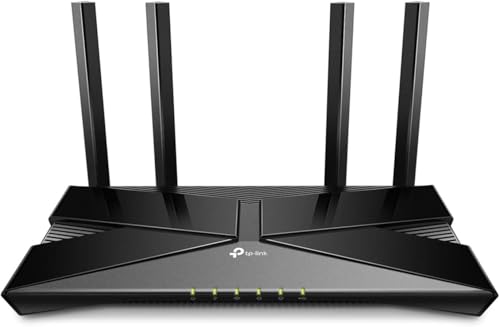
TP-Link Archer AX10 WiFi 6 Router

eero Pro 7 Tri-Band Mesh Router
A Breakdown Of The Leading Choices
The Flint 3 is built for people who actually want to configure their network rather than hide it behind an app. Five 2.5-gigabit wired ports give you room for a fiber gateway, a NAS, and a gaming desktop without a switch, which is rare at this tier.
Its headline trick is VPN performance: WireGuard and OpenVPN speeds reach up to 680 Mbps, fast enough that routing your whole household through a VPN tunnel stops feeling like a penalty. AdGuard Home support adds DNS-level blocking of trackers, handy in homes with dozens of chatty devices.
A Strong Showing
- Up to 680 Mbps over WireGuard or OpenVPN keeps encrypted browsing usable for daily work
- Five 2.5G Ethernet ports handle fiber gateways, storage servers, and consoles natively
- Tri-band Wi-Fi 7 spreads congested households across more airspace than dual-band rivals like the RS200
- Built-in AdGuard Home DNS filtering cuts unwanted tracking network-wide
- Deep firmware controls appeal to anyone who likes tweaking channels and firewall rules
Honest Caveats
- The interface assumes some networking literacy, so total beginners may find the settings dense
- Real VPN speed depends heavily on your provider and server distance, so treat 680 Mbps as a ceiling
Quick Facts
Who It Suits Best
Remote workers, VPN users, and home-lab hobbyists running gigabit-class fiber will get the most out of this one.
A Better Fit Elsewhere
Households that want set-and-forget simplicity should look at the NETGEAR Nighthawk RS200 instead of wrestling with advanced menus.
Where the Flint 3 caters to enthusiasts, the RS200 aims squarely at the family living in a 2,500-square-foot house with eighty devices fighting for bandwidth. Dual-band Wi-Fi 7 pushes up to 6.5 Gbps of raw wireless speed, roughly 1.2 times faster than Wi-Fi 6 under comparable conditions.
A 2.5-gig internet port matters here: it lets you feed the router from a multi-gig fiber plan without bottlenecking at the WAN connection. In practice, that means simultaneous 4K streams, video calls, and game sessions stop stepping on each other in most mid-sized homes.
Positive Takeaways
- Coverage rated up to 2,500 sq. ft. suits two-story homes from a single unit
- Capacity for around 80 connected devices absorbs growing smart-home collections
- Wi-Fi 7 efficiency helps older phones and laptops share airtime more fairly
- The 2.5G port future-proofs your fiber handoff for multi-gig plans
Things To Weigh Up
- Being router-only, dead zones beyond its rated footprint require buying mesh nodes separately
- Placement matters: thick masonry walls can shrink real-world range below the published figure
Made For
Families in detached homes juggling streaming, gaming, and a drawer full of smart gadgets on a single floor plan.
Skip It When
Apartment dwellers with modest square footage will find the cheaper NETGEAR R6700AX covers their needs just fine.
This is the sensible upgrade path when your ISP-supplied box keeps dropping video calls in the back bedroom. The R6700AX delivers AX1800-class Wi-Fi 6, meaning up to 1.8 Gbps of combined wireless throughput across its dual bands.
Rated coverage sits at 1,500 square feet with support for up to 20 simultaneous devices, which maps neatly onto apartments and small single-family homes. Compared with the Archer AX10 below, it trades some feature depth for a cleaner setup experience and NETGEAR’s expert help line.
Where It Delivers
- Wi-Fi 6 efficiency noticeably reduces lag spikes when several people stream at once
- 1,500 sq. ft. of rated reach handles most apartments and bungalows comfortably
- Twenty-device capacity covers phones, laptops, TVs, and a handful of smart plugs
- Dual-band operation keeps legacy gadgets connected without fuss
Potential Sticking Points
- No multi-gig WAN port, so very fast fiber plans will be throttled at the connection
- Larger homes with concrete walls commonly report needing a second node for far corners
The Numbers That Matter
Right Fit For
Renters and first-time router owners in smaller spaces who want dependable Wi-Fi 6 without overspending.
Another Choice May Suit
Anyone planning to grow past twenty devices should step up to the Nighthawk RS200 for its larger capacity budget.
Sold through the renewed program, this Archer AX10 has been professionally inspected and cleaned to work and appear like new, which is where the value comes from. You get AX1500-class dual-band Wi-Fi 6 hardware at a fraction of what new stock commands.
Under the hood sit the technologies that made Wi-Fi 6 a leap: OFDMA splits channels so many devices transmit together instead of queuing, while beamforming focuses signal toward each client. Parental controls round out a package aimed at families on tight budgets.
Points In Its Favor
- OFDMA and MU-MIMO keep a crowded apartment network responsive during peak hours
- Beamforming directs stronger signal toward laptops and phones at range
- Parental controls let you manage screen time from the router itself
- Renewed pricing makes Wi-Fi 6 accessible on nearly any budget
Small Caveats
- As a refurbished unit, cosmetic wear is possible even though function is verified before resale
- AX1500 throughput trails the newer Wi-Fi 7 boxes here, so heavy 8K households will feel the gap
Built With In Mind
Students, renters, and anyone replacing a tired ISP modem-router combo in a small space without stretching the wallet.
Where A Sibling Pick Shines
Shoppers wanting brand-new condition and stronger throughput should compare the NETGEAR R6700AX before settling here.
eero plays a different game entirely: instead of one powerful tower, you start with one node and add more until every room has strong signal. This Pro 7 unit supports internet plans up to 5 Gbps, blankets about 2,000 square feet, and connects 200-plus devices, numbers the single-unit routers above simply cannot approach.
The optional eero Plus subscription layers on content filters, wifi schedules for kids, and ad-and-tracker blocking. One honest note: that subscription auto-renews after the included month, so factor the ongoing cost into your decision if you want those features long term.
Strong Points
- Tri-band design dedicates radio space to backhaul, keeping 8K streams and online games smooth
- 200-plus device capacity suits fully automated smart homes with cameras, locks, and sensors
- Mesh architecture eliminates the dead spots single routers leave behind
- App-driven setup takes minutes, no networking knowledge required
- Supports internet plans up to 5 Gbps for top-tier fiber subscribers
Worth Bearing In Mind
- Advanced security and parental features sit behind the eero Plus subscription rather than being built in
- Covering a large home properly means budgeting for additional nodes beyond this single pack
Essential Details
Whose Shelf It Belongs On
Owners of large or multi-story homes with heavy smart-device loads and a fast fiber plan will feel most at home here.
Reach For A Different Pick When
Single-floor apartments get everything they need from the GL.iNet Flint 3 at a lower commitment level.
What Matters Most Before Choosing Fiber Routers
Match The Router To Your Plan
A router can never deliver more than your line provides, but it can easily waste what you pay for. Feeding a 2-gig fiber plan into a router with only a gigabit WAN port caps your speed at the wall. Check the internet port rating first, then the wireless class, since both must clear your subscription tier with headroom to spare.
Count Your Devices Honestly
Walk through your home and tally everything that connects: phones, laptops, TVs, consoles, cameras, thermostats, even the robot vacuum. A couple streaming in one room is a light load; thirty devices is not. Capacity ratings exist for a reason, and exceeding them is the most common cause of evening slowdowns people blame on their ISP.
Coverage Beats Raw Speed
Published square-footage figures assume open layouts, and walls eat signal for breakfast. A 6.5 Gbps rating means little in a far bedroom receiving a weak signal. Larger or multi-story homes benefit more from mesh systems like the eero Pro 7 than from any single-box spec sheet.
Key Considerations Across These Picks
Traps First Timers Fall Into
The biggest mistake is buying on peak speed alone and ignoring device capacity and port selection. Second is skipping the WAN port check, which quietly throttles fast fiber plans. Third: placing the router inside a cabinet, where metal doors and clutter cut range dramatically. Set it high, central, and out in the open.
What Separates Premium From Basic
Higher-tier models buy you tri-band radios, multi-gig ports, and processor muscle for VPN encryption and dozens of concurrent clients. Paying up makes sense once your household crosses roughly twenty active devices or your plan exceeds a gigabit. Below that threshold, a solid Wi-Fi 6 box serves you just as well day to day.
Frequently Asked Questions
Do I need a special router for fiber internet?
Most fiber installations use an ONT that converts the optical signal to standard Ethernet. Any router with a matching WAN port connects directly, though multi-gig plans need a 2.5G or faster port to run at full speed.
Is Wi-Fi 7 worth it over Wi-Fi 6 right now?
Wi-Fi 7 shines when many devices compete simultaneously and your plan runs multi-gig speeds. Households on basic gigabit service with modest device counts see little practical difference today.
Can one router cover an entire house?
It depends on size and construction. Single-story homes under roughly 2,000 square feet often work with one unit, while multi-story layouts usually need mesh nodes for consistent signal upstairs.
Do refurbished routers perform as well as new ones?
Professionally inspected refurbished units are verified to work like new, though cosmetics may show minor wear. They represent a genuine saving when budget is the deciding factor.
Does a better router improve my ping in games?
A capable router reduces local network congestion, which stabilizes latency within your home. Distance to the game server still dominates overall ping, so expectations should stay realistic there.
Closing Thoughts
The right choice comes down to your home, not the flashiest spec sheet. Tinkerers and VPN users belong with the GL.iNet Flint 3, busy families fit the Nighthawk RS200, small spaces thrive on the R6700AX or Archer AX10, and sprawling smart homes justify the eero Pro 7. Start with your plan speed and device count, and the rest follows naturally.




