


Busy homes need a router that matches real habits, not just a spec sheet. That usually means steady coverage in the rooms you actually use, enough bandwidth for streaming and work calls, and setup that does not turn into an evening project.
This roundup focuses on nine routers that fit different household sizes, device counts, and upgrade paths. You’ll see strong options for larger spaces, simpler homes, gaming setups, and a few value-leaning choices for tighter budgets.
Quick Look At The Shortlist

NETGEAR Nighthawk RS200 WiFi 7 Router


Tenda AX3000 WiFi 6 Router RX12 Pro V3.0

NETGEAR Nighthawk WiFi 6 Router RAX36

NETGEAR Nighthawk RS140 WiFi 7 Router
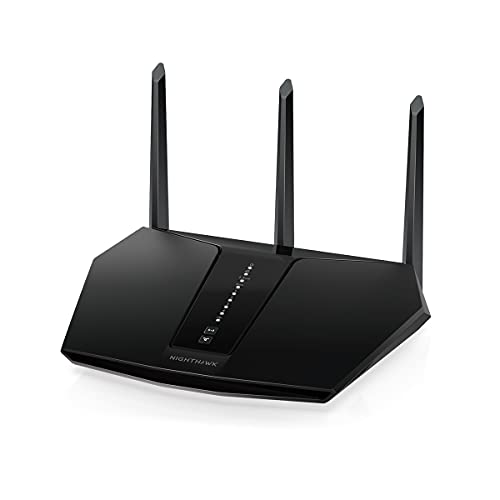
NETGEAR Nighthawk WiFi 6 Router RAX30

Tenda AC1200 WiFi Router AC10

NETGEAR RAX36-100PAR AX3000 Nighthawk Router
More Details On Our Top Picks
The RS200 sits at the top of this lineup for homes that push a router hard all day, especially with multiple streams, game consoles, and work laptops running at once. Its 2.5 Gig internet port gives you more headroom on a fast connection, and the rated 2,500 square feet coverage suggests it belongs in larger layouts.
Compared with the RAX36 and RAX30 below, this one is the most future-leaning choice in the list, though your actual setup still needs to match the rest of your network gear. The honest read is that it makes the most sense for a busy household that wants room to grow without jumping straight to a mesh system.
Strong Points
- WiFi 7 support gives you newer wireless headroom than the WiFi 6 models here.
- The 2.5 Gig internet port helps avoid bottlenecks on faster service plans.
- Coverage for up to 2,500 sq. ft. suits larger homes with open common areas.
- Support for 80 devices fits families with phones, tablets, TVs, and smart gear.
Things To Consider
- Its feature set is more than a basic apartment setup really needs.
- Router-only packaging means you still need the rest of your network to match.
- Higher-end specs can feel wasted in a small space with modest internet speed.
Feature Snapshot
Who It Suits Best
You get the most from this router in a larger home with several people online at the same time, especially where fast internet and newer gear already matter.
A Better Fit Elsewhere
NETGEAR Nighthawk WiFi 6 Router RAX36 suits you better if you want strong coverage for a mid-size home without paying for WiFi 7 extras.
The R6700AX keeps things simple, and that can be exactly what you want in a smaller home or apartment. With AX1800 speed, dual-band support, and coverage up to 1,500 sq. ft., it fits everyday streaming, browsing, and video calls without leaning into overbuilt hardware.
Compared with the RS200 and RAX36, this is the gentler choice in both reach and speed, which also keeps setup expectations more grounded. For most two- or three-person homes, that trade-off feels sensible instead of stripped down.
What We Like
- AX1800 is enough for routine family use and standard streaming.
- The 1,500 sq. ft. coverage rating works well in smaller layouts.
- Support for 20 devices covers common phone, laptop, and TV loads.
- Dual-band design helps separate everyday traffic from heavier activity.
Room For Improvement
- It does not leave much room for very device-heavy homes.
- Coverage is more modest than the larger Nighthawk options above it.
- Households with fast fiber service may outgrow it sooner than expected.
Core Details
Who Should Grab It
You’ll like this most in a smaller household where internet use stays fairly steady and you want a straightforward router instead of a feature-stuffed tower.
Where A Sibling Pick Shines
NETGEAR Nighthawk RS140 is the better fit for you once you need more room to grow and a faster WiFi 7 platform.
RX12 Pro V3.0 stands out because it mixes router basics with extra tools you may actually use at home. Mesh mode, AP mode, built-in VPN, NFC tap-to-connect, OFDMA, and MU-MIMO make it feel more flexible than the simpler NETGEAR picks above it.
That flexibility matters in a house where you want one device to handle gaming, 4K streaming, and a secure IoT network without switching hardware later. The catch is that this kind of feature spread asks for a little more attention during setup, especially compared with the stripped-back R6700AX.
Highlights
- Mesh and AP modes give you more placement and expansion options.
- Built-in VPN support adds privacy-oriented flexibility for home networking.
- NFC tap-to-connect can simplify access for compatible phones or devices.
- OFDMA and MU-MIMO help manage several active connections more cleanly.
- It suits homes that mix gaming, streaming, and smart devices.
Small Caveats
- The extra features can feel busy for a plain plug-in-and-go setup.
- Some homes will never use the mesh and AP flexibility.
- Privacy tools like VPN support still depend on how you configure them.
Technical Sheet
The Right Fit
This fits you best in a busy home that wants networking features without moving to a high-end WiFi 7 model.
Skip It When
NETGEAR RAX30 makes more sense for you if you want a simpler setup and are shopping refurbished to stretch your budget.
The RAX36 lands in a very comfortable middle ground. It brings AX3000 speed, dual-band service, a 2,000 sq. ft. coverage rating, and support for 25 devices, so it has a little more muscle than the R6700AX without stepping into the newer WiFi 7 tier.
Built-in VPN support, USB 3.0, and gaming-friendly positioning make it feel practical for households that want more than basic browsing help. In a shared home office or a living room setup with consoles, it looks like the kind of router that stays out of the way and still earns its keep.
Reasons To Buy
- AX3000 speed gives you a noticeable step up from AX1800 models.
- Coverage for 2,000 sq. ft. suits many midsize homes.
- Support for 25 devices leaves more breathing room than compact routers.
- USB 3.0 can help with local sharing and attached accessories.
Worth Noting
- Router-only packaging means you still need compatible internet gear.
- It sits between simpler WiFi 6 choices and newer WiFi 7 models.
- Gaming branding helps with positioning, but your connection quality still depends on the whole setup.
Details At A Glance
Best Suited To
You’ll get the most from this router in a midsize home that wants stronger everyday performance without jumping into a premium platform.
Another Choice May Suit
NETGEAR Nighthawk RS200 is the smarter step up for you once your home needs WiFi 7 and a faster internet port.
The RS140 looks like the cleaner future-facing choice for homes that want WiFi 7 without moving to the highest-priced tier in the lineup. Its rated 2,250 sq. ft. coverage, support for 80 devices, and 2.5 Gig internet port give it a lot of room for busy households.
Compared with the RS200, it gives you slightly less wireless headroom on paper, but the overall shape is still built for large device counts and faster service. That balance makes sense for a family that wants a strong router today and does not want to start over soon.
Upsides
- WiFi 7 brings newer wireless capability than the WiFi 6 routers here.
- Support for up to 80 devices suits connected homes with lots of gear.
- The 2.5 Gig port is a good match for faster broadband plans.
- Coverage for up to 2,250 sq. ft. gives you broad household reach.
Areas To Watch
- Its larger feature set may be more than a small apartment needs.
- Router-only packaging still assumes the rest of your network is in place.
- People with modest internet speeds may not see the full upside of WiFi 7.
Core Details
Who Will Love This
This fits you best in a larger household where device count, coverage, and newer wireless support all matter at once.
Look Elsewhere When
NETGEAR WiFi 6 Router RAX36 is the more grounded choice if you want a strong midrange router without the WiFi 7 step up.
The renewed RAX30 is the thriftier way into this list’s Nighthawk family, and that matters for shoppers who want a recognizable model without starting at the newest tier. AX2400 speed, 5-stream design, dual-band support, and a 2,000 sq. ft. coverage rating make it a sensible middle-ground router.
Because it is renewed, the value story depends on your comfort with that kind of purchase rather than on fresh-box appeal. For a home office or a smaller family that wants more than entry-level hardware, the trade-off can feel very reasonable.
Bright Spots
- AX2400 sits comfortably above the most basic routers here.
- Five streams help the router juggle several active connections.
- Coverage for 2,000 sq. ft. fits many common home layouts.
- Renewed pricing structure can make a midrange upgrade easier to justify.
Minor Gripes
- Renewed condition may matter more to some shoppers than to others.
- It does not carry the newer WiFi 7 platform of the RS200 and RS140.
- Device-heavy households may prefer a model with more headroom.
Feature Rundown
Built With In Mind
You should look at this one for a modest household that wants a recognizable Nighthawk model and does not mind renewed condition.
Where A Sibling Pick Shines
Tenda AX3000 WiFi 6 Router RX12 Pro V3.0 makes more sense for you if flexible modes and built-in VPN support matter more than renewed value.
The U-SPEED N300 is the most straightforward router in the group, and that simplicity has a place. Its 2.4G wireless N rate reaches up to 300 Mbps, which is a reasonable fit for security cameras, browsing, VoIP calls, and light streaming in a small home or office.
Two 5 dBi antennas help with coverage and stability, though the trade-off is clear, because this is not meant for a crowded modern household. You may find it best as a no-frills network tool rather than a main hub for a house full of phones and TVs.
Best Bits
- Simple setup suits people who want a basic network quickly.
- 2.4 GHz support works with common low-bandwidth home devices.
- Up to 300 Mbps is fine for lighter daily internet tasks.
- Two 5 dBi antennas help strengthen reach in smaller spaces.
Softer Spots
- It is built for basic use, not heavy family traffic.
- The speed ceiling is modest compared with the WiFi 6 options here.
- Hands-on placement may matter more than it does with larger routers.
Quick Facts
Whose Shelf It Belongs On
This fits your shelf best in a small office, apartment, or camera-focused setup where the connection load stays light.
Reach For A Different Pick When
NETGEAR WiFi 6 Router R6700AX suits you better once you want a fuller home router with broader modern coverage.
AC10 is the sort of router that makes sense in a home where wired gear still matters. Its four Gigabit ports are handy for consoles, desktop towers, or a TV setup, while dual-band service, MU-MIMO, beamforming, parental controls, guest WiFi, and IPv6 support round out the package.
That mix gives you more day-to-day utility than the bare-bones N300 above it, but it still feels grounded rather than flashy. One thing worth considering is availability, because the listing data here shows a current stock issue, so this is a model to keep an eye on rather than a guaranteed easy grab.
Standout Traits
- Four Gigabit ports are excellent for wired home devices.
- Dual-band support helps separate everyday traffic from heavier tasks.
- MU-MIMO and beamforming can help with multi-device steadiness.
- Parental controls and guest access add useful household flexibility.
Points To Note
- The listing information here shows availability concerns.
- It sits below the newer WiFi 6 and WiFi 7 models in wireless tier.
- Basic setup needs may still outweigh the extra feature set for some homes.
Spec Overview
Perfect Match For
You’ll appreciate this most in a home with several wired devices and a need for straightforward control features.
Another Choice May Suit
NETGEAR Nighthawk RAX36 is the better route for you if you want stronger router performance and a more future-ready speed class.
The RAX36-100PAR is a refurbished route into a stronger Nighthawk platform, which can be appealing if you want useful speed without paying for a newer release. AX3000 wireless, 4-stream design, and WiFi 6 support place it in the same practical lane as the standard RAX36, while the renewed status changes the ownership equation.
Compared with the RS200 and RS140, this one gives up the latest wireless generation but keeps a familiar midrange shape that suits many homes well. For shoppers who value function over fresh-box packaging, it can be a very sensible middle step.
Positives
- AX3000 speed keeps it comfortably above entry-level routers.
- The 4-stream layout helps with busy home traffic.
- Refurbished status can open the door to a more capable model.
- It suits homes that want a midrange router with familiar Nighthawk styling.
Honest Caveats
- Renewed condition is part of the trade-off and may not suit everyone.
- It does not match the newest WiFi 7 choices in the lineup.
- Device-heavy homes may still want the larger coverage and port headroom of the RS200 or RS140.
Feature Card
Right Fit
This belongs in a home that wants a capable router and is comfortable with refurbished condition as part of the value equation.
Where A Sibling Pick Shines
Tenda AC1200 WiFi Router AC10 suits you better if wired ports and household controls matter more than raw wireless speed.
How To Choose The Right 2 4 Ghz Routers
Start With Your Space, Not The Box
Coverage matters because router strength is only useful where your rooms actually are. A small apartment can usually live happily with a compact model, while a larger split-level home needs wider reach or a router that can grow into a mesh setup.
Device count deserves the same attention. A household with a few phones and a laptop has very different needs from a place where TVs, tablets, consoles, and smart gadgets all stay online at once.
Match Band, Speed, And Internet Plan
2.4 GHz reaches farther and handles walls better, but it usually moves data more slowly than 5 GHz or newer WiFi 7 gear. That makes it useful for cameras, casual browsing, and smart home gear, while faster bands serve streaming, gaming, and heavy transfers better.
Speed labels such as AX1800, AX3000, and BE5000 describe the wireless class rather than a guaranteed real-world result. A faster router only pays off when your internet service, wired equipment, and device mix can use that extra headroom.
Look At Ports And Features That Change Daily Use
A 2.5 Gig port matters for fast broadband, and Gigabit Ethernet ports matter for consoles, desktops, and media gear that should stay wired. USB 3.0 can also help in homes that use attached storage or shared accessories.
Extra tools like guest WiFi, parental controls, VPN support, mesh mode, and AP mode sound technical, but they shape how easy the router is to live with. In plain terms, they decide whether your network feels flexible or cramped.
Choose For Growth, Not Just Today
WiFi 7 models cost more because they bring a newer standard, larger device headroom, and often a faster internet port. That upgrade makes sense for a busy home that already pays for strong service and wants less replacement pressure later.
More basic WiFi 6 or N300 options can still be the smarter move for a small household or a secondary space. The right router is the one that fits your present routine without turning every new device into a planning problem.
What To Weigh Before You Move Forward
Traps First Timers Fall Into
Many shoppers overspend on speed tiers they will never use. A fast label looks impressive, but a small apartment with basic streaming rarely needs the same hardware as a house full of gamers and remote workers.
Another common miss is forgetting about wired ports and router-only packaging. Those details matter the moment you need a console, desktop, or TV connected without an adapter.
The Upgrade Payoff
Higher-tier models usually bring better coverage, faster ports, newer wireless standards, and more device capacity. That extra cost can make sense in a larger home where the router has to serve many active connections at once.
Spending up also helps when your internet service is already fast and you want the network gear to keep pace. For smaller spaces, the extra money often lands better in your pocket than in unused wireless headroom.
Frequently Asked Questions
What does 2.4 GHz do best?
2.4 GHz reaches farther and handles walls more easily than higher-frequency bands. It suits smart devices, browsing, and lighter household tasks.
Is WiFi 7 worth it for a home router?
WiFi 7 makes the most sense in busy homes with fast internet and lots of connected devices. For lighter use, WiFi 6 is still a sensible fit.
How many devices should a router support?
That depends on your household, not just the number on the box. A family with phones, laptops, TVs, and smart gear benefits from more headroom than a small apartment does.
Do mesh mode and AP mode matter?
They matter when you want flexible placement or plan to expand the network later. In a simple setup, those features may sit unused.
Why would you choose a renewed router?
A renewed router can make a stronger model easier to justify. The trade-off is that condition and packaging matter more to some shoppers than to others.
Closing Thoughts
The best router for your home depends on space, device count, and how much speed your plan can actually use. The RS200 and RS140 suit larger, busier households, while the RAX36 and RAX30 sit in a practical middle zone. Smaller spaces can do well with the R6700AX or U-SPEED N300, and wired-heavy homes get a useful edge from the Tenda AC10. Pick the one that matches your rooms and routine, and the rest gets easier.




