


Gigabit internet only pays off when your router can actually deliver it to the room you’re sitting in. That’s the gap these five picks close: each one handles multi-gigabit plans, modern Wi-Fi standards, and a house full of streaming boxes, laptops, and smart devices without choking. Whether you’re working video calls from a back office or gaming upstairs while someone streams downstairs, there’s a fit here for your floor plan and budget.
A Closer Look At The Lineup

TP-Link Deco XE75 AXE5400 Tri-Band WiFi 6E Mesh System
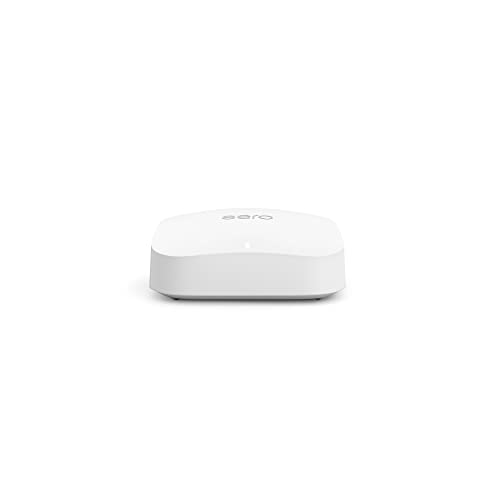
Like-New Amazon eero Pro 6E Mesh WiFi Router

GL.iNet GL-BE6500 Flint 3e Wi-Fi 7 Router with VPN

NETGEAR Nighthawk Dual-Band WiFi 7 Router (RS140)

Google Nest WiFi Pro – Wi-Fi 6E Mesh Router – 2 Pack – Snow
More Details On Our Top Picks
Mesh systems replace both your old router and any range extender you’ve been propping up on a bookshelf. The Deco XE75 covers roughly 2,900 square feet per unit, which in practice means one node handles most two-story homes without dead zones over the garage.
The headline feature is its dedicated 6 GHz band, the newest Wi-Fi frequency that older gadgets can’t touch. By default it works as backhaul, the private link between nodes, so your connection stays stable even with dozens of devices fighting for airtime. Setup happens through TP-Link’s app, and it plays nicely with other Deco hardware if you expand later.
Useful Touches
- Dedicated 6 GHz backhaul keeps node-to-node links steady during heavy evening use
- Roughly 2,900 sq ft of coverage per unit means fewer nodes for most floor plans
- AI-driven mesh steering moves devices to the least congested band automatically
- Works standalone or alongside existing Deco units, so expansion stays simple
Things To Consider
- Older phones and laptops can’t use the 6 GHz band at all, so legacy devices ride the slower frequencies
- Owners commonly report placement matters a lot; tucking a node inside a media cabinet weakens the backhaul noticeably
Who It Suits Best
Homes between 2,000 and 3,000 square feet with a mix of new and aging devices benefit most from this balanced setup.
Where Another Pick Suits Better
Privacy-minded users who want VPN routing built into the router itself will get more from the GL.iNet GL-BE6500 Flint 3e.
This is eero’s flagship 6E unit sold refurbished: inspected, cleaned, and backed by the same limited warranty terms as a new device, though it may arrive in generic packaging. For shoppers watching their budget, that trade is hard to argue with given what’s under the hood.
It supports plans up to 2.5 Gbps through a 2.5 Gb Ethernet port, with wireless throughput around 1.6 Gbps and wired speeds near a gigabit. Coverage runs about 2,000 square feet with support for 100-plus connected devices, enough for a busy household of streamers and remote workers. It also pairs with earlier eero units, so mixing generations across rooms works fine.
Everyday Wins
- Refurbished pricing puts flagship 6E hardware within reach of tighter budgets
- 2.5 Gb Ethernet port unlocks gigabit-and-up fiber plans fully
- Handles 100+ devices, so smart-home-heavy homes won’t strain it
- Backward compatibility lets you blend it with older eero nodes you already own
- About 2,000 sq ft of coverage suits most apartments and mid-size homes from one unit
Small Caveats
- Cosmetic wear is possible on refurbished units, and packaging may be plain rather than retail-boxed
At A Glance
Made For
Cost-conscious shoppers on gigabit fiber who still want current-generation 6E speed and capacity.
Consider Something Else When
Shoppers who want brand-new hardware with a fresh box should look at the NETGEAR Nighthawk RS140 instead.
Where the Deco XE75 focuses on coverage, the Flint 3e focuses on control. GL.iNet builds its routers around open, customizable firmware, and this Wi-Fi 7 model leans hard into VPN routing, something most mainstream brands treat as an afterthought.
Both WireGuard and OpenVPN, the two dominant VPN protocols, run at up to 680 Mbps here, fast enough that encrypting your whole network doesn’t gut your bandwidth. Actual results shift depending on your provider, server location, and network conditions, so temper expectations accordingly. Gamers and remote workers who tunnel traffic daily are the obvious audience, and the home-or-office framing fits either desk.
Noteworthy Benefits
- WireGuard and OpenVPN both sustain up to 680 Mbps, rare speed for encrypted traffic
- Wi-Fi 7 support future-proofs the network for next-gen laptops and consoles
- Open, tweakable firmware appeals to anyone who wants granular control over routing
Potential Sticking Points
- The advanced interface can feel intimidating compared with app-first systems like the Google Nest WiFi Pro
- VPN throughput depends heavily on server distance and provider, so real-world numbers vary
- Single-router design means very large homes may need a second unit or extender
Feature Snapshot
Right Fit For
Tinkerers, gamers, and privacy-conscious users comfortable with deeper settings menus get the most out of this one.
Look Elsewhere When
Anyone wanting plug-and-play simplicity across a big house will find the TP-Link Deco XE75 far less fussy.
Nighthawk has long been NETGEAR’s raw-power line, and the RS140 keeps that identity with BE5000-class wireless speed, up to 5.0 Gbps combined across its 2.4 GHz and 5 GHz bands. On paper that’s the highest throughput figure in this lineup.
It reaches about 2,250 square feet and manages up to 80 simultaneous devices, covering 4K streaming, video calls, and console gaming in a typical apartment or small house. A 2.5 Gig Internet port feeds it from fast modems, and NETGEAR includes access to expert setup help, which softens the usual install friction. One thing worth knowing: this is a router only, so you’ll pair it with your existing modem or gateway.
Practical Advantages
- Up to 5.0 Gbps combined wireless speed leaves headroom for demanding households
- 2.5 Gig Internet port matches modern high-tier fiber connections
- Handles around 80 devices at once without visible slowdown in most homes
- Included expert help makes first-time setup less daunting
Worth Bearing In Mind
- No mesh nodes included, so homes past 2,500 sq ft may see weaker signal at the edges
- You must supply your own modem, an extra purchase some shoppers forget to budget for
Best Suited To
Apartment dwellers and small-home owners on fast fiber who want maximum speed from a single, no-fuss unit.
A Better Fit Elsewhere
Multi-floor homes with signal trouble will get better whole-house results from the Google Nest WiFi Pro two-pack.
Two Nest WiFi Pro nodes blanket up to 4,400 square feet, which covers most large single-family homes in one purchase. This listing ships in non-retail packaging, so expect plain wrapping rather than a showroom box; the hardware inside is standard.
Each puck runs Wi-Fi 6E, roughly twice the speed of prior-generation Wi-Fi 6 in everyday use, and the whole system is managed through Google’s famously simple Home app. The catch is ecosystem lock-in: Nest WiFi Pro doesn’t work with older Nest routers, so starting fresh means replacing everything. Households already living in Google’s world, with Nest speakers and cameras, will feel right at home.
Reasons It Performs
- Two-node pack covers up to 4,400 sq ft, ideal for larger floor plans
- Wi-Fi 6E delivers noticeably faster, steadier connections than Wi-Fi 6 gear
- Setup and management through the Google Home app takes minutes, not hours
Points To Note
- Incompatible with previous-generation Nest routers, so upgrades mean a full swap
- Non-retail packaging means no polished unboxing, worth knowing before gifting
Core Details
Who Will Love This
Google-ecosystem households in bigger homes who value effortless management over deep customization.
Swap It Out When
Users who want VPN control and open firmware will prefer the GL.iNet GL-BE6500 Flint 3e by a wide margin.
What Matters Most Before Choosing Google Fiber 6e Routers
Match Coverage To Your Floor Plan
A router rated for 2,000 square feet won’t stretch to a 3,500-square-foot house, no matter how good the marketing sounds. Count your square footage honestly, then add a margin for thick walls and multiple floors. Mesh systems like the Deco XE75 or Nest WiFi Pro exist precisely because single routers hit physical limits.
Check Your Plan Speed Against Port Speed
Your router’s Ethernet port caps what your fiber line can actually deliver. A 2.5 Gb port makes sense on gigabit-and-up plans; anything less wastes money you’re already paying your provider every month. Wired speed matters most for desktops, consoles, and workstations.
Think About Device Load
Modern homes routinely run 50 or more connected devices once you count phones, TVs, cameras, thermostats, and speakers. Capacity ratings like the eero’s 100+ device support aren’t vanity numbers; they determine whether Friday-night streaming stutters when everyone’s online at once.
Decide How Much Control You Want
App-managed systems trade flexibility for simplicity. Open-firmware options like the Flint 3e reward patience with VPN routing and granular settings. Neither approach is wrong, but picking against your own temperament leads to regret.
Key Considerations Across These Picks
Traps First Timers Fall Into
The most common mistake is buying a single powerful router for a home that genuinely needs mesh. Walls, floors, and distance degrade signal faster than most people expect, and no amount of antenna power fixes physics. The second trap is ignoring modem requirements: units like the Nighthawk RS140 ship router-only, so factor that hardware into your total spend before checkout.
What Separates Premium From Basic
Higher-tier models earn their cost through faster ports, newer Wi-Fi standards, and better radios that hold speed at range rather than just at the router’s side. Wi-Fi 7 hardware such as the Flint 3e and RS140 costs more today but stretches further as your devices refresh over the next several years. Paying up makes sense when your internet plan and device mix can actually use the headroom.
Frequently Asked Questions
Do I need a Wi-Fi 6E router for Google Fiber?
Not strictly, but it helps. Fast fiber plans benefit from 6 GHz band capacity and modern ports that keep pace with multi-gigabit speeds.
What does the 6 GHz band actually do?
It’s a freshly opened frequency range that older devices can’t use, leaving it clear for your newest gadgets and for router-to-node backhaul links.
Can I mix mesh brands across my home?
Generally no. Systems like Deco, eero, and Nest use proprietary communication between nodes, so stick with one brand per network.
Is a refurbished router a safe buy?
Units sold as inspected refurbishments typically carry the same limited warranty terms as new stock. The main trade-off is possible cosmetic wear and plain packaging.
Do these routers include a modem?
Most don’t. The Nighthawk RS140 is explicitly router-only, so confirm whether your fiber installation provides a modem or gateway before ordering.
Closing Thoughts
Fast internet deserves hardware that keeps up, and any of these five will outperform the rental gateway your provider handed you. Start with your square footage, match the port speeds to your plan, then choose between simplicity and control. The right pick is the one that disappears into daily life and never makes you think about it again.




