


Cheap networking gear has a reputation problem, and honestly, some of it is deserved. But a tight budget doesn’t mean settling for dead zones in the back bedroom or video calls that freeze mid-sentence. This roundup gathers five budget-friendly options, including three Wi-Fi 6 models and one travel hotspot, that cover apartments, small homes, and people who work from coffee shops. Each one earns its spot by solving a specific problem at a price that won’t sting.
A Snapshot Of The Selections

TP-Link Archer C54 AC1200 Dual-Band WiFi Router

GlocalMe Numen Air 5G Mobile Hotspot

NETGEAR WiFi 6 Router R6700AX (AX1800)
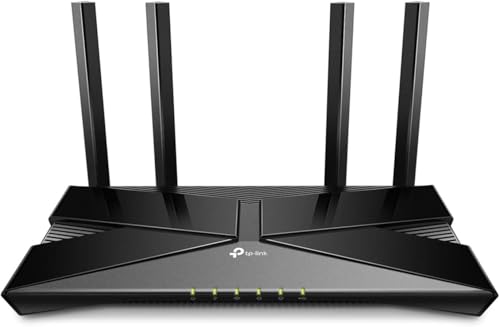
TP-Link Archer AX10 AX1500 Smart WiFi Router

TP-Link Archer AX50 AX3000 Wireless Dual-Band Gigabit Router
Why These Options Stand Out
This renewed Archer C54 targets the most common household frustration: Wi-Fi that fades before it reaches the far corners of an apartment or small house. Four external antennas paired with beamforming, a technique that aims the signal toward your devices instead of spraying it everywhere, help the signal hold up across rooms.
The AC1200 dual-band rating splits traffic between 2.4 GHz and 5 GHz bands, which matters when someone streams 4K in the living room while another person downloads files nearby. Because it ships as a refurbished unit, the price sits well below comparable new hardware, though availability varies by listing.
The Upside
- Four antennas plus beamforming push usable signal deeper into a home than single-antenna budget boxes typically manage
- Dual-band AC1200 throughput handles 4K streaming and large downloads without choking the whole network
- MU-MIMO lets the router talk to several devices simultaneously rather than one at a time, so multiple users feel less lag during peak evening hours
- Works with essentially any home internet provider, so swapping ISPs later won’t strand you
- Refurbished pricing makes it one of the least expensive ways to replace aging ISP rental gear
Worth Noting
- As a renewed unit, cosmetic wear is possible and the original packaging may be absent, which matters if appearance counts in a visible spot
- No mesh expansion, so very large floor plans may still need a second node down the line
Who It Suits Best
Renters and small-household streamers who want dependable dual-band coverage without spending much.
Where A Sibling Pick Shines
Households with twenty-plus connected gadgets will get better headroom from the NETGEAR R6700AX further down this list.
Not everyone needs a router bolted to a shelf. Anyone working from hotel lobbies, airports, or rental cars needs internet that travels, and that’s where the Numen Air fits. It’s a pocket-sized 5G hotspot that connects to carrier networks in over 200 countries without requiring a physical SIM card, which removes the fiddly swap-and-activate ritual at every border.
Speeds can reach up to 2.5 Gbps where 5G coverage allows, roughly fifteen times faster than 4G in ideal conditions, though real-world rates depend heavily on local towers. Up to sixteen devices can share the connection, enough for a laptop, phone, tablet, and a travel companion’s gear at once.
Notable Gains
- No SIM card needed, so crossing borders means no hunting for local carriers or kiosks
- Supports more than 90 commercialized 5G markets and hundreds of operator networks worldwide
- Up to 16 simultaneous connections covers a whole travel party from one device
- Optional protection plans add drop and spill coverage with round-the-clock support, useful for gear that lives in backpacks
Small Caveats
- Data plans are billed separately, and heavy streaming abroad adds up faster than a home broadband bill
- Performance hinges entirely on local cellular coverage, so rural destinations may disappoint regardless of the spec sheet
At A Glance
Made For
Digital nomads and frequent flyers who bounce between countries and hate SIM-card logistics.
Skip It When
A stationary home setup suits you better; the TP-Link Archer C54 above costs far less for always-on house coverage.
The R6700AX is the pick for anyone whose current router buckles under a modern device count. Wi-Fi 6 (the 802.11ax standard) was built precisely for crowded networks, scheduling traffic efficiently instead of letting twenty gadgets shout over each other. This unit pushes combined speeds up to 1.8 Gbps across two bands.
NETGEAR rates coverage at up to 1,500 square feet with support for 20 simultaneous devices, which maps neatly onto a small home running smart TVs, phones, laptops, and a doorbell camera together. Video calls in a back office and gaming sessions downstairs coexist more gracefully here than on older Wi-Fi 5 hardware.
Where It Excels
- Wi-Fi 6 efficiency keeps 20 devices responsive at once, a real difference in smart-home-heavy households
- Rated 1,500 sq ft of coverage reaches bedrooms and patios in typical small-home layouts
- AX1800 speeds leave headroom for gigabit-class internet plans
- Router-only configuration means no monthly equipment fee tacked onto an ISP bill
- Free expert help is included, easing setup for first-time buyers of standalone routers
Things To Consider
- Larger two-story homes may find 1,500 sq ft optimistic through walls, and a mesh node could become necessary
- Protection plans cost extra beyond the purchase, so factor that into long-term ownership if accidental damage worries you
Key Specs
Right Fit For
Small-home owners juggling a dozen-plus devices who want current-gen performance at a mid-range price.
Another Choice May Suit
Shoppers chasing raw speed for gaming should step up to the TP-Link Archer AX50 below, whose AX3000 rating doubles the throughput.
Here’s the cheapest doorway into Wi-Fi 6 in this lineup, and it arrives renewed, meaning a prior owner returned it and qualified suppliers inspected and tested it to work like new. For a student apartment or a starter flat, that trade makes sense: modern OFDMA technology (which slices bandwidth into tiny channels so many devices share airtime efficiently) at secondhand pricing.
Beamforming focuses signal toward connected devices, and built-in parental controls let households schedule or restrict access per device, handy with kids in the house. TP-Link has also ranked highly in customer satisfaction surveys for wireless routers across multiple years, a reassuring sign for long-term reliability.
Advantages To Know
- Wi-Fi 6 with OFDMA and 1024-QAM boosts overall network efficiency noticeably in multi-device homes
- MU-MIMO and beamforming combine to serve several active users with steadier connections
- Parental controls give parents scheduling power over kids’ devices without extra software
- Renewed status brings the price down well below new Wi-Fi 6 alternatives
Potential Drawbacks
- AX1500 is the entry tier of Wi-Fi 6, so throughput trails the pricier AX3000 option in this list
- Refurbished stock varies in cosmetic condition, and units sell out unpredictably
Who Will Love This
Students, first-apartment renters, and anyone upgrading from ISP rental gear on a strict budget.
Reach For A Different Pick When
Heavy gamers and 4K-streaming households get meaningfully more speed from the TP-Link Archer AX50 reviewed next.
The fastest option here, and it isn’t close. The AX50’s four-stream design delivers up to 2402 Mbps on the 5 GHz band plus 574 Mbps on 2.4 GHz, combining for roughly 3 Gbps of wireless throughput. An Intel dual-core processor keeps everything moving smoothly even with the whole household online at once.
Compared with the Archer AX10 earlier in this list, the AX50 trades a slightly higher price for double the rated speed and lower latency, with TP-Link citing lag reductions of up to 75 percent versus older Wi-Fi 5 gear. Competitive online gaming, 4K streams in multiple rooms, and constant video conferencing all land in its comfort zone.
The Helpful Details
- AX3000 speeds suit gigabit internet plans and bandwidth-hungry households
- OFDMA communicates with multiple devices at once, keeping smart home gear responsive during heavy use
- Intel dual-core CPU sustains steady performance under sustained load
- Gigabit wired ports provide stable connections for consoles and desktop PCs
- Wi-Fi 6 architecture cuts latency substantially for gaming and video calls
Honest Caveats
- Being a renewed unit, expect possible light cosmetic marks and check the seller’s inspection terms before ordering
- Its footprint is larger than compact travel-style routers, so shelf space matters in tight media centers
Feature Snapshot
Best Suited To
Gamers, streamers, and work-from-home professionals who need top-tier throughput at a refurbished-friendly price.
Swap It Out When
Light-usage households save money without real sacrifice by choosing the Archer AX10 instead.
What Matters Most Before Choosing Inexpensive Routers
Match The Standard To Your Devices
Wi-Fi 6 (802.11ax) handles crowded networks far better than older Wi-Fi 5, but the benefit only shows up when your phones and laptops support it too. Homes full of recent devices justify the upgrade immediately. Older gadget collections can comfortably run an AC1200 model like the Archer C54 without noticing a ceiling.
Count Your Square Footage Honestly
Coverage ratings assume open layouts, not walls full of plumbing and plaster. A 1,500 sq ft rating shrinks fast in a two-story brick house. Measure your space, note how many interior walls sit between the router and the weakest room, and size up accordingly rather than trusting the box number blindly.
Weigh New Versus Renewed
Refurbished units deliver serious savings, sometimes half the cost of equivalent new hardware. The trade-off is cosmetic variance and shorter effective lifespan expectations. Reputable renewal programs inspect and test units thoroughly, so risk stays low, but shoppers wanting pristine condition and full accessory kits should lean toward new stock.
Key Considerations Across These Picks
Wrong Turns To Avoid
The most common mistake is buying for peak speed alone while ignoring device count and layout. A blazing-fast router crammed behind a TV stand inside a metal cabinet performs worse than a modest one placed centrally and elevated. Placement beats specs every time. Also skip routers lacking parental controls when kids share the network.
The Upgrade Payoff
Higher-tier models earn their price through processing power, antenna arrays, and capacity technology like OFDMA. Spending up makes sense once your household crosses roughly fifteen active devices or runs competitive gaming alongside 4K streams. Below that threshold, budget picks handle daily life just fine, and the extra money buys little you’d notice.
Frequently Asked Questions
Do inexpensive routers work with any internet provider?
Yes, virtually all consumer routers connect to any modem or gateway via Ethernet regardless of provider. Just confirm your plan’s speed so the router isn’t the bottleneck.
Is Wi-Fi 6 worth it on a budget?
For households with ten or more devices, absolutely, since Wi-Fi 6 manages congestion far better than Wi-Fi 5. Single-user setups gain little from the jump.
What does “renewed” actually mean?
It refers to returned or traded-in products inspected and tested by qualified suppliers to function like new. Cosmetic wear is possible, and stock availability fluctuates.
Can one router cover a whole two-story house?
Sometimes, depending on construction materials and layout. Homes beyond roughly 1,500 sq ft with thick walls usually benefit from adding a mesh satellite later.
How often should a budget router be replaced?
Most last five to seven years before standards and speeds move past them. Replace sooner when buffering appears despite a fast internet plan.
Closing Thoughts
Budget networking in 2026 looks nothing like the compromise-filled market of a few years ago. Wi-Fi 6 has trickled down to genuinely affordable prices, and refurbished channels push costs lower still. Start by counting your devices and measuring your space, then match the pick to the profile. The right choice here costs less than a couple of months of ISP rental fees, and it’ll likely outlast them too.




