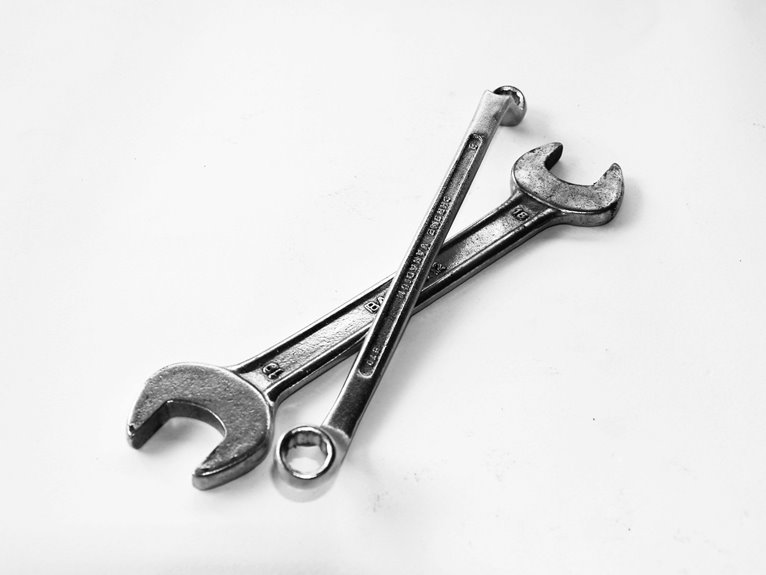
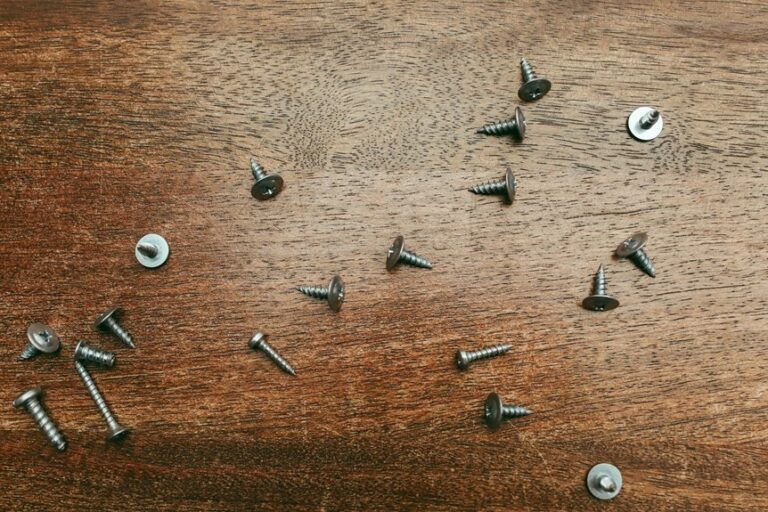
A dead laptop, a dropped screw behind a desk, a router that needs re-terminating: these moments arrive without warning. The right tool turns a frustrating afternoon into a quick fix, while the wrong one leaves you hunting through a junk drawer mid-project. If you handle your own computer upkeep, run a small repair side gig, or just want to stop cursing at stuck fasteners, a small kit of dependable IT tools pays for itself. The picks below cover everything from magnetic retrieval to network termination, so you spend less time improvising and more time fixing.
A Closer Look At The Lineup

VSKIZ Telescoping Magnetic Pickup Tool 20lb Pull Force, 30in
VMAN Ratchet Screwdriver Set with S2 Steel Bits

Klein Tools 32303HD Impact Driver Set, 20-in-1

EZARC Electric Screwdriver Set, 181 in 1 Cordless

iFixit Repair Business Toolkit – Smartphone, Laptop, Tablet Starter Tools
ZOERAX 14 in 1 Network Tool Kit with RJ45 Crimp

iFixit Pro Tech Toolkit – Electronics, Smartphone, Computer & Tablet Repair Kit
Inside Each Recommended Option
Screws have a habit of vanishing into the worst possible places, and that is exactly where a telescoping magnetic pickup earns its keep. The VSKIZ tool extends to 30 inches, giving you a usable reach under desks, behind rack-mounted gear, and into the narrow channels of a PC case. A neodymium-style tip (a rare-earth magnet known for high pull strength relative to size) handles fasteners up to 20 pounds in optimal conditions, which covers anything from a small Phillips to a heavier hex nut.
The 0.79-inch removable magnetic head unscrews for cleaning or replacement, and the telescoping shaft is built from stainless steel tubing for rigidity. For most server rooms and home workbenches, that combination of reach and pull force is the difference between a five-minute recovery and a full teardown.
Reasons It Performs
- 30-inch telescoping reach fits into deep crevices behind rack gear and case interiors.
- 20-pound pull force handles most dropped fasteners, from tiny M2 screws to larger hex nuts.
- Removable 0.79-inch head simplifies cleaning if metal shavings stick over time.
- Stainless steel shaft resists bending during repeated extensions in tight quarters.
- Two-pack format means you can stage one at a bench and keep another in a mobile bag.
Worth Noting
- Pull force drops noticeably as the extension lengthens, so a fully extended reach feels weaker than a compressed one.
- The head attracts only ferrous metals, so stainless or brass fasteners will not respond.
Built With In Mind
Anyone who works around rack hardware, PC builds, or densely packed workstations where small metal parts love to disappear.
Skip It When
You mainly need precision bit-driving rather than retrieval; the VMAN Ratchet Screwdriver Set is a better fit for repetitive fastening work.
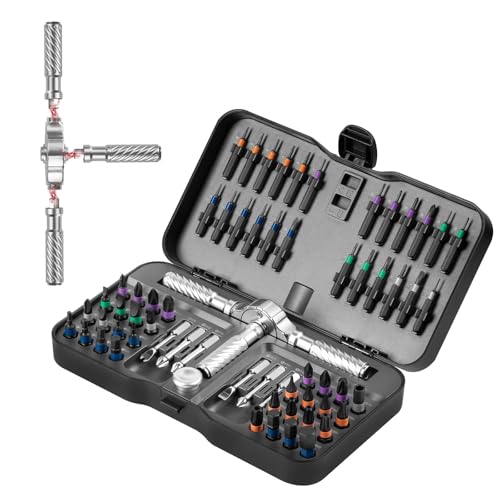
Where the VSKIZ pickup tool grabs what falls, the VMAN set drives what needs turning. This ratcheting screwdriver kit covers furniture assembly, electronics repair, and bicycle adjustments, with 6 long-shank bits, 32 short-shank bits, and 24 precision bits spanning Phillips, flathead, hex, and Torx profiles (the common star-shaped fastener found on electronics and bikes). The ratcheting mechanism keeps the bit engaged while you swing the handle, which is noticeably easier on the wrist than a fixed driver.
Magnetic components hold bits in place during quick swaps, and a flexible extension shaft reaches into the kind of awkward cavities you find behind motherboard standoffs or inside appliance housings. Bits are machined from S2 steel, a shock-resistant tool steel commonly used for impact-grade drivers, so they should hold up to repeated torque without rounding out.
Useful Touches
- 62-bit selection covers the fastener types most home and electronics jobs actually use.
- Ratcheting action reduces wrist fatigue during long assembly or teardown sessions.
- Flexible extension reaches recessed screws inside PC cases and appliance chassis.
- S2 steel bits resist cam-out (slipping out of the screw head) under moderate torque.
Things To Consider
- The sheer number of bits means more cases and sleeves to track during a project.
- This is a manual driver, so for high-volume screw driving, a powered option like the EZARC 181-in-1 may save time.
- Storage case organization can loosen over time if tossed in a tool bag regularly.
Right Fit For
DIYers who split time between furniture assembly, electronics repair, and bike tune-ups and want one driver that handles most fastener types.
Consider Something Else When
You spend hours driving screws into dense materials, where the Klein Tools 32303HD Impact Driver Set delivers far less wrist strain.
Klein Tools built the 32303HD for situations where a standard screwdriver simply runs out of authority. Every component carries an impact rating, meaning the bits and nut drivers are hardened to survive the sudden torsional pulses (short bursts of rotational force) from a powered impact driver. The 20-in-1 design combines common nut-driving sizes with screwdriver tips in Phillips, slotted, square, and Torx formats, all in a single handle that accepts a 1/4-inch quick-connect shank.
That quick-connect compatibility matters when you already own an impact driver: drop the Klein shaft into the chuck and the same tool you use for lag bolts becomes a precision fastener driver. For IT pros pulling rack hardware, anyone maintaining workshop equipment, or DIYers tackling deck builds, that versatility trims trips back to the toolbox.
Everyday Wins
- Impact-rated construction prevents bit rounding during high-torque applications.
- 20-in-1 format consolidates nut drivers and screwdriver tips into one compact body.
- 1/4-inch quick-connect end drops directly into most impact drivers and drill chucks.
- Handles the heavy fastening that breaks standard chrome-vanadium bits.
Honest Caveats
- Requires a separate impact driver or drill to deliver the rated performance, so it is not a standalone hand tool.
- Bit variety is narrower than the VMAN set, focusing on common sizes rather than specialty profiles.
Who It Suits Best
Tradespeople, IT technicians, and serious DIYers who already own an impact driver and want a hardened bit set that survives real shop conditions.
Not Your Match When
You need a manual-only kit for delicate electronics; the iFixit Pro Tech Toolkit is purpose-built for that kind of precision work.
For sheer breadth of bits, the EZARC cordless set is hard to match. The case holds 162 bits plus a handful of specialized opening and prying tools, giving you a screwdriver ready for nearly any consumer electronics fastener you encounter. A flip-cover enclosure, inspired by the aesthetic of a small spacecraft console, doubles as a storage and presentation case, with magnetic bit slots that keep everything visible at a glance.
The cordless driver offers three torque settings, which control how much rotational force the motor applies before slipping the clutch, useful when switching between a phone back panel and a sturdier laptop chassis. You control direction with a simple forward/reverse switch, and the rechargeable battery handles the small jobs that fatigue a hand driver over time.
The Upside
- 181-piece count covers obscure and common fastener types in one organized case.
- Three torque settings reduce the risk of stripping small electronics screws.
- Flip-cover case keeps bits indexed and visible, which speeds up mid-project swaps.
- Cordless operation removes wrist strain during long disassembly sessions.
Possible Compromises
- Battery life between charges is shorter than a manual driver, so a fully drained mid-project can stall your workflow.
- The driver is not a substitute for a real impact driver, so heavy fastening still needs a separate tool.
Best Suited To
Repair bench hobbyists and small-shop technicians who regularly crack open phones, laptops, and gaming hardware and want one kit that handles nearly everything.
Look Elsewhere When
You mainly terminate network cables and punch down keystones; the ZOERAX 14-in-1 Network Tool Kit is purpose-built for that workflow.
The iFixit Repair Business Toolkit is built for a specific reader: someone who has decided that fixing devices is more than a hobby. It bundles the brand’s Pro Tech Toolkit with their phone-opening Anti-Clamp and several shop-grade essentials, then drops the entire collection into a messenger bag designed to ride between job sites. Everything has a labeled slot, so you are not digging through a canvas sack when a client is waiting.
What separates this kit from a casual repair bundle is the workflow orientation. The Anti-Clamp creates the controlled gap needed to insert a pick under a glued phone screen, and the included spudgers (plastic prying tools) and suction handles are the same items iFixit technicians use in their own guides. For someone starting a repair side hustle or formalizing an existing one, the case layout alone saves real time across a day’s appointments.
Strong Points
- Messenger bag format keeps tools organized and portable between client sites.
- Anti-Clamp simplifies glued phone screen separation, a task that often ruins casual attempts.
- Combines Pro Tech Toolkit essentials with shop-specific additions in one purchase.
- Compatible with iFixit’s extensive library of free repair guides for ongoing reference.
Points To Keep In Mind
- Premium positioning means a higher entry cost than assembling bits and drivers separately.
- Bag capacity tops out at the included tools, so adding specialty items may require a second case.
Perfect Match For
New and growing repair technicians who need a presentable, organized kit for client-facing work and want everything in one bag from day one.
Where A Sibling Pick Shines
You are a hobbyist repairing your own devices occasionally; the iFixit Pro Tech Toolkit alone covers that need at a more accessible price.
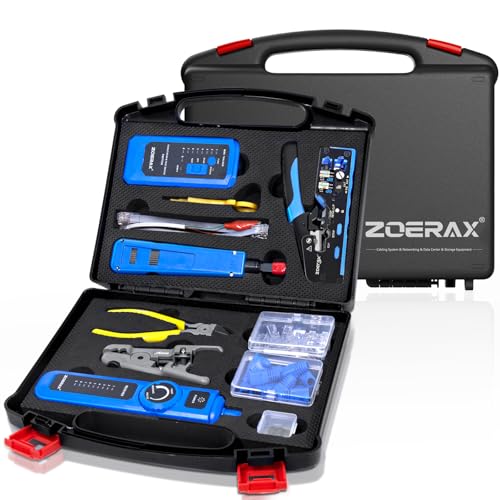
Network cabling lives in its own world, and the ZOERAX 14-in-1 kit is built for that world specifically. At its core is an RJ45 crimp tool (a ratcheting pliers-style tool that presses the metal contacts of an RJ45 plug onto the wires of an Ethernet cable) paired with pass-through connectors for Cat6, Cat6A, and Cat5e cable. A continuity tester checks each terminated run, while a punch-down tool seats wires into keystone jacks and patch panels.
The included wire stripper and cable boots round out the workflow, all stored in a hard-shell carrying case. For small-office IT staff, home-lab enthusiasts running their own structured cabling, or anyone who has ever needed to re-terminate a damaged run at 9 PM, having these tools in one case eliminates the scavenger-hunt phase of the job.
Where It Helps
- RJ45 crimp tool supports pass-through connectors, which speed up and clean up terminations.
- Continuity tester confirms each conductor after crimping, catching errors before you close up a wall plate.
- Punch-down tool handles keystone jacks and 110-style patch panels.
- Hard case keeps small parts and tools from scattering during transport.
Less Ideal Details
- Specialized toolset, so it has little overlap with general electronics repair kits.
- Continuity tester typically requires its own battery, which you must remember to keep fresh.
Who Should Grab It
Small-business IT staff, structured cabling installers, and serious home-network hobbyists who run their own drops and patch panels.
A Better Fit Elsewhere
You rarely touch network cabling and mostly repair devices; the iFixit Pro Tech Toolkit is a more general-purpose choice.
Few repair kits have shaped the hobbyist electronics community like the iFixit Pro Tech Toolkit. It pairs a 64-bit precision driver with tweezers, a flexible extension, opening picks, and an anti-static wristband, all arranged in a magnetic case with a foam insert that holds each tool in its place. The case lid doubles as a sorting tray during a teardown, so screws do not wander off your work surface.
Where the bigger Repair Business Toolkit targets working technicians, the Pro Tech Toolkit is the everyday version: enough bits to crack open a smartphone, a laptop, a tablet, or a game console, with the build quality to last years of weekend projects. The brand’s free repair guides cover an enormous catalog of devices, so you are rarely guessing what step comes next.
Where It Excels
- 64-bit selection covers virtually every small fastener found in consumer electronics.
- Magnetic case and foam insert keep tools organized and visible at a glance.
- Anti-static wristband reduces the risk of ESD damage (electrostatic discharge, a static-electricity zap that can silently destroy sensitive components) during component-level work.
- Backed by iFixit’s extensive library of free, model-specific repair guides.
Some Limits To Know
- Not designed for heavy fastening or high-torque applications.
- Foam insert can wear if you swap tools in and out aggressively, though replacements are available.
Whose Shelf It Belongs On
Home tinkerers, students, and hobbyists who want a single trustworthy kit for phone, laptop, and tablet repairs without committing to a professional-tier setup.
Reach For A Different Pick When
You need network-specific tools like a crimper and punch-down; the ZOERAX 14-in-1 Network Tool Kit covers that specialty.
What Matters Most Before Choosing IT Tools
Match the Kit to the Workload
Before anything else, define the work you actually do. Hobbyists opening a phone once a quarter have very different needs from a technician running a daily repair queue. The iFixit Pro Tech Toolkit handles the former, while the iFixit Repair Business Toolkit fits the latter. Mixing the two usually means overpaying for tools that sit unused.
For multi-purpose DIYers, a manual ratcheting driver like the VMAN set covers the broadest range of fastener types without committing to a powered tool. You can always upgrade later if a project outgrows the kit.
Prioritize Bit Quality Over Bit Count
A 60-bit set made from S2 or similar impact-grade steel outperforms a 200-bit set made from soft chrome-vanadium. Harder steel resists cam-out, the common failure where a bit slips out of the screw head and strips the fastener, which means fewer ruined screws and longer tool life. Look for bit material specifications in the product details rather than counting bits alone.
Heat-treated bits, identified by impact-rated labeling, hold their edges through repeated use. If you cannot find material specifics, treat the count as a secondary concern and read long-term ownership impressions before committing.
Decide Between Manual and Powered
Powered screwdrivers like the EZARC 181-in-1 reduce wrist fatigue during long sessions, but they add charging, torque management, and bulk. Manual drivers give you tactile feedback, which matters when working near delicate connectors. A balanced approach: manual for precision, powered for repetitive tasks.
Torque control (the ability to set how forcefully the driver turns before slipping) is a real differentiator for powered drivers. Three settings is a sensible minimum, and some high-end models offer five or more. Match the range to the device mix you actually service.
Storage and Portability
A scattered collection of bits in a kitchen drawer will cost you time on every project. Hard cases with foam inserts, magnetic trays, and labeled compartments pay off fast. If you travel between sites, a messenger-style bag like the iFixit Repair Business Toolkit keeps everything in one organized layer.
Consider how often you move the kit. A bench-bound setup can prioritize drawer storage, while a mobile workflow needs a closed case that protects against drops and jostling in a vehicle.
Key Considerations Across These Picks
Mistakes Worth Dodging
Shopping by bit count alone leads to bloated kits full of sizes you never touch. Focus on the profiles relevant to your work: Phillips, Torx, pentalobe (the five-pointed screw Apple uses on iPhones), and tri-wing cover most consumer electronics. Skipping the research on bit material means replacing stripped bits within months.
Another common slip is ignoring ergonomics. A driver that feels awkward for fifteen minutes of light use will be miserable during a full afternoon teardown. Look for handles with grip texture and balanced weight distribution before you commit.
When Paying More Pays Off
Premium kits justify their cost through longer-lasting bits, better storage, and included specialty tools like the Anti-Clamp. For occasional hobbyists, the upgrade may not pencil out. For working technicians, the saved time across a year of repairs typically recoups the higher upfront cost.
Higher tiers also tend to include better documentation and brand-supported repair guides, which shorten the learning curve on unfamiliar devices. That support has real value when you are facing a model you have never opened before.
Frequently Asked Questions
What is the most versatile IT tool to start with?
A precision screwdriver set with Phillips, flathead, Torx, and pentalobe bits covers the largest share of consumer electronics fasteners. The iFixit Pro Tech Toolkit is a strong starting point for that reason.
Add a magnetic pickup tool if you frequently work around small screws that love to vanish into crevices.
Do I really need an anti-static wristband?
For component-level work like replacing SSDs or RAM, an anti-static wristband reduces the risk of ESD damage. For simple case opening and screw swaps, the risk is lower but never zero.
If you already own a kit without one, the cost of adding a wristband is small compared to the cost of a damaged motherboard.
How do I know which bit size to use?
Match the bit to the screw head so it seats fully without wobble. A bit that sits proud of the head will cam-out and strip the fastener within a few turns.
When in doubt, start with a slightly smaller bit and work up. A loose bit damages screws faster than a snug one ever will.
Can one kit handle both network cabling and device repair?
Not really. Network tools like RJ45 crimpers and punch-down tools serve a different purpose than electronics repair drivers, and combining them usually means a cluttered case with mediocre versions of each.
Specialized kits, like the ZOERAX 14-in-1 for cabling and the iFixit Pro Tech Toolkit for devices, outperform any all-in-one compromise.
How should I store bits so they do not get lost?
Keep bits in their original case or a dedicated organizer with labeled slots. Magnetic cases help, but foam inserts with cutouts are the most reliable for long-term organization.
A small tray during active work prevents bits from rolling off the bench, and a quick inventory at the end of each session catches missing pieces before they vanish.
Wrap Up
The right IT tool kit depends less on brand reputation and more on the work you actually do. Hobbyists get years of use from a precision driver set, while working technicians benefit from organized, portable kits with specialty add-ons. Network specialists live in a different category entirely, with crimpers and testers that do not overlap with general repair tools. Match the kit to your workflow, prioritize bit material over bit count, and you will spend less time improvising and more time fixing.