


Losing your keys once a week is exhausting, and the scramble gets old fast. The right finder turns a five-minute hunt into a ten-second beep, whether your keys slipped between couch cushions or got left at the office. This list covers the styles that actually fit a real routine: phone-paired Bluetooth tags, app-free RF remotes, slim wallet cards, and a hybrid flashlight-tracker for late-night searches.
A Fast Comparison Of The Options

A-SZCXTOP Key Finder Locator RF Wireless Remote Tracker

Pebblebee Clip 5 Bluetooth Tracker Tag

Qylara 2 Pack Bluetooth Tracker for Apple Find My

KeySmart SmartCard Gen 3 Wallet Tracker
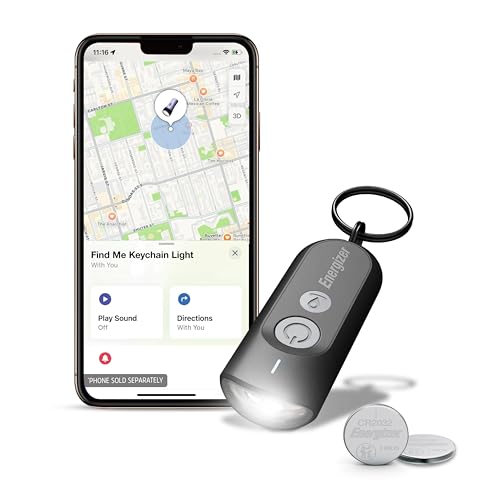
Energizer Find Me Keychain Light Tracker
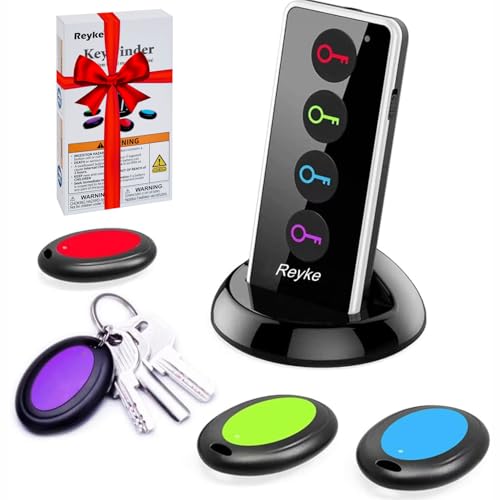
Reyke Key Finder with Sound 131ft RF Remote

Esky Key Finder Locator with 85dB Sound 6 Receivers

Life360 Tile Bluetooth Tracker for Keys and Bags

Apple AirTag 2nd Generation Tracker
Taking A Closer Look At The Options
The A-SZCXTOP RF wireless tracker runs on a simple premise: press a color-coded button on the remote, follow the beep. There’s no smartphone app, no account setup, and no learning curve for an older parent or a technophobe partner. It ships with four small receivers that you loop onto keyrings or stick onto remotes with the included adhesive pads.
Because it uses radio frequency (RF) rather than Bluetooth, you don’t need a phone nearby for it to work. That makes it a solid pick for households where the phone is always in another room or for tracking items that belong to people who don’t carry a smartphone at all, like a child’s backpack or a workshop toolbox.
What It Does Well
- No app or phone required, which removes the main setup friction most Bluetooth trackers carry.
- Four color-coded receivers let one remote cover keys, wallet, TV remote, and a pet collar from the same device.
- Built-in LED flash on each receiver helps locate items dropped in dark corners or under furniture.
- RF signal works through walls and cushions better than line-of-sight infrared remotes do.
Things To Consider
- RF range is shorter than a Bluetooth mesh network, so lost items outside the house are harder to locate.
- Receiver batteries need periodic replacement, and owners commonly report the small CR2032 cells being easy to misplace during swaps.
Who It Suits Best
Multi-item households that want a single remote to manage four different things without ever opening a phone app.
Where Another Pick Suits Better
Deep iPhone users who want a network-assisted map view will find the Apple AirTag (2nd Generation) a better fit for off-property tracking.
The Pebblebee Clip 5 is one of the few trackers that genuinely covers both sides of the phone divide. It works with Apple’s Find My network on iPhone and Google’s Find Hub on Android, so the same tag can move with you through a household device swap. The 130dB siren is loud enough to cut through couch cushion fabric and the noise of a busy kitchen.
Where this one earns its keep is shared living situations. A couple with one iPhone and one Pixel can each pair the Clip 5 to their own network without buying duplicate hardware. The clip form factor also attaches to bag straps and belt loops more securely than a plain tile.
Notable Gains
- Dual-network compatibility removes the iOS-versus-Android lock-in that affects most other Bluetooth trackers.
- 130dB siren out-punches the typical 80–100dB range you see in this category.
- Rapid presses trigger a safety mode with flashing lights, useful for a parent walking to a car at night.
Points To Keep In Mind
- Battery life varies with how often the siren is triggered, so heavy users may charge more often than expected.
- The clip design adds a little bulk compared to a flat tile, which matters on slimmer keychain setups.
Key Specs
Made For
Households running a mix of iPhone and Android phones who don’t want to manage two different tracking ecosystems.
Look Elsewhere When
Shoppers locked into Apple-only gear will get slightly tighter Find My integration from the Apple AirTag (2nd Generation).
The Qylara 2 Pack plugs straight into Apple’s Find My app on iOS 14.6 and up, which means setup takes about thirty seconds per tag. You get two units, which is handy for covering a keychain and a wallet, or one for you and one for a partner. Each tag weighs about 0.35 ounces, so it doesn’t add noticeable bulk to a pocket carry.
You tap the app, the tag beeps between 80 and 100dB, and an LED indicator helps in dim spaces. Range tops out around 400 feet in open air, which is enough to cover most homes and backyards but can drop quickly through concrete walls.
Everyday Wins
- Native Apple Find My support means no extra app to download or account to maintain.
- Two tags in one box gives wallet-and-keys coverage without buying separately.
- Replaceable CR2032 battery lasts around a year in typical daily use.
- IPX4 water resistance handles rain and accidental splashes around sinks or pool decks.
Worth Noting
- Android users are locked out, since the tag only pairs with iOS devices running Find My.
- Range can drop noticeably through brick or concrete walls compared to a flat 400-foot line of sight.
Best Suited To
iPhone households that want a wallet-friendly two-pack without paying the premium for an AirTag.
Skip It When
Anyone on Android should look at the KeySmart SmartCard Gen 3, which pairs with Google Find Hub instead.
The KeySmart SmartCard is built for one job: living inside a wallet without bulging it. At roughly 1.8mm thick, it’s about the profile of two stacked credit cards, so it slides into a money clip or card slot without distorting the leather. It pairs with Google Find Hub on Android phones, which is the rarer side of the tracker market.
Unlike coin-cell trackers, the SmartCard is rechargeable, so you top it up over USB rather than prying open a battery cover. That detail matters for shoppers who don’t want a drawer of spare CR2032s lying around. The trade-off is wallet-only form factor; this isn’t the tag you clip to a dog leash.
Reasons It Performs
- 1.8mm profile is the thinnest tracker you’ll find in a wallet-friendly shape.
- Rechargeable battery means no annual coin-cell swaps in most ownership patterns.
- Google Find Hub pairing covers a major gap in the Android tracking ecosystem.
Honest Caveats
- No speaker loud enough to find inside a deep couch gap, since the slim body limits driver size.
- You may find the recharge cadence a new habit to remember if you’ve only used disposable-cell trackers before.
Feature Snapshot
Right Fit For
Android-carrying commuters who lose their wallet more often than their keys and want a near-invisible tracker.
Not Your Match When
iPhone users should consider the Pebblebee Clip 5, which taps into Apple’s Find My network on the same hardware.
Energizer folded a flashlight into a tracker, which sounds gimmicky until you fish keys out from under a car seat at 11 p.m. The built-in LED adds a real second use beyond the beeping tag, and the housing still pairs with Apple Find My on iPhone, iPad, and Mac for map directions and play-sound alerts.
For someone whose lost-keys moment always happens in a dark entryway, the light earns its weight. For someone who already keeps a keychain flashlight, the extra function feels redundant and the slightly larger body may not be welcome.
Why It Works Well
- Two tools in one body, which trims keychain clutter for a minimal carry.
- Native Apple Find My pairing takes about a minute from the iPhone setup screen.
- Energizer’s brand familiarity reduces the anxiety of trusting a new electronics maker.
Trade Offs
- The body is thicker than a flat tile, which can feel chunky on a slim keyring.
- Android users are out of luck, since the tag is wired to Apple’s network only.
Who Will Love This
iPhone users who often search for keys in dim hallways, garages, or after-dark parking lots.
Reach For A Different Pick When
You already carry a keychain light, in which case the Life360 Tile offers a slimmer profile for a similar app workflow.
The Reyke RF remote is the slightly older sibling of the A-SZCXTOP option, with a similar 131-foot RF range and four color-coded receivers. It comes with the batteries in the box, so you can start using it the day it arrives without a trip to the store. The transmitter takes two AAA cells, while the receivers use CR2032 coin cells.
Where it stands out is the loud 80dB-plus beep paired with a built-in LED flashlight on each receiver. In a noisy household or a workshop with power tools, that combination helps you zero in on a missing item faster than a quieter tag would.
Useful Strengths
- Batteries ship in the box, removing the “stop at the store” step on day one.
- 131-foot RF range is generous for two-story homes or detached garages.
- LED on each receiver doubles as a pocket flashlight, useful during a nighttime search.
Softer Spots
- Like other RF remotes, range drops through metal walls or foil-backed insulation.
- Replacing four coin-cell batteries at once every year or so is a small chore most owners tend to forget.
Quick Facts
Perfect Match For
Homeowners who want app-free tracking and need range that reaches a basement or detached shop.
Swap It Out When
You want to see your item’s last location on a map, in which case the Life360 Tile is the better network-based option.
The Esky set ships with six receivers, which is more than any other option on this list. For a four-person family where everyone loses something different, or a small office with shared equipment, the extra receivers remove the “but I already used all four” problem. Each receiver pairs to a specific color-coded button on the transmitter.
It’s a traditional RF remote, so the workflow stays the same as the A-SZCXTOP and Reyke options: press, listen, follow the beep. The 85dB output cuts through a typical living room, and the flashing LED on each receiver is handy for items lost in dim corners.
Notable Upsides
- Six receivers in a single set covers a large household or shared workspace from one remote.
- 85dB output is loud enough to hear through a couch cushion or a closed drawer.
- No phone or app needed, which keeps the workflow simple for less tech-confident family members.
Room For Improvement
- Six coin-cell batteries to replace over time, which can feel like a lot of small chores depending on the household.
- The transmitter is bigger than a typical key fob, so it doesn’t slip into a pocket as easily as a phone-based option.
Built With In Mind
Large families or shared homes that need a single remote to manage more than the usual two or three items.
A Better Fit Elsewhere
Solo key-losers in a one-bedroom apartment will do fine with the smaller four-receiver A-SZCXTOP set.
The Life360 Tile sits in the middle of the Bluetooth tracker world. It works on both iOS and Android through the Tile app, which makes it one of the few mainstream options not tied to either Apple’s or Google’s network alone. The app shows a last-known location on a map, plays a loud ring, and can ping your phone with a double-press of the Tile button.
For shoppers already using the Life360 family-location app, the Tile integration feels like a natural extension. For everyone else, the standalone Tile app still works fine, but the family-tracking angle is where the brand adds the most value beyond a generic tracker.
Noteworthy Benefits
- Cross-platform support covers both iPhone and Android households without a network switch.
- Double-press on the Tile rings your phone, even on silent, which solves the lost-phone-in-the-house problem.
- Optional SOS mode can send a discreet alert through the Life360 network, useful for older kids walking home.
Factors To Consider
- Range and network reach depend on how many other Tile users are nearby, which varies by neighborhood.
- The companion app asks for several permissions, and you may find the broader Life360 ecosystem more involved than a single-purpose tracker.
Spec Overview
Whose Shelf It Belongs On
Mixed-device families who want a tracker that fits into an existing Life360 safety routine.
Where A Sibling Pick Shines
Single-platform iPhone users get a deeper, more polished experience with the Apple AirTag (2nd Generation).
The second-generation AirTag is the polished end of the iPhone tracker experience. Setup is a one-tap pop-up on the iPhone or iPad, and from there you get Precision Finding directions on the screen, a chime from the upgraded speaker, and step-by-step guidance on Apple Watch as well. The 1.5x precision range over the first generation helps you zero in on a tag in a dense couch cushion faster.
It’s worth being honest about the trade-off: this is the most expensive single tag on the list, and you’ll need a keychain holder since the disc body has no built-in clip. For someone deep in the Apple ecosystem, that extra spend buys the smoothest workflow in the category.
A Favorable Mix
- Ultra Wideband (UWB) Precision Finding gives on-screen arrows pointing exactly to the tag indoors.
- Apple’s Find My network reaches further than most crowdsourced networks because of the installed base.
- Speaker is louder than the first generation, with a distinctive chime that’s easier to pick out from background noise.
- One-tap setup removes any guesswork for first-time tracker owners.
Worth Bearing In Mind
- Android users can’t pair the AirTag at all, so the value drops to zero outside the Apple ecosystem.
- The disc body needs a separate holder or loop to attach to most keychains, adding a small accessory cost.
Feature Card
Who Should Grab It
iPhone-first households that want the smoothest pairing flow and the widest crowdsourced network for off-property tracking.
Consider Something Else When
Android households get more value from the Pebblebee Clip 5, which supports both Find My and Google Find Hub on the same tag.
Picking The Right Finder For Your Routine
The right tracker depends on three honest questions: which phone you carry, how many items you actually lose, and whether you want a map view or just a beep. Phone-paired Bluetooth tags like the AirTag and Tile work best when you want a last-known location and a community network, while RF remotes like the Reyke and A-SZCXTOP work best when you want zero app setup and a single remote that the whole household shares.
Range matters more than specs suggest. A 400-foot line-of-sight Bluetooth range can collapse to 50 feet through brick walls, so a tag that performs well in an open-plan apartment may disappoint in an older home with plaster. RF remotes use a different radio path and tend to push through walls more reliably at shorter distances, which is why they remain popular in multi-story houses.
Speaker loudness is the difference between finding a tag in one minute or five. Anything below 80dB gets swallowed by a TV at normal volume, while 100dB and up cuts through most household noise. The Pebblebee Clip 5’s 130dB siren is unusually loud for the category and worth considering if your lost-keys moment always happens over background music or a dishwasher cycle.
Battery type changes the long-term ownership feel. Replaceable coin cells like the CR2032 are easy to swap but easy to forget. Rechargeable designs like the KeySmart SmartCard require a charging habit but skip the spare-battery drawer. Pick the one that matches how often you want to think about the tag after the first month.
What To Watch Before You Commit
Common Shopping Slip Ups
The biggest mistake is buying a tracker for the wrong phone network. AirTags are useless to an Android user, and Find Hub-compatible tags like the Qylara 2 Pack won’t pair with an iPhone. Always confirm network compatibility before you order, because the return process is rarely worth the saved few dollars.
Another trap is assuming a single tag will cover a household. Two adults, two keychains, and a shared wallet need at least three tags, which is why two-packs and multi-receiver sets often end up cheaper per unit than buying singles. Plan for the realistic count of items you actually lose, not the optimistic one.
Where The Extra Money Goes
Premium trackers earn their higher cost through louder speakers, wider precision-finding radios like Ultra Wideband (UWB), and access to larger crowdsourced networks. The AirTag’s UWB chip shows on-screen arrows pointing to the exact spot indoors, a feature cheaper tags don’t have. Whether that upgrade is worth it depends on how often you lose things in the same room versus across town. If your keys usually turn up in the house, the precision hardware pays off quickly. If they usually turn up at the office or a friend’s place, the network reach matters more than the indoor accuracy.




