Good joinery starts before a single cut, and it starts with layout tools you can actually trust. A wobbly square or a scratched-off scale shows up later as a gapped joint or a crooked shelf, and no amount of sanding fixes that. This roundup covers five measuring and marking tools aimed at hobbyists setting up their first bench as well as experienced woodworkers tightening up accuracy on saws and routers.
A Quick View Of The Lineup

IRWIN Combination Square 12-Inch Stainless Steel

Saker Multi-function Scribing Tool 5.5 Inch
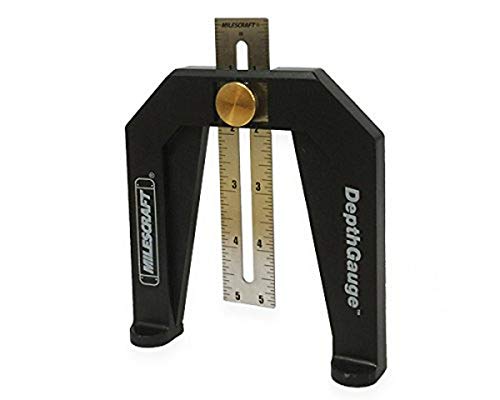
Milescraft 8601 Depth Gauge

Violetfox Precision Pocket Slide Rule Set (3 Pcs)

ViewReal Carpenter Square Hole Scribing Ruler
The Picks, Examined More Closely
A combination square is the first layout tool most woodworkers reach for, and this 12-inch version from IRWIN handles the core jobs: squaring lines across stock, checking 45-degree miters, and setting blade or bit depth. The stainless steel blade resists rust in a humid garage, which matters more than it sounds once summer rolls around.
The cast zinc body slides along the blade and locks where you need it, so the head doubles as a depth stop or an angle transfer guide. Compared with the specialty picks further down this list, this one covers more ground per dollar spent.
Strong Points
- Rust-resistant stainless blade holds up in damp workshops
- Covers both 90-degree and 45-degree marking in one tool
- Sliding head works as a depth gauge for saw and router setups
- Black etched scales stay readable under shop lighting
- Fits apron pockets and tool bags without fuss
Things To Consider
- Zinc body is lighter than machined steel heads some owners prefer for heft
- Lock tension can loosen over years of heavy use, so check squareness occasionally against a known reference
Key Specs
Who It Suits Best
Beginners building a starter kit and anyone who wants one dependable square for everyday benchwork.
Where A Sibling Pick Shines
The Violetfox pocket slide rule set below suits fine furniture makers who mark inside small joints more often than they square large panels.
Where the IRWIN square draws straight reference lines, this compact aluminum scribe follows irregular shapes: uneven wall corners, pipe runs, tile edges. You adjust the arm geometry by loosening the pencil holder and nut, set your offset, then lock everything tight so the line stays consistent along the whole profile.
The anodized aluminum body shrugs off shop abuse better than plastic competitors, and at 5.5 inches it lives in a nail pouch rather than a toolbox drawer. Installers fitting cabinets or flooring around imperfect walls will get the most mileage here; pure furniture makers may touch it once a month.
The Practical Payoff
- Adjustable pivot geometry handles both parallel offsets and angle transfers
- Locked settings hold position through a full run of scribing
- Anodized finish resists corrosion and cleans off pencil dust easily
- Compact size suits trim carpenters working on ladders and in tight rooms
Small Caveats
- Repeated loosening of the holder nut means checking tightness before each job
- Not designed for straight-line layout, so it complements rather than replaces a square
Built With In Mind
Remodelers and installers who trace odd contours daily and need repeatable offset lines fast.
Reach For A Different Pick When
Your work is mostly squared-up joinery, in which case the IRWIN combination square above does the heavy lifting.
Setting router bit height by eye wastes stock, and this little gauge exists to end that habit. The wide-based frame stands on its own next to the bit or blade, so both hands stay free to turn the height adjustment while you read the measurement through the viewing window.
A brass thumb knob locks the ruler once you’ve dialed in the number, and dual inch-and-millimeter scales mean plans from either side of the Atlantic work without conversion math. Owners commonly report reaching for it every time a bit changes, which says something about how quickly it earns its spot near the router table.
The Helpful Details
- Self-standing base frees both hands during machine setup
- Dual inch and metric scales suit any printed plan
- Brass thumb knob gives firm, repeatable locking
- Easy-view window reduces parallax errors when reading the scale
- Also locates fences and marks positions, not just depths
Points To Note
- Narrow use case compared with a general square like the IRWIN
- Keep it clear of sawdust buildup around the sliding ruler for smooth adjustment
Quick Facts
Right Fit For
Router-table owners and table-saw users who change blades or bits often and want repeatable depth settings.
Swap It Out When
You rarely touch power tools; the ViewReal multi-angle square later in this list serves hand-tool layout better.
T-type pocket rulers are the quiet heroes of fine joinery, letting you hook the end over stock edge and mark consistent lines fast. This set gives you three lengths, six, eight, and twelve inches, in CNC-machined aluminum with laser-engraved markings on both inch and metric scales.
The engraved numbers are the real story here: unlike printed scales that wear pale after seasons of handling, engraving stays crisp essentially indefinitely. The sliding stop with its fine notch lets you repeat identical measurements across a batch of parts, which is exactly what drawer making demands. At three rulers for the price tier, the value case writes itself.
Good Reasons To Consider
Less Ideal Details
- Thin aluminum can flex slightly under firm pressure on wide spans
- No locking protractor function, so angles still need another tool
- Small parts are easy to misplace between sessions
Who Will Love This
Detail-oriented furniture makers and box builders who mark tenons, dovetails, and drawer parts daily.
Consider Something Else When
Your projects lean toward big construction angles rather than fine internal marking; the ViewReal square below fits that brief better.
Octagonal frames and angled braces used to mean fumbling with a bevel gauge and a protractor. This square simplifies things with preset stops at 22.5, 30, 45, 60, 67.5, and 75 degrees, plus quarter-inch pin holes that let you lock the included angle pin into whichever setting the job calls for.
The full range runs from zero to ninety degrees, so it also behaves as a plain square for ordinary crosscut lines. Laser-printed scale lines keep the markings sharp enough to read against dark lumber. Woodworkers who split from the IRWIN’s two-angle world into octagons, hexagons, and compound frames will appreciate having six presets waiting instead of one.
Reasons It Performs
- Six preset angles cover common polygon and miter layouts
- Quarter-inch pin holes accept the supplied pin for locked settings
- Full 0-to-90-degree range doubles as a standard square
- Laser-printed scales stay legible on darker woods
Trade Offs To Weigh
- More moving parts than a fixed square means more to keep clean and aligned
- General-purpose build may feel less rigid than dedicated machined squares to some users
Feature Snapshot
Whose Shelf It Belongs On
Framing-minded DIYers and general contractors splitting time between rough carpentry and angled trim work.
Another Choice May Suit
Pure beginners should start simpler: the IRWIN combination square teaches fundamentals with fewer variables to manage.
What Actually Matters In Woodworking Layout Tools
Accuracy And How It Holds Over Time
Scales mean nothing if the tool drifts. Look for etched or engraved graduations rather than printed ones, since printing wears smooth after a few seasons of thumb traffic. Check any square against a known true reference now and then; even good tools can shift after a drop onto concrete.
Material Choices And Their Trade-Offs
Stainless and anodized aluminum resist rust, which matters in garages without climate control. Cast zinc keeps cost and weight down but trades away some rigidity. Machined steel feels best in the hand yet needs a light oil wipe in humid climates to stay clean.
Matching The Tool To Your Projects
Fine furniture work rewards pocket rules and precision squares with fine graduations. Machine-heavy shops benefit from a dedicated depth gauge. Trim installers fighting out-of-plumb walls need a contour scribe. Buying for your actual workload beats buying for versatility you’ll never use.
Storage And Everyday Handling
Layout tools live in apron pockets, so size and snag-free edges count. Sliding mechanisms collect sawdust; a quick blast of compressed air keeps them moving smoothly. Store blades flat to protect graduations from knocking against other steel.
Key Considerations Across These Picks
Traps First Timers Fall Into
New woodworkers often buy one do-everything gadget instead of two simple tools done well. Another common slip is ignoring scale durability; printed markings fade faster than most people expect. Start with a solid square, add specialty pieces as projects demand them.
The Upgrade Payoff
Higher-tier layout tools spend money where it counts: CNC-machined bodies, engraved scales, tighter tolerances. That precision compounds over dozens of cuts in a single project. Casual builders won’t notice the difference; anyone doing repeatable joinery will.
Frequently Asked Questions
What size combination square suits most home workshops?
A 12-inch blade handles the majority of furniture and cabinet stock in one pass. Smaller 6-inch versions work well as a secondary tool for tight interior joints.
Are engraved scales really worth the extra cost?
Engraving cuts into the metal itself, so the numbers survive thousands of handling cycles. Printed ink sits on top and tends to wear faint within a couple of busy seasons.
How often should I verify my square is still square?
Checking against a known reference every few months is plenty for normal use. Do it immediately after any drop onto a hard floor.
Do I need both a depth gauge and a combination square?
They overlap somewhat, since a square head can act as a crude depth stop. A dedicated gauge like the Milescraft stands on its own and reads faster during machine setup.
What’s the point of preset angles like 22.5 and 67.5 degrees?
Those settings correspond to eight-sided and related polygon layouts common in trim and furniture work. Presets remove the guesswork of transferring angles by hand each time.
Closing Thoughts
Layout accuracy costs less than almost any other upgrade in a woodworking shop, and these five picks prove it. Start with the IRWIN square as your foundation, add the Milescraft gauge once machines enter the picture, and let project type pull you toward the rest. Whatever you choose, check it against a trusted reference occasionally and store it dry. Sharp lines make sharp joints.