


Mid-level 3D printing is where hobby turns into habit. You’ve moved past toy machines that jam every third print, and now you want speed, reliability, and results you’d actually display. The five products below cover that middle ground: two fast CoreXY filament printers, a beginner-friendly resin machine, a bed-leveling helper, and a proven workhorse. Whether your desk is a spare bedroom or a garage workbench, there’s a fit here for how you actually create.
The Main Contenders

FLASHFORGE AD5X Multi-Color 3D Printer

Creality HALOT R6 Resin 3D Printer

ELEGOO Centauri Carbon 3D Printer
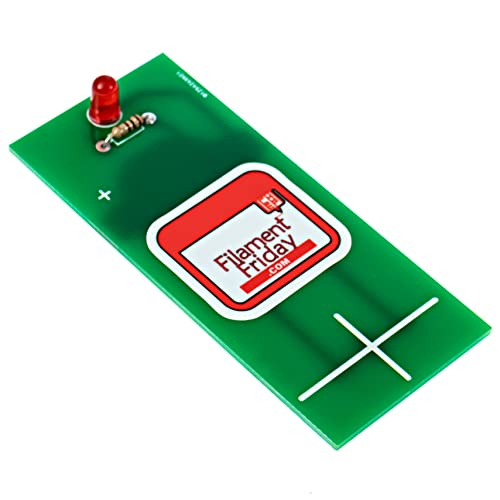
Filament Friday E-Leveler Bed Leveling Tool

FLASHFORGE Adventurer 5M 3D Printer
A Closer Look At Each Pick
The headline feature here is four-color printing in a single run, something the Adventurer 5M later in this list can’t do without extra hardware. CoreXY motion, where both motors move the print head on fixed rails rather than dragging a heavy bed around, lets it hit 600mm/s without wobble. For cosplay props or signage with color changes, that combination saves hours of manual filament swapping.
The 220x220x220mm build area handles most mid-size projects, though it’s noticeably smaller than the ELEGOO Centauri Carbon’s cube. A 300°C direct drive extruder opens the door to tougher materials like nylon blends, which bowden setups often struggle with.
What Makes Sense
- Up to four colors per print, so gradients and logos come off the plate finished.
- One-click auto leveling removes the first-layer guesswork that plagues newcomers.
- A 300°C direct drive extruder widens your material options beyond basic PLA.
- CoreXY architecture keeps high speeds stable instead of shaky.
Things To Consider
- The enclosed multi-color system adds moving parts, and owners commonly report that clogs near the color changer take patience to clear.
- You may find the 220mm cube limiting once you start printing helmets or larger vases.
Key Specs
Built With In Mind
Intermediate makers who want color capability and speed in one chassis will get the most from this machine.
A Better Fit Elsewhere
Anyone chasing maximum build size should look at the ELEGOO Centauri Carbon instead, since its 256mm cube gives you more room per print.
Resin printing works differently from filament: liquid photopolymer hardens layer by layer under a light source, producing far finer detail. The HALOT R6 uses a 2K 6.08-inch LCD as that light source, which translates to crisp miniatures and jewelry-grade surfaces. Creality ships it fully assembled with an onboard boot guide, so networking and setup happen on-screen rather than through forums.
The body runs roughly two-fifths the footprint of a standard resin machine, a real advantage in apartments or shared desks. Compared to the filament printers elsewhere on this list, expect smaller prints but smoother finishes straight off the plate.
Where It Helps
- Arrives fully assembled, so there’s no calibration marathon before your first print.
- A guided startup walks complete novices through configuration step by step.
- The compact body tucks into spaces larger resin machines simply won’t fit.
- 2K LCD masking delivers detail filament printers can’t match at this scale.
Honest Caveats
- Resin handling means gloves, isopropyl alcohol washes, and cured-waste disposal, a routine messier than any filament workflow.
- Ventilation matters; uncured resin has an odor you’ll notice in small rooms.
- The small build plate suits figurines, not functional brackets.
The Right Fit
Hobbyists painting miniatures, or families introducing teens to 3D printing, benefit most from this low-friction entry point.
Swap It Out When
Shoppers who want large, durable utility parts should choose the FLASHFORGE Adventurer 5M instead, since its PEI-coated plate and 220mm volume handle practical loads better.
Where the AD5X chases color, the Centauri Carbon chases capacity and oversight. Its 256x256x256mm chamber gives you roughly 35% more printable space per axis than either FLASHFORGE option here, enough for full-size cosplay components or batch production runs. Auto bed leveling and a pre-calibrated, fully assembled frame mean the setup experience stays friendly despite the bigger hardware.
The built-in camera deserves special mention. Remote monitoring catches spaghetti failures early, which matters when you’re running overnight jobs unattended. In our view, that single feature justifies this pick over similarly priced rivals for anyone printing while asleep or at work.
A Few Highlights
- A 256mm cube accommodates larger single-piece prints the others can’t.
- CoreXY motion reaches 500mm/s, keeping long jobs reasonably quick.
- The onboard camera lets you check progress from another room.
- Auto calibration plus touchscreen controls flatten the learning curve.
- A 320°C nozzle supports higher-temp engineering filaments.
Small Limitations
- No multi-color support out of the box; complex colorwork requires post-processing or paint.
- Its carbon-reinforced frame and enclosure take up meaningful desk real estate compared to the HALOT R6.
Feature Rundown
Who Will Love This
Experienced hobbyists running long or oversized jobs, especially overnight, are the natural match here.
Another Choice May Suit
First-timers who value guided setup over raw capacity will feel more comfortable with the Creality HALOT R6’s hand-holding approach.
Not every mid-level upgrade costs hundreds. This little electronic gauge, designed by Chuck Hellebuyck of the Filament Friday channel, replaces the paper-slide method of tramming a print bed with actual visual feedback. Place it on the nozzle, adjust each corner until the indicator reads even, and your first layers stop lifting at the edges.
It earns its place on a list of printers because a level bed is the difference between a good machine and a frustrating one. Owners of older bedslinger printers without auto leveling get the most obvious benefit, though even sensor-equipped machines drift after belt maintenance or nozzle swaps.
Advantages To Know
- Gives instant visual confirmation, removing the guesswork of eyeballing paper drag.
- A CR2032 coin cell comes included, so it works straight away.
- Pocket-sized and printer-agnostic; it travels between machines easily.
Worth Noting
- Manual leveling takes a few minutes per adjustment cycle, unlike the one-touch systems on the AD5X or Adventurer 5M.
- The coin cell eventually needs replacing, a minor but recurring cost.
Quick Facts
Whose Shelf It Belongs On
Tinkerers maintaining older or secondhand printers, and anyone dialing in a stubborn first layer, should keep one in a drawer.
Skip It When
Shoppers buying a brand-new machine like the Centauri Carbon already have auto calibration, making this tool redundant for them.
The Adventurer 5M shares DNA with the AD5X: same 600mm/s CoreXY top speed, same one-click auto leveling, same 220mm cube. What sets it apart is maintenance design. The direct-drive extruder’s 280°C nozzle detaches quickly, so a clogged tip becomes a thirty-second swap instead of an evening teardown. Frequent printers know exactly how much downtime that saves over a year.
The dual-sided PEI coating plate also deserves credit. One side grips PLA firmly and releases parts cleanly when cooled; flip it for different adhesion needs. For classrooms, offices, or any setting where uptime matters more than color changes, this is the steadier choice.
Positive Takeaways
- Quick-detach nozzles turn a common failure into a fast fix.
- Full-auto one-click leveling delivers reliable first layers with zero fiddling.
- Aggressive acceleration gets prints moving fast without lost detail.
- The reversible PEI plate serves multiple filament types from one surface.
Potential Sticking Points
- Single-color output only; the AD5X covers multicolor needs better.
- PEI surfaces lose grip over time with oily fingerprints, so owners commonly wipe the plate with alcohol before each session.
Right Fit For
High-volume users, educators, and workshop regulars who prioritize uptime and easy upkeep will settle in comfortably here.
Consider Something Else When
Creators whose work depends on multicolor prints should reach for the FLASHFORGE AD5X, whose four-color system handles those jobs natively.
What Matters Most Before Choosing Mid Level 3d Printers
Motion And Speed Architecture
CoreXY designs move the print head along fixed gantry rails, letting machines like the AD5X and Centauri Carbon sustain 500-600mm/s cleanly. Traditional bedslinger frames cost less but shake at speed, which shows up as ringing on tall prints. Match the architecture to what you print: decorative models tolerate slower machines fine, while functional prototypes reward speed.
Filament Versus Resin
This choice shapes everything downstream. Filament printers accept PLA, PETG, and tougher engineering plastics with minimal cleanup, making them ideal for brackets, enclosures, and toys. Resin machines like the HALOT R6 trade convenience for surface detail that filament can’t touch, at the cost of gloves, washing stations, and ventilation. Miniature painters go resin; everyone else usually starts filament.
Build Volume Reality
Measure your typical project before falling in love with a spec sheet. A 220mm cube covers phone stands, replacement knobs, and most RC parts comfortably. Helmets, cosplay armor, and batch production push you toward the 256mm Centauri Carbon. Buying extra volume you never use wastes desk space and money alike.
Maintenance You’ll Actually Do
Auto leveling, quick-swap nozzles, and removable plates all exist to reduce friction between prints. Be honest about your tolerance: hands-on tinkerers enjoy the ritual, while busy households should lean toward the low-fuss options above.
Key Considerations Across These Picks
Traps First Timers Fall Into
The classic error is overspending on speed specs you’ll rarely use, then underspending on the consumables that actually determine print quality. Newcomers also overlook ventilation and desk space, then discover their new machine doesn’t fit the shelf. Measure first, buy second.
When Paying More Pays Off
Higher-tier machines earn their price through automation: auto calibration, cameras, enclosed chambers, and multi-color systems each remove a failure point. Running daily jobs or selling prints makes those features pay for themselves in saved time and scrapped spools.
Frequently Asked Questions
Are mid-level 3D printers good for beginners?
Yes, provided they include auto leveling and guided setup. The HALOT R6 and Centauri Carbon both minimize the calibration work that frustrates newcomers.
How much desk space do these machines need?
The HALOT R6 fits a crowded shelf, while the Centauri Carbon and AD5X want a sturdy table with clearance around them. Always add a few inches for cable access.
Is resin printing harder than filament printing?
It demands more cleanup and safety habits, including gloves and ventilation. In exchange, you get dramatically finer detail on small models.
Do I still need a leveling tool with auto-leveling printers?
Usually not day to day. The E-Leveler earns its keep on older manual-bed machines or after major maintenance on newer ones.
Which pick handles the biggest prints?
The ELEGOO Centauri Carbon, with its 256mm cubic build volume, offers the most room per axis among these five.
Closing Thoughts
Every machine here solves a slightly different problem, and that’s the point. Pick the AD5X for color, the Centauri Carbon for capacity, the HALOT R6 for detail, the Adventurer 5M for uptime, or the E-Leveler to revive what you already own. Match the tool to your actual projects, not the flashiest spec sheet, and mid-level printing will treat you well for years.




