


Reliable internet shouldn’t stop at your front door. Whether you’re working from a rental abroad, streaming in a small apartment, or juggling a house full of smart devices, the right router or mobile hotspot quietly handles all of it. This roundup covers five options that solve different versions of that problem: one home WiFi 6 upgrade, three travel-ready units, and one pocket hotspot built for global roaming. Each entry below explains what it does well, where it falls short, and who actually benefits from buying it.
A Fast Comparison Of The Options

NETGEAR R6700AX WiFi 6 Router

GlocalMe Numen Air 5G Mobile Hotspot

KuWFi L100EU 4G LTE Travel Hotspot
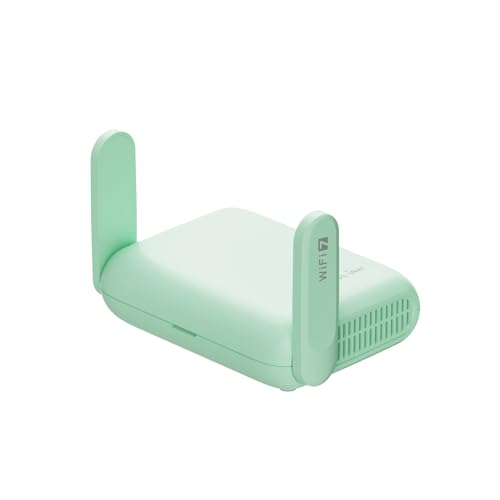
GL.iNet GL-MT3600BE Beryl 7 Travel Router

GL.iNet MUDI E750V2 4G LTE Travel Router
Why These Options Stand Out
Most apartments ship with an ISP modem-router combo that chokes once more than a handful of devices join the network. The NETGEAR R6700AX is the straightforward fix: a dual-band WiFi 6 unit rated for AX1800 speeds up to 1.8 Gbps across roughly 1,500 square feet. In a two-bedroom place, that footprint usually reaches the far bedroom without a mesh add-on.
WiFi 6, if you’re new to the term, is the standard that lets routers talk to many gadgets at once instead of taking turns slowly. With support for up to 20 connected devices, video calls, gaming consoles, and smart-home gear can share bandwidth without the evening slowdown you may have grown used to.
What Pays Off
- Covers up to 1,500 sq. ft., which typically spans a full apartment or small single-story home
- Handles around 20 simultaneous connections, so phones, laptops, and smart devices coexist during peak hours
- WiFi 6 efficiency reduces lag when several people stream or game at the same time
- NETGEAR’s expert help service offers setup and troubleshooting assistance at no extra charge
Small Caveats
- Router only, so you’ll need a separate modem from your internet provider to get online
- Larger multi-story homes often report dead spots beyond its rated range, depending on wall construction
The Right Fit
Renters, remote workers, and small households upgrading from aging ISP equipment will find this the simplest path to steadier whole-home WiFi.
Where A Sibling Pick Shines
Anyone who needs internet away from a fixed broadband line should look at the GlocalMe Numen Air 5G Mobile Hotspot instead, since it generates its own cellular connection anywhere with coverage.
Roaming SIMs are the annoying part of international travel: local kiosks, unfamiliar plans, swapping tiny cards at the airport. The GlocalMe Numen Air sidesteps that entirely by working without a physical SIM, pulling data through cloud-based carrier arrangements across 200-plus countries. Compared with the plug-in NETGEAR above, this one makes its own internet rather than redistributing someone else’s.
Speeds reach up to 2.5 Gbps over 5G, which is comfortably enough for HD video calls and large downloads. Sixteen devices can connect at once, so a small work team or family can share one pocket-sized unit through a long layover or a week of meetings.
Positive Takeaways
- Operates in over 200 countries without inserting a SIM card, removing the hassle of local purchases
- Up to 2.5 Gbps potential speed keeps streaming and video conferencing smooth where 5G coverage exists
- Supports 16 connected gadgets, enough for a family or a small traveling team
- Optional protection plans cover accidental damage like drops and spills, with round-the-clock expert support available
Things To Consider
- Data costs depend on GlocalMe’s plans per region, which can add up on long trips versus a local SIM
- Real-world throughput varies widely by country and carrier, so treat the 2.5 Gbps figure as a ceiling, not a promise
Key Specs
Made For
Frequent flyers and business travelers hopping between continents benefit most, especially anyone tired of hunting down local SIM vendors.
Skip It When
Budget travelers sticking to Europe alone may prefer the KuWFi L100EU 4G LTE Travel Hotspot, which uses cheap local data SIMs instead of bundled cloud plans.
Not every trip justifies a premium hotspot. The KuWFi L100EU takes a refreshingly old-school approach: pop in a local 4G data SIM, and it broadcasts WiFi wherever you go. It supports FDD bands B1/B3/B5/B7/B8/B20 plus several TDD-LTE bands, covering Europe, Asia, Africa, the Middle East, Australia, and parts of South America and the Caribbean.
A small screen shows signal and status at a glance, something neither the GlocalMe nor the GL.iNet Mudi emphasizes as directly. The 2400mAh lithium battery runs it indoors or outdoors without a wall outlet, which matters at campsites, markets, or anywhere broadband simply doesn’t exist. Owners commonly report it behaves best as a one-or-two-person connection rather than a household hub.
Why It Works Well
- Unlocked design accepts any compatible local data SIM, keeping ongoing costs low
- Broad band support spans dozens of countries across four continents
- Onboard display lets you check signal strength without opening an app
- Battery power makes it usable outdoors and in places with no wired internet
Points To Note
- 4G LTE tops out well below what 5G hotspots deliver, so heavy streaming feels slower
- You must source and manage your own SIM cards in each region
- Band compatibility varies by carrier, so verify local frequencies before departure
Quick Facts
Who Should Grab It
Cost-aware travelers spending extended time in Europe, Africa, or Southeast Asia get the best value here, particularly solo users with modest data needs.
Another Choice May Suit
Power users wanting modern speeds and deep customization should step up to the GL.iNet GL-MT3600BE Beryl 7, reviewed next.
Hotel WiFi is notoriously hostile: captive portals, device limits, zero privacy. The Beryl 7 exists to fix that. Plug it into the room’s ethernet or tether it to your phone, and it creates your own private dual-band Wi-Fi 7 network supporting up to 120 devices. Wireless throughput reaches 2882 Mbps on 5GHz plus 688 Mbps on 2.4GHz, figures that leave the KuWFi and the Mudi far behind on raw speed.
The real hook is OpenWrt firmware, an open-source operating system that turns the router into a customizable networking platform with 512MB of storage for plugins. WireGuard and OpenVPN come pre-installed, hitting up to 1100 Mbps and 1000 Mbps respectively, so encrypting your traffic barely dents performance. Dual 2.5G ethernet ports and USB 3.0 round out a spec sheet that reads more like a desktop unit than a travel gadget.
Notable Gains
- Wi-Fi 7 dual-band speeds give noticeable headroom for gaming and 4K streaming
- OpenWrt firmware enables plugins and network customization most travel routers can’t touch
- Pre-installed WireGuard and OpenVPN deliver fast encrypted browsing on untrusted networks
- Dual 2.5G ports handle high-speed wired backhaul or gigabit-class hotel lines
- Interchangeable US, UK, EU, and AU plugs mean one adapter set covers most trips
Honest Caveats
- It creates WiFi from an existing connection but has no cellular radio, so pair it with a phone or hotspot for true mobility
- OpenWrt’s flexibility rewards patience; total beginners face a learning curve
- Running VPN encryption continuously adds heat, and owners commonly report warm chassis in enclosed spaces
Details At A Glance
Who Will Love This
Developers, security-minded professionals, and anyone comfortable tinkering will extract the most value from this pick.
Reach For A Different Pick When
Travelers who want cellular built in rather than borrowed should choose the GL.iNet MUDI E750V2, which combines this brand’s VPN strengths with a SIM slot.
The Mudi sits neatly between the KuWFi’s budget simplicity and the Beryl 7’s power-user depth. Like the KuWFi, it takes a SIM card and converts 4G LTE into personal WiFi, with combined wireless speeds of 300 Mbps on 2.4GHz and 433 Mbps on 5GHz. That’s modest next to the Beryl 7, yet plenty for email, navigation, calls, and casual streaming on the road.
Where it pulls ahead is security tooling: built-in OpenVPN and WireGuard support plus customizable DNS servers let you lock down traffic on public networks, with 30-plus VPN services supported for straightforward setup. Optional damage protection covering drops, spills, and breakdowns is available, which adds peace of mind for gear living in a backpack. The trade-off is price relative to simpler hotspots doing similar cellular work.
Noteworthy Benefits
- Integrated SIM slot delivers independent internet without relying on hotel or cafe networks
- Native OpenVPN and WireGuard support secures sensitive work traffic from anywhere
- Dual-band output separates older gadgets onto 2.4GHz while faster devices use 5GHz
- Optional accidental-damage coverage suits gear that travels rough
Less Ideal Details
- Cellular speeds are capped by 4G LTE, noticeably slower than the GlocalMe Numen Air’s 5G capability
- You’re responsible for sourcing compatible SIMs and managing data plans yourself
Built With In Mind
Remote workers and digital nomads who prioritize encrypted connections over raw speed will feel at home with the Mudi.
Swap It Out When
Heavy streamers and large households needing top-tier throughput are better served by the GL.iNet Beryl 7 paired with a fast home or office line.
What Matters Most Before Choosing Mobile Wireless Routers
Match The Device To Your Internet Source
Start with a simple question: where does your internet actually come from? Home routers like the NETGEAR R6700AX redistribute a wired broadband line, while cellular hotspots such as the GlocalMe and KuWFi generate their own connection. Buying the wrong category solves nothing, no matter how good the hardware is.
Coverage And Device Count
Rated range tells you how far the signal should reach under ideal conditions, and real walls reduce it. A 1,500 sq. ft. rating suits most apartments; multi-story homes may want mesh systems instead. Device capacity matters equally, since a household of smart gadgets stresses a router built for ten connections.
Band Support For International Travel
Cellular devices live or die by frequency compatibility. The KuWFi’s listed LTE bands cover much of Europe, Africa, and Asia, but carriers elsewhere may not cooperate. Always check your destination’s bands against the manufacturer’s list before committing.
Security Features Worth Paying For
Public networks expose your traffic in ways home broadband doesn’t. Built-in VPN client support, as on both GL.iNet picks, means encrypted browsing without extra software. Frequent travelers working with sensitive material should weight this heavily in their decision.
Key Considerations Across These Picks
Traps First Timers Fall Into
The most common mistake is assuming “router” means the same thing across products. A travel router without cellular still needs another internet source, and a hotspot without wide band support may be useless at your destination. Skipping that check leads to returns. Another frequent slip is ignoring whether a modem is required for home routers.
What Separates Premium From Basic
Higher-tier models buy you newer wireless standards, faster processors, and open firmware. The jump from 4G to 5G cellular, or WiFi 6 to Wi-Fi 7, translates directly into headroom for more devices and heavier use. That premium earns its keep for power users; casual browsers rarely notice the difference day to day.
Frequently Asked Questions
Do I need a separate modem with the NETGEAR R6700AX?
Yes, it’s a router only, so a modem from your internet provider supplies the actual connection. Most cable and fiber subscribers already own or rent one.
How does a no-SIM hotspot like the GlocalMe Numen Air work?
It connects through cloud-based carrier partnerships rather than a physical SIM you insert. You purchase data through the companion platform based on your destination.
Can the KuWFi L100EU be used in North America?
Its supported LTE bands focus on Europe, Africa, Asia, and parts of South America and the Caribbean. Verify your specific carrier’s frequencies before relying on it there.
What’s the difference between a travel router and a mobile hotspot?
A hotspot generates internet from cellular networks, while a travel router creates a private WiFi network from an existing connection. Devices like the GL.iNet Mudi combine both functions.
Is OpenWrt firmware worth having on a travel router?
For tinkerers, yes: it allows custom plugins, advanced routing rules, and deeper VPN control. Casual users can ignore it and still enjoy solid stock performance.
Closing Thoughts
Your situation decides the right pick here. Apartment dwellers upgrading tired ISP gear should start with the NETGEAR R6700AX, while globe-trotters who hate SIM paperwork will appreciate the GlocalMe Numen Air. Budget travelers get honest value from the KuWFi, and the two GL.iNet units serve security-focused nomads at different skill levels. Whichever direction fits, matching the device to your actual internet source matters more than any single spec on the box.




