


Owning your own modem and router combo is one of the easiest ways to cut a recurring charge off your monthly cable bill and take control of your home network. The five options below cover a range of budgets and speed tiers, from a modest DOCSIS 3.0 workhorse to multi-gig WiFi 6 hardware. Every unit here works with major US cable providers like Xfinity, Spectrum, and Cox, so the main decision comes down to how fast your plan runs today and where you expect it to go next.
A Quick View Of The Lineup

NETGEAR Nighthawk CAX30-100NAR WiFi 6 Modem Router (Renewed)

Arris SBG8300-RB DOCSIS 3.1 Cable Modem Router Combo
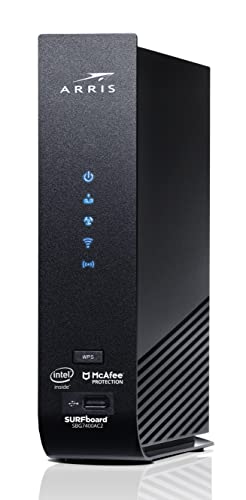
ARRIS Surfboard SBG7400AC2-RB DOCSIS 3.0 Wi-Fi Router

NETGEAR Nighthawk CAX80 WiFi 6 Modem Router (Renewed)

Motorola MG8725 WiFi 6 Router + Multi-Gig Cable Modem
A Deeper Look At The Lineup
This renewed Nighthawk pairs a DOCSIS 3.1 modem, the current cable standard that supports faster speeds than older hardware, with dual-band WiFi 6 rated up to 2.7 Gbps. In practice that means a household running an Xfinity plan around 800 Mbps or a Spectrum or Cox plan near 1 Gbps has headroom without overpaying.
Coverage reaches roughly 2,500 square feet with support for about 25 connected devices, which suits a typical three-bedroom home with smart TVs, phones, and a console or two. Setup happens through the Nighthawk app, where you can adjust settings per device, run speed checks, and watch data usage. Compared with the older Arris units later in this list, this one carries more future-proofing per dollar.
Benefits That Matter
- DOCSIS 3.1 with 32×8 channel bonding keeps gigabit-class plans running at their advertised pace
- Four gigabit Ethernet ports support link aggregation, useful for wired NAS drives or gaming rigs
- A USB 3.0 port lets you share storage across the network without extra hardware
- The Nighthawk app handles activation, parental controls, and traffic monitoring from your phone
Points To Note
- Certified speeds are capped by provider tier, currently 800 Mbps on Xfinity, so check your plan first
- Being a renewed unit, cosmetic wear is possible even though function is inspected; some owners report occasional reactivation calls with carriers
- No compatibility with DSL providers such as Verizon, AT&T, or CenturyLink
Key Specs
Made For
Households on mid-tier cable plans who want WiFi 6 performance without stepping up to flagship pricing.
A Better Fit Elsewhere
Shoppers on tight budgets with slower plans will find the ARRIS Surfboard SBG7400AC2-RB covers the basics for less.
The SURFboard SBG8300 sits in an interesting spot: it carries the same modern DOCSIS 3.1 modem silicon as pricier units but pairs it with an earlier AC2350 WiFi 5 radio. For anyone whose devices cluster on the 5 GHz band and whose plan tops out around 1 Gbps, that trade rarely shows up day to day.
Where it earns its place is the protection plan ecosystem around this listing, which includes accidental damage handling and round-the-clock support with no repair costs for covered issues. First-time combo owners often find that reassurance worth something. Against the NETGEAR CAX30 above, you give up WiFi 6 efficiency but keep the same forward-looking modem standard.
Practical Pluses
- DOCSIS 3.1 with OFDM channels supports true gigabit download capability on eligible plans
- Works across Comcast Xfinity, Cox, Spectrum, and other major cable providers
- Optional damage coverage handles drops, spills, and power surges from day one
Small Caveats
- WiFi 5 radios handle crowded device lists less gracefully than the WiFi 6 picks here
- As a refurbished unit, plan a quick call to your provider for activation, which some owners describe as the only friction point
The Right Fit
Gigabit-plan subscribers who mostly use wired connections or live in homes with moderate wireless congestion.
Reach For A Different Pick When
Homes packed with 25-plus wireless devices benefit more from the NETGEAR Nighthawk CAX80’s newer WiFi 6 capacity.
This is the entry point of the list, and it makes no apologies for it. The SBG7400AC2 uses DOCSIS 3.0, the older but still widely deployed cable standard, with a max internet plan ceiling of 800 Mbps and four gigabit LAN ports. ARRIS has sold over 260 million modems, so replacement parts, guides, and carrier familiarity are all easy to come by.
For a smaller apartment or a home where nobody streams 4K on three screens at once, the AC2350 WiFi and 800 Mbps ceiling are honestly enough. The math on ownership still works too: eliminating rental fees adds up year after year. Just know what you’re skipping compared with the SBG8300 above, namely the DOCSIS 3.1 headroom for future plan upgrades.
The Value In It
- Owning instead of renting trims a recurring line item from the cable bill
- Four 1 Gbps ports give wired stability to desktops, consoles, and streaming boxes
- Carrier approval spans Xfinity, Cox, Charter Spectrum, and most major US providers
Things To Weigh Up
- An 800 Mbps plan ceiling means upgrading your internet tier later likely means replacing this box
- DOCSIS 3.0 relies on older channel bonding, which can matter in congested neighborhoods
- AC WiFi lacks the device-handling efficiency of WiFi 6 in busy smart-home setups
Who Should Grab It
Apartment dwellers and light-use households on plans at or below 800 Mbps who want the lowest sensible entry cost.
Swap It Out When
Anyone planning to move to a gigabit tier soon should step up to the Arris SBG8300-RB instead.
Step up to the CAX80 and you’re looking at the heavy hitter of this group: AX6000 WiFi 6 throughput paired with a DOCSIS 3.1 modem built for cable plans as fast as 6 Gbps. Even households nowhere near those numbers feel the difference in how many simultaneous streams, video calls, and downloads the router absorbs without stuttering.
Coverage matches the CAX30’s footprint at around 2,500 square feet but pushes concurrent device support to 30, which matters in homes where every family member streams on their own screen. Wired users get four gigabit ports alongside higher-speed LAN options depending on configuration. The honest caveat is that paying for 6 Gbps capability only pays off when your provider actually offers those tiers in your area.
The Upside
- Headroom for cable plans up to 6 Gbps means no hardware swap when you upgrade service
- AX6000 dual-band WiFi 6 keeps 30 devices moving smoothly during peak evening use
- Broad compatibility with major cable providers simplifies switching carriers later
- Optional damage coverage with 24/7 expert help softens the risk of buying renewed networking gear
- Strong wired port selection suits desktop gamers and home-office workers alike
Worth Bearing In Mind
- Paying for multi-gig capability only matters if local infrastructure supports those speeds
- No DSL or fiber-provider compatibility, including Verizon, AT&T, and CenturyLink
- Its size and output mean decent ventilation space on the shelf is worth planning for
Feature Snapshot
Who It Suits Best
Large households with gigabit-or-faster plans, multiple streamers, and a mix of wired and wireless gear.
Not Your Match When
Modest-speed households get everything they need from the Motorola MG8725 at a friendlier commitment level.
Motorola’s MG8725 closes the list with a spec sheet aimed squarely at tomorrow’s networks. Its standout detail is the single 2.5 Gigabit Ethernet port sitting next to three standard gigabit jacks, letting a wired desktop or NAS actually taste multi-gig speeds once your plan catches up. The modem side runs DOCSIS 3.1 while staying backward compatible with 32×8 DOCSIS 3.0 provisioning.
On the wireless side, AX6000 4×4 radios combine Power Boost amplification, Range Boost, and AnyBeam beamforming, a technique that focuses the signal toward individual devices rather than spraying it everywhere. In real terms, far corners of larger homes tend to hold connections better than with basic routers. Where it differs from the NETGEAR CAX80 above is emphasis: Motorola leans into wired multi-gig readiness and signal shaping rather than raw plan ceilings.
Real-World Strengths
- A 2.5 Gigabit LAN port future-proofs wired connections for multi-gig plans
- Beamforming plus Range Boost helps distant rooms maintain usable speeds
- Backward-compatible modem design activates cleanly on legacy DOCSIS 3.0 provisioning
- Optional accidental-damage coverage includes drops, spills, and surge events
Less Ideal Details
- Only one high-speed Ethernet jack, so multi-device multi-gig wired setups need a switch
- Approval is limited to cable carriers, ruling out fiber and DSL households entirely
- Some owners report needing a provider-side refresh after firmware updates, a quick support call usually sorts it
Core Details
Whose Shelf It Belongs On
Tech-forward households planning to adopt multi-gig cable plans within the next few years.
Consider Something Else When
Smaller homes on mid-range plans save money with the ARRIS Surfboard SBG7400AC2-RB and lose little in daily use.
What Actually Matters Before You Buy A Combo
Match The Device To Your Plan, Not The Other Way Around
The fastest mistake shoppers make is buying more modem than their plan can use. A DOCSIS 3.1 unit delivers nothing extra on a 300 Mbps tier, so check your current plan and any upgrade you realistically see yourself taking within two years. Carrier certification matters just as much: each model here lists approved providers and speed caps, and a five-minute check against your provider’s compatibility page prevents an activation headache.
Count Your Devices Honestly
WiFi generation matters most in crowded homes. WiFi 6 handles dozens of simultaneous connections far better than WiFi 5, which shows up as fewer stutters during evening peak hours. A couple streaming in one room while kids game upstairs puts different demands on hardware than a quiet two-person apartment, so let your household shape the choice rather than raw top speeds.
Weigh Wired Needs And Coverage Area
Wired ports still beat wireless for latency-sensitive uses like competitive gaming or large file transfers. Count the devices you’d rather hardwire, then confirm the port layout fits. Coverage claims also deserve scrutiny: a 2,500-square-foot rating assumes open layouts, and thick walls or multiple floors may push you toward mesh add-ons regardless of which combo you pick here.
Understand The Renewed Trade
Most options in this roundup ship as professionally inspected pre-owned units, which lowers cost meaningfully. The practical trade-off is cosmetic wear and a slightly higher chance of needing a provider activation call. Pairing a renewed purchase with optional damage coverage offsets much of that risk for buyers who want peace of mind.
Smart Guidance Before You Commit
Traps First Timers Fall Into
The classic error is ignoring provider compatibility lists and discovering at activation that your ISP won’t provision the device. Another common slip is buying for peak specs instead of plan reality, then wondering why a 6 Gbps-capable modem changes nothing on a 400 Mbps tier. Renting “just one more month” while deciding also quietly drains money; commit and start saving immediately.
The Case For Spending Up
Higher-tier combos justify their cost through headroom and efficiency. WiFi 6 radios, DOCSIS 3.1 chipsets, and multi-gig Ethernet ports all extend the useful life of the purchase, meaning you won’t replace hardware the next time you upgrade your internet plan. Heavy households recoup that premium quickly in avoided rental fees and fewer dead-zone frustrations.
Frequently Asked Questions
Will these combos work with my internet provider?
All five models support major US cable carriers such as Xfinity, Cox, and Spectrum. None of them work with Verizon, AT&T, CenturyLink, DSL services, or satellite TV bundles, so verify your provider type first.
Do I really save money owning instead of renting?
Rental fees typically run several dollars per month, which compounds into well over a hundred dollars annually for many households. Ownership eliminates that recurring charge for the life of the device.
Is a DOCSIS 3.1 modem necessary right now?
It depends on your plan speed and how long you intend to keep the device. Plans at or below 500 Mbps run fine on DOCSIS 3.0, while gigabit tiers and beyond require DOCSIS 3.1 hardware.
What does buying a renewed unit involve?
Renewed products arrive inspected, cleaned, and functional, though cosmetic wear is possible. Activation usually works like new equipment, occasionally requiring a quick call to your provider to register the MAC address.
Can I use these with mesh WiFi systems?
Yes, most combos can run in bridge mode, disabling the router half so a separate mesh system manages WiFi. Check the specific model’s manual for exact steps before purchasing additional hardware.
Wrapping Up This Roundup
The right choice comes down to honest self-assessment. Match the plan ceiling to your actual internet tier, count the devices fighting for bandwidth in your home, and decide whether wired multi-gig ports belong in your future. Any of these five will end the rental fee line item on your bill, and that saving starts the moment the box is plugged in and activated.




