


Renting a modem from your cable company quietly drains your budget every single month, and stacking a separate router on top just adds more boxes and cables behind your TV stand. A two-in-one combo solves both problems at once: one device, one power outlet, no monthly rental line item. This shortlist covers five options that suit different households and budgets, from refurbished workhorses to a Wi-Fi 7 flagship. Match the pick to your internet plan speed and home size, and you’ll stop overpaying for hardware you don’t own.
An Overview Of The Picks

Arris SBG8300-RB Cable Modem Router Combo
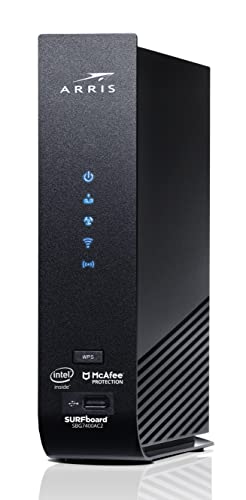
ARRIS Surfboard SBG7400AC2-RB DOCSIS 3.0 Modem Router

NETGEAR Nighthawk CAX80 WiFi 6 Cable Modem Router

Motorola MG8725 WiFi 6 Multi-Gig Cable Modem Router

TP-Link Tri-Band BE9700 WiFi 7 Router (Archer BE600)
The Picks, Examined More Closely
This renewed Arris pairs a DOCSIS 3.1 modem, the current cable standard that uses OFDM channels to squeeze far more bandwidth out of your provider’s line, with an AC2350 dual-band router. For anyone on a gigabit-tier Xfinity, Cox, or Spectrum plan, that combination means you’re not throttling your own connection with older hardware.
In a busy household with simultaneous video calls, 4K streams, and game downloads, the gigabit ceiling keeps buffer spinners rare. Because it’s sold through the Renewed program, it arrives professionally inspected, and protection plans covering drops, spills, and post-warranty malfunctions are typically offered at checkout.
Practical Pluses
- DOCSIS 3.1 support future-proofs you for gigabit and faster cable plans without another upgrade soon.
- Owning it outright removes the recurring modem rental fee from your monthly bill.
- Optional coverage plans include parts, labor, shipping, and 24/7 expert help at no added repair cost.
- Renewed units are inspected and cleaned before resale, softening the usual refurb risk.
Things To Consider
- As a pre-owned unit, cosmetic wear is possible; check the listing photos before committing.
- Confirm your specific provider tier supports DOCSIS 3.1 activation, since some areas still provision older profiles.
At A Glance
Who It Suits Best
Households on mid-to-high tier cable plans from Xfinity, Cox, or Spectrum who want modern gigabit capability without paying new-unit prices.
Where Another Pick Suits Better
Shoppers with modest 100 to 300 Mbps plans will find the ARRIS Surfboard SBG7400AC2 covers them comfortably for less.
Where the SBG8300 chases gigabit lines, this refreshed Surfboard plays a smarter game for smaller plans. Its DOCSIS 3.0 modem tops out around 800 Mbps of internet throughput, which comfortably covers the 100 to 400 Mbps tiers most apartments and small homes actually subscribe to. The AC2350 Wi-Fi side keeps streaming and browsing smooth across a typical floor plan.
Arris has shipped well over 260 million modems, so firmware maturity and provider compatibility are about as proven as this category gets. Four gigabit Ethernet ports give you wired drops for a desktop, console, or streaming box without buying a switch.
The Value In It
- Broad approval across major US cable providers makes setup a quick activation call.
- Four 1 Gbps LAN ports handle wired devices directly, no extra switch needed.
- Renewed pricing puts ownership within reach of tight budgets.
Worth Noting
- DOCSIS 3.0 caps your ceiling, so upgrading to a gigabit plan later means replacing this unit.
- Being pre-owned, expect light cosmetic marks and verify the renewal inspection details on the listing.
- Coverage in larger homes may need a mesh extender added down the line.
Made For
Students, renters, and small families on entry-to-mid cable tiers who want dependable Wi-Fi and an end to rental fees.
Consider Something Else When
Anyone planning to jump to gigabit service should step up to the Arris SBG8300 instead, since its DOCSIS 3.1 chipset is built for those speeds.
The Nighthawk name carries weight here for good reason: the CAX80 combines a DOCSIS 3.1 modem rated for cable plans up to 6 Gbps with AX6000-class Wi-Fi 6, the generation that handles dozens of connected devices far better than Wi-Fi 5 ever did. In a smart home crowded with cameras, speakers, and tablets, that concurrency is what keeps everything responsive.
Netgear rates coverage at roughly 2,500 square feet, which spans most single-family floors without extenders. Wired users get four gigabit LAN ports plus a 2.5G multi-gig port for high-throughput NAS or desktop connections, something neither Arris pick in this list offers.
What Helps Most
- Wi-Fi 6 efficiency keeps 30-plus devices running smoothly during peak evening hours.
- A dedicated 2.5G Ethernet port feeds multi-gig-capable wired gear at full speed.
- Roughly 2,500 sq ft of rated coverage suits larger layouts without mesh add-ons.
- Renewed status brings the same optional damage-and-breakdown coverage as the other picks here.
Points To Note
- Cable-only compatibility: DSL, fiber-on-premises, and bundled voice services are off the table.
- Its footprint is larger than the compact Arris units, so shelf space matters.
- Fewer provider activations are commonly reported on smaller regional ISPs; verify yours first.
Quick Facts
Right Fit For
Smart-home-heavy households in larger homes on premium Xfinity, Spectrum, or Cox plans who want wired multi-gig options built in.
Look Elsewhere When
Apartment dwellers on sub-500 Mbps plans get all they need from the cheaper SBG7400AC2, and the Motorola MG8725 offers comparable muscle if you prefer its port layout.
Compared to the Nighthawk above, Motorola trades one 2.5G port arrangement for a different mix: a single 2.5 Gigabit Ethernet jack alongside three 1 Gbps ports, wrapped in a DOCSIS 3.1 modem that also stays backward compatible with 32×8 DOCSIS 3.0 channel bonding. That flexibility matters in neighborhoods where providers still provision legacy channels.
On the wireless side, the AX6000 4×4 radio array leans on Power Boost, Range Boost, and AnyBeam beamforming to push signal toward the devices that need it most. Competitive gamers and remote workers on latency-sensitive calls tend to notice the difference in congested evening hours.
Noteworthy Benefits
- 2.5G plus triple 1G wired ports cover a desk setup, console, and media server simultaneously.
- Backward compatibility with 32×8 DOCSIS 3.0 eases activation on mixed-infrastructure networks.
- AnyBeam beamforming aims signal at active devices, tightening performance room to room.
- New-unit condition with optional accidental-damage and breakdown coverage available.
Softer Spots
- You’ll pay new-product pricing rather than the renewed discounts on the Arris and Netgear picks.
- Only one 2.5G port, so two multi-gig wired devices would need an external switch.
- Like every combo unit here, placement drives range; thick walls may still call for a satellite node.
Who Will Love This
Gamers, streamers, and hybrid workers on fast Xfinity, Cox, or Spectrum plans who want fresh hardware with serious wired expansion.
A Better Fit Elsewhere
Value-focused shoppers on moderate plans should lean toward the renewed Arris SBG8300, while Wi-Fi 7 early adopters belong with the TP-Link below.
One honest note up front: this TP-Link is a router only, not a modem combo, so it pairs with your existing cable modem rather than replacing it. What you gain is Wi-Fi 7, the newest wireless standard, delivered across three bands with 7-stream BE9700-class throughput. Features like Multi-Link Operation (which lets a device use two bands at once) and wide 320 MHz channels translate into steadier 4K and 8K streaming and lower lag for newer phones, laptops, and consoles such as recent iPhone, Galaxy, and PS5 Pro models.
Tech-forward households already holding a capable modem will appreciate the forward compatibility; everyone else should weigh whether their devices can even use these speeds yet.
A Favorable Mix
- Tri-band Wi-Fi 7 with Multi-Link Operation keeps next-gen devices performing at their peak.
- 320 MHz channels and 4K-QAM boost real-world throughput for compatible hardware.
- Optional protection plans cover drops, spills, and breakdowns with round-the-clock claim support.
Small Caveats
- No built-in cable modem, so total cost includes keeping or buying a separate modem.
- Older laptops and phones can’t tap Wi-Fi 7 speeds, capping the practical benefit for now.
Feature Snapshot
The Right Fit
Enthusiasts with Wi-Fi 7-ready phones, laptops, or consoles who already own a solid DOCSIS 3.1 modem and want the wireless side future-proofed.
Reach For A Different Pick When
Anyone starting from scratch with cable internet should grab the NETGEAR Nighthawk CAX80 instead, since it bundles modem and router into one bill-friendly device.
What Matters Most Before Choosing Modem Router Comboes
Match Your Plan Speed First
Your internet tier dictates the modem standard you need. Plans at or near gigabit demand DOCSIS 3.1, while 100 to 500 Mbps tiers run happily on DOCSIS 3.0 hardware like the SBG7400AC2. Buying beyond your plan wastes money; buying under it strangles every device in the house.
Count Your Devices Honestly
A studio apartment with a laptop and a phone needs nothing fancy. A family home juggling security cameras, consoles, smart TVs, and work video calls benefits from Wi-Fi 6 concurrency or tri-band separation. Underestimating device load is the most common regret owners report.
Verify Provider Compatibility
Xfinity, Cox, and Spectrum approve most units here, but regional ISPs vary, and voice-bundled services usually require provider equipment. A two-minute check on your provider’s approved list prevents a frustrating return.
Weigh New Versus Renewed
Renewed units cut the entry cost meaningfully and typically arrive inspected, with optional damage coverage available. New units like the Motorola bring pristine cosmetics and full manufacturer support. Both routes are reasonable; the trade-off is upfront savings versus peace of mind.
Key Considerations Across These Picks
Pitfalls Shoppers Hit
The classic mistake is buying a DOCSIS 3.0 unit right before upgrading to a gigabit plan, forcing a second purchase. Another frequent slip: ignoring provider compatibility lists and discovering at activation that a bundled phone line isn’t supported. Always confirm both before checkout.
When Paying More Pays Off
Higher-tier combos earn their cost through Wi-Fi 6 or 7 radios, multi-gig Ethernet ports, and wider coverage ratings. Households over 2,000 sq ft, heavy streamers, and competitive gamers see tangible daily benefit. Everyone else is paying for headroom they won’t touch.
Frequently Asked Questions
Do modem router combos really save money?
Yes, owning eliminates the monthly rental fee most cable providers charge, often adding up to a meaningful annual sum. Break-even typically lands within the first year or two of ownership.
Will a combo work with my fiber or DSL provider?
No, the picks here serve cable internet exclusively. Fiber and DSL providers use different connection technologies requiring their own equipment.
Is a renewed modem router safe to buy?
Reputable renewed programs inspect, clean, and test each unit before resale, and optional coverage plans can extend protection. Checking listing condition notes helps set expectations.
Can I use my own router with these combos?
Some combos support bridge mode, letting an external router handle Wi-Fi. The TP-Link Archer BE600 exists precisely for that pairing approach.
How long do these devices last?
Well-maintained units commonly serve five years or more before standards move past them. Keeping firmware updated and ensuring ventilation extends lifespan.
Bottom Line
Picking the right combo comes down to three numbers: your plan speed, your square footage, and your device count. The renewed Arris SBG8300 hits the sweet spot for gigabit households, the SBG7400AC2 serves lighter needs affordably, and the Nighthawk CAX80 or Motorola MG8725 carry bigger homes. Whatever fits, you’ll retire a rental fee and reclaim a shelf. That’s a good month of decisions.




