


Working on circuit boards rewards patience, steady hands, and a soldering setup that does not fight back. The right station keeps tip temperature stable, heats up without long waits, and offers the kind of fine control that dense SMD pads demand. The wrong one leaves you chasing cold joints, replacing tips, and wondering why a simple repair turned into a saga.
This guide looks at nine soldering stations, mats, and holders aimed at hobbyists, repair techs, and small-batch builders. Every pick here is built for circuit board work, from basic through-hole repairs to fine SMD rework. Whether you are fixing a laptop motherboard, assembling a custom keyboard, or learning the craft for the first time, there is something below that matches the way you actually work.
The Main Contenders

Skmiiloy Silicone Soldering Mat for Circuit Board Repair

SainSmart Magnetic Helping Hands Soldering Station with LED Magnifier
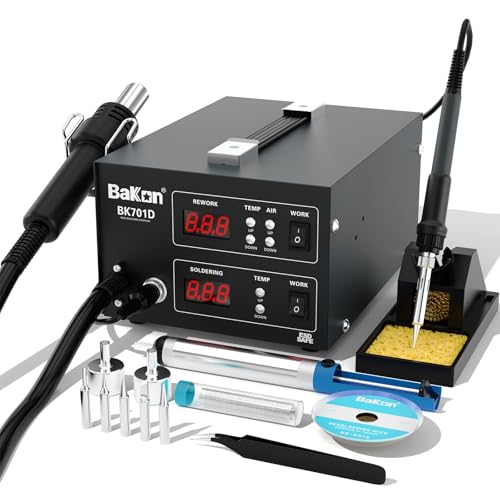
BAKON BK701D 700W 2-in-1 Hot Air Rework and Soldering Station

BAKON 852D+ Heat Gun and Soldering Iron 2-in-1 Kit
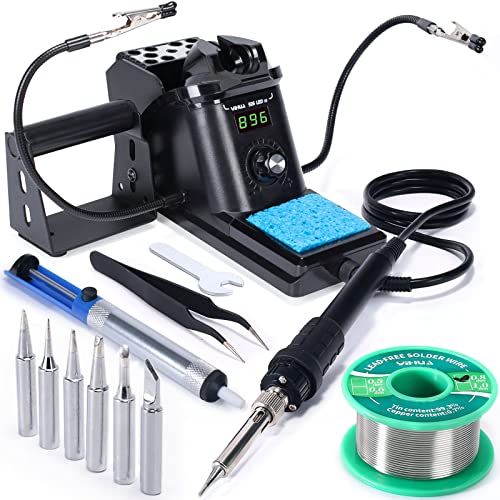
YIHUA 926 III 60W Digital Soldering Iron Station Kit
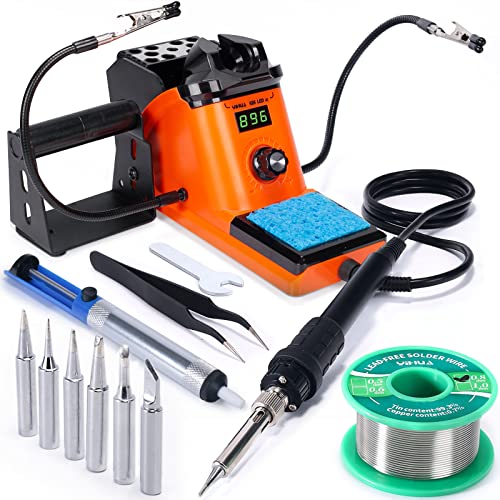
YIHUA 926 III 60W LED Display Soldering Iron Station Kit

YIHUA 926 III 12-in-1 Soldering Iron Station Kit with Helping Hands

BAKON BK602S 2-in-1 Soldering Iron and Hot Air Rework Station
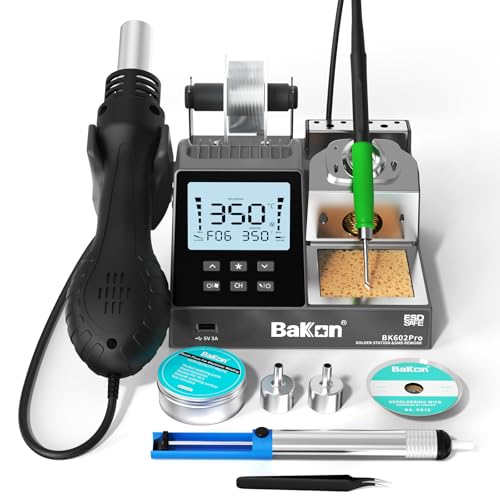
BAKON BK602Pro C210 Soldering and Hot Air Rework Station
What Each Pick Brings To The Table
Before you ever fire up an iron, the surface beneath it matters more than most people expect. The Skmiiloy mat gives you a 17.7 x 11.8 inch silicone workspace rated to handle heat up to 932°F, so stray solder splashes and hot tips stop being a small crisis. The integrated scale ruler, three covered parts boxes, and magnetic zones turn a flat counter into something closer to a real repair bench.
Anyone tearing down phones or laptops knows how quickly tiny screws and components vanish. Having labeled zones and a few magnetic pads on the mat cuts that problem down sharply. It pairs well with every station on this list, and the silicone rolls up for storage when the work is done.
A Few Strong Suits
- Heat resistance up to 932°F protects desks and table tops from accidental burns
- Built-in ruler and magnetic zones reduce lost screws during phone and laptop teardown
- Three covered parts boxes keep small components sorted and visible
- Flexible silicone cleans easily and rolls flat or stores in a drawer after use
Things To Consider
- Not a soldering station on its own, so you will still need an iron and stand
- The 11.8 inch depth may feel tight when working on full-size motherboards
Made For
Phone and laptop repair techs who want a cleaner, more organized work surface without a permanent bench setup.
Consider Something Else When
You need active soldering capability, not just a safe work surface. In that case, the YIHUA 926 III 60W Digital Soldering Iron Station Kit gives you a full station at a similar entry tier.
Fine-pitch soldering punishes shaky hands and tired eyes, which is exactly what the SainSmart station is designed to fix. The 11.1 x 7.1 inch base is wider than most, and four magnetic gooseneck arms hold boards at the angle you need while the 5X LED magnifier brings tiny pads into focus. Four included PCB pillars act as a stable circuit board holder during rework.
This is the kind of platform that pairs nicely with whatever iron you already own. Because the arms are magnetic, repositioning is quick and you are not constantly tightening thumbscrews mid-job. For SMD work where seeing clearly is half the battle, this setup earns its spot on the bench.
Everyday Advantages
- 5X LED magnifier brings micro SMD pads into clear view during rework
- Magnetic gooseneck arms let you reposition boards without fiddling with clamps
- Large base gives working room for multiple components at once
Trade Offs
- Does not include a soldering iron, so it supplements rather than replaces a station
- LED lighting is helpful but a separate desk lamp may still be needed depending on your workspace
- Magnetic bases work best on metal shelves, so a thin wooden desk limits placement options
Right Fit For
Hobbyists tackling dense SMD boards, repair techs doing micro-soldering, and anyone whose eyes need a break from squinting at fine traces.
Look Elsewhere When
You want a single unit that includes both the holder and the iron. The BAKON BK602S 2-in-1 Soldering Iron and Hot Air Rework Station integrates iron and holder in a much smaller footprint.
Phone and laptop board repair rarely lives on just an iron. The BAKON BK701D delivers a 700W combined system that handles both contact soldering and hot air rework independently, with ESD-safe (electrostatic discharge protected) circuitry that matters when working on expensive logic boards. It targets the SOIC, QFP, PLCC, BGA, and SMD packages that come up constantly in modern electronics.
The trade-off for that capability is footprint and learning curve. The two modules give you flexibility, but they also take more bench space than a single-station unit like the YIHUA 926 III further down this list. For serious repair work where you are constantly switching between iron and hot air, the dual design earns its weight.
Points In Its Favor
- 700W combined output handles demanding SMD and BGA rework on mobile and laptop boards
- Independent operation of iron and hot air lets you run tasks side by side
- ESD-safe design protects sensitive components during repair work
Honest Caveats
- Larger bench footprint than compact single-unit stations, so a small desk may feel crowded
- Hot air and iron functions have separate learning curves for accurate temperature control
- More powerful than a beginner typically needs, so it may sit underused for basic through-hole projects
Best Suited To
Mobile phone and laptop repair shops, plus experienced hobbyists who work on logic boards with mixed SMD and BGA components.
Swap It Out When
Most of your projects are simpler through-hole or light SMD work. The YIHUA 926 III 60W Digital Soldering Iron Station Kit offers a friendlier entry point without the hot air module.
Starting from zero means a long parts list, which is why the BAKON 852D+ kit ships with a roll of lead-free solder, five soldering tips, two hot air nozzles, ESD-safe tweezers, a desoldering pump, a brass tip cleaner, a sponge, and a stand. The combination station runs an iron and hot air gun with knob-style temperature adjustment and a clear LED display.
For first-time circuit board builders, the included accessories remove a lot of guesswork. You may not need every tip right away, but having them on hand for different pad sizes and component types is genuinely useful. Compared to the BK701D above, this kit is friendlier for newcomers and the variety of extras is what sets it apart.
What It Does Well
- Bundled accessories cover nearly every consumable a beginner needs on day one
- Independent iron and hot air modules handle mixed contact and rework tasks
- ESD-safe tweezers and grounded design help protect sensitive components
Worth Noting
- Knob temperature control is less precise than digital PID (proportional-integral-derivative) stations like the YIHUA 926 III LED model
- Hot air nozzles may need replacement over time as they warp from repeated high-heat cycles
Whose Shelf It Belongs On
Newcomers to circuit board work who would rather unbox a complete kit than hunt for individual accessories.
A Better Fit Elsewhere
You want sharper temperature control for fine SMD joints. The YIHUA 926 III 60W LED Display Soldering Iron Station Kit focuses on iron accuracy with a clearer digital readout.
Most circuit board work happens on a single iron station that just needs to do its job reliably. The YIHUA 926 III delivers 60W with PID temperature stabilization, a range of 194°F to 896°F, and °C/°F conversion right on the front panel. Auto sleep and calibration support are real long-term quality-of-life features, not just spec-sheet filler.
Two helping hands, six extra tips, lead-free solder, a desoldering pump, and stainless tweezers come in the box, so the station is genuinely usable from the first unboxing. The compact footprint fits on most desks, and the PID control keeps tip temperature steady when you are working through a long assembly session.
Bright Spots
- PID temperature stabilization keeps the tip at the set value through extended use
- Auto sleep extends tip life and saves energy during breaks
- Calibration support lets you match the displayed temperature to a reference for accuracy
- Six included tips cover a useful range of pad sizes and component types
Points To Keep In Mind
- 60W is fine for most circuit board work but may feel underpowered for large ground planes
- Helping hands are basic compared to the magnetic arm system on the SainSmart station
Feature Snapshot
Right Fit For
Hobbyists and learners who solder a few times a week and want a dependable station that does not need babysitting.
Consider Something Else When
You regularly rework multi-layer boards with large copper pours. The BAKON BK701D 700W 2-in-1 Hot Air Rework and Soldering Station handles thermal mass more comfortably.
The LED-display sibling of the previous YIHUA station uses the same 60W output and 194°F to 896°F range, with the same PID temperature control and calibration support. What it adds is a different read style that some find easier to read at a glance during a focused build, and a similar accessory bundle with two helping hands, six tips, solder, desoldering pump, and tweezers.
For most home setups the difference between this and the digital version is small, more about interface preference than capability. If you already use other YIHUA gear or simply prefer the LED readout style, this is the safer pick. It is also a good middle ground if the BAKON 852D+ feels like too much kit and the SainSmart holder feels like too little tool.
Good Reasons To Consider
- LED display is bright and easy to read across the bench
- Same proven PID temperature control as the sibling YIHUA station
- Auto sleep helps conserve tip life during interrupted sessions
- Comes with helping hands, tips, solder, and pump for a ready-to-go setup
Small Caveats
- Functionally very close to the digital YIHUA 926 III, so choosing between them is mostly cosmetic
- Still a 60W iron, so heavy ground-plane work may push the limit
Who It Suits Best
Regular hobby builders who prefer an LED readout and want a balanced station that handles most circuit board jobs without extras they will not use.
Not Your Match When
You specifically want hot air rework built into the same unit. The BAKON BK602S 2-in-1 Soldering Iron and Hot Air Rework Station combines both in a tighter housing.
The 12-in-1 YIHUA kit pulls together a 60W ESD-safe (protected against static discharge) iron, PID temperature control, six soldering tips, lead-free solder, a desoldering pump, and integrated helping hands with a solder wire dispenser. For a first-time circuit board builder, that bundle removes a long list of separate purchases and gets you actually soldering within minutes of opening the box.
ESD-safe design matters when handling sensitive components like MOSFETs (metal-oxide-semiconductor field-effect transistors) and ICs (integrated circuits), and the compact layout keeps the footprint small. Compared to the BAKON 852D+ above, this kit skips the hot air module in favor of a more focused iron-centered setup that beginners tend to find less intimidating.
What Works In Its Favor
- 12-piece bundle includes consumables and helpers needed from day one
- ESD-safe iron helps protect sensitive components during early learning projects
- Integrated helping hands hold boards steady without buying extras
- PID temperature control keeps heat stable for consistent joints
A Few Limitations
- No hot air module, so SMD rework on QFN (quad flat no-leads) and BGA parts is harder
- Compact layout means the included helping hands are smaller than the SainSmart magnetic arms
Made For
First-time builders and learners who want one purchase to cover the basics of circuit board soldering and through-hole assembly.
Where A Sibling Pick Shines
You grow into rework projects quickly and want hot air on hand. The BAKON BK602S 2-in-1 Soldering Iron and Hot Air Rework Station is a logical next step in a similar size class.
Not everyone has room for two separate modules on the bench, which is where the BAKON BK602S earns its keep. It merges a soldering iron and a hot air rework station into a single compact body, with dual switches for independent control and a PID program for steady temperature. The °C/°F conversion on the front panel and auto sleep are useful touches.
For tight desks, dorm rooms, or shared workspaces, the smaller footprint really does matter. The iron and hot air outputs are not as aggressive as the 700W BK701D above, so very heavy rework will still want more headroom, but for typical repair and small-batch work the BK602S handles the common cases well.
Where It Helps
- Compact single-body design frees up bench space on small or shared desks
- Independent switches for iron and hot air allow safe simultaneous use
- PID temperature control supports repeatable, consistent results
- Auto sleep extends tip and heater life during idle periods
Softer Spots
- Lower power than the BK701D, so demanding rework may take longer
- Hot air and iron share internal space, which can mean warmer external surfaces during long sessions
Feature Rundown
Best Suited To
Makers and repair techs with limited bench space who still want both contact soldering and hot air rework in one box.
Skip It When
You regularly work on dense BGA boards that need maximum thermal headroom. The BAKON BK701D 700W 2-in-1 Hot Air Rework and Soldering Station pushes more power for tougher jobs.
The BK602Pro steps up to a C210 all-in-one heater core soldering iron, which is a meaningful change for anyone used to generic pencil tips. C210-series tips are widely available and offer better thermal transfer than budget ceramics, which shows up as faster recovery when you touch a large pad. Combined with a hot air module and a large LCD showing real-time power, set and actual temperatures, airflow, and presets, this station is built for shop-level work.
Compared to the YIHUA 926 III LED station, the BK602Pro is a noticeable upgrade in tip technology and information density, but it is also a bigger commitment. For experienced techs who already know what they want, the preset slots and the clearer airflow readouts are the kind of features that pay for themselves in saved time.
Real-World Strengths
- C210 heater core supports widely available, high-quality tip cartridges
- Large LCD shows real-time power, set, and actual temperatures for both modules
- Temperature presets reduce setup time between repeated jobs
- Auto sleep helps protect tips and reduce energy use on busy benches
Some Limits To Know
- More complex menu than entry stations like the YIHUA 926 III, so beginners face a learning curve
- Larger LCD and dual-module design take up more room than the compact BK602S
- C210 tips cost more to replace than generic pencil tips, which adds to long-term ownership cost
Who Will Love This
Experienced repair techs, small repair shops, and serious hobbyists who need precise tip control and detailed readouts during frequent rework sessions.
Reach For A Different Pick When
You mostly do light through-hole work and do not need C210 precision. The YIHUA 926 III 60W LED Display Soldering Iron Station Kit covers the basics with less complexity and a friendlier price point.
What Matters Most When Choosing Soldering Irons For Circuit Boards
Wattage and Heat Recovery
Wattage is not just about how hot an iron gets, but how fast it bounces back after touching a cold pad. For most circuit board soldering, 60W handles through-hole and small SMD work comfortably. Boards with large ground planes and thick copper pour through heat quickly, and a 60W iron will struggle to keep up. Stations in the 700W combined class, like the BAKON BK701D, give you more headroom for those jobs. For most home and hobby projects, you likely do not need that much, but it is worth knowing the ceiling before you outgrow a smaller station.
Temperature Control Type
Temperature control is where soldering stations differ most. Basic stations use simple on-off thermostats, while better units use PID (proportional-integral-derivative) control that adjusts power continuously to hold the set temperature. PID keeps the tip steady when thermal load changes, which translates into fewer cold joints and less burned flux (the chemical cleaning agent that helps solder flow). Most YIHUA and BAKON stations in this list use PID, and the difference shows up clearly during long sessions.
Tip Compatibility and Format
Tip format matters more than people expect. Generic pencil tips are cheap and easy to find, but C210-series cartridges, like those in the BAKON BK602Pro, transfer heat more efficiently and swap faster. For fine SMD work under a magnifier, smaller conical and chisel tips give more control. For drag soldering multiple pins, a small bevel or knife tip works better. Picking a station with a healthy tip ecosystem means you will not be stuck hunting for unusual sizes later.
ESD Safety and Workbench Setup
Sensitive components can be damaged by static discharge, so ESD-safe (electrostatic discharge protected) stations are worth the small premium for any board with MOSFETs, ICs, or modern logic chips. Pairing the station with a proper mat, like the Skmiiloy silicone mat, and basic wrist grounding gives you a safer setup. The mat also keeps your desk from heat damage, which becomes more important as you add hot air rework to the mix.
Key Considerations Across These Picks
Common Shopping Slip Ups
The most common mistake is buying a high-wattage station when a 60W iron would have handled the work just fine. Bigger numbers feel reassuring, but a 700W system on a simple through-hole board is wasted capability and a bigger footprint. The opposite trap is buying the cheapest pencil iron and expecting it to behave like a station. The YIHUA and BAKON 60W models show that real temperature control does not require a huge budget. Another slip is overlooking the work surface itself. Even a great station can struggle if you are working on a wooden desk with no heat protection, which is why the Skmiiloy mat earns its place as a first purchase for many home setups.
What The Higher Tier Buys
Moving up the price ladder usually buys three things: better tip technology, more accurate temperature control, and integrated hot air. The BAKON BK602Pro with its C210 heater core is the clearest example. The tip system transfers heat more efficiently, the LCD shows real-time data, and the presets save time during repeated rework. For a beginner, those gains may not matter much, but for someone doing daily repair work they pay off quickly. The hot air module is the other big jump, since SMD rework on parts like QFN and BGA chips is genuinely difficult with just an iron. Paying more mostly pays off when you are working on modern, dense boards where contact soldering alone is not enough.
Frequently Asked Questions
What wattage do I need for circuit board soldering?
For most circuit board work, 60W is a comfortable starting point that handles through-hole and small SMD jobs well. Dense boards with large ground planes may need more headroom, which is where 700W combined stations earn their place.
Do I need hot air rework for circuit board work?
Hot air is essential for removing and replacing SMD parts like QFN and BGA chips, but it is not required for through-hole soldering or basic SMD drag work. Many hobbyists start with an iron-only station and add a hot air module later.
What is PID temperature control?
PID (proportional-integral-derivative) is a control method that continuously adjusts power to hold a set temperature, rather than cycling on and off. The result is a more stable tip temperature, fewer cold joints, and better consistency during long soldering sessions.
Is ESD safety important for circuit board soldering?
ESD (electrostatic discharge) safety helps protect sensitive components like MOSFETs and ICs from static damage. For modern logic boards, an ESD-safe station and a grounded work surface are a sensible precaution.
Can a soldering mat really protect my workbench?
A silicone soldering mat rated for high heat, like the Skmiiloy model, can handle direct contact from hot tips and solder splashes without damage to the surface beneath. For any setup that includes hot air rework, a mat becomes close to essential.




