


Working on printed circuit boards at home means juggling small components, tight pads, and the constant fear of lifting a trace with too much heat. The right iron makes that fiddly work feel calm, the wrong one turns every joint into a coin toss. This roundup focuses on stations and kits that earn their place on a real electronics bench, from a basic 60W station for first solder joints to 2-in-1 hot air rework rigs built for surface-mount work.
A Side-By-Side Look

Plusivo Soldering Iron Station Kit with Helping Hands
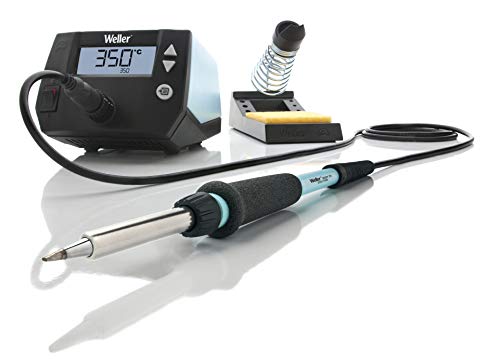
Weller WE1010NA 70W Digital Soldering Station

Plusivo 60W LED Soldering Iron Kit (21-in-1)
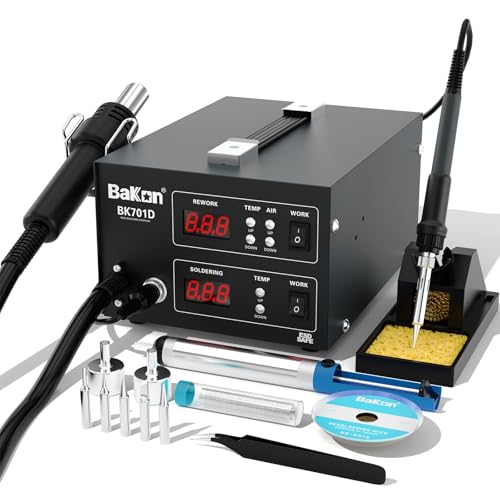
BAKON BK701D 700W 2-in-1 Hot Air Rework Station

Bakon 852D+ Hot Air and Soldering 2-in-1 Kit
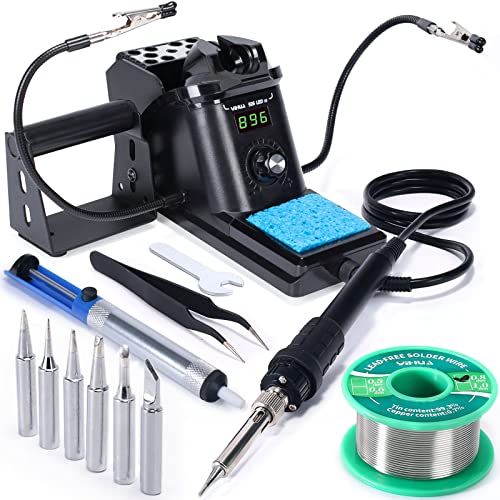
YIHUA 926 III 60W Digital Soldering Station Kit
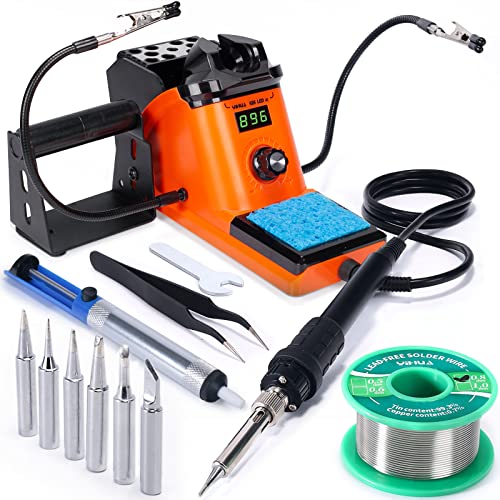
YIHUA 926 III 60W LED Soldering Station Kit

YIHUA 926 III 12-in-1 Helping Hands Kit

BAKON BK602S 2-in-1 Soldering and Hot Air Station
Meet The Standout Selections
Plusivo built this station for the maker who wants everything in one box on day one. The 60W iron runs through a digital control box, a separate helping-hands stand keeps tiny boards pinned, and a digital multimeter rides along so you can sanity-check joints before powering up.
For a first PCB kit, it removes the usual scavenger hunt. You get five tips covering most through-hole and basic surface-mount work, a roll of solder, and a stand that doesn’t slide around. The all-in-one design is more useful than it sounds, especially when you are still learning which accessories matter.
Positive Points
- Wide accessory spread means no extra trips to the store before your first project.
- Digital readouts on the station make repeat settings simple, which matters when swapping between leaded and lead-free solder.
- Helping-hands stand frees both of your hands, a real quality-of-life upgrade over a basic iron cradle.
- Multimeter inclusion lets you check continuity and cold joints in the same session.
Things To Consider
- At 60W, heavy ground-plane boards can tax the thermal recovery, so patience is required on bigger pads.
- Owners commonly report the included tips wear faster than aftermarket replacements, so budgeting for spares early is wise.
Feature Snapshot
Made For
First-time PCB builders and weekend hobbyists who want a single box that covers learning, repair, and small builds.
Consider Something Else When
You regularly work on multilayer or large ground-plane boards where the Weller WE1010NA offers stronger thermal headroom.
Weller is the name that shows up in trade schools and repair shops, and the WE1010NA is the entry point into that lineage. The 70W iron pushes more heat than the Plusivo station above, so it stays stable on thicker pads and small SMD work without dropping out of temperature.
You trade the all-in-one kit idea for a leaner setup. There is no helping-hands stand or multimeter in the box, just the station, iron, and a tip. For someone upgrading from a pencil iron, that focused approach is a plus, not a miss.
Useful Touches
- 70W output recovers temperature quickly on multi-layer boards, which is where cheaper stations fall behind.
- Weller’s tip ecosystem is deep, so finding the exact profile for a specific SMD package is rarely a problem.
- Intuitive front-panel layout, easier to teach to a beginner than some menu-driven stations.
- Solid metal housing feels like it will outlast a decade of weekend use.
Worth Noting
- Genuine Weller tips cost more than third-party alternatives, so factor that into long-term ownership.
- The station ships with only one tip, so a starter tip pack is almost a must on day one.
Right Fit For
Advanced hobbyists and pros who already know their tip preferences and want a station that disappears into the background.
Look Elsewhere When
You need SMD hot air rework in the same box, where the BAKON BK701D handles both jobs on one bench footprint.
This Plusivo kit takes the opposite approach from its station sibling. Instead of a benchtop box, you get a 60W pencil-style iron with an LED display on the handle, plus a 21-piece accessory spread in a carry bag. It is the kind of kit you toss in a drawer or a laptop bag.
You may find the standalone form factor more useful than a full station for quick repairs. There’s no bulky base to find room for, and the included desoldering pump covers the most common rework mistake. Compared to the Plusivo station above, this trades a helping-hands stand for true grab-and-go portability.
Notable Gains
- Carry bag keeps the iron, tips, and solder together, a small detail that prevents lost parts on the move.
- LED display on the handle means you can read the temperature without craning over the bench.
- Five replaceable tips cover a useful range from small SMD to chunky through-hole leads.
- Plug-and-play 120V US design, no separate power brick to keep track of.
Honest Caveats
- Pencil-style irons tend to have slower thermal recovery than full stations during long soldering sessions.
- No sleep or standby mode listed, so tip oxidation can creep in if you forget to switch it off.
- The 21-in-1 count leans on small consumables, so a few items may run out faster than expected.
Best Suited To
Hobbyists and field repair techs who need a portable, all-in-one iron without committing to a benchtop station.
Swap It Out When
You mostly work at a fixed bench and want temperature stability under load, where the YIHUA 926 III station holds settings more reliably.
The BK701D is a different animal. It combines a 700W hot air rework station with a separate soldering iron channel, both fed through one base unit. That means you can reflow an SMD chip and then hand-solder a through-hole cap on the same board without swapping equipment.
The trade-off is size and complexity. Compared to the Weller WE1010NA above, this rig demands more bench space and a steadier learning curve. ESD-safe circuitry matters when working on phone motherboards and laptop boards, where static damage is a real risk.
Where It Excels
- Hot air channel covers SOIC, QFP, PLCC, BGA, and SMD packages that pure soldering irons can’t touch.
- Independent controls let you run the iron and hot air at the same time, useful for mixed-technology boards.
- ESD-safe design protects sensitive components during longer rework sessions.
Trade Offs
- Hot air rework has a real learning curve, so first attempts on expensive boards can be costly.
- Bulkier than single-function stations, so apartment-friendly benches may feel cramped.
- Higher power draw means you’ll want a dedicated outlet rather than a shared power strip.
Who It Suits Best
Mobile phone and laptop repair techs, plus serious SMD hobbyists tackling BGA and fine-pitch components.
A Better Fit Elsewhere
You only do basic through-hole PCB work, where the Weller WE1010NA keeps things simpler and cheaper.
The 852D+ leans into the “complete practice kit” idea. Inside the box you get the dual-function station, five soldering tips, two hot air nozzles, ESD-safe tweezers, a desoldering pump, brass cleaner, sponge, solder suction tape, and a roll of lead-free solder. For a first rework setup, that head start is meaningful.
The knob-based temperature adjustment is less precise than digital inputs, so on small SMD work you’ll want to test on a scrap board first. Compared to the BK701D above, this kit includes more consumables, which can matter if you don’t already own a full accessory drawer.
Good Reasons To Consider
- Wide accessory spread removes the need to source bits and pieces separately over the first few months.
- ESD-safe tweezers included, a detail often skipped in cheaper kits.
- Brass tip cleaner extends tip life compared to wet sponges alone.
Points To Keep In Mind
- Knob-style temperature control is less repeatable than digital, depending on your dial-in habit.
- Station weight and footprint grow once you add hot air, so plan desk space accordingly.
Perfect Match For
Repair techs setting up their first rework bench who want a single purchase that covers the most common jobs.
Another Choice May Suit
You prefer digital readouts and tighter thermal control, where the BAKON BK602S offers a more compact 2-in-1 alternative.
YIHUA’s 926 III has become a fixture in hobby circles for good reason. The 60W station pairs digital temperature control with PID stabilization (a feedback loop that nudges the heater to hold a steady temperature), two helping-hands arms, and a tip selection broad enough to cover most projects from resistor leads to small SMD parts.
The kit feels balanced for a hobbyist who already owns a basic iron and wants a meaningful upgrade. You get lead-free solder, a solder sucker, and stainless tweezers, so the upgrade doesn’t arrive half-built. Compared to the Plusivo station in slot one, the tip count is higher and the auto-sleep function extends tip life noticeably.
Everyday Advantages
- PID temperature control keeps heat steady when you hit a cold joint, which beginners tend to do often.
- Six extra tips cover both through-hole and surface-mount work without buying extras right away.
- Two helping-hands arms hold irregular boards more securely than single-arm stands.
- Auto-sleep and calibration support keep the station accurate over years of use.
Trade-Offs To Consider
- 60W hits its limit on heavy copper ground planes, so a higher-wattage station is worth considering for power electronics.
- The compact body leaves little room for storing tips inside the base.
Feature Snapshot
Who Will Love This
Hobbyists moving up from a basic pencil iron who want a full station plus accessories in one box.
Reach For A Different Pick When
You want hot air rework in the same unit, where the BAKON BK602S combines both functions on a smaller bench footprint.
This 926 III variant swaps the standard digital panel for an LED display, and the difference shows up where you need it most: dim basements, late-night sessions, and shaded corners of a busy bench. The LED readouts are easier to glance at without leaning in.
Functionally it matches the standard 926 III in slot six, including the same 60W output, PID control, and six extra tips. The shift is more about visibility than capability. If you solder in a well-lit studio, the non-LED version above is the better value.
The Good Stuff
- LED display remains readable at odd angles, helpful when the iron is between you and the readout.
- Same PID temperature control as the standard 926 III, so joint quality is consistent across the family.
- Two helping-hands arms keep boards steady without a third hand required.
Less-Strong Areas
- Small premium for the LED panel versus the standard display, with no change in core soldering performance.
- LEDs are not a substitute for task lighting on microscopic SMD work.
Built With In Mind
Makers who work evenings or in low-light setups and want a glanceable temperature readout without straining.
Where A Sibling Pick Shines
You mostly solder during the day in a bright space, where the standard YIHUA 926 III in slot six delivers the same core experience for less.
This 926 III variant focuses on board handling. The 12-in-1 helping-hands setup, solder dispenser, and integrated holder mean you can keep a board pinned, feed solder one-handed, and swap tips without leaving your chair. For through-hole assembly lines at home, that workflow is genuinely faster.
The 60W iron and PID temperature control stay consistent with the other YIHUA 926 III models. Where it differs is the bench ecosystem around the iron. Compared to the LED variant above, this version is better suited to projects that involve many repeated joints, not quick one-off repairs.
Everyday Wins
- Integrated solder dispenser keeps the wire feeding without a second hand, useful during long assembly sessions.
- ESD-safe design protects sensitive components during repetitive soldering work.
- Entry-level positioning makes it accessible for first-time PCB builders who want stable temperature without a learning curve.
Softer Spots
- Compact station design, so the helping-hands arms may feel cramped when working on wider boards.
- More parts to assemble out of the box, so count on a longer initial setup before your first joint.
Whose Shelf It Belongs On
Through-hole assembly hobbyists who build the same kit of boards repeatedly and value a one-handed workflow.
Not Your Match When
Your projects lean toward varied one-off repairs, where the LED-display YIHUA 926 III in slot seven is more adaptable.
The BK602S trims the bulk of a full rework station into a smaller dual-function unit. The hot air channel and soldering iron run off one base with independent switches, so you control each side without unplugging. For a desktop setup where space is tight, that compact body earns its keep.
The 2-in-1 format also trims your accessory drawer. You can preheat an SMD pad with hot air and finish a joint with the iron, all in the same footprint. Compared to the larger BK701D in slot four, this model is friendlier to small workspaces and lighter projects.
What Stands Out
- Independent dual-switch design lets you run the iron and hot air at the same time safely.
- Compact footprint fits a small desk or shared-space workbench without dominating it.
- Rapid heat-up means less waiting between project starts.
- Auto-sleep and °C/°F conversion round out the small-but-useful feature set.
Practical Considerations
- Smaller hot air output than larger 700W-class rework stations, so very large BGA work may stretch its limits.
- Fewer included accessories than the Bakon 852D+ kit, so expect to add tips and nozzles over time.
Who Should Grab It
Desktop DIYers and small-workshop users who want both hot air and iron functions without devoting a corner of the room to a full rework rig.
Skip It When
You handle large phone or laptop boards daily, where the BAKON BK701D’s higher-wattage hot air channel is the more capable tool.
What Matters When Choosing a Soldering Iron for PCB Work
Wattage and Thermal Recovery
Wattage is shorthand for how fast the iron can replace heat lost to the board. A 60W station handles most through-hole and small SMD parts, while multilayer boards with ground planes benefit from 70W and up. Recovery time matters more than peak temperature, because pads cool the tip the moment you touch them.
Temperature Control Type
Basic pencil irons have a single setpoint, while digital stations add PID stabilization, which adjusts the heater continuously to hold the chosen temperature. For PCB work, that consistency shows up in shinier, more reliable joints, especially when you solder repeatedly without pausing.
Station vs Pencil vs 2-in-1
A benchtop station gives you temperature stability and a proper stand. A pencil iron trades that for portability. A 2-in-1 hot air and iron station covers SMD rework and through-hole work on the same footprint, which is the main reason phone and laptop repair techs lean toward them.
ESD Safety and Tip Variety
Sensitive components on modern PCBs can be damaged by static discharge, so ESD-safe circuitry (designed to safely route static away from components) is a quiet but real benefit. Tip variety matters just as much, since different pad sizes and component packages each prefer a specific tip geometry.
Key Considerations Across These Picks
Pitfalls Shoppers Hit
Many first-time shoppers buy a cheap pencil iron and skip the stand, only to find the iron rolling off the desk mid-project. Others ignore tip variety and end up with one tip that overheats small components. For PCB work, budgeting for at least three or four tip profiles upfront saves burned pads later.
Where The Extra Money Goes
Higher-tier stations spend the budget on faster thermal recovery, more accurate PID loops, and a deeper tip ecosystem. That translates to fewer cold joints, less tip replacement, and less time fighting the tool. The upgrade is worth it once you solder regularly, but a mid-range 60W station is plenty for occasional builds.




