


A first soldering iron can feel like holding a tiny lightning bolt: exciting, slightly scary, and easy to misuse. The right kit, though, sets you up with a sensible temperature range, safe handling habits, and a project that rewards practice instead of punishing it. Whether you’re patching a frayed headphone cable, modding a guitar, or just curious about how circuits come together, these nine kits cover the path from absolute first joint to confident rework.
A Snapshot Of The Selections

amomii Neon Tennis Soldering Practice Kit
Weller Soldering Education Kit WE1010EDU
BAKON BK701D 700W 2-in-1 Soldering Station

Bakon 852d+ Heat Gun and Soldering Kit

amomii Testudo Soldering Practice Kit

QSDXNYDC Cordless Soldering Iron for Dewalt 20V

BAKON BK602S 2-in-1 Rework Station
BAKON BK602Pro C210 2-in-1 Station

BAKON 968S 90W Soldering Station Kit
The Strengths Of Each Pick
The amomii Neon Tennis kit flips the usual “solder this and shelve it” formula by turning the finished board into a working two-player game. You build it, then you play it, which gives a beginner an immediate payoff for the patience required to land clean joints.
Paper instructions and rules ship in the box, so there’s no hunting for a PDF before you start. The trade-off is that you’ll need a separate soldering iron, since the kit doesn’t include one. For anyone who already owns a basic iron or wants to pair this with a station like the BAKON 968S reviewed below, the experience feels surprisingly complete.
The Good Stuff
- Gameplay loop rewards careful soldering, since loose joints can break the controller after assembly.
- Arduino UNO compatibility opens the door to reprogramming the board once the build is done.
- Two-player design makes it a natural gift or weekend project for parents and kids tackling it together.
- Stepped paper instructions keep the learning curve gentle for a true first build.
Things To Consider
- No iron included, so first-timers need to budget for a separate station or handheld tool.
- Limited replay value once you’ve mastered the controller; the main use is as a learning artifact.
Who It Suits Best
Absolute beginners who learn best when a project ends in something playable, especially households with two curious kids or a parent-child team.
Where Another Pick Suits Better
The Weller Soldering Education Kit is the stronger starting point for a classroom, since it bundles a real station and the consumables needed to keep going past the first project.
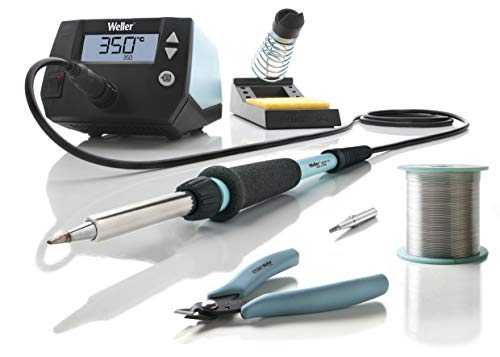
Weller’s WE1010EDU kit leans into the brand’s reputation in professional benches, condensing a real soldering station, a separate pencil iron, a safety rest, a flush cutter, and a spool of lead-free solder into an eight-piece teaching bundle. It’s the kind of kit a shop class would order.
Compared to the gamified amomii kit above, this one assumes the project is the skill itself. You get the tools to work on your own projects for years, not just a single board. For a student moving from guided kits to independent repair, the upgrade path is built in.
What Stands Out
- WE1010NA station brings professional-grade temperature control to a learning environment.
- WEP70 iron and PH70 safety rest teach proper handling habits from day one.
- Lead-free solder spool nudges students toward safer, modern materials.
- Brand ecosystem makes replacement tips and parts easy to source later.
Points To Note
- No project board included, so beginners need a separate practice project to learn on.
- Heavier and more desk-hungry than a simple practice kit.
Key Specs
Made For
Students, hobbyists, and instructors who want a bench-ready setup that survives daily classroom use and outlasts the first project.
Skip It When
The amomii Neon Tennis kit fits better for a true first-timer who needs a structured project to follow before working on open-ended repair work.
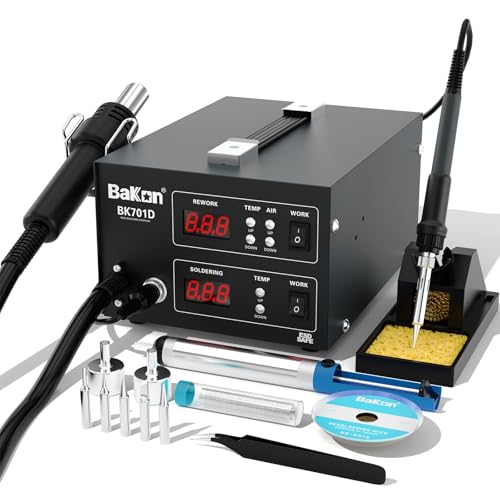
Where the Weller and amomii kits focus on through-hole basics, the BAKON BK701D jumps straight into rework territory. It pairs a 700W soldering station with a separate hot air station, so you can desolder SMD parts and reflow chips without buying a second piece of gear.
For a true beginner this can feel like overkill, but for someone whose first project is a cracked phone charging port or a lifted laptop pad, the dual setup is what makes the job possible. ESD-safe circuitry helps protect sensitive components, which is a quiet but important detail.
Everyday Wins
- Two-in-one design saves bench space compared to buying separate stations.
- Independent controls let you work the iron and hot air at the same time on bigger jobs.
- ESD-safe design reduces the risk of frying delicate components during repair.
- 700W rating handles larger tips and longer heating cycles without sagging.
Worth Noting
- Hot air rework has a steeper learning curve than basic iron work, so the kit rewards patience.
- No consumables or practice board in the box.
Feature Card
Best Suited To
Beginners who already know their first project is a phone or laptop repair and want one station that handles both soldering and desoldering.
Consider Something Else When
The BAKON BK602Pro is a friendlier fit for someone who wants precision SMD work with a C210-style iron and a clearer display, without pushing the full 700W envelope.
The Bakon 852d+ leans into the “everything in one box” promise, bundling a lead-free solder roll, multiple SGS-certified tips, two hot air nozzles, ESD tweezers, a desoldering pump, a stand, a brass cleaner, and a sponge. For a first-time buyer trying to figure out what to add to the cart, that reduces decision fatigue considerably.
Knob-based temperature control and a digital display keep the operation simple, even if the spec sheet is denser than the Weller station above. The trade-off is that more parts mean more to lose in a shared drawer, so a small organizer helps.
Useful Strengths
- Bundled consumables mean you can start soldering the day the box arrives.
- Multiple tips let you switch from fine SMD work to larger joints without buying extras.
- Digital display gives at-a-glance feedback when adjusting temperature mid-job.
- ESD-safe tweezers included for handling small static-sensitive parts.
Honest Caveats
- Knob controls feel less precise than touchscreen or button-based stations on competing models.
- Lots of small accessories, so expect to spend a few minutes sorting them into a kit box.
Whose Shelf It Belongs On
A hobbyist who wants one box with everything to handle both basic soldering and the occasional SMD rework, without separately sourcing tips and consumables.
Look Elsewhere When
The BAKON BK602S is the cleaner pick for a tiny workbench where two independent channels in one compact body matter more than the bundled consumables.
Where the Neon Tennis kit ends in one game, the amomii Testudo spreads the learning across three builds: a digital piano, an infrared remote, and an arcade console. Modular shields let the same hardware switch between projects, which keeps the kit relevant long after the first soldering session.
It’s a bigger time investment than the simpler amomii kit, and the “phygital escape room” angle assumes you’ll plug the boards into a computer to keep playing. Soldering iron isn’t included, so pair it with a station like the BAKON 968S covered below.
Useful Highlights
- Three distinct projects build different soldering skills, from fine pitch to larger pads.
- Arduino compatibility means the boards can be reprogrammed with custom code later.
- Modular shield design stretches one purchase into multiple experiences.
- Escape room game mode gives a clear reward for getting the joints right.
Points To Keep In Mind
- Longer build time means younger builders may need help staying focused.
- Computer access is required for the digital escape room gameplay layer.
Right Fit For
Hobbyists and teens who want a project that grows with them, rather than a single-use kit that gets shelved after one weekend.
Swap It Out When
The amomii Neon Tennis kit is the easier entry point for a true first-timer who wants a shorter, more guided build before tackling multi-project boards.
Most soldering kits assume you have a wall outlet nearby. The QSDXNYDC cordless iron flips that assumption by sliding onto a Dewalt 20V Max battery, so the tool goes wherever your work does, whether that’s a garage, a basement, or a ceiling junction box.
It’s a niche pick, and the lack of a bundled battery bumps the real cost up if you don’t already own a compatible pack. For tradespeople and mobile tinkerers, though, the cordless convenience changes the kind of jobs that are practical to attempt.
Well-Handled Touches
- Runs on common Dewalt 20V Max batteries many owners already keep charged.
- USB and Type-C ports add flexibility for power options away from the bench.
- Fast heat-up reduces downtime on quick field repairs.
- Compact form factor fits in a tool bag alongside drivers and pliers.
Possible Compromises
- Battery and charger sold separately, so factor that into the real cost.
- Not a full station, so it lacks the stable base and tip storage of a bench unit.
Quick Facts
Perfect Match For
DIYers and appliance repair hobbyists who already use Dewalt 20V tools and need a soldering iron that follows them off the bench.
Another Choice May Suit
The BAKON 968S is the better fit for someone setting up a dedicated home workbench and not planning to solder away from a power outlet.
The BAKON BK602S crams a soldering iron and a hot air rework station into a single compact chassis, which is a relief on a small workbench where every square inch matters. A built-in PID program (a control loop that constantly adjusts power to hold a set temperature) keeps the iron steady, and the auto sleep function cools the unit down when you forget to turn it off.
Compared to the larger BK701D above, the BK602S feels more like a hobbyist-grade rework station than a high-power repair tool. For someone starting with Arduino repair or basic SMD practice, the smaller footprint and gentler specs land in a useful middle ground.
Benefits That Matter
- Compact 2-in-1 design frees up bench space compared to running two separate units.
- PID temperature control reduces drift, so the iron holds its setpoint during long joints.
- Auto sleep extends tip life and reduces accidental burn risk on a busy bench.
- Independent switches for iron and hot air make one-handed workflow easier.
Small Caveats
- Lower power ceiling than the BK701D, so it struggles with the largest tips and joints.
- No consumables in the box, so first-time users need a separate tip and solder purchase.
Who Should Grab It
Beginners setting up a small apartment workbench who want both soldering and hot air in one footprint without paying for the higher-wattage BK701D.
Reach For A Different Pick When
The BAKON BK701D is the stronger match for someone regularly working on phones or laptops who needs the extra thermal headroom.
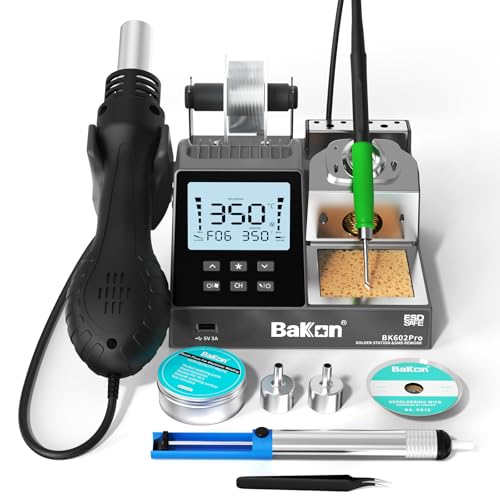
The BK602Pro sits at the top of BAKON’s beginner-friendly 2-in-1 line, swapping the standard pencil for a C210 all-in-one heater core iron that recovers heat quickly and handles fine-pitch SMD work. The larger display shows real-time temperature, airflow, and power settings side by side.
For a total beginner, the C210 iron is a quiet luxury rather than a necessity, since most starter projects don’t need that level of thermal response. For someone who plans to grow into micro-soldering and hot air rework, though, the upgrade buys headroom that cheaper stations can’t match.
What It Does Well
- C210 iron delivers fast thermal recovery during continuous fine-pitch work.
- Large display reduces squinting at small readouts mid-job.
- Temperature presets let you save common settings for repeat tasks.
- Auto sleep protects tips and reduces idle power draw.
Worth Bearing In Mind
- C210 tips are a more specialized ecosystem than the common 900M series, so replacements cost a little more.
- Overkill for absolute beginners who haven’t yet needed fine-pitch work.
Snapshot
Built With In Mind
Detail-oriented beginners who want a station that won’t need replacing once they graduate from through-hole kits to micro-soldering and SMD rework.
Where A Sibling Pick Shines
The BAKON BK602S is the more approachable pick for a complete newcomer who doesn’t yet need the C210 iron’s fine-pitch performance.
The BAKON 968S is the most grounded pick on the list: a single-channel 90W iron station, five extra tips, lead-free solder, a desoldering sucker (a spring-loaded pump that pulls molten solder off a pad), and tweezers, all in one kit. No hot air, no frills, just the tools most beginners actually need on day one.
Unlike the amomii kits above, the 968S doesn’t ship with a project, so you’ll need to source your own practice board. In return, you get a station that’s straightforward to learn on and capable of handling the electronics repair work most hobbyists eventually attempt.
What Makes Sense
- Ceramic heating core reaches working temperature in roughly 10 seconds, so you spend less time waiting.
- PID program keeps the tip temperature stable during continuous soldering.
- Five extra tips cover most through-hole and basic SMD jobs out of the box.
- Desoldering sucker included, which is the first tool most beginners wish they’d bought sooner.
Where It Is Less Suited
- No hot air rework, so SMD desoldering still requires a separate station like the BK602S.
- No practice project, so the first session is a bit “solder what exactly?” until you plan it out.
At A Glance
Who Will Love This
First-time station buyers who want a single, capable iron they can grow into, paired with a practice project bought separately.
A Better Fit Elsewhere
The amomii Neon Tennis kit is the better match for someone who wants the project to come in the box and learn the iron alongside guided assembly.
Picking The Right Soldering Kit For Your First Projects
Iron Power And Temperature Range
Wattage tells you how fast the tip recovers heat when it touches a cold joint, not just how hot it gets. A 60W iron handles small electronics comfortably, while 90W and above gives more headroom for larger pads or lead-free solder, which needs more heat to flow. Beginners working on phone charging ports, laptop boards, or through-hole kits generally land in the 60W to 90W range. Kits like the BAKON 968S sit comfortably in that window, while hot air stations like the BK701D push wattage much higher to drive the airflow heater.
Station Versus Practice Project
There are two big flavors in this category. A soldering station (the Weller, BAKON, and Dewalt-compatible picks) gives you the tool first and assumes you’ll find your own project. A practice kit (the amomii Neon Tennis and Testudo) ships a guided build alongside the learning experience. Beginners who want structure tend to prefer the latter, while those who already have a repair in mind usually start with the former.
Hot Air Versus Iron Only
Hot air rework stations heat components with a focused stream, which is the right tool for removing and reflowing SMD chips. A standard iron can’t do that job cleanly. Beginners doing Arduino or through-hole work don’t need hot air, so a single-function station like the BAKON 968S is plenty. Once you start opening smartphones or laptops, a 2-in-1 like the BAKON BK602S or BK701D starts to earn its bench space.
Consumables And Accessories
A kit that ships with solder, tips, a desoldering pump, and a stand saves a separate shopping trip. The Bakon 852d+ and BAKON 968S bundle most of these, while the Weller Education Kit and the amomii practice boards focus on the core tool and let you source consumables separately. For a first setup, bundled accessories usually beat a bare-bones station once you add up the extras.
Key Considerations Across These Picks
Traps First Timers Fall Into
First-time buyers often grab the cheapest iron they see, then discover it has no temperature control, which makes learning much harder. A station with a stable, adjustable temperature, like the BAKON 968S or the Weller WE1010EDU, gives you repeatable results while you build muscle memory. Another common slip is assuming a practice kit is a complete starter: most, including the amomii Neon Tennis, don’t include the iron itself, so the station still has to come from somewhere.
The Upgrade Payoff
Higher-tier kits in this list earn their cost in three places: faster heat recovery, more precise temperature control, and bundled hot air. The BAKON BK602Pro’s C210 iron recovers heat quickly during continuous work, which matters once you start soldering bigger ground planes. The BK701D’s 700W rating and hot air channel turn a single-function station into a small repair bench. For absolute first-timers, those upgrades aren’t necessary, but they stop being optional the moment you tackle SMD rework or phone board repair.
Frequently Asked Questions
What wattage iron do I need as a beginner?
A 60W to 90W iron with adjustable temperature covers most beginner projects, from through-hole kits to small electronics repair. Anything below 40W tends to struggle with anything beyond tiny joints.
Is lead-free solder harder to use than leaded solder?
Lead-free solder needs a bit more heat and slightly different technique, but modern stations handle it well. Beginners can start with lead-free safely, though leaded solder is generally easier to learn on if you have proper ventilation.
Do I need a hot air rework station right away?
Not for basic through-hole kits or simple repairs. Hot air becomes important once you start desoldering SMD components, like phone charging ports or microcontroller chips. For most first projects, an iron-only station is enough.
How long does a soldering iron tip last?
Tip life depends on temperature, usage, and care, but a well-maintained tip can last months of regular hobby use. Keeping the tip tinned (a thin layer of solder on the tip to prevent oxidation) when not in use, and avoiding abrasive cleaning, extends its life considerably.
Can kids use these kits safely?
Younger builders need close adult supervision, since the irons reach 300°C and above. Practice kits with clear paper instructions, like the amomii Neon Tennis, pair well with guided adult help, while stations like the Weller WE1010EDU are a better fit for older students working independently.




