


A decent soldering iron is the difference between a frustrating afternoon and a clean, repeatable joint. The picks below cover the most common first scenarios: a few quick repairs around the house, learning through-hole and SMD work on a budget, adding a small hot air station for rework, and going cordless for tight spots.
Everything in this list keeps the learning curve gentle, the controls simple, and the kit complete enough that you can start a project the day it arrives.
A Quick View Of The Lineup

M12 REDLINK Soldering Iron Kit W/LED Light
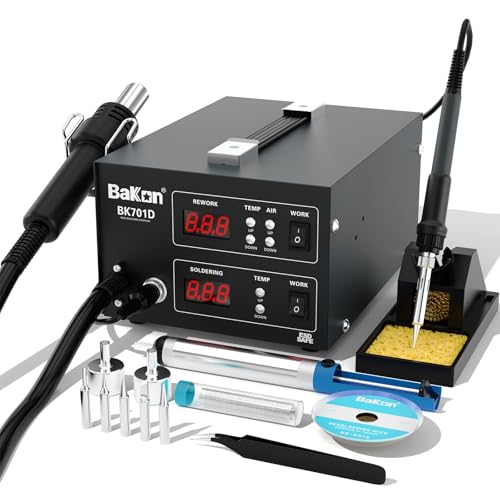
BAKON BK701D 700W Soldering Station 2 In 1

BAKON 852D+ Heat Gun and Soldering Iron 2-in-1 Kit
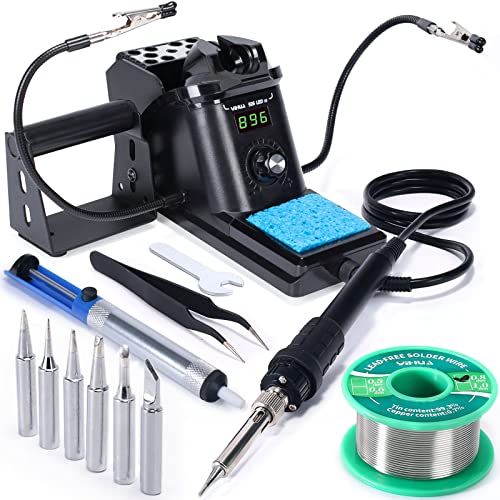
YIHUA 926 III 60W Digital Soldering Station Kit
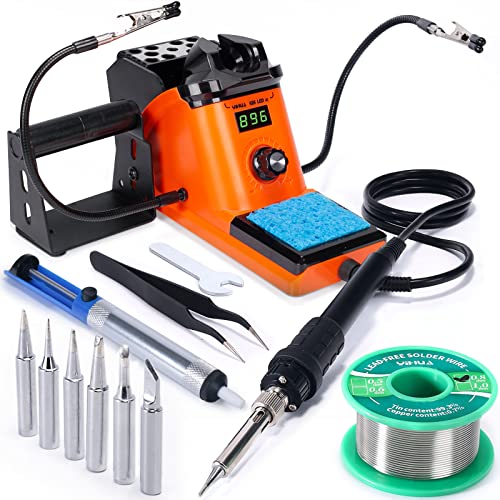
YIHUA 926 III 60W LED Soldering Station Kit

YIHUA 926 III Soldering Station Kit 12-in-1

Cordless Soldering Iron for DeWalt 20V Max

BAKON BK602S 2-in-1 Soldering and Hot Air Station
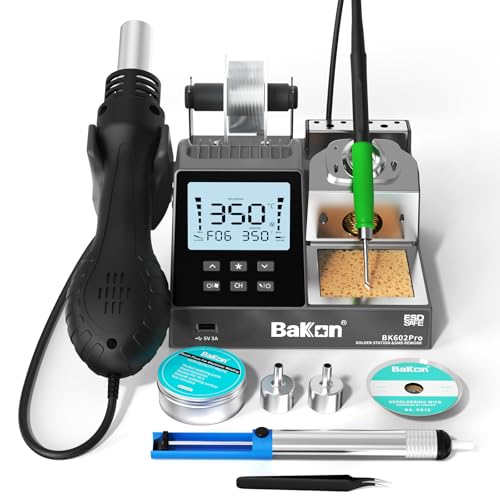
BAKON BK602Pro C210 Soldering and Hot Air Station
A Closer Look At Each Pick
For anyone already living in the M12 ecosystem, this iron slots into the batteries you own instead of adding another charger to the drawer. The on-board LED light focuses on the joint, which matters when you are working inside a wall plate or behind a low-mounted control box. A heat indicator tells you when the tip is safe to handle, so the cooldown step is a little less guesswork.
Compared to the bench stations later in the list, the trade-off is portability over a precise digital readout. You give up the wide temperature dial of a YIHUA 926 III, and you trade a fixed base for a battery that you have to remember to top off. For someone with a small parts shelf and a DeWalt-style tool habit, those compromises tend to feel minor.
Notable Gains
- Ready to solder in under 18 seconds, which keeps short repair jobs from dragging out.
- REDLINK intelligence adds a clear heat status, helpful for beginners who second-guess cooldown timing.
- Pivoting head reaches awkward angles, such as stereo terminals tucked behind furniture.
- LED work light brightens tight spaces like appliance control boards.
Points To Note
- Requires an M12 battery and charger, sold separately if you don’t already own them.
- Temperature is preset rather than fully adjustable, so it may run hot for delicate SMD work.
Who It Suits Best
Existing M12 tool owners handling quick electrical repairs around the home, shop, or jobsite.
Look Elsewhere When
You need a bench station with fine temperature control, in which case the YIHUA 926 III 60W Digital Soldering Station Kit is the closer match.
The BK701D is built for people who want both an iron and a hot air gun in a single housing. Independent control of each channel matters when you are pulling a charge port off a phone board with hot air while keeping the iron at a safe idle for cleanup. The SMD focus shows up in the smaller tip options and ESD-safe circuitry, which protects sensitive components from static discharge (a tiny zap that can silently damage chips).
Stepping up from the M12 iron above, you get a stationary setup with a much wider temperature window and a hot air channel that the M12 simply doesn’t have. You will need to budget bench space and a power outlet capable of running the 700W draw, so apartment dwellers on shared circuits should test the breaker first.
Standout Benefits
- Two tools in one unit, saving room over a separate iron and hot air station.
- ESD-safe design reduces the risk of static damage on phone motherboards.
- Independent switches for iron and hot air make it easy to use one at a time.
Trade Offs
- 700W draw is heavy, and you may find older household circuits complain.
- No starter solder or tips included, so a first-time shopper still needs to pick up consumables.
Right Fit For
Repair techs and hobbyists taking on phone, laptop, and small SMD board work.
Consider Something Else When
You mostly want through-hole soldering and accessories in one box, in which case the BAKON 852D+ Heat Gun and Soldering Iron 2-in-1 Kit makes more sense.
Where the BK701D assumes you already have a drawer full of accessories, the 852D+ ships with the whole starter kit. You get a roll of lead-free solder, a few SGS-certified tips, hot air nozzles, a stand, brass tip cleaner, desoldering pump, and tweezers. That is enough to start a practice board within minutes of unboxing, which is a big deal for someone who hasn’t yet learned which extras are necessary.
The 852D+ is the more accessible sibling to the BK701D above, and the right pick for someone whose first project is a kit build or a basic rework. The hot air side uses a knob rather than a digital readout, so expect to read temperature off feel and the included chart rather than a precise number.
A Favorable Mix
- Starter accessories included, removing the guesswork from your first parts order.
- 2-in-1 design handles both standard through-hole soldering and surface-mount rework.
- LED display and adjustable knobs keep the learning curve short.
- Brass cleaner and sponge help extend tip life, which matters in a first-time kit.
Honest Caveats
- Knob-based hot air control is less precise than the digital readouts on higher-tier stations.
- The included lead-free solder can feel stiff for absolute beginners; many users add a small leaded roll later for practice.
Built With In Mind
First-week beginners who want everything in one box and a wide margin for learning mistakes.
Another Choice May Suit
Hobbyists who want a clearer digital temperature read should look at the YIHUA 926 III 60W Digital Soldering Station Kit instead.
The 926 III is the station most first-time builders eventually land on, and for good reason. The digital display shows both set and actual tip temperature, which means you stop guessing whether the iron is ready. PID temperature stabilization (a control loop that constantly adjusts power to keep the tip near your target) helps the iron hold steady when you are working a larger joint, instead of dropping the moment the tip touches a cold pad.
Compared to the BAKON 852D+ above, you give up the hot air channel and the bundled practice kit, but you gain a calmer, more precise iron designed for repeated use. For through-hole kits, wire soldering, and general electronics, that trade usually pays off fast.
What Helps Most
- Clear digital temperature readout takes the guesswork out of the first sessions.
- Includes 6 extra tips, lead-free solder, a desoldering pump, and tweezers.
- Two helping hands hold boards steady, so you can stop balancing things on books.
- Switchable °C/°F readout helps if you are following tutorials from either camp.
Worth Noting
- Auto sleep mode is a smart feature, but you may find the wake-up delay noticeable on quick jobs.
- No hot air capability, so surface-mount removals are off the table.
Key Specs
Best Suited To
First-time station users who want a precise iron for kit building, school projects, and general electronics repair.
Skip It When
Your main goal is mobile phone or SMD rework, in which case the BAKON BK701D 700W Soldering Station 2 In 1 is the better fit.
The LED display variant of the 926 III shares the same internals as the digital version above, with a brighter, larger readout that holds up in dimmer workshops. For basements, garages, or late-night repair sessions, that extra brightness is more useful than it sounds, especially for users who find the smaller LCD hard to read at a glance.
Functionally, this and the previous YIHUA are twins, so the choice is mostly about which display style you prefer. If your bench is well lit, the regular digital version is the same tool in different clothes.
Positive Takeaways
- Brighter LED readout stays readable in low-light shops and basements.
- Same reliable 60W output and PID stabilization as the sibling 926 III above.
- Includes helping hands, six tips, solder, sucker, and tweezers.
Some Limits To Know
- No functional advantage over the standard digital version beyond display style.
Whose Shelf It Belongs On
Shoppers with a dimly lit workbench who want a brighter temperature readout without paying for a higher tier.
Where A Sibling Pick Shines
You prefer a smaller LCD footprint, in which case the YIHUA 926 III 60W Digital Soldering Station Kit is the quieter-looking option.
Where the regular 926 III ships with two helping hands, the 12-in-1 version integrates the holding frame directly into the station. That single change removes a stack of loose clamps from the bench and keeps the board centered in your line of sight. The included solder dispenser is a small but underrated touch, since pulling fresh solder one-handed becomes much easier.
This is still the same 60W iron at heart, so the soldering performance tracks the earlier YIHUA picks. The value is in workflow: less fiddling, more soldering. For someone whose bench lives in a closet or shared space, the integrated frame is a real estate saver.
The Upside
- Integrated helping hands keep boards stable without extra stands or books.
- Built-in solder dispenser speeds up feed and cleanup.
- ESD-safe design protects sensitive components during longer sessions.
- Heat-resistant iron holder adds a layer of safety on a crowded bench.
Potential Drawbacks
- Integrated frame is less adjustable than a separate pair of magnifier hands.
- Same 60W output as other 926 IIIs, so it shares the same SMD limits.
Made For
Beginners who do a lot of board soldering and want the holding and feeding tools built into the station itself.
Reach For A Different Pick When
You need rework capability, in which case the BAKON BK602S 2-in-1 Soldering and Hot Air Station is a smarter upgrade.
Sometimes the job is not at a bench. A cordless iron that runs on a 20V Max battery makes field repairs, off-grid projects, and tight spots inside appliances much more approachable. Heat-up time in this category tends to be the deciding factor, and the quick warm-up spec here is what makes the difference between getting a quick fix done and putting the project off for another weekend.
The catch is shared with the M12 iron earlier: the battery and charger are not included. For someone with no DeWalt 20V Max batteries, the cost of admission creeps up quickly, and a corded station like the YIHUA 926 III becomes the better value. For someone whose garage is already a sea of yellow, this slots in without adding a new charger.
Why It Works Well
- Truly portable, useful for appliances, vehicles, and remote repairs.
- Quick warm-up keeps short jobs from becoming long ones.
- USB and Type-C ports add flexibility for charging small accessories in the field.
Things To Weigh
- Battery and charger are not included, raising the real cost for new DeWalt owners.
- Continuous run time is limited compared to a corded station, so long rework sessions still favor a plug-in setup.
Quick Facts
Who Will Love This
DeWalt 20V Max owners doing appliance repair, off-grid wiring, and DIY projects away from a workbench.
A Better Fit Elsewhere
You mostly work at a stationary bench, in which case the BAKON BK602Pro C210 Soldering and Hot Air Station is a stronger long-term pick.
The BK602S shrinks the 2-in-1 concept into a much smaller housing than the BK701D earlier in the list. The dual-switch design is a small but important safety feature: you can power the iron without waking the hot air gun, which matters when you only need one channel running. Auto sleep rounds out the safety story by cooling the iron when you set it down for a while.
Where the BAKON 852D+ leans toward kit-first beginners, the BK602S is the better step up once you are soldering and desoldering on real boards. Apartment dwellers will appreciate that this unit does not dominate a small desk, and the °C/°F readout makes following international tutorials easier.
What Earns Its Place
- Compact 2-in-1 design fits smaller benches and shared desks.
- Dual independent switches reduce accidental heating of the wrong tool.
- Auto sleep protects the tip and conserves energy between joints.
- PID temperature control keeps the tip steady during long rework sessions.
Points To Keep In Mind
- Hot air and iron can’t run at full output at the same time, which may slow down some larger reworks.
- Sold without accessories, so first-time shoppers will need a separate tips and solder order.
Perfect Match For
Small-space hobbyists and apartment workbenches who want both iron and hot air without a giant footprint.
Swap It Out When
You are stepping up to fine-pitch SMD work and want a higher-grade heater core, in which case the BAKON BK602Pro C210 Soldering and Hot Air Station is the natural next step.
The BK602Pro takes the BK602S formula and upgrades the heart of the iron. The C210 heater core is a precision element that handles fine-pitch and small SMD work more confidently than the standard tips in most beginner kits. The large display shows real-time power, actual versus set temperature, airflow, and preset menus, which is the kind of feedback loop that turns trial-and-error into repeatable process.
For someone finishing their first year of electronics, this is the natural graduation. It still has the same 2-in-1 footprint, but the precision on the iron side is meaningfully better. If you are still finding your feet, the BAKON 852D+ remains a more forgiving starting point.
A Few Strong Suits
- C210 precision heater core handles fine-pitch SMD with better thermal recovery.
- Large display shows power, temperature, airflow, and presets at a glance.
- Temperature presets save time on recurring tasks like lead-free drag soldering.
What To Weigh
- Higher learning curve than a simple single-purpose station, so it’s overkill for absolute first projects.
- C210 tips are a specialty consumable and may cost more than standard replacements.
Feature Snapshot
Who Should Grab It
Returning hobbyists scaling up from a basic station to fine-pitch SMD and rework on real boards.
Where Another Pick Suits Better
You are still on your first project and want a gentler learning curve, in which case the YIHUA 926 III 60W Digital Soldering Station Kit makes more sense.
What Matters Most Before Choosing Starter Soldering Irons
Wattage And Heat-Up Time
Wattage tells you how hard the iron can work, not just how hot it gets. A 60W iron like the YIHUA 926 III holds temperature better on a ground plane than a 30W pencil, which is the difference between a clean pad and a cold joint. Quick heat-up matters when you only have ten minutes between dinner and a repair.
Temperature Control And Stability
A digital readout and PID stabilization make the iron predictable. Beginners in particular benefit from seeing the actual tip temperature, because the difference between 300°C and 380°C is the difference between solder that flows and flux that burns. For SMD work, look for stations with PID loops rather than simple on-off heaters.
Station Vs Cordless Vs Hot Air
Pick the format that matches where you actually solder. A station is best at a fixed bench, a cordless iron is best for off-grid and appliance jobs, and a 2-in-1 hot air rework station is best when you expect to remove and reflow small components. Trying to cover all three with one tool usually means compromising on all three.
Included Accessories And Consumables
First-day extras like solder, a sucker, and helping hands remove a frustrating second order. If you already own a starter consumable kit, a bare station may be a smarter buy. If you are unboxing your first iron, the bundled BAKON 852D+ style kits save the day.
Key Considerations Across These Picks
Mistakes Worth Dodging
Chasing high wattage alone usually backfires, because raw power without stable temperature control just cooks pads. Skipping ESD-safe design is another common slip, especially when working on phone boards where a tiny static discharge can quietly damage chips. Finally, many first-timers forget to budget for consumables, only to find the iron arrives with no solder, no tips, and no sucker.
The Upgrade Payoff
Spending up buys two things: better thermal recovery, meaning the tip returns to temperature faster when it touches a cold pad, and clearer feedback through larger displays and PID readouts. For someone who only solders occasionally, a 60W station is plenty. For someone who solders weekly, the upgrade to a C210 heater core and proper hot air channel tends to pay for itself in fewer ruined boards.




