


A good work surface changes how your laser behaves, and most of the frustration that gets blamed on the machine actually starts at the table. The right plate holds small parts flat, lets smoke escape instead of pooling against the lens, and gives you a clean baseline when you swap between flat stock and round objects. This roundup focuses on the surfaces and supporting accessories that sit under, around, and on top of the laser: honeycomb beds, rotary rollers, airflow kits, and a camera overlay that helps you place designs without measuring twice.
The picks below lean toward hobbyists and small shop owners who already own a diode or CO₂ machine and want to upgrade the area where the actual work happens. You’ll see different working-area sizes, two rotary styles for cylindrical projects, and a couple of platform options for popular machines. Nothing here is a laser itself; it’s everything that turns a laser into a usable workstation.
An Overview Of The Picks

Longer Air Assist Kit for RAY5 10W/20W
ACMER M3 Laser Rotary Roller 6–164mm

ACMER M4 Laser Rotary Roller 3–150mm

Longer Honeycomb Laser Bed 440x440mm
Longer Honeycomb Laser Bed 400x400mm

xTool P2 Honeycomb Working Panel 2.0

Longer LightBurn Camera Kit 5MP
Longer New-Rotary Roller Y-Axis 360°
A Deeper Look At The Lineup
Air assist is one of those accessories that doesn’t look exciting in photos but pays for itself the first time you cut plywood without it. The Longer Air Assist Kit for RAY5 10W/20W sits next to the laser and blows a steady stream across the cut, clearing smoke before it clouds the lens and keeping the cut edge cooler. Compared to the rotary rollers and honeycomb beds later in this list, this one targets a different problem: air quality at the cut.
You get an adjustable airflow range of 10 to 30 liters per minute, which is the part most budget pumps skip. That range matters because dense woods and acrylics want different pressures; too much air on thin plywood can scorch the back, while too little on thick hardwood leaves a sooty edge. The pump is built around low-noise operation, so it won’t dominate a small home shop. For RAY5 owners running long sessions, the airflow control is the headline feature.
Positive Takeaways
- Adjustable 10 to 30 L/min range lets you match airflow to material, which directly affects edge quality on plywood, hardwood, and acrylic.
- Smoke evacuation at the cut keeps the laser lens cleaner over time, reducing the maintenance cycle that often catches beginners off guard.
- Low-noise operation suits a bedroom or shared workspace where a loud compressor would be a problem.
- Direct compatibility with the RAY5 10W and 20W models means no adapter hunting or wiring guesswork.
Things To Consider
- Tubing routing takes some patience; first-time installers commonly spend extra time finding a clean path that doesn’t snag the gantry.
- The pump is a dedicated match for RAY5 machines, so it doesn’t double as a general shop accessory.
Who It Suits Best
Owners of a Longer RAY5 10W or 20W doing regular cutting in wood, plywood, or acrylic who want cleaner edges and a longer-lasting lens.
A Better Fit Elsewhere
Shoppers running an ACMER or xTool machine should look at the Longer New-Rotary Roller or the xTool P2 Honeycomb Working Panel 2.0 instead, since this kit is built specifically for the RAY5.
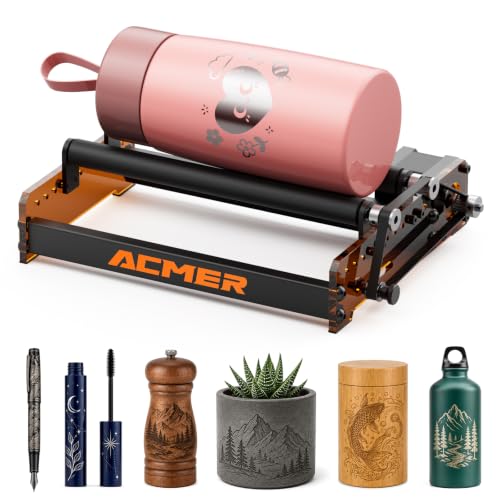
Rotary engraving opens up a category of work flat beds simply can’t touch: tumblers, wine glasses, pens, and the kind of cylindrical gifts that show up constantly in maker commissions. The ACMER M3 Laser Rotary Roller handles that workload with a 360° Y-axis rotation and an adjustable diameter range of 6 to 164mm. That’s the spread that covers everything from a slim pen barrel to a wide tumbler, which is why it lands here instead of narrower specialty rollers.
A toggle switch on the unit lets you flip between rotary and non-rotary mode without re-cabling anything, which is the small touch that saves real time on mixed jobs. The one-piece rubber roller design provides the friction needed to keep tall or oddly weighted objects from slipping mid-rotation. It’s listed as compatible with ACMER’s P3, P2, P1, S2, S1, and P1 S Pro, plus most other laser engravers, though the wiring side is the part to verify before ordering.
The Upside
- The 6 to 164mm range covers pens, mugs, tumblers, and bottles in a single unit, removing the need for multiple rollers.
- Quick toggle between rotary and standard mode cuts the time lost when switching between flat and round projects in one session.
- Solid one-piece rubber roller holds heavier pieces steady, which matters when engraving tumblers with off-center weight.
Worth Noting
- The wide compatibility list is partly marketing; wiring connectors may not match every third-party machine out of the box.
- Tall objects need extra clearance under the gantry, so smaller-format lasers can feel cramped.
Feature Snapshot
Right Fit For
ACMER P-series owners and mixed shops that engrave both flat panels and round gift items like tumblers, mugs, and bottles.
Reach For A Different Pick When
Engravers focusing on small jewelry pieces and rings will get better range use from the ACMER M4 Laser Rotary Roller 3–150mm, which has tighter spacing for tiny diameters.
Where the M3 aims wide, the ACMER M4 Laser Rotary Roller narrows the focus to small and mid-sized cylindrical work. The 3 to 150mm adjustable engraving space reaches down into ring and pen territory that wider rollers can’t grip properly, then stretches up to handle standard cups and small bottles. For jewelry makers, this is the more useful tool even if its maximum diameter is lower than the M3’s.
You get the same 360° Y-axis rotation model and the same broad compatibility with most laser engravers, including ACMER’s P3, P2, and P1 families. The compact roller spacing is what sets the M4 apart: smaller objects stay centered under the laser without sliding sideways during rotation. Anyone whose commissions lean toward wedding favors, pens, and slim bottles will find the M4’s range a tighter match than the M3’s bigger-but-looser setup.
Reasons It Performs
- The 3mm lower bound covers rings and slim pen barrels that wider rollers simply can’t hold.
- Compact roller footprint makes it easier to keep small pieces aligned under the laser head.
- Compatible with most ACMER machines and many third-party lasers, giving you a path forward if you upgrade your main unit later.
Trade Offs
- The 150mm upper limit rules out wide tumblers and oversized bottles, so shops doing both jewelry and large drinkware may need a second roller.
- Wiring adapters may be needed for non-ACMER machines, and the documentation is lighter than the hardware list suggests.
Built With In Mind
Jewelry makers, pen turners, and craft sellers who mostly engrave small cylindrical items in the 3 to 150mm range.
Look Elsewhere When
Workshops engraving full-size tumblers and wide bottles should pick the ACMER M3 Laser Rotary Roller 6–164mm, which covers that end of the range.
The honeycomb pattern is the unsung hero of diode laser work. Open cells let smoke and heat drop away from the workpiece instead of pooling under the cut, which is what gives you those clean bottoms on plywood and the absence of soot halos on basswood. The Longer Honeycomb Laser Bed in the 440 x 440mm size is for shops that have outgrown the standard 400 x 400 plate and want extra room for batch jobs or larger signs.
You get a honeycomb plate paired with an aluminum panel underneath, which serves two purposes: the panel catches anything that drops through the cells, and the iron-and-aluminum build helps spread and dissipate heat. The double-layer setup also protects your desk or workstation from the laser, since the panel takes the hit when a cut fully passes through the workpiece. Compared to the smaller 400 x 400 version, this one trades a bit of compactness for working area.
Useful Touches
- 440 x 440mm area gives breathing room for medium signs, multiple small pieces in a batch, or off-cuts you don’t want to trim down first.
- The aluminum sub-panel catches through-cuts, so nothing falls onto your desk or gets lost behind the machine.
- Open honeycomb cells draw heat and smoke downward, which is the main reason cuts come out cleaner on the underside of the workpiece.
Honest Caveats
- Honeycomb surfaces collect residue in the cells, and owners commonly report needing compressed air or a stiff brush to clear soot buildup between sessions.
- The larger footprint may not fit machines with a smaller internal bed; confirm your laser’s working area before ordering.
Best Suited To
Workshops running longer cuts or batch layouts that need more area than the standard 400 x 400 plate offers.
Skip It When
Makers with a 400 x 400mm laser frame and no plans to upgrade should grab the Longer Honeycomb Laser Bed 400x400mm instead, since the extra 40mm of side won’t help.
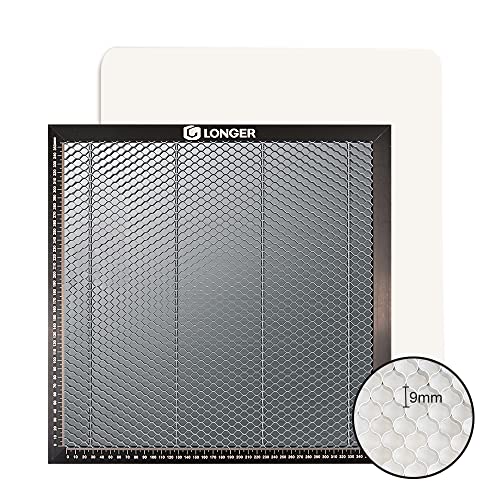
The 400 x 400mm size is the default working area for most diode lasers in this category, which is why the Longer Honeycomb Laser Bed in that footprint ends up being the everyday workhorse. The honeycomb-and-aluminum sandwich gives the same two-layer protection as the larger 440 x 440 plate, just sized to drop into the machines most hobbyists already own. It is the safer pick when you don’t need extra room.
You get the desk protection and material protection the brand highlights: the aluminum panel underneath stops the laser from reaching your workbench, and the honeycomb pattern pulls heat and smoke away from the cut. Compared to the 440 x 440 version, the trade-off is less room for batch jobs, but for single-piece work and standard signs this size is usually plenty.
What Earns Its Place
- 400 x 400mm matches the working area of most diode lasers, so there’s no wasted overhang or fit guesswork.
- Aluminum sub-panel protects the desk underneath, a small detail that pays off the first time a cut fully passes through.
- Smoke evacuation through the open cells reduces the burnt-back look on plywood edges and helps the lens stay clean.
Things To Weigh
- Smaller than the 440 x 440 version, so batch jobs and large signs may need repositioning.
- Honeycomb cells still need periodic brushing or air-blowing to clear soot.
Quick Facts
Who Should Grab It
Diode laser owners running a standard 400 x 400mm frame who want a cleaner cut surface and a layer of desk protection.
Another Choice May Suit
Anyone with extra room in their laser frame should consider the Longer Honeycomb Laser Bed 440x440mm for that extra working area.
The xTool P2 Honeycomb Working Panel 2.0 is one of the few honeycomb beds on this list designed as a tailor-made fit rather than a universal plate. It’s cut to drop cleanly into xTool’s P2 and P2S CO₂ machines, which is the part that matters for owners of those specific units. Universal honeycomb plates work, but they often leave small gaps at the edges or sit slightly above the chassis lip.
Beyond the fit, the panel addresses the two complaints that show up most in honeycomb bed reviews: small pieces falling through the cells and getting burned on the back, and the time spent aligning the plate each session. The 2.0 version aims to reduce drops, support easier batch engraving, and slot in without a long setup. For xTool P2 owners, that specificity is the whole point.
What Works In Its Favor
- Factory fit for the xTool P2 and P2S removes the trial-and-error of trimming a universal plate to size.
- Designed to reduce the chance of small cut pieces falling through the cells, which protects both the part and the lens below.
- Supports batch engraving layouts, so you can tile multiple small items without rearranging the panel between runs.
Where It May Fall Short
- Limited to xTool P2 and P2S machines, so it doesn’t carry over to a different laser if you upgrade.
- The honeycomb cells still need cleaning over time, though the slot-in design makes that slightly easier than floating panels.
Spec Overview
Perfect Match For
xTool P2 and P2S owners who want a panel that fits the machine out of the box and supports batch workflows.
Swap It Out When
Anyone running a Longer or generic diode machine will get a better fit from the Longer Honeycomb Laser Bed 400x400mm or 440x440mm.
A camera isn’t a table, but it changes how you use the one you have. The Longer LightBurn Camera Kit sits above the bed and projects a live image of the working area into LightBurn, the popular laser control software, so you can place designs on top of the actual workpiece instead of measuring and typing coordinates. For mixed-media work on found objects, scrap wood, or irregular stock, that overlay is what turns a finicky job into a one-shot one.
The 5MP sensor with an industrial-grade wide-angle lens covers a 740 x 560mm area, which is wider than the standard 400 x 400 plate, and it also supports time-lapse video recording of the engraving itself. The wider coverage matters when you’re tiling large layouts or running batch jobs on a 440 x 440 bed, since a narrower camera would lose the edges. Pairing this with the Longer Honeycomb Laser Bed 440x440mm is a common upgrade path.
Notable Upsides
- 740 x 560mm coverage exceeds the typical 400 x 400mm bed, so it frames wider work areas without the edges going dark.
- Live overlay inside LightBurn removes the measuring step that eats time on irregular stock like reclaimed wood or off-cuts.
- Time-lapse recording doubles as a documentation tool for tutorials, commissions, and content workflows.
A Few Limitations
- Calibration on first install takes patience; getting the overlay to match the actual laser path is the part that frustrates first-time users.
- The camera depends on LightBurn compatibility, so users running other control software may not get the same overlay benefits.
The Numbers That Matter
Whose Shelf It Belongs On
Makers who work in LightBurn and engrave irregular stock, scrap wood, or batch layouts that need placement accuracy without manual measuring.
Consider Something Else When
Anyone using control software other than LightBurn, or anyone happy with manual positioning, may not get full value from the camera overlay.
Rotary rollers tend to be brand-locked, which is the friction the Longer New-Rotary Roller is built to avoid. It runs on a 360° Y-axis rotation for full wraparound engraving, and the dual wiring options are the headline feature: a white connector aimed at Longer RAY5 and Laser B1 machines, plus an alternative that works with a wide swath of other engravers on the market. For mixed-brand workshops, that flexibility matters more than peak diameter specs.
You get support for the usual cylindrical range: round wood pieces, bowls, cups, cans, bottles, pipes, and drums. It’s a generalist roller, which is exactly what the compatibility story is selling. Compared to the ACMER M3 and M4, which are more at home on ACMER machines, this one leans into the “switch between lasers” workflow.
Practical Advantages
- Dual wiring options cover both Longer machines and roughly 80% of other engravers, reducing the chance of buying the wrong connector.
- Handles the standard cylindrical lineup, from pens and cups up through bottles and drums, without needing a specialty roller for each size band.
- 360° Y-axis rotation gives full wraparound coverage on standard tumblers and bottles.
Where It Is Less Suited
- It is a generalist roller, so shops with very specific ACMER or xTool workflows may prefer the brand-specific rollers for tighter integration.
- Very small jewelry pieces sit at the edge of the supported diameter range, where the ACMER M4 3–150mm has the better grip.
Who Will Love This
Makers running a mixed laser setup, or anyone with a non-Longer engraver who wants a rotary without committing to a single brand’s ecosystem.
Not Your Match When
ACMER P-series owners should consider the ACMER M3 Laser Rotary Roller 6–164mm, which is purpose-built for that family of machines.
What To Match Between Bed, Roller, and Machine
A table for a laser engraver isn’t just a flat surface. The honeycomb bed handles flat stock, the rotary roller handles round objects, and a few machines, like the xTool P2, want a panel that’s cut to their chassis. The right starting point is the working area of your laser: 400 x 400mm for most diode machines, 440 x 440mm for roomier setups, and a brand-specific panel if you own an xTool P2 or P2S.
Material matters too. Plywood, MDF, and basswood all benefit from the open cells of a honeycomb surface, where smoke can drop away. Acrylic cuts cleaner with air assist pulling heat off the cut edge, which is why the Longer Air Assist Kit pairs well with a honeycomb bed rather than replacing it. The two accessories solve different problems: the bed holds the part, the air assist keeps the cut clean.
For cylindrical work, the diameter range of the roller is the deciding spec. Anything below 10mm points toward rings and pen barrels, which the ACMER M4 3–150mm handles cleanly. Tumblers and bottles over 100mm need the M3’s wider reach or the Longer’s generalist spread. Owners running multiple laser brands get the most flexibility from the Longer New-Rotary Roller’s dual wiring.
If your workflow leans on LightBurn and irregular stock, the camera overlay is the upgrade that saves the most time, since placement accuracy on found wood or off-cuts usually eats more minutes than the cut itself. None of these accessories overlap directly, which is why a complete setup often ends up with a honeycomb bed, a rotary roller, and an air pump sharing the same machine.
Key Considerations Across These Picks
Pitfalls Shoppers Hit
The most common mistake is buying a honeycomb bed in the wrong size. A 440 x 440mm plate won’t fit cleanly into a laser with a 400 x 400mm internal frame, and a 400 x 400mm plate leaves wasted space on larger machines. Measure the actual internal working area of the laser, not the marketing footprint, before choosing between the two Longer honeycomb beds.
Rotary rollers run into a similar problem with wiring. Compatibility lists often include the connector type but not the pinout, so a roller that “fits” may still need an adapter or a different cable. The Longer New-Rotary Roller’s dual wiring exists specifically because of this confusion. Verify the connector on your machine before assuming any universal roller will plug straight in.
Where The Extra Money Goes
Premium rotary rollers in this category tend to spend the extra cost on the roller material itself. A solid one-piece rubber roller grips better and lasts longer than multi-piece assemblies with adjustable belts, which is why the ACMER M3 leans on that design. The trade-off is replacement: if the rubber wears out, the unit is more involved to service.
The larger honeycomb bed and the LightBurn camera also cost more, but for different reasons. The 440 x 440 plate is simply more material and a wider frame, while the camera is the sensor and lens assembly plus the calibration software. In both cases, the upgrade pays off when you actually use the extra area or the overlay regularly; otherwise the smaller bed and manual placement cover most needs.
Frequently Asked Questions
What size honeycomb bed do most diode lasers need?
Most diode lasers in the hobbyist and prosumer range use a 400 x 400mm working area, which is why the Longer Honeycomb Laser Bed 400x400mm is the most common drop-in fit. Larger machines and some 20W diode frames support 440 x 440mm or more, and brand-specific machines like the xTool P2 need a tailored panel rather than a universal plate.
Can one rotary roller cover both pens and tumblers?
A roller with a wide diameter range can. The ACMER M3 6–164mm and the Longer New-Rotary Roller both span pen barrels up to wide tumblers in a single unit. For very small jewelry work in the 3 to 10mm range, the ACMER M4 3–150mm has tighter roller spacing that holds tiny pieces more reliably.
Do honeycomb beds really improve cut quality?
The open cells pull heat and smoke downward during cutting, which reduces back-side burning and soot halos on the underside of the workpiece. The effect shows up most on plywood and basswood, where trapped smoke tends to leave dark marks. A honeycomb bed also catches small cut parts, so they don’t fall onto the chassis or the lens below.
Is an air assist pump necessary for a diode laser?
Air assist isn’t strictly required, but it makes a noticeable difference on thicker materials and longer cuts. The Longer Air Assist Kit’s adjustable 10 to 30 L/min range lets you tune the airflow to the material, which reduces charring on plywood and keeps the laser lens cleaner over time. It’s one of the more practical upgrades for anyone running regular cutting jobs rather than occasional engraving.
Can a camera kit work with any laser?
Camera kits depend on software compatibility, not just physical fit. The Longer LightBurn Camera Kit is designed to pair with LightBurn, where the live overlay and placement features work natively. Users running other control software may get basic video capture but lose the placement overlay, which is the main reason to buy a camera kit in the first place.




